RDM accessing DVLS via Azure App Proxy fails to connect

Currently trialling Devolutions products, and have run into problems getting RDM to talk to DVLS via an Azure App Proxy. After following the guide, RDM now brings up the Azure/Entra login page, but after entering credentials just gives a 404 error "HTTP Error 404. The requested resource is not found.".
This is with the latest version (2025.3.29) of RDM, along with DVLS 2025.3.14.
All Comments (5)
Hello Stephen ,
Thank you for reaching to our forum,a 404 right after the Entra/Azure App Proxy sign-in usually means the post-login redirect is going to a URL/path that is not being published (or not served by DVLS).
Could you please check:
- Copy/paste the full URL shown on the 404 page.
- Can you open the DVLS Web UI successfully in a normal browser using the Azure App Proxy External URL?
- On the DVLS machine: Devolutions Server Console → Edit instance → IIS
- Ensure the Access URI is correct
- Add the Azure App Proxy External URL as an additional URI via the “…” menu (keep both internal + external)
- Restart the DVLS instance
- In RDM: File → Data Sources → your DVLS data source
- Confirm it points to the Azure App Proxy External URL
- Share a screenshot of the Authentication/SSO options in that data source window
Best regards,
Michel Audi
Hi Michel,
- The full URL (with domain obscured) on the 404 page is: https://dvls.<my-public-domain>.com/dvls/login-success
- I get the same issue when opening https://dvls.<my-public-domain>.com/dvls/ in a browser as well, - after authenticating with my Entra ID at https://dvls.<my-public-domain>.com/dvls/, I get sent to the same URL with a 404 error
- The access URI in the Devolutions Server Console is: https://devolsv01.<my-internal-domain>.int/dvls - I've added https://dvls.<my-public-domain>.com/dvls/ as well (and also without the trailing slash) and restarted the instance, but it's made no difference
- It does indeed:
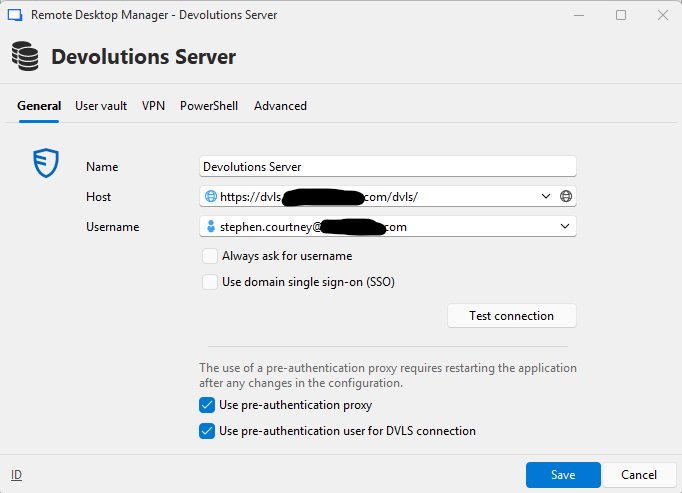
cb4dd485-e3b8-4715-9c6d-8cbfd9dd66dc.png
Could it be to do with the fact that the DVLS Server Console requires me to have the URI ending in /dvls - but in Entra I have to have it ending /dvls/ ?
Figured it out - I had added the FQDN in the HTTPS binding in IIS - once I removed that, everything worked fine. Not entirely sure why it didn't work with that in there, but I'll take it!
Hello Stephen,
Thank you for the update, and I am glad you were able to get it working.
What was happening is that after the Entra/Azure App Proxy sign-in, the redirect back to DVLS was not being handled by the DVLS IIS site due to the HTTPS binding being too restrictive (host name/FQDN mismatch). As a result, the post-login redirect (e.g., /dvls/login-success) was hitting the wrong IIS site (or no matching binding), which returned a 404. Once the FQDN was removed from the HTTPS binding, IIS could route the incoming requests correctly and DVLS handled the post-login redirect as expected.
Best regards,
Michel Audi