
tonyfredriksson
Devolutions Gateway Certificate could not be verified after the DVLS upgrade
Hi Michel.
Thank you for the through response and sorry for the late response.
We are indeed on 2025.3.18.0.
I can see if we can get an upgrade done on our test system. Would the latest Extended Maintenance Release: Devolutions Server Version 2026.1.24.0 be sufficient?
Thanks. Br, Tony
Devolutions Gateway Certificate could not be verified after the DVLS upgrade
Hi again @Michel Audi
Do you have any updates on the issues above?
Devolutions Gateway Certificate could not be verified after the DVLS upgrade
Hi @Michel Audi
Have you been able to reproduce the issues we are seeing? Or are the issues environmental rather than application based? It's really causing us some headaches, since the automatic renewals are causing disruptions for us. For now we need to manually renew the certificates before they are up for renewal so we can be ready to accept the new certificates since if it is done automatically, DVLS won't accept the new certificate since it's pinned to the old thumbprint.
Br. Tony
Devolutions Gateway Certificate could not be verified after the DVLS upgrade
Hi.
I just ran it (from RDM on my local PC, not DVLS) and everything is green.
If you want the report, i can send it to you in a DM.
Br, Tony
Devolutions Gateway Certificate could not be verified after the DVLS upgrade
Hi again.
Do you have any update on this issue? Have you been able to recreate it?
We have investigated some more, and it seems like the "Save and Continue" adds the thumbprint of that specific certificate to the gateway object. When said certificate is changed/updated, an administrator needs to manually go in and once again "Save and Continue" to add the new updated thumbprint to the gateway object for the gateway to continue functioning.
This will cause major unplanned disruptions for us since we use Let's encrypt with automatic updates of the certificates when they are about to expire.
When running Test-DsGateway from powershell (version 2026.1.4)
PS C:> (Test-DSGateway -GatewayID [GATEWAYID]).GatewayCertificate.Statusinformation
The certificate is not valid for the requested usage.
Are there any new requirements on what the certificate should include? Could you in that case point me to these requirements so we can try to issue new certificates to make DVLS automatically accept the valid certificates.
Devolutions Gateway Certificate could not be verified after the DVLS upgrade
Hi.
No, there are no dashes, hyphens or other non-alphabetic characters. Only letters, but on the form "xx.yy.zz.aa.bb.com"
Br, Tony
Devolutions Gateway Certificate could not be verified after the DVLS upgrade
Hi.
I'm from the same organization as Rok.
Some further information about our setup and what we have tried.
We have:
Added the intermediary CA of letsencrypt (E7) to certstore:
PS C:\Windows\System32> certutil -store -enterprise CA "E7"
CA "Intermediate Certification Authorities"
================ Certificate 0 ================
Serial Number: aa75f1e62b8f0a220966d38bbfd4baa1
Issuer: CN=ISRG Root X1, O=Internet Security Research Group, C=US
 NotBefore: 3/13/2024 12:00 AM
 NotAfter: 3/12/2027 11:59 PM
Subject: CN=E7, O=Let's Encrypt, C=US
Non-root Certificate
Cert Hash(sha1): 3b73c17e3df87cf3aa77f1389219eb5edd519e7f
No key provider information
Cannot find the certificate and private key for decryption.
CertUtil: -store command completed successfully.
Made sure it's being picked up by both the service users that IIS and scheduler service is running from.
Made sure the CRL is reachable for both service users (we are using a http proxy).
When connecting to the gateway (/jet/health) with Edge,IE and powershell (invoke-webrequest), the certificate shows as valid.
Logs from DVLS:
2026-06-09 12:55:40.362 +00:00 [DBG]  Unable to get the health for a Devolutions Gateway - Health failed for Devolutions Gateway "[REDACTED]:
   at System.Net.Http.ConnectHelper.EstablishSslConnectionAsync(SslClientAuthenticationOptions sslOptions, HttpRequestMessage request, Boolean async, Stream stream, CancellationToken cancellationToken)
   at System.Net.Http.HttpConnectionPool.ConnectAsync(HttpRequestMessage request, Boolean async, CancellationToken cancellationToken)
   at System.Net.Http.HttpConnectionPool.CreateHttp11ConnectionAsync(HttpRequestMessage request, Boolean async, CancellationToken cancellationToken)
   at System.Net.Http.HttpConnectionPool.InjectNewHttp11ConnectionAsync(QueueItem queueItem)
   at System.Threading.Tasks.TaskCompletionSourceWithCancellation`1.WaitWithCancellationAsync(CancellationToken cancellationToken)
   at System.Net.Http.HttpConnectionPool.SendWithVersionDetectionAndRetryAsync(HttpRequestMessage request, Boolean async, Boolean doRequestAuth, CancellationToken cancellationToken)
   at System.Net.Http.RedirectHandler.SendAsync(HttpRequestMessage request, Boolean async, CancellationToken cancellationToken)
   at System.Net.Http.HttpClient.<SendAsync>g__Core|83_0(HttpRequestMessage request, HttpCompletionOption completionOption, CancellationTokenSource cts, Boolean disposeCts, CancellationTokenSource pendingRequestsCts, CancellationToken originalCancellationToken)
   at Devolutions.Gateway.Client.Client.ApiClient.ExecAsync[T](HttpRequestMessage req, IReadableConfiguration configuration, CancellationToken cancellationToken)
   at Devolutions.Gateway.Client.Client.ApiClient.Exec[T](HttpRequestMessage req, IReadableConfiguration configuration)
   at Devolutions.Gateway.Client.Client.ApiClient.Get[T](String path, RequestOptions options, IReadableConfiguration configuration)
   at Devolutions.Gateway.Client.Api.HealthApi.GetHealthWithHttpInfo()
   at Devolutions.Gateway.Client.Api.HealthApi.GetHealth()
   at Devolutions.Server.Managers.Gateway.GatewayManager.CheckGatewayHealth(Gateway gateway)
2026-06-09 12:55:40.421 +00:00 [DBG]  Gateway invalid certificate - Devolutions Gateway [REDACTED] has an invalid certificate:
    at System.Net.Http.ConnectHelper.EstablishSslConnectionAsync(SslClientAuthenticationOptions sslOptions, HttpRequestMessage request, Boolean async, Stream stream, CancellationToken cancellationToken)
   at System.Net.Http.HttpConnectionPool.ConnectAsync(HttpRequestMessage request, Boolean async, CancellationToken cancellationToken)
   at System.Net.Http.HttpConnectionPool.CreateHttp11ConnectionAsync(HttpRequestMessage request, Boolean async, CancellationToken cancellationToken)
   at System.Net.Http.HttpConnectionPool.InjectNewHttp11ConnectionAsync(QueueItem queueItem)
   at System.Threading.Tasks.TaskCompletionSourceWithCancellation`1.WaitWithCancellationAsync(CancellationToken cancellationToken)
   at System.Net.Http.HttpConnectionPool.SendWithVersionDetectionAndRetryAsync(HttpRequestMessage request, Boolean async, Boolean doRequestAuth, CancellationToken cancellationToken)
   at System.Net.Http.RedirectHandler.SendAsync(HttpRequestMessage request, Boolean async, CancellationToken cancellationToken)
   at System.Net.Http.HttpClient.<SendAsync>g__Core|83_0(HttpRequestMessage request, HttpCompletionOption completionOption, CancellationTokenSource cts, Boolean disposeCts, CancellationTokenSource pendingRequestsCts, CancellationToken originalCancellationToken)
   at Devolutions.Gateway.Client.Client.ApiClient.ExecAsync[T](HttpRequestMessage req, IReadableConfiguration configuration, CancellationToken cancellationToken)
   at Devolutions.Gateway.Client.Client.ApiClient.Exec[T](HttpRequestMessage req, IReadableConfiguration configuration)
   at Devolutions.Gateway.Client.Client.ApiClient.Get[T](String path, RequestOptions options, IReadableConfiguration configuration)
   at Devolutions.Gateway.Client.Api.HeartbeatApi.GetHeartbeatWithHttpInfo()
   at Devolutions.Gateway.Client.Api.HeartbeatApi.GetHeartbeat()
   at Devolutions.Server.Managers.Gateway.GatewayManager.GetHeartbeat(Gateway gateway)
   at Devolutions.Server.Managers.Gateway.GatewayManager.CheckGatewayHealth(Gateway gateway)
Logs from the gateway:
2026-06-09T13:00:05.699902Z TRACE listener{port=7171}:https{client=127.0.0.1:53574}: devolutions_gateway::tls::windows: Received ClientHello server_name=Some("[REDACTED]")
2026-06-09T13:00:05.701873Z TRACE listener{port=7171}:https{client=127.0.0.1:53574}: devolutions_gateway::tls::windows: Found certificate contexts subject_name=[REDACTED] count=1
2026-06-09T13:00:05.701998Z TRACE listener{port=7171}:https{client=127.0.0.1:53574}: devolutions_gateway::tls::windows: Parsed store certificate idx=0 serial_number=6F78795039035B91958595E5C3CC35741 subject=CN=[REDACTED] issuer=C=US,O=Let's Encrypt,CN=E7 not_before=2026-04-18 03:52:32 not_after=2026-07-17 03:52:31 issues=
2026-06-09T13:00:05.702021Z TRACE listener{port=7171}:https{client=127.0.0.1:53574}: devolutions_gateway::tls::windows: Sorted certificate sorted_idx=0 idx=0 not_after=2026-07-17 03:52:31
2026-06-09T13:00:05.704323Z TRACE listener{port=7171}:https{client=127.0.0.1:53574}: devolutions_gateway::tls::windows: Selected certificate idx=0 not_after=2026-07-17 03:52:31 key_algorithm_group=Ok(Ecdh) key_algorithm=Ok("ECDH_P256")
2026-06-09T13:00:05.706301Z TRACE listener{port=7171}:https{client=127.0.0.1:53574}: devolutions_gateway::tls::windows: Cached certified key
2026-06-09T13:00:05.706367Z DEBUG listener{port=7171}:https{client=127.0.0.1:53574}: rustls::server::hs: decided upon suite TLS13_AES_256_GCM_SHA384
2026-06-09T13:00:05.707613Z TRACE listener{port=7171}:https{client=127.0.0.1:53574}: rustls::server::tls13::client_hello: sending server hello Message { version: TLSv1_2, payload: Handshake { parsed: HandshakeMessagePayload(ServerHello(ServerHelloPayload { legacy_version: TLSv1_2, random: 3e32c8f13f98639e142d1771c9b32782eb6ace4a4b915dccb488be33ff04ed95, session_id: 1102e60fcbaa316aa8248facb50a6f2c2ce6e9a0c51bb2cd0b563535fb4dfaa4, cipher_suite: TLS13_AES_256_GCM_SHA384, compression_method: Null, extensions: ServerExtensions { key_share: KeyShareEntry { group: secp384r1, payload: 0416f8f2b019ee75f5f8737cdae4ed7bfbde42750c0a4b8a0cbef5308db2a89422fc8c02288180021547188f78002eb73ff183d93ccf176a8bd30605ab000967d2fc5386a3486186ac0867f5fe7dd9c2eecd2b61c31ad5d5379360d63c862d982f }, selected_version: TLSv1_3, unknown_extensions: {}, .. } })), encoded: 020000b703033e32c8f13f98639e142d1771c9b32782eb6ace4a4b915dccb488be33ff04ed95201102e60fcbaa316aa8248facb50a6f2c2ce6e9a0c51bb2cd0b563535fb4dfaa4130200006f00330065001800610416f8f2b019ee75f5f8737cdae4ed7bfbde42750c0a4b8a0cbef5308db2a89422fc8c02288180021547188f78002eb73ff183d93ccf176a8bd30605ab000967d2fc5386a3486186ac0867f5fe7dd9c2eecd2b61c31ad5d5379360d63c862d982f002b00020304 } }
2026-06-09T13:00:05.707720Z TRACE listener{port=7171}:https{client=127.0.0.1:53574}: rustls::server::tls13::client_hello: sending encrypted extensions HandshakeMessagePayload(EncryptedExtensions(ServerExtensions { server_name_ack: (), unknown_extensions: {}, .. }))
2026-06-09T13:00:05.707734Z TRACE listener{port=7171}:https{client=127.0.0.1:53574}: rustls::server::tls13::client_hello: sending certificate HandshakeMessagePayload(CertificateTls13(CertificatePayloadTls13 { context: , entries: [CertificateEntry { cert: CertificateDer(0x3082039c30820321a0030201020212060f787950390035b91958595e5c3cc35741300a06082a8648ce3d0403033032310b300906035504061302555331163014060355040a130d4c6574277320456e6372797074310b3009060355040313024537301e170d3236303431383033353233325a170d3236303731373033353233315a30233121301f0603550403131861646d2e67772e65752e72646d2e7365637472612e6e65743059301306072a8648ce3d020106082a8648ce3d03010703420004d683c7aaf380f67017fba1045454927e4b30a5112649cf945c33a33ec060eda7afa405fd6725106814bc826482bf2766870d24ffd3dc4725146ba0204ca1dca4a382022430820220300e0603551d0f0101ff04040302078030130603551d25040c300a06082b06010505070301300c0603551d130101ff04023000301d0603551d0e041604141dffe53ddccea6869dcc82778db7882e530b1bfa301f0603551d23041830168014ae489edc871d44a06fdaa2e560740478c29c0080303206082b0601050507010104263024302206082b060105050730028616687474703a2f2f65372e692e6c656e63722e6f72672f30230603551d11041c301a821861646d2e67772e65752e72646d2e7365637472612e6e657430130603551d20040c300a3008060667810c010201302d0603551d1f042630243022a020a01e861c687474703a2f2f65372e632e6c656e63722e6f72672f36362e63726c3082010c060a2b06010401d6790204020481fd0481fa00f8007600d76d7d10d1a7f577c2c7e95fd700bff982c9335a65e1d0b3017317c0c8c569770000019d9eed8fba0000040300473045022100c1dae6c0963b4efb8cf6a888ac59876d0343625593d9b21cf1b8357eb3267730022038c7212a7df4d34ca47e5e1408f8183b9ecafb749e4c0354acec97ddee8934de007e0046af863d3b3ee59fa577dea8245d36b0d9ed22a223f4617741229452ee95505f0000019d9eed903a000800000500042f8258040300473045022100b1c3908982ad8e20e3eb28b871aad9bd30573a268840f0718d92ff8b3efd761602202d512c9a18ab044a501c0cc6fef2578e4064feb968bcaa4c1987eb896942591f300a06082a8648ce3d040303036900306602310087aabe6eeb27b6d6f398e5eb6ac11d1da1d629c6b76479375a12e67ec39d291be76bbea02a85318ce2d82b82d2a4f237023100a2d51cdb75aa7d8938ea2ecb8a5019fe4f2e34f6aee1bd18bac7225a80d4483becb25053433f8eac62f090897e371bfc), extensions: CertificateExtensions { .. } }, CertificateEntry { cert: CertificateDer(0x308204573082023fa003020102021100aa75f1e62b8f0a220966d38bbfd4baa1300d06092a864886f70d01010b0500304f310b300906035504061302555331293027060355040a1320496e7465726e65742053656375726974792052657365617263682047726f7570311530130603550403130c4953524720526f6f74205831301e170d3234303331333030303030305a170d3237303331323233353935395a3032310b300906035504061302555331163014060355040a130d4c6574277320456e6372797074310b30090603550403130245373076301006072a8648ce3d020106052b810400220362000441e8049308587fbe37300cc0a041eafe56da84933ec900dbab6712cff94f5309e8a82fab29e59f1546f45b624e0fd4834199b79f4072451c2c5c4a32a6c2dbc6056a65ffdadaf075b4403b146895b6a8e26a71e274655153de16d41e27c133fda381f83081f5300e0603551d0f0101ff040403020186301d0603551d250416301406082b0601050507030206082b0601050507030130120603551d130101ff040830060101ff020100301d0603551d0e04160414ae489edc871d44a06fdaa2e560740478c29c0080301f0603551d2304183016801479b459e67bb6e5e40173800888c81a58f6e99b6e303206082b0601050507010104263024302206082b060105050730028616687474703a2f2f78312e692e6c656e63722e6f72672f30130603551d20040c300a3008060667810c01020130270603551d1f0420301e301ca01aa0188616687474703a2f2f78312e632e6c656e63722e6f72672f300d06092a864886f70d01010b050003820201008f1eba7c374b939cb0167dc2cc0d70d6a7f29475036847f4419a57709b1e75d24649f6d450ebdb351f4dfd0435e8ad655e5e151728661970d3e4a75f72bd11bc8215acdc4587896a1ed45108fe91051b2da9b676cd4460a9a927fd78a9d226902f421d7c7059af7f7a1609279e245815c90a3913c6c8cdd02a777aea0b4cb2df08e67911425020fc96fe19cdde808bee18a59ba04d46f3d353b0df4b4c30f73cb8f475432b388baa5632c1f29102eb293d7a7ae5aea8d742090b118857ceaedd2da7efe5592283a1a5d27baeaa3a9fa744356e2d68c953409577ba6945f0f7609c8210bd6cdb0a10ed7e339d98639fa87c85e54bf48441bbd561804b679c9e8a0955eaddd233a1febd31b468ff581f32e7fca54e1f31907d70cfeea339b647feedd8997bba367f0e8eec8bcde9fb105c44108fc4c9517271bf6fee26172ecbfb520e05f01ccf14937e1635b453ef31931a44115f482c6e301e6bf8d80285afd19bd0470a6a3deefd0ff8bb09ea7ca969c0fbb004ff70774bfddd1046267349697b5dfae80ffa184824de4b6bf4f12842b2c286ce88b6edf09cd2c1d9eb82f082862d01691ad38eff6fe18802a3c9a8da04fdb9c358c5d1697c05baa77b7b99daad46c8f149611993eff397a66387fc554bb704bef278357009a90ae8cfc2d78964d7031b4b05da7fec734f9241fe3d7ddc942b4b72f95530163f6d996c7247f3), extensions: CertificateExtensions { .. } }, CertificateEntry { cert: CertificateDer(0x3082056b30820353a0030201020211008210cfb0d240e3594463e0bb63828b00300d06092a864886f70d01010b0500304f310b300906035504061302555331293027060355040a1320496e7465726e65742053656375726974792052657365617263682047726f7570311530130603550403130c4953524720526f6f74205831301e170d3135303630343131303433385a170d3335303630343131303433385a304f310b300906035504061302555331293027060355040a1320496e7465726e65742053656375726974792052657365617263682047726f7570311530130603550403130c4953524720526f6f7420583130820222300d06092a864886f70d01010105000382020f003082020a0282020100ade82473f41437f39b9e2b57281c87bedcb7df38908c6e3ce657a078f775c2a2fef56a6ef6004f28dbde68866c4493b6b163fd14126bbf1fd2ea319b217ed1333cba48f5dd79dfb3b8ff12f1219a4bc18a8671694a66666c8f7e3c70bfad292206f3e4c0e680aee24b8fb7997e94039fd347977c99482353e838ae4f0a6f832ed149578c8074b6da2fd0388d7b0370211b75f2303cfa8faeddda63abeb164fc28e114b7ecf0be8ffb5772ef4b27b4ae04c12250c708d0329a0e15324ec13d9ee19bf10b34a8c3f89a36151deac870794f46371ec2ee26f5b9881e1895c34796c76ef3b906279e6dba49a2f26c5d010e10eded9108e16fbb7f7a8f7c7e50207988f360895e7e237960d36759efb0e72b11d9bbc03f94905d881dd05b42ad641e9ac0176950a0fd8dfd5bd121f352f28176cd298c1a80964776e4737baceac595e689d7f72d689c50641293e593edd26f524c911a75aa34c401f46a199b5a73a516e863b9e7d72a712057859ed3e5178150b038f8dd02f05b23e7b4a1c4b730512fcc6eae050137c439374b3ca74e78e1f0108d030d45b7136b407bac130305c48b7823b98a67d608aa2a32982ccbabd83041ba2830341a1d605f11bc2b6f0a87c863b46a8482a88dc769a76bf1f6aa53d198feb38f364dec82b0d0a28fff7dbe21542d422d0275de179fe18e77088ad4ee6d98b3ac6dd27516effbc64f533434f0203010001a3423040300e0603551d0f0101ff040403020106300f0603551d130101ff040530030101ff301d0603551d0e0416041479b459e67bb6e5e40173800888c81a58f6e99b6e300d06092a864886f70d01010b05000382020100551f58a9bcb2a850d00cb1d81a6920272908ac61755c8a6ef882e5692fd5f6564bb9b8731059d321977ee74c71fbb2d260ad39a80bea17215685f1500e59ebcee059e9bac915ef869d8f8480f6e4e99190dc179b621b45f06695d27c6fc2ea3bef1fcfcbd6ae27f1a9b0c8aefd7d7e9afa2204ebffd97fea912b22b1170e8ff28a345b58d8fc01c954b9b826cc8a8833894c2d843c82dfee965705ba2cbbf7c4b7c74e3b82be31c822737392d1c280a43939103323824c3c9f86b255981dbe29868c229b9ee26b3b573a82704ddc09c789cb0a074d6ce85d8ec9efceabc7bbb52b4e45d64ad026cce572ca086aa595e315a1f7a4edc92c5fa5fbffac28022ebed77bbbe3717b9016d3075e46537c3707428cd3c4969cd599b52ae0951a8048ae4c3907cecc47a452952bbab8fbadd233537de51d4d6dd5a1b1c7426fe64027355ca328b7078de78d3390e7239ffb509c796c46d5b415b3966e7e9b0c963ab8522d3fd65be1fb08c284fe24a8a389daac6ae1182ab1a843615bd31fdc3b8d76f22de88d75df17336c3d53fb7bcb415fffdca2d06138e196b8ac5d8b37d775d533c09911ae9d41c1727584be0241425f67244894d19b27be073fb9b84f817451e17ab7ed9d23e2bee0d52804133c31039edd7a6c8fc60718c67fde478e3f289e0406cfa5543477bdec899be91743df5bdb5ffe8e1e57a2cd409d7e6222dade1827), extensions: CertificateExtensions { .. } }] }))
2026-06-09T13:00:05.709405Z TRACE listener{port=7171}:https{client=127.0.0.1:53574}: rustls::server::tls13::client_hello: sending certificate-verify HandshakeMessagePayload(CertificateVerify(DigitallySignedStruct { scheme: ECDSA_NISTP256_SHA256, sig: 304402207a665396b77ccee865eb3e2723c9116204a7fd31e559e838e73e7983a5449e010220116f8f8fd055801f29ba183df9e343d95422df042fc5ed688974ae9945c12009 }))
2026-06-09T13:00:05.709450Z TRACE listener{port=7171}:https{client=127.0.0.1:53574}: rustls::server::tls13::client_hello: sending finished HandshakeMessagePayload(Finished(bb9c757dff42afc85c42a205d5e1f0f81d664ad0792bcb850b2f1cfb3996f56d97ccb9ccf2e996bfa09da36d94f1255c))
2026-06-09T13:00:05.756508Z TRACE listener{port=7171}:https{client=127.0.0.1:53574}: rustls::conn: Dropping CCS
2026-06-09T13:00:05.756628Z TRACE listener{port=7171}:https{client=127.0.0.1:53574}: rustls::server::tls13: sending new ticket HandshakeMessagePayload(NewSessionTicketTls13(NewSessionTicketPayloadTls13 { lifetime: 86400, age_add: 4099907008, nonce: b172b24fb82753028e62765932a1e315b51b0da025a906af973c74b1f43cdb39, ticket: 662c9538cd4e0c29ea5755a45f7f5eaea29cc79a2c69319a37c7bb7ad0c171af, extensions: NewSessionTicketExtensions { .. } })) (stateless: false)
2026-06-09T13:00:05.756679Z TRACE listener{port=7171}:https{client=127.0.0.1:53574}: rustls::server::tls13: sending new ticket HandshakeMessagePayload(NewSessionTicketTls13(NewSessionTicketPayloadTls13 { lifetime: 86400, age_add: 2888738761, nonce: 084f76f59995f0d1f60719772d4a72fdddbebac8d9a5378c504e3e2f11e53351, ticket: b44da67c9adf73aaa14037a6af0edef9dd8d31a1d89e6c86a6deada9547430e7, extensions: NewSessionTicketExtensions { .. } })) (stateless: false)
2026-06-09T13:00:05.758103Z ERROR listener{port=7171}:https{client=127.0.0.1:53574}: devolutions_gateway::listener: handle_https_peer failed error="HTTP server: received fatal alert: CertificateUnknown"
2026-06-09T13:00:14.345124Z TRACE listener{port=7171}:https{client=127.0.0.1:53577}: rustls::server::hs: we got a clienthello ClientHelloPayload { client_version: TLSv1_2, random: b64f83543449635f2434d0b010d6103d28f519797f71808d8336f8e3a257cd3d, session_id: 812b28d25bb904fa3c346bc494f52992e44ed6fc22c044e90e47bbff73f07048, cipher_suites: [TLS13_AES_256_GCM_SHA384, TLS13_AES_128_GCM_SHA256, TLS_ECDHE_ECDSA_WITH_AES_256_GCM_SHA384, TLS_ECDHE_ECDSA_WITH_AES_128_GCM_SHA256, TLS_ECDHE_RSA_WITH_AES_256_GCM_SHA384, TLS_ECDHE_RSA_WITH_AES_128_GCM_SHA256, TLS_ECDHE_ECDSA_WITH_AES_256_CBC_SHA384, TLS_ECDHE_ECDSA_WITH_AES_128_CBC_SHA256, TLS_ECDHE_RSA_WITH_AES_256_CBC_SHA384, TLS_ECDHE_RSA_WITH_AES_128_CBC_SHA256], compression_methods: [Null], extensions: ClientExtensions { server_name: SingleDnsName(DnsName("[REDACTED]")), named_groups: [secp384r1, secp256r1], ec_point_formats: SupportedEcPointFormats { uncompressed: true }, signature_schemes: [RSA_PSS_SHA256, RSA_PSS_SHA384, RSA_PSS_SHA512, RSA_PKCS1_SHA256, RSA_PKCS1_SHA384, RSA_PKCS1_SHA1, ECDSA_NISTP256_SHA256, ECDSA_NISTP384_SHA384, ECDSA_SHA1_Legacy, SignatureScheme(0x202), RSA_PKCS1_SHA512, ECDSA_NISTP521_SHA512], extended_master_secret_request: (), session_ticket: Request, supported_versions: SupportedProtocolVersions { tls13: true, tls12: true }, preshared_key_modes: PskKeyExchangeModes { psk_dhe: true, psk: false }, key_shares: [KeyShareEntry { group: secp384r1, payload: 04795bede822777bfddf0e866e141e8e6cf87b8cdb5214d362205514bde1d4197018bbe576a1fbbd222c6d8d4e91f711769bcbfd42bbada5214d7ae8af1323766db314ca2238e320c38f3301bf77df0795dd565dfacd4567c9d00765d829998615 }], renegotiation_info: , order_seed: 0, contiguous_extensions: [], .. } }
2026-06-09T13:00:14.345340Z TRACE listener{port=7171}:https{client=127.0.0.1:53577}: rustls::server::hs: Resolving server certificate: ClientHello {
    server_name: Some(
        DnsName(
            "[REDACTED]",
        ),
    ),
    signature_schemes: [
        RSA_PSS_SHA256,
        RSA_PSS_SHA384,
        RSA_PSS_SHA512,
        RSA_PKCS1_SHA256,
        RSA_PKCS1_SHA384,
        RSA_PKCS1_SHA1,
        ECDSA_NISTP256_SHA256,
        ECDSA_NISTP384_SHA384,
        ECDSA_SHA1_Legacy,
        SignatureScheme(0x202),
        RSA_PKCS1_SHA512,
        ECDSA_NISTP521_SHA512,
    ],
    alpn: None,
    server_cert_types: None,
    client_cert_types: None,
    cipher_suites: [
        TLS13_AES_256_GCM_SHA384,
        TLS13_AES_128_GCM_SHA256,
        TLS_ECDHE_ECDSA_WITH_AES_256_GCM_SHA384,
        TLS_ECDHE_ECDSA_WITH_AES_128_GCM_SHA256,
        TLS_ECDHE_RSA_WITH_AES_256_GCM_SHA384,
        TLS_ECDHE_RSA_WITH_AES_128_GCM_SHA256,
        TLS_ECDHE_ECDSA_WITH_AES_256_CBC_SHA384,
        TLS_ECDHE_ECDSA_WITH_AES_128_CBC_SHA256,
        TLS_ECDHE_RSA_WITH_AES_256_CBC_SHA384,
        TLS_ECDHE_RSA_WITH_AES_128_CBC_SHA256,
    ],
    certificate_authorities: None,
    named_groups: Some(
        [
            secp384r1,
            secp256r1,
        ],
    ),
}
So the issue is that DVLS don't seem to automatically accept the certificate issued by letsencrypt. If you press "Continue and Save", the gateway certificate is accepted and DVLS can start communicating with it. The same behavior happens when adding a new gateway, the certificate needs to be accepted.
Propagation Scripts over Devolutions Gateway
Hi again.
That explains why it's not showing.
I've now tried on our test environment that is on 2025.3.18 and i'm able to configure the script and add a configuration.
However, when it launches the script, it is not successful:
Propagation: Error
Error while executing the script Scheduled Task with the configuration Scheduled Task ADm: websocket closed
Propagation: Error
websocket closed
The PAM provider is working over the Devolutions Gateway, it is able to reset the password for the account.
In the DVLS Console, i can only find the following logs:
A Devolutions Gateway token has been generated from the gateway 'ADM Gateway #1' towards the host 'tcp://[FQDN-OF-REMOTE-SERVER]:5985' by 'System Operation'.
Powershell: Using new WinRM Client
I did try to "Test" the script with the built in functionality to "test" the script on the propagation script entry, but there were no options to use a Devolutions Gateway there, so i don't think it's trying over the Devolutions Gateway, and thus can't replicate it there either.
I can also add that we are using egress web proxy in our environment, but have added proxy bypass configurations for the FQDNs the Devolutions Gateway is part of, both on the DVLS host itself, but it's also added to the web.conf configuration file for DVLS.
I don't really know where to further look for what's causing this.
Br, Tony
Propagation Scripts over Devolutions Gateway
Hi Luc.
I can't seem to find the Powershell settings you refer to.
Just to try things out, i imported the "Scheduled task" template that's present on the gihub repo.
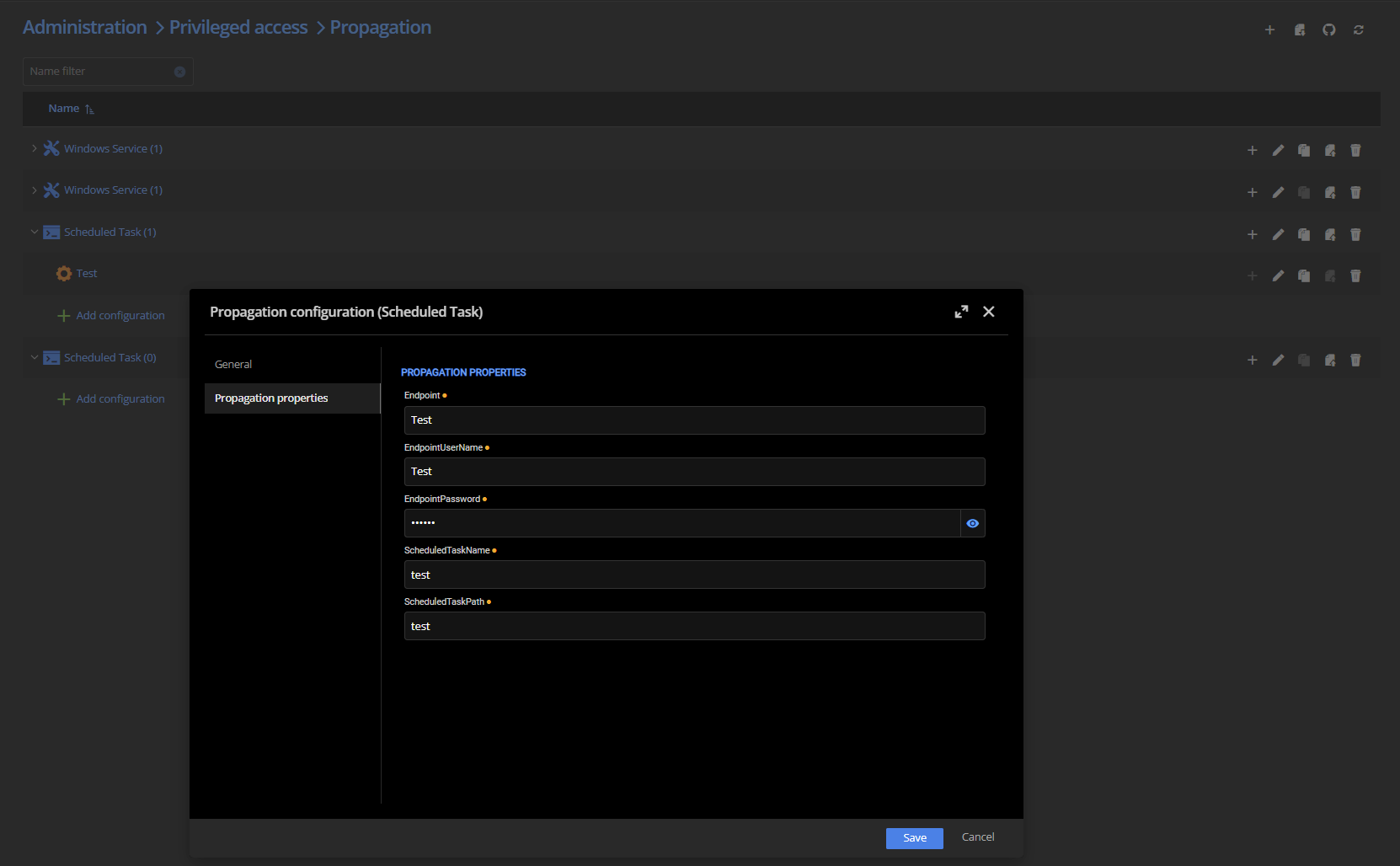
And for the "legacy" version:
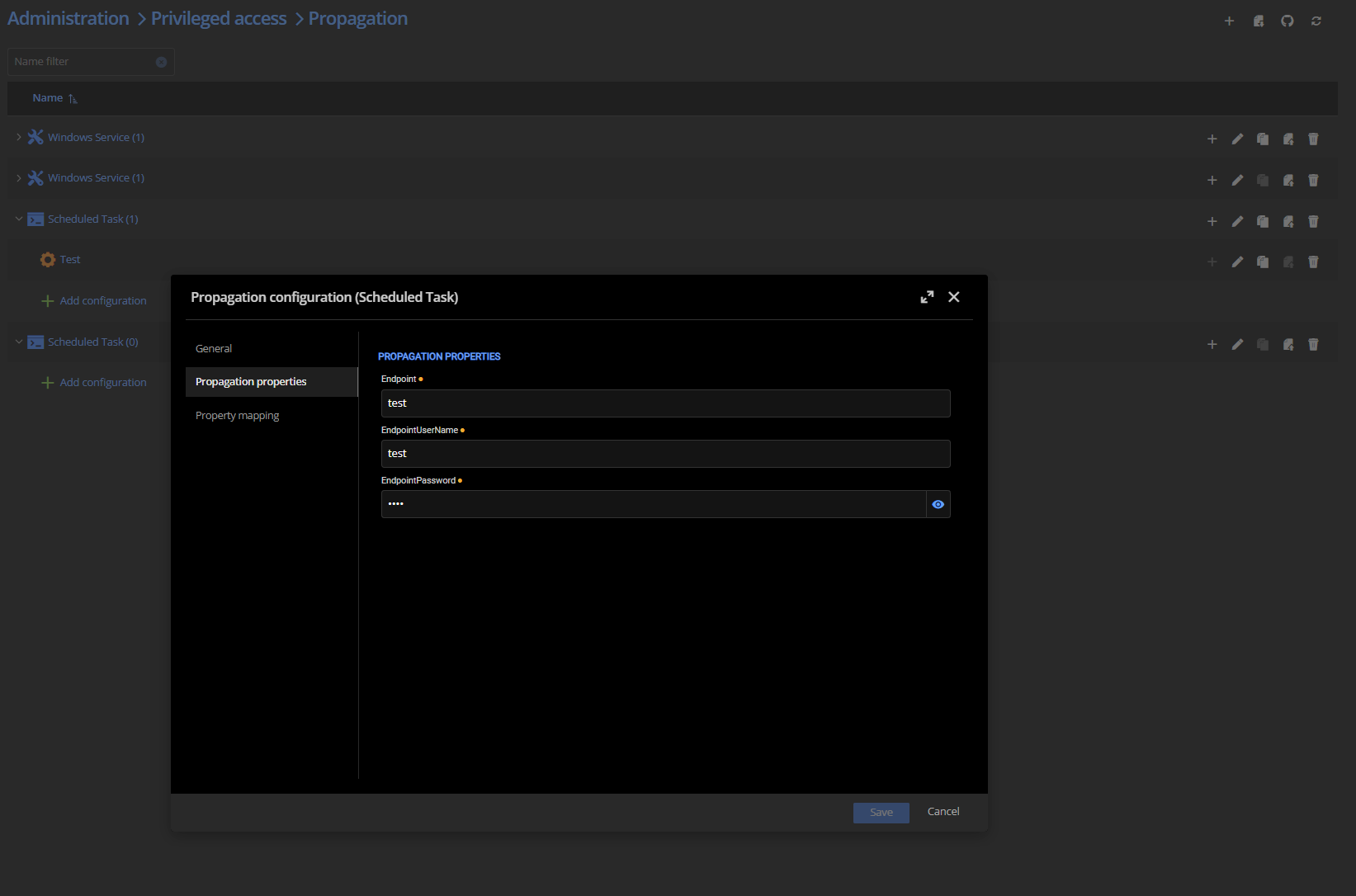
We are at the moment running DVLS version 2025.1.13, if that matters.
Propagation Scripts over Devolutions Gateway
Hello.
Is it possible to do propagation scripts over Devolutions Gateway? I can't seem to find any way to configure it, and as i understand it, the actual scripts are running from the Devolutions Server? So the Propagation Scripts require line of sight to the servers it should run on, if the propagation script requires remote configuration to be set on remote computers?
Br, Tony
Feature Request - Support for Custom AD Attributes in PAM Account Scanning
Would it be possible to achieve the same result with a custom PAM provider?
I can't seem to find a base template for Domain Users in PAM-Providers/Providers at master · Devolutions/PAM-Providers · GitHub that could be modified to suit the needs. Being able to solve this need would greatly decrease the complexity of our setup.
Feature Request - Support for Custom AD Attributes in PAM Account Scanning
Hi Devolutions Team,
We are currently using Devolutions PAM to manage accounts across multiple remote domains and have implemented a solution to map remote accounts to personnel in our local domain (where Devolutions Server/RDM is hosted). This mapping enables us to automatically apply appropriate permissions to each PAM account within our PAM vaults.
Current Workflow:
Our current process relies on custom Active Directory attributes set on remote AD accounts. We:
Export the entire AD catalog from the remote domain
Run a custom script to match remote AD accounts to Devolutions users based on these custom attributes
Apply permissions accordingly
This workflow is functional but requires manual intervention and external scripting.
Feature Request:
We would like the ability for Devolutions PAM to read and import custom AD attributes during account discovery. Specifically:
Capability: Extract custom AD attributes (beyond standard attributes) during PAM scans
Configuration: Option to specify custom attributes at either the PAM Provider or PAM Scan Template level
Storage: Store these attributes as metadata on PAM accounts
Use Case: Enable automated permission mapping and other business logic based on custom AD data
Technical Feasibility:
Since PAM already performs LDAPS queries to retrieve standard AD attributes during account discovery, extending this to include configurable custom attributes should be technically achievable.
Business Value:
This enhancement would:
Eliminate manual export/import processes
Reduce administrative overhead
Enable real-time synchronization of custom metadata
Improve automation capabilities for permission management
Would this be something you could consider for a future release? We'd be happy to provide additional details about our use case if helpful.
Thank you for your consideration.
Best regards,
Tony
Devolutions Gateway Publish Revocation List via Powershell
When setting up new Devolutions Gateways, you need to "Publish Revocation List" in the DVLS web GUI before you can start using the new gateway.
It would be great to be able to do this via Powershell, so you can setup and configure everything Devolutions Gateway wise automatically.
Get-RDMOauthToken not working since version 2026.1.0
Hi.
Get-RDMOauthToken stopped working since version 2026.1.0 at least, but i tried with the latest 2026.1.2 as well.
PS C:\Users\to-fre> Get-Command -Module Devolutions.Powershell | where {$_.Name -match "Get-RDMOAuthToken"}

CommandType     Name                                               Version    Source
-----------     ----                                               -------    ------
Cmdlet          Get-RDMOAuthToken                                  2026.1.2   Devolutions.PowerShell

PS C:\Users\to-fre> New-DSSession -BaseURI $DSServerUri -UseOAuth
PS C:\Users\to-fre> Get-RDMOAuthToken
Get-RDMOAuthToken: The type initializer for 'System.Text.Json.JsonSerializer' threw an exception.
PS C:\Users\to-fre> Import-Module -Name Devolutions.PowerShell -requiredVersion 2025.3.4
PS C:\Users\to-fre> Get-Command -Module Devolutions.Powershell | where {$_.Name -match "Get-RDMOAuthToken"}
CommandType Name Version Source
----------- ---- ------- ------
Cmdlet Get-RDMOAuthToken 2025.3.4 Devolutions.PowerShell
PS C:\Users\to-fre> New-DSSession -BaseURI $DSServerUri -UseOAuth
PS C:\Users\to-fre> Get-RDMOAuthToken
AccessToken
-----------
e...........Br, Tony
Get-DSPamAccount: Add parameter to retrieve detailed information for all PAM accounts in a single
Current Behavior:
Get-DSPamAccount(without parameters) returns only limited information for all PAM accountsGet-DSPamAccount -AccountID [ID]returns detailed information for a specific accountTo get detailed information for all accounts, we must: Call Get-DSPamAccount to retrieve all account IDs
Iterate through each ID and call
Get-DSPamAccount -AccountID [ID]individually
Issue:
Our automation scripts run frequently (several times per hour) and need detailed information for all PAM accounts. The current workflow requires N+1 requests to DVLS (one initial request + one per account), which:
Creates unnecessary load on the DVLS server, sometimes even crashing it
Increases script execution time
Is inefficient for a common use case
Proposed Solution:
Add a parameter (e.g., -Detailed or -IncludeDetails) to Get-DSPamAccount that retrieves detailed information for all accounts in a single call.
Example Usage:
Get-DSPamAccount -DetailedBenefits:
Reduces server load by consolidating multiple requests into one
Improves script performance
Provides a more efficient API for common automation scenarios
Alternative Considerations:
Batch parameter:
Get-DSPamAccount -AccountID @(id1, id2, id3)to retrieve multiple accounts at once
Desktop shortcut when installing with msiexec
Hello.
When using the provided command to install RDM with msiexec unattended, there is a flag
INSTALLMODE=Complete that should perform the complete install of RDM. However, it does not seem to add the shortcut to desktop. Is there a undocumented way of getting the installer to add the shortcut even when installing with msiexec and quiet/unattended?
Adding the possibility to unlock AD accounts during password reset
Hi William.
We don't use shared privileged accounts. All our users have their own personal accounts.
And yes. We are leveraging the Devolutions Gateway as well. But we want to limit the first jump to a jump-server, which is performed with the help of Devolutions Gateway. The subsequent jumps, we want to do from the jump server however. I.e. we don't want to be able to access all the servers directly from our workstations, but rather push us to go via a jump-server. The sessions that's being initiated from the Jump-server is therefore not performed via RDM or Devolutions gateway.
We have due to this experienced that some accounts have been locked out after the PAM has reset the password, probably due to sessions or tickets being tried to renew. This would not be an issue if each user itself would be able to unlock it's account via the PAM.
Adding the possibility to unlock AD accounts during password reset
Hi.
We're facing the same challenges as described above. We use a jump host architecture to jump further into our solution, and even though the first jump made with RDM could be solved with RDM entry parameters, the secondary sesisons from the jumphost won't be solved by changing RDM entry logoff settings.
Being able to unlock a locked account with PAM (or unlocking being part of checkout if locked or something), would be a great addition to solve the challenges with lingering sessions trying to reauthenticate, resulting in locked accounts.
Missing powershell features for DVGW and PAM management.
Hello.
When working with automating setup of Devolutions Gateway and Devolutions PAM, we have discovered that there is a gap in functionality in what can be done with the web GUI and what can be done with powershell.
Devolutions Gateway:
Missing "New/Update-DSGatewayFarm" commands to be able to create and manage Devolutions Gateway Farms.
New/Update-DSGateway:
Missing ability to set permissions with New-DSGateway (Limited functionality is present with Update-DSGateway).
Missing ability to set default permissions (Defaults to "Default (Allowed)")
Missing functionality to control KDC-proxy settings.
Devolutions PAM:
New-DSPamProvider
Missing ability to configure "Use Devolutions Gateway" and choose what gateway/fram to use.
Missing ability to configure Domain Controller
Missing ability to configure "Password Template"
New-DSPamVault
Unable to assign permissions to an "Application"
It would be great if the functionality available in the web GUI, would also be available in the Powershell module, to enable automating things and improve consistency.