Devolutions Gateway Certificate could not be verified after the DVLS upgrade
Devolutions Gateway Certificate could not be verified after the DVLS upgrade

After upgrade of dvls from 2025.1.x to 2025.3.18 our gateways started to have issues with certificate verification. Gateways are marked as down and when we do the Ping Certificate warning pops up. Workaround is to click Continue and Save but we are curios why, both sides should have access to CRLs, certs are valid and created by trusted CA. 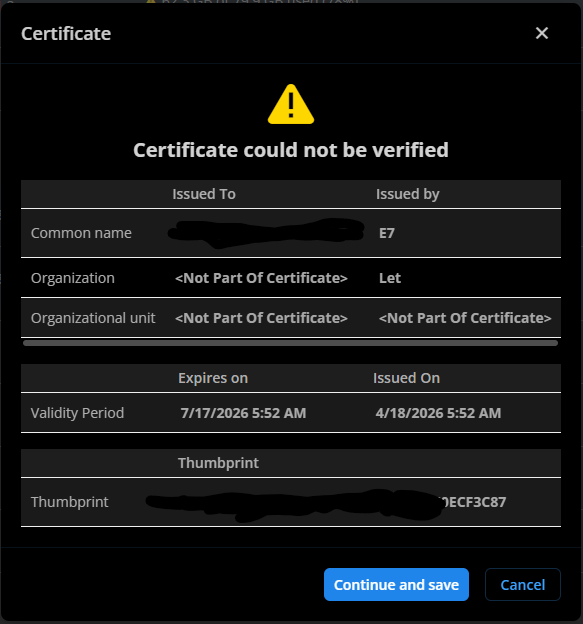
c4a7ebe3-4c27-4091-84a1-910bf4f89136.png
All Comments (13)
Hi.
I'm from the same organization as Rok.
Some further information about our setup and what we have tried.
We have:
- Added the intermediary CA of letsencrypt (E7) to certstore:
PS C:\Windows\System32> certutil -store -enterprise CA "E7"
CA "Intermediate Certification Authorities"
================ Certificate 0 ================
Serial Number: aa75f1e62b8f0a220966d38bbfd4baa1
Issuer: CN=ISRG Root X1, O=Internet Security Research Group, C=US
 NotBefore: 3/13/2024 12:00 AM
 NotAfter: 3/12/2027 11:59 PM
Subject: CN=E7, O=Let's Encrypt, C=US
Non-root Certificate
Cert Hash(sha1): 3b73c17e3df87cf3aa77f1389219eb5edd519e7f
No key provider information
Cannot find the certificate and private key for decryption.
CertUtil: -store command completed successfully.
- Made sure it's being picked up by both the service users that IIS and scheduler service is running from.
- Made sure the CRL is reachable for both service users (we are using a http proxy).
- When connecting to the gateway (/jet/health) with Edge,IE and powershell (invoke-webrequest), the certificate shows as valid.
Logs from DVLS:
2026-06-09 12:55:40.362 +00:00 [DBG]  Unable to get the health for a Devolutions Gateway - Health failed for Devolutions Gateway "[REDACTED]:
   at System.Net.Http.ConnectHelper.EstablishSslConnectionAsync(SslClientAuthenticationOptions sslOptions, HttpRequestMessage request, Boolean async, Stream stream, CancellationToken cancellationToken)
   at System.Net.Http.HttpConnectionPool.ConnectAsync(HttpRequestMessage request, Boolean async, CancellationToken cancellationToken)
   at System.Net.Http.HttpConnectionPool.CreateHttp11ConnectionAsync(HttpRequestMessage request, Boolean async, CancellationToken cancellationToken)
   at System.Net.Http.HttpConnectionPool.InjectNewHttp11ConnectionAsync(QueueItem queueItem)
   at System.Threading.Tasks.TaskCompletionSourceWithCancellation`1.WaitWithCancellationAsync(CancellationToken cancellationToken)
   at System.Net.Http.HttpConnectionPool.SendWithVersionDetectionAndRetryAsync(HttpRequestMessage request, Boolean async, Boolean doRequestAuth, CancellationToken cancellationToken)
   at System.Net.Http.RedirectHandler.SendAsync(HttpRequestMessage request, Boolean async, CancellationToken cancellationToken)
   at System.Net.Http.HttpClient.<SendAsync>g__Core|83_0(HttpRequestMessage request, HttpCompletionOption completionOption, CancellationTokenSource cts, Boolean disposeCts, CancellationTokenSource pendingRequestsCts, CancellationToken originalCancellationToken)
   at Devolutions.Gateway.Client.Client.ApiClient.ExecAsync[T](HttpRequestMessage req, IReadableConfiguration configuration, CancellationToken cancellationToken)
   at Devolutions.Gateway.Client.Client.ApiClient.Exec[T](HttpRequestMessage req, IReadableConfiguration configuration)
   at Devolutions.Gateway.Client.Client.ApiClient.Get[T](String path, RequestOptions options, IReadableConfiguration configuration)
   at Devolutions.Gateway.Client.Api.HealthApi.GetHealthWithHttpInfo()
   at Devolutions.Gateway.Client.Api.HealthApi.GetHealth()
   at Devolutions.Server.Managers.Gateway.GatewayManager.CheckGatewayHealth(Gateway gateway)
2026-06-09 12:55:40.421 +00:00 [DBG]  Gateway invalid certificate - Devolutions Gateway [REDACTED] has an invalid certificate:
    at System.Net.Http.ConnectHelper.EstablishSslConnectionAsync(SslClientAuthenticationOptions sslOptions, HttpRequestMessage request, Boolean async, Stream stream, CancellationToken cancellationToken)
   at System.Net.Http.HttpConnectionPool.ConnectAsync(HttpRequestMessage request, Boolean async, CancellationToken cancellationToken)
   at System.Net.Http.HttpConnectionPool.CreateHttp11ConnectionAsync(HttpRequestMessage request, Boolean async, CancellationToken cancellationToken)
   at System.Net.Http.HttpConnectionPool.InjectNewHttp11ConnectionAsync(QueueItem queueItem)
   at System.Threading.Tasks.TaskCompletionSourceWithCancellation`1.WaitWithCancellationAsync(CancellationToken cancellationToken)
   at System.Net.Http.HttpConnectionPool.SendWithVersionDetectionAndRetryAsync(HttpRequestMessage request, Boolean async, Boolean doRequestAuth, CancellationToken cancellationToken)
   at System.Net.Http.RedirectHandler.SendAsync(HttpRequestMessage request, Boolean async, CancellationToken cancellationToken)
   at System.Net.Http.HttpClient.<SendAsync>g__Core|83_0(HttpRequestMessage request, HttpCompletionOption completionOption, CancellationTokenSource cts, Boolean disposeCts, CancellationTokenSource pendingRequestsCts, CancellationToken originalCancellationToken)
   at Devolutions.Gateway.Client.Client.ApiClient.ExecAsync[T](HttpRequestMessage req, IReadableConfiguration configuration, CancellationToken cancellationToken)
   at Devolutions.Gateway.Client.Client.ApiClient.Exec[T](HttpRequestMessage req, IReadableConfiguration configuration)
   at Devolutions.Gateway.Client.Client.ApiClient.Get[T](String path, RequestOptions options, IReadableConfiguration configuration)
   at Devolutions.Gateway.Client.Api.HeartbeatApi.GetHeartbeatWithHttpInfo()
   at Devolutions.Gateway.Client.Api.HeartbeatApi.GetHeartbeat()
   at Devolutions.Server.Managers.Gateway.GatewayManager.GetHeartbeat(Gateway gateway)
   at Devolutions.Server.Managers.Gateway.GatewayManager.CheckGatewayHealth(Gateway gateway)
Logs from the gateway:
2026-06-09T13:00:05.699902Z TRACE listener{port=7171}:https{client=127.0.0.1:53574}: devolutions_gateway::tls::windows: Received ClientHello server_name=Some("[REDACTED]")
2026-06-09T13:00:05.701873Z TRACE listener{port=7171}:https{client=127.0.0.1:53574}: devolutions_gateway::tls::windows: Found certificate contexts subject_name=[REDACTED] count=1
2026-06-09T13:00:05.701998Z TRACE listener{port=7171}:https{client=127.0.0.1:53574}: devolutions_gateway::tls::windows: Parsed store certificate idx=0 serial_number=6F78795039035B91958595E5C3CC35741 subject=CN=[REDACTED] issuer=C=US,O=Let's Encrypt,CN=E7 not_before=2026-04-18 03:52:32 not_after=2026-07-17 03:52:31 issues=
2026-06-09T13:00:05.702021Z TRACE listener{port=7171}:https{client=127.0.0.1:53574}: devolutions_gateway::tls::windows: Sorted certificate sorted_idx=0 idx=0 not_after=2026-07-17 03:52:31
2026-06-09T13:00:05.704323Z TRACE listener{port=7171}:https{client=127.0.0.1:53574}: devolutions_gateway::tls::windows: Selected certificate idx=0 not_after=2026-07-17 03:52:31 key_algorithm_group=Ok(Ecdh) key_algorithm=Ok("ECDH_P256")
2026-06-09T13:00:05.706301Z TRACE listener{port=7171}:https{client=127.0.0.1:53574}: devolutions_gateway::tls::windows: Cached certified key
2026-06-09T13:00:05.706367Z DEBUG listener{port=7171}:https{client=127.0.0.1:53574}: rustls::server::hs: decided upon suite TLS13_AES_256_GCM_SHA384
2026-06-09T13:00:05.707613Z TRACE listener{port=7171}:https{client=127.0.0.1:53574}: rustls::server::tls13::client_hello: sending server hello Message { version: TLSv1_2, payload: Handshake { parsed: HandshakeMessagePayload(ServerHello(ServerHelloPayload { legacy_version: TLSv1_2, random: 3e32c8f13f98639e142d1771c9b32782eb6ace4a4b915dccb488be33ff04ed95, session_id: 1102e60fcbaa316aa8248facb50a6f2c2ce6e9a0c51bb2cd0b563535fb4dfaa4, cipher_suite: TLS13_AES_256_GCM_SHA384, compression_method: Null, extensions: ServerExtensions { key_share: KeyShareEntry { group: secp384r1, payload: 0416f8f2b019ee75f5f8737cdae4ed7bfbde42750c0a4b8a0cbef5308db2a89422fc8c02288180021547188f78002eb73ff183d93ccf176a8bd30605ab000967d2fc5386a3486186ac0867f5fe7dd9c2eecd2b61c31ad5d5379360d63c862d982f }, selected_version: TLSv1_3, unknown_extensions: {}, .. } })), encoded: 020000b703033e32c8f13f98639e142d1771c9b32782eb6ace4a4b915dccb488be33ff04ed95201102e60fcbaa316aa8248facb50a6f2c2ce6e9a0c51bb2cd0b563535fb4dfaa4130200006f00330065001800610416f8f2b019ee75f5f8737cdae4ed7bfbde42750c0a4b8a0cbef5308db2a89422fc8c02288180021547188f78002eb73ff183d93ccf176a8bd30605ab000967d2fc5386a3486186ac0867f5fe7dd9c2eecd2b61c31ad5d5379360d63c862d982f002b00020304 } }
2026-06-09T13:00:05.707720Z TRACE listener{port=7171}:https{client=127.0.0.1:53574}: rustls::server::tls13::client_hello: sending encrypted extensions HandshakeMessagePayload(EncryptedExtensions(ServerExtensions { server_name_ack: (), unknown_extensions: {}, .. }))
2026-06-09T13:00:05.707734Z TRACE listener{port=7171}:https{client=127.0.0.1:53574}: rustls::server::tls13::client_hello: sending certificate HandshakeMessagePayload(CertificateTls13(CertificatePayloadTls13 { context: , entries: [CertificateEntry { cert: CertificateDer(0x3082039c30820321a0030201020212060f787950390035b91958595e5c3cc35741300a06082a8648ce3d0403033032310b300906035504061302555331163014060355040a130d4c6574277320456e6372797074310b3009060355040313024537301e170d3236303431383033353233325a170d3236303731373033353233315a30233121301f0603550403131861646d2e67772e65752e72646d2e7365637472612e6e65743059301306072a8648ce3d020106082a8648ce3d03010703420004d683c7aaf380f67017fba1045454927e4b30a5112649cf945c33a33ec060eda7afa405fd6725106814bc826482bf2766870d24ffd3dc4725146ba0204ca1dca4a382022430820220300e0603551d0f0101ff04040302078030130603551d25040c300a06082b06010505070301300c0603551d130101ff04023000301d0603551d0e041604141dffe53ddccea6869dcc82778db7882e530b1bfa301f0603551d23041830168014ae489edc871d44a06fdaa2e560740478c29c0080303206082b0601050507010104263024302206082b060105050730028616687474703a2f2f65372e692e6c656e63722e6f72672f30230603551d11041c301a821861646d2e67772e65752e72646d2e7365637472612e6e657430130603551d20040c300a3008060667810c010201302d0603551d1f042630243022a020a01e861c687474703a2f2f65372e632e6c656e63722e6f72672f36362e63726c3082010c060a2b06010401d6790204020481fd0481fa00f8007600d76d7d10d1a7f577c2c7e95fd700bff982c9335a65e1d0b3017317c0c8c569770000019d9eed8fba0000040300473045022100c1dae6c0963b4efb8cf6a888ac59876d0343625593d9b21cf1b8357eb3267730022038c7212a7df4d34ca47e5e1408f8183b9ecafb749e4c0354acec97ddee8934de007e0046af863d3b3ee59fa577dea8245d36b0d9ed22a223f4617741229452ee95505f0000019d9eed903a000800000500042f8258040300473045022100b1c3908982ad8e20e3eb28b871aad9bd30573a268840f0718d92ff8b3efd761602202d512c9a18ab044a501c0cc6fef2578e4064feb968bcaa4c1987eb896942591f300a06082a8648ce3d040303036900306602310087aabe6eeb27b6d6f398e5eb6ac11d1da1d629c6b76479375a12e67ec39d291be76bbea02a85318ce2d82b82d2a4f237023100a2d51cdb75aa7d8938ea2ecb8a5019fe4f2e34f6aee1bd18bac7225a80d4483becb25053433f8eac62f090897e371bfc), extensions: CertificateExtensions { .. } }, CertificateEntry { cert: CertificateDer(0x308204573082023fa003020102021100aa75f1e62b8f0a220966d38bbfd4baa1300d06092a864886f70d01010b0500304f310b300906035504061302555331293027060355040a1320496e7465726e65742053656375726974792052657365617263682047726f7570311530130603550403130c4953524720526f6f74205831301e170d3234303331333030303030305a170d3237303331323233353935395a3032310b300906035504061302555331163014060355040a130d4c6574277320456e6372797074310b30090603550403130245373076301006072a8648ce3d020106052b810400220362000441e8049308587fbe37300cc0a041eafe56da84933ec900dbab6712cff94f5309e8a82fab29e59f1546f45b624e0fd4834199b79f4072451c2c5c4a32a6c2dbc6056a65ffdadaf075b4403b146895b6a8e26a71e274655153de16d41e27c133fda381f83081f5300e0603551d0f0101ff040403020186301d0603551d250416301406082b0601050507030206082b0601050507030130120603551d130101ff040830060101ff020100301d0603551d0e04160414ae489edc871d44a06fdaa2e560740478c29c0080301f0603551d2304183016801479b459e67bb6e5e40173800888c81a58f6e99b6e303206082b0601050507010104263024302206082b060105050730028616687474703a2f2f78312e692e6c656e63722e6f72672f30130603551d20040c300a3008060667810c01020130270603551d1f0420301e301ca01aa0188616687474703a2f2f78312e632e6c656e63722e6f72672f300d06092a864886f70d01010b050003820201008f1eba7c374b939cb0167dc2cc0d70d6a7f29475036847f4419a57709b1e75d24649f6d450ebdb351f4dfd0435e8ad655e5e151728661970d3e4a75f72bd11bc8215acdc4587896a1ed45108fe91051b2da9b676cd4460a9a927fd78a9d226902f421d7c7059af7f7a1609279e245815c90a3913c6c8cdd02a777aea0b4cb2df08e67911425020fc96fe19cdde808bee18a59ba04d46f3d353b0df4b4c30f73cb8f475432b388baa5632c1f29102eb293d7a7ae5aea8d742090b118857ceaedd2da7efe5592283a1a5d27baeaa3a9fa744356e2d68c953409577ba6945f0f7609c8210bd6cdb0a10ed7e339d98639fa87c85e54bf48441bbd561804b679c9e8a0955eaddd233a1febd31b468ff581f32e7fca54e1f31907d70cfeea339b647feedd8997bba367f0e8eec8bcde9fb105c44108fc4c9517271bf6fee26172ecbfb520e05f01ccf14937e1635b453ef31931a44115f482c6e301e6bf8d80285afd19bd0470a6a3deefd0ff8bb09ea7ca969c0fbb004ff70774bfddd1046267349697b5dfae80ffa184824de4b6bf4f12842b2c286ce88b6edf09cd2c1d9eb82f082862d01691ad38eff6fe18802a3c9a8da04fdb9c358c5d1697c05baa77b7b99daad46c8f149611993eff397a66387fc554bb704bef278357009a90ae8cfc2d78964d7031b4b05da7fec734f9241fe3d7ddc942b4b72f95530163f6d996c7247f3), extensions: CertificateExtensions { .. } }, CertificateEntry { cert: CertificateDer(0x3082056b30820353a0030201020211008210cfb0d240e3594463e0bb63828b00300d06092a864886f70d01010b0500304f310b300906035504061302555331293027060355040a1320496e7465726e65742053656375726974792052657365617263682047726f7570311530130603550403130c4953524720526f6f74205831301e170d3135303630343131303433385a170d3335303630343131303433385a304f310b300906035504061302555331293027060355040a1320496e7465726e65742053656375726974792052657365617263682047726f7570311530130603550403130c4953524720526f6f7420583130820222300d06092a864886f70d01010105000382020f003082020a0282020100ade82473f41437f39b9e2b57281c87bedcb7df38908c6e3ce657a078f775c2a2fef56a6ef6004f28dbde68866c4493b6b163fd14126bbf1fd2ea319b217ed1333cba48f5dd79dfb3b8ff12f1219a4bc18a8671694a66666c8f7e3c70bfad292206f3e4c0e680aee24b8fb7997e94039fd347977c99482353e838ae4f0a6f832ed149578c8074b6da2fd0388d7b0370211b75f2303cfa8faeddda63abeb164fc28e114b7ecf0be8ffb5772ef4b27b4ae04c12250c708d0329a0e15324ec13d9ee19bf10b34a8c3f89a36151deac870794f46371ec2ee26f5b9881e1895c34796c76ef3b906279e6dba49a2f26c5d010e10eded9108e16fbb7f7a8f7c7e50207988f360895e7e237960d36759efb0e72b11d9bbc03f94905d881dd05b42ad641e9ac0176950a0fd8dfd5bd121f352f28176cd298c1a80964776e4737baceac595e689d7f72d689c50641293e593edd26f524c911a75aa34c401f46a199b5a73a516e863b9e7d72a712057859ed3e5178150b038f8dd02f05b23e7b4a1c4b730512fcc6eae050137c439374b3ca74e78e1f0108d030d45b7136b407bac130305c48b7823b98a67d608aa2a32982ccbabd83041ba2830341a1d605f11bc2b6f0a87c863b46a8482a88dc769a76bf1f6aa53d198feb38f364dec82b0d0a28fff7dbe21542d422d0275de179fe18e77088ad4ee6d98b3ac6dd27516effbc64f533434f0203010001a3423040300e0603551d0f0101ff040403020106300f0603551d130101ff040530030101ff301d0603551d0e0416041479b459e67bb6e5e40173800888c81a58f6e99b6e300d06092a864886f70d01010b05000382020100551f58a9bcb2a850d00cb1d81a6920272908ac61755c8a6ef882e5692fd5f6564bb9b8731059d321977ee74c71fbb2d260ad39a80bea17215685f1500e59ebcee059e9bac915ef869d8f8480f6e4e99190dc179b621b45f06695d27c6fc2ea3bef1fcfcbd6ae27f1a9b0c8aefd7d7e9afa2204ebffd97fea912b22b1170e8ff28a345b58d8fc01c954b9b826cc8a8833894c2d843c82dfee965705ba2cbbf7c4b7c74e3b82be31c822737392d1c280a43939103323824c3c9f86b255981dbe29868c229b9ee26b3b573a82704ddc09c789cb0a074d6ce85d8ec9efceabc7bbb52b4e45d64ad026cce572ca086aa595e315a1f7a4edc92c5fa5fbffac28022ebed77bbbe3717b9016d3075e46537c3707428cd3c4969cd599b52ae0951a8048ae4c3907cecc47a452952bbab8fbadd233537de51d4d6dd5a1b1c7426fe64027355ca328b7078de78d3390e7239ffb509c796c46d5b415b3966e7e9b0c963ab8522d3fd65be1fb08c284fe24a8a389daac6ae1182ab1a843615bd31fdc3b8d76f22de88d75df17336c3d53fb7bcb415fffdca2d06138e196b8ac5d8b37d775d533c09911ae9d41c1727584be0241425f67244894d19b27be073fb9b84f817451e17ab7ed9d23e2bee0d52804133c31039edd7a6c8fc60718c67fde478e3f289e0406cfa5543477bdec899be91743df5bdb5ffe8e1e57a2cd409d7e6222dade1827), extensions: CertificateExtensions { .. } }] }))
2026-06-09T13:00:05.709405Z TRACE listener{port=7171}:https{client=127.0.0.1:53574}: rustls::server::tls13::client_hello: sending certificate-verify HandshakeMessagePayload(CertificateVerify(DigitallySignedStruct { scheme: ECDSA_NISTP256_SHA256, sig: 304402207a665396b77ccee865eb3e2723c9116204a7fd31e559e838e73e7983a5449e010220116f8f8fd055801f29ba183df9e343d95422df042fc5ed688974ae9945c12009 }))
2026-06-09T13:00:05.709450Z TRACE listener{port=7171}:https{client=127.0.0.1:53574}: rustls::server::tls13::client_hello: sending finished HandshakeMessagePayload(Finished(bb9c757dff42afc85c42a205d5e1f0f81d664ad0792bcb850b2f1cfb3996f56d97ccb9ccf2e996bfa09da36d94f1255c))
2026-06-09T13:00:05.756508Z TRACE listener{port=7171}:https{client=127.0.0.1:53574}: rustls::conn: Dropping CCS
2026-06-09T13:00:05.756628Z TRACE listener{port=7171}:https{client=127.0.0.1:53574}: rustls::server::tls13: sending new ticket HandshakeMessagePayload(NewSessionTicketTls13(NewSessionTicketPayloadTls13 { lifetime: 86400, age_add: 4099907008, nonce: b172b24fb82753028e62765932a1e315b51b0da025a906af973c74b1f43cdb39, ticket: 662c9538cd4e0c29ea5755a45f7f5eaea29cc79a2c69319a37c7bb7ad0c171af, extensions: NewSessionTicketExtensions { .. } })) (stateless: false)
2026-06-09T13:00:05.756679Z TRACE listener{port=7171}:https{client=127.0.0.1:53574}: rustls::server::tls13: sending new ticket HandshakeMessagePayload(NewSessionTicketTls13(NewSessionTicketPayloadTls13 { lifetime: 86400, age_add: 2888738761, nonce: 084f76f59995f0d1f60719772d4a72fdddbebac8d9a5378c504e3e2f11e53351, ticket: b44da67c9adf73aaa14037a6af0edef9dd8d31a1d89e6c86a6deada9547430e7, extensions: NewSessionTicketExtensions { .. } })) (stateless: false)
2026-06-09T13:00:05.758103Z ERROR listener{port=7171}:https{client=127.0.0.1:53574}: devolutions_gateway::listener: handle_https_peer failed error="HTTP server: received fatal alert: CertificateUnknown"
2026-06-09T13:00:14.345124Z TRACE listener{port=7171}:https{client=127.0.0.1:53577}: rustls::server::hs: we got a clienthello ClientHelloPayload { client_version: TLSv1_2, random: b64f83543449635f2434d0b010d6103d28f519797f71808d8336f8e3a257cd3d, session_id: 812b28d25bb904fa3c346bc494f52992e44ed6fc22c044e90e47bbff73f07048, cipher_suites: [TLS13_AES_256_GCM_SHA384, TLS13_AES_128_GCM_SHA256, TLS_ECDHE_ECDSA_WITH_AES_256_GCM_SHA384, TLS_ECDHE_ECDSA_WITH_AES_128_GCM_SHA256, TLS_ECDHE_RSA_WITH_AES_256_GCM_SHA384, TLS_ECDHE_RSA_WITH_AES_128_GCM_SHA256, TLS_ECDHE_ECDSA_WITH_AES_256_CBC_SHA384, TLS_ECDHE_ECDSA_WITH_AES_128_CBC_SHA256, TLS_ECDHE_RSA_WITH_AES_256_CBC_SHA384, TLS_ECDHE_RSA_WITH_AES_128_CBC_SHA256], compression_methods: [Null], extensions: ClientExtensions { server_name: SingleDnsName(DnsName("[REDACTED]")), named_groups: [secp384r1, secp256r1], ec_point_formats: SupportedEcPointFormats { uncompressed: true }, signature_schemes: [RSA_PSS_SHA256, RSA_PSS_SHA384, RSA_PSS_SHA512, RSA_PKCS1_SHA256, RSA_PKCS1_SHA384, RSA_PKCS1_SHA1, ECDSA_NISTP256_SHA256, ECDSA_NISTP384_SHA384, ECDSA_SHA1_Legacy, SignatureScheme(0x202), RSA_PKCS1_SHA512, ECDSA_NISTP521_SHA512], extended_master_secret_request: (), session_ticket: Request, supported_versions: SupportedProtocolVersions { tls13: true, tls12: true }, preshared_key_modes: PskKeyExchangeModes { psk_dhe: true, psk: false }, key_shares: [KeyShareEntry { group: secp384r1, payload: 04795bede822777bfddf0e866e141e8e6cf87b8cdb5214d362205514bde1d4197018bbe576a1fbbd222c6d8d4e91f711769bcbfd42bbada5214d7ae8af1323766db314ca2238e320c38f3301bf77df0795dd565dfacd4567c9d00765d829998615 }], renegotiation_info: , order_seed: 0, contiguous_extensions: [], .. } }
2026-06-09T13:00:14.345340Z TRACE listener{port=7171}:https{client=127.0.0.1:53577}: rustls::server::hs: Resolving server certificate: ClientHello {
    server_name: Some(
        DnsName(
            "[REDACTED]",
        ),
    ),
    signature_schemes: [
        RSA_PSS_SHA256,
        RSA_PSS_SHA384,
        RSA_PSS_SHA512,
        RSA_PKCS1_SHA256,
        RSA_PKCS1_SHA384,
        RSA_PKCS1_SHA1,
        ECDSA_NISTP256_SHA256,
        ECDSA_NISTP384_SHA384,
        ECDSA_SHA1_Legacy,
        SignatureScheme(0x202),
        RSA_PKCS1_SHA512,
        ECDSA_NISTP521_SHA512,
    ],
    alpn: None,
    server_cert_types: None,
    client_cert_types: None,
    cipher_suites: [
        TLS13_AES_256_GCM_SHA384,
        TLS13_AES_128_GCM_SHA256,
        TLS_ECDHE_ECDSA_WITH_AES_256_GCM_SHA384,
        TLS_ECDHE_ECDSA_WITH_AES_128_GCM_SHA256,
        TLS_ECDHE_RSA_WITH_AES_256_GCM_SHA384,
        TLS_ECDHE_RSA_WITH_AES_128_GCM_SHA256,
        TLS_ECDHE_ECDSA_WITH_AES_256_CBC_SHA384,
        TLS_ECDHE_ECDSA_WITH_AES_128_CBC_SHA256,
        TLS_ECDHE_RSA_WITH_AES_256_CBC_SHA384,
        TLS_ECDHE_RSA_WITH_AES_128_CBC_SHA256,
    ],
    certificate_authorities: None,
    named_groups: Some(
        [
            secp384r1,
            secp256r1,
        ],
    ),
}
So the issue is that DVLS don't seem to automatically accept the certificate issued by letsencrypt. If you press "Continue and Save", the gateway certificate is accepted and DVLS can start communicating with it. The same behavior happens when adding a new gateway, the certificate needs to be accepted.
Hello,
Thank you for reaching out and for the detailed logs and the certificate output, that makes this much easier to narrow down.
Your evidence shows the gateway certificate itself is valid and the chain is complete. The gateway selects the certificate, completes the TLS handshake and presents the full chain . The rejection is happening on the Devolutions Server side during its own validation of the gateway certificate, which is why the connection is refused even though everything else trusts it. This also explains the timing: newer Devolutions Server builds validate the gateway certificate more strictly than 2025.1 did, but a valid publicly trusted certificate like yours should still pass, so the behavior you are seeing is being looked at on our side.
"Continue and save" is safe here. It tells Devolutions Server to trust that specific, valid certificate and is the correct interim step. You are not papering over a real certificate problem.
To confirm which validation path you are hitting, could you tell me whether the common name (CN) of the gateway certificate contains a dash/hyphen character? That one detail helps us match your case to the right fix.
I will keep you updated here.
Best regards,
Michel Audi
Hi.
No, there are no dashes, hyphens or other non-alphabetic characters. Only letters, but on the form "xx.yy.zz.aa.bb.com"
Br, Tony
Hi again.
Do you have any update on this issue? Have you been able to recreate it?
We have investigated some more, and it seems like the "Save and Continue" adds the thumbprint of that specific certificate to the gateway object. When said certificate is changed/updated, an administrator needs to manually go in and once again "Save and Continue" to add the new updated thumbprint to the gateway object for the gateway to continue functioning.
This will cause major unplanned disruptions for us since we use Let's encrypt with automatic updates of the certificates when they are about to expire.
When running Test-DsGateway from powershell (version 2026.1.4)
PS C:> (Test-DSGateway -GatewayID [GATEWAYID]).GatewayCertificate.Statusinformation
The certificate is not valid for the requested usage.
Are there any new requirements on what the certificate should include? Could you in that case point me to these requirements so we can try to issue new certificates to make DVLS automatically accept the valid certificates.
Hello Tony,
You've nailed the behaviour. To confirm the exact validation reason on our end and move this forward internally, could you run the TLS Diagnostics tool in Remote Desktop Manager: Tools → All tools → TLS diagnostics, enter the gateway FQDN in the Domain field, leave "Perform TLS handshake" checked, and click Start. Then export the result and send it over. I can arrange a secure upload link if you'd rather not post it here.
Continue and save remains safe to use in the meantime.
Best regards,
Michel Audi
Hi.
I just ran it (from RDM on my local PC, not DVLS) and everything is green.
If you want the report, i can send it to you in a DM.
Br, Tony
Hi Tony,
Yes Please DM me as i need the Diagnostics.
Best regards,
Michel Audi
Hi @Michel Audi
Have you been able to reproduce the issues we are seeing? Or are the issues environmental rather than application based? It's really causing us some headaches, since the automatic renewals are causing disruptions for us. For now we need to manually renew the certificates before they are up for renewal so we can be ready to accept the new certificates since if it is done automatically, DVLS won't accept the new certificate since it's pinned to the old thumbprint.
Br. Tony
Hi Tony,
Thanks for sending the diagnostic. To answer your questions directly, this is application side, not environmental. We have not reproduced it in-house yet, but it is a recognized issue affecting a small number of setups that use publicly issued, automatically renewing certificates, and it has been raised in priority internally. The export you sent is what the team needs to drive that reproduction, so it was the right thing to capture. Nothing in your environment or your certificate is at fault.
On the certificate requirements, there is nothing new for you to add or change. The certificate already carries the Server Authentication usage it needs, so the "not valid for the requested usage" result is coming from how Devolutions Server evaluates the certificate, not from anything missing on it. That is why no certificate you reissue from Let's Encrypt will make Devolutions Server accept it automatically. This one has to be fixed on our side.
I also want to be straight about the renewal impact, since that is the part actually hurting you. Having an administrator re-accept the certificate after every automatic renewal is not a sustainable answer for your setup, and that is exactly why I have pushed this internally. I do not have a release date I can commit to yet, and I will come back to you here the moment I have something concrete from the team.
Best regards,
Michel
Michel Audi
Hi again @Michel Audi
Do you have any updates on the issues above?
Hi Tony,
Yes, and with the specific mechanism this time. Devolutions Server's own check was re-adding the Server Authentication requirement that .NET has already placed on the chain, and the duplicate entry is what makes the chain rebuild fail. That is where your "not valid for the requested usage" comes
from.
Your diagnostic backs it from the other side. Windows returns an error status of zero on the certificate, the intermediate and the root, with the verdict "Certificate chain is valid". It also covers a different gateway and a different Let's Encrypt intermediate than the log you posted, so it is not specific to one certificate. And the usage message from Test-DSGateway is the server's own check reporting on itself, so there is no gap between machines to argue about.
Two things you can stop spending time on, and I should have told you in June. Your proxy and the CRL were never at fault, because our check tolerates a revocation status it cannot determine. Adding the intermediate to the store was not needed either: your gateway already presents the full chain.
One thing I need: are you still on 2025.3.18, and if not, which build? The change to that line went out in 2026.1.8.0 and was never brought back to the 2025.3 line, so 2025.3.18 sits below it, as does 2025.3.23, the newest build there. Your version is two months old, so if you have moved to 2026.1.8.0 or later and it still happens, that changes where we look.
If you are below it, the test is quick and needs no renewal. On a Devolutions Server test instance running 2026.1.8.0 or later, add the gateway using the certificate it is serving now. Adding one runs the same validation a renewal does, which is why both prompted you, so if it goes through with no prompt your renewals stop breaking.
I still cannot promise it settles your case, because the renewal ticket is open and we have not reproduced it. And I cannot tell you what changed at your original upgrade: I have no readable 2025.1 build to compare against, so please treat what I said earlier about stricter validation since 2025.1 as unconfirmed.
Send me your build, or your result if you get as far as testing, and I will pick it up from there.
Best regards,
Michel
Michel Audi
Hi Michel.
Thank you for the through response and sorry for the late response.
We are indeed on 2025.3.18.0.
I can see if we can get an upgrade done on our test system. Would the latest Extended Maintenance Release: Devolutions Server Version 2026.1.24.0 be sufficient?
Thanks. Br, Tony
Hi Tony,
No apology needed, and thanks for the build: it settles the question I asked. 2025.3.18.0 sits below the change, so you do not have it today.
And yes, 2026.1.24.0 is sufficient for that test. I read the gateway certificate validation code at that exact build and compared it with 2026.1.8.0, where the change shipped on 13 March: the two are the same apart from compiler directives. 2026.1.24.0 is a released build, 23 July, and the newest one on that line.
One thing worth knowing before you plan the upgrade: nothing newer would help here either. That same file is unchanged in the newest 2026.2 and 2026.3 builds, so there is no reason to move off the 2026.1 line for this. The build you found is the right one to test on.
Two notes so the test result means something. Use a certificate that is currently valid: the one in your June log expired on 17 July. An expired certificate is refused when you add a gateway fresh, 2026.1.24.0 included, and that refusal would look like your original failure for an entirely different reason. Then add the gateway as I described, and watch for the prompt.
What I still cannot promise is that this closes your case. The renewal side of the problem has not moved on our end and is not yet scheduled for a release, and we have not reproduced it in-house even against a test ACME server, so the mechanism rests on the code and on your own chain rather than on a reproduction. Your test on 2026.1.24.0 is the thing that would settle it.
Send me the result either way and I will pick it up from there.
Best regards,
Michel
Michel Audi