
Christian Egli
Remember Trusted Devices and Apply Risk-Based Device Authorization
Hello,
Since the introduction of the new device authorization mechanism in Devolutions Server 2026.2.19.0, users must confirm "Yes, it's me" for every login when using Windows SSO or an external identity provider.
While we fully understand and support the security improvements introduced to address the vulnerability described in DEVO-2026-0035, the current implementation can create unnecessary friction for users who regularly access the system from the same trusted workstation.
We would like to request an enhancement that allows trusted devices to be remembered and uses a risk-based authorization model.
Proposed Behavior
After a successful device authorization, the device could be marked as trusted for a configurable period or until specific conditions change.
The authorization prompt would only be displayed when:
The login originates from a new device.
The login originates from a significantly different geographic location.
The login pattern is considered unusual or high risk.
The trusted device status has expired or been revoked by an administrator.
For previously approved and regularly used devices, users would not be prompted to confirm every login.
Benefits
Maintains the security improvements introduced by the current implementation.
Improves user experience by reducing repetitive confirmation prompts.
Aligns with the approach used by many modern identity providers and MFA solutions that support trusted devices and risk-based authentication.
Reduces support requests and user confusion regarding repeated authorization prompts.
Environment
Product: Devolutions Server
Version: 2026.2.19.0
Authentication: Windows SSO / Microsoft Entra ID
Client: Remote Desktop Manager
Thank you for considering this enhancement. We believe it would provide a good balance between security and usability while preserving the protection introduced by the recent security changes.
Best regards,
Christian
Shared PAM Account Pool for Service Groups
Hi Luc,
The main reason we need a pool is that multiple administrators share a limited set of privileged AD accounts.
Using My privileged account requires each administrator to have a dedicated privileged account assigned to them. In our environment, this is not possible because the accounts are shared and must be allocated dynamically.
What we need is the ability to select a pool as the credential source. The pool would contain multiple privileged AD accounts, and when a connection is opened, the system would automatically select an available account that is not currently checked out by another administrator.
This ensures that:
Administrators can continue to open connections directly without manually selecting credentials.
Shared privileged accounts are managed centrally.
Account collisions are avoided because only free accounts are assigned.
For this reason, the My privileged account feature does not meet our requirements.
Cheers,
Christian
Shared PAM Account Pool for Service Groups
Hi Luc,
What we need is the ability to select a pool instead of a single account. This pool would contain multiple AD accounts.
When a connection is opened, the system should automatically select an available account from the pool that is not currently checked out or in use by another administrator. The account assignment should happen transparently in the background, so the administrator can connect without having to manually choose or manage the account.
Shared PAM Account Pool for Service Groups
Hi Luc,
The main reason for this requirement is to improve the administrator experience and workflow. Today, administrators are used to simply launching a connection and being logged in automatically. They do not need to think about which privileged account to use.
With the current PAM workflow, an administrator must first identify the correct account, check it out, then search for the target server and launch the connection. This introduces additional steps and complexity into the daily administration process.
Ideally, the account selection and assignment should happen automatically in the background, allowing administrators to simply launch the connection without having to manually manage privileged accounts.
To achieve this, we need a pool of domain accounts from which an available account can be automatically assigned when a connection is opened.
Shared PAM Account Pool for Service Groups
We manage multiple services that consist of server groups. For example, the "File" service contains approximately 30 servers. Access to each server is controlled through an Active Directory security group, which includes all authorized users, including those managed through Devolutions PAM.
Currently, a dedicated PAM account must be assigned to each server, resulting in a large number of privileged accounts that need to be created, managed, and maintained.
However, in our environment, there are never more than three administrators working concurrently across the servers of the same service group. Therefore, maintaining 30 separate PAM accounts provides little operational value.
We would like to request a Shared PAM Account Pool feature for service groups. Instead of assigning a dedicated PAM account to every server, a configurable pool of accounts could be shared across all servers within a service group. In this example, a pool of three PAM accounts would be sufficient for all 30 file servers
.
When an administrator requests access to a server within the service group, an available PAM account would be automatically allocated from the pool. Once the session is completed and the account is checked back in, it becomes available for the next administrator.
Important: A Just-In-Time (JIT) approach that creates a new account on demand and deletes it after use is not a suitable alternative in our environment. The required waiting time for Active Directory replication can introduce delays and negatively impact operational efficiency. We require immediately available privileged accounts without dependency on AD replication timing.
Benefits
Significant reduction in the number of PAM accounts that must be managed.
Lower administrative overhead.
Faster onboarding of new servers into existing service groups.
Improved scalability for large environments.
Better alignment between the number of PAM accounts and the actual number of concurrent administrators.
No delays caused by AD replication as can occur with JIT-created accounts.
This feature would provide a practical and efficient solution for organizations where servers are managed in service-based groups and concurrent administrative usage is considerably lower than the total number of managed systems.
Pre-selected AD group for JIT elevation based on custom value
A new feature request with the same requirements has been submitted here:
Session-Specific JiT Privilege Selection via Drop-Down Menu
Starting with version 2026.2, it is possible to assign a "Default JiT privilege" to a PAM account.
We would like to request an enhancement to configure this privilege on a per-session basis. Specifically, we need a drop-down menu within the session configuration that displays and lets users select from the available privileges assigned to the inherited user.

This scenario is necessary when multiple sessions are linked to the same account, but each individual session requires a different "Default JiT privilege".
Best regards,
Christian
Pre-selected AD group for JIT elevation based on custom value
This means that when the RDP session is started during the checkout request, the fixed group is automatically selected as the default and can still be edited manually.

Pre-selected AD group for JIT elevation based on custom value
A drop-down menu would be perfect here. Please note that we have inherited the PAM account.

Kind regards,
Christian Egli
Pre-selected AD group for JIT elevation based on custom value
Hi Luc,
Thank you for your reply.
I don't think privilege sets are the solution.
When I start a session “Server01” with a PAM account “user01,” the elevation group “group01” should be selected automatically. When I start a session ‘Server02’ with the same PAM account “user01,” the elevation group “group02” should be selected automatically.
Do you have a solution for this?
Kind regards,
Christian
Pre-selected AD group for JIT elevation based on custom value
Hello,
We are currently in the pilot integration phase of RDM with our customers. The feedback so far has been very positive.
The only drawback is that selecting the JiT group is quite complicated. At the moment, it is necessary to check which role the server or session belongs to and then manually search for the corresponding group in the JiT selection window. This process is time-consuming and inconvenient.
A potential improvement could be the use of a custom attribute: the AD group to which the server belongs could be stored in a custom field. When opening a session, the user would automatically be assigned to the stored AD group in the background.

Could you please let us know if such a feature is planned or already under development?
Kind regards,
Christian
Setting "Replication latency" with a message when clicking on a session
Hello,
That's perfect.
Thank you very much and best regards,
Christian
Execute PowerShell, Timeout value cannot be set below 10
Hello,
That's perfect.
Thank you very much and best regards,
Christian
Execute PowerShell, Timeout value cannot be set below 10
Hello,
I need this for a message. According to the settings under “Replication Settings,” the user does not receive any information about the waiting time when they click on a session with a PAM user:

My workaround look like:

but I only need 6 seconds.
Best regards,
Christian
Setting "Replication latency" with a message when clicking on a session
Hello,
We want to see a message when the user clicks on the session. For example: Please wait until the JiT permissions are set.
At the moment, the user clicks several times in the same session because nothing happens for about 10 seconds.

Best regards,
Christian
Default value for "Elevated as" in a "Check out request"
Hello,
Thanks for the answer.
We just want to select one AD group. We want the selection to be done automatically from tag information. If the info in tag is database, then we want the default AD group name database selected.. Is this possible?
Kind regards,
Christian
Default value for "Elevated as" in a "Check out request"
Hello,
We want to define a default AD group in a checkout request for better usability.

Could you please implement this feature.
Kind regards,
Christian
Option to deactivate the Utilities menu in the system permissions
Hello,
Thank you for your reply. Our goal is to ensure that external users who are not part of our organization do not receive any information about our system.
This would work for us if you remove the Utilities section for each business user.
Best regards,
Christian Egli
Option to deactivate the Utilities menu in the system permissions
Hello,
We have set all system permissions to "disallowed". The user (set to IT professional or business user) can always see the Entries in reports, the Api documentation and the online help menu.
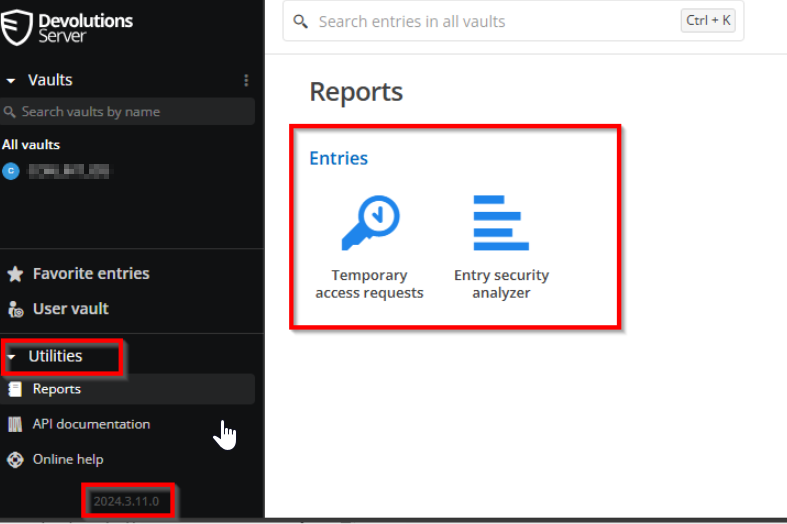
Can you add a system permission configuration entry to disable the “Utilities” menu?
We have external users and they don't need this.
Many thanks and best regards,
Christian Egli
Email alerts behavior analytics
Hello,
When the behavior analytics trigger an alert, we need a Email notification.

Can you implement these feature?
Kind regards,
Christian
Skip the Choose your authentication method page.
Dear support,
Same question, we have users who will use RDM application, but for the authentication they will have to go to the "authentication page", will offer the choice to select :
Okta Authentication
Devolution Server authentication
For basic user it's seems over complicated, as it was say earlier in this topic, end user want very simple experience.
The only authentication that will be use by user is "Okta authentication", is il possible to offer two differentes web page :
One for "basic user" with Okta authentication
One for "admin user" with choice or only Devolution server ?
Regards,
Damien R.

Hello,
Similar request as here: Different login mask for external and internal users, please vote.
Kind regards,
Christian
Different login mask for external and internal users
Thanks for the feedback.
Avoiding the click on the “Microsoft” button is not the problem. It works, with https://<DVLS_URL>/login/entra-id
What we want are two different login pages. One for external users who only use login with entra-id and one for internal users who only use domain with SSO.
The perfect way where we can separate the IIS web content from the application layer. So, only the IIS content is located in a DMZ zone server for external users.
Kind regards,
Christian
Different login mask for external and internal users
Hello,
The following use case:
Only Azure Authentication should be activated externally and redirected directly so that the login screen does not appear. The website is external and must not disclose any information about the application.
From internally, only the SSO and domain login may be visible.
Kind regards
Christian
