Option to deactivate the Utilities menu in the system permissions
Option to deactivate the Utilities menu in the system permissions
1 vote

Hello,
We have set all system permissions to "disallowed". The user (set to IT professional or business user) can always see the Entries in reports, the Api documentation and the online help menu.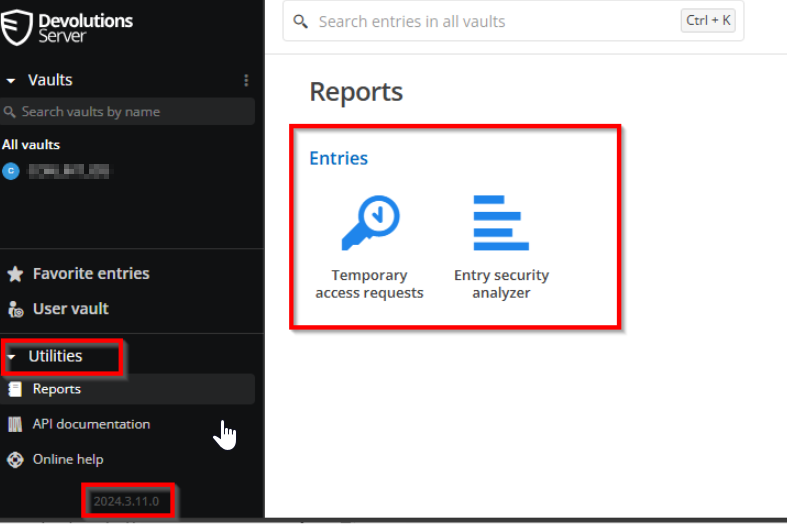
Can you add a system permission configuration entry to disable the “Utilities” menu?
We have external users and they don't need this.
Many thanks and best regards,
Christian Egli
9b7f9f3e-23eb-44ef-9d72-f19e83d91400.png
All Comments (4)
Hello,
Thank you for your request. I would be curious to know exactly your goal by hiding those menu items. Is it to simplify the UI and remove unnecessary menus? I will talk with the UI/UX team to see what could be done. If we remove the Utilities section for any Business User, would it work for you?
Best regards,
François Dubois
Hello,
Thank you for your reply. Our goal is to ensure that external users who are not part of our organization do not receive any information about our system.
This would work for us if you remove the Utilities section for each business user.
Best regards,
Christian Egli
Hello,
Thank you for your answer. I created a ticket to remove the Utilities section for business user. It should not be hard to do, we will post back here once we have an update.
Best regards,
François Dubois
Hello Christian,
The next release, 2025.1.2.0, should be available this week and will contain your suggestion. The "Utilities" section has been removed for business users.
Let us know if that works for you.
Best regards,
François Dubois