Skip the Choose your authentication method page.
0 vote

I want to skip this page: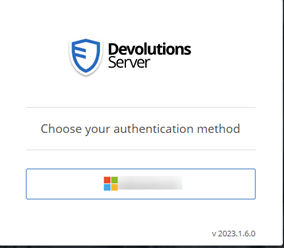
Is that possible?
I can’t set the Microsoft user to be the primary authentication method, I don’t know if this would solve it.
4fde74e5-719d-45f5-8890-c8e4e7f20e89.png
baf4eb55-18ab-4730-963b-dc126864506b.png
All Comments (51)
Hello,
At the moment, when enabled, only the Domain or Devolutions Server user authentication methods can be set as the Primary authentication method.
I will ask our engineering if they can do something about it or why it's not possible with Microsoft authentication and I will get back to you.
Thank you for your patience.
Best regards,
Érica Poirier
Hello,
Currently, when Microsoft Authentication (Azure AD) is set as the primary authentication method, there is no built-in mechanism to seamlessly switch back to alternative authentication methods without manual intervention. This is because, when it is configured as the primary authentication method, it takes precedence over other available authentication methods, and DVLS relies solely on Azure AD for user authentication. As a result, other authentication methods become inaccessible by default.
To switch back to a different authentication method, the DVLS administrators would need to modify the configuration settings and change the Primary authentication parameter to the desired method or disable it.
In fact, there is currently no elegant way to handle switching between Azure AD authentication and other methods when Azure AD is set as the primary authentication method.
If our engineering team finds a way to allow this configuration, we will let you know.
Thank you for understanding.
Best regards,
Érica Poirier
Hello,
For your information, I moved that thread in "Feature Request" section, I have created a ticket on our side and we will see what could be done to improve that. As my colleague said, if we find a way to allow this configuration, we will let you know.
Best regards,
François Dubois
When doing our configuration, I noticed the the "devolution login" is alway there and thus for "seamless usage with our users, having only one choice, or simply login with the default IDP automatically would be great.
For some deployments the bulk of users will just be using a single standard logon method (i.e. AzureAD) and having to click the Microsoft button everytime they need to authenticate is a waste of peoples time. Would it be possible to just have a seperate URL for emergency or alternate login methods if/when they are actually needed, and the respective users could bookmark it?
Hello,
Thank you for your input. We understand that it can be a waste of time to have to click on the AzureAD button. We will try to find a good solution for that problem. We will let you know as soon as we have something for that.
Best regards,
François Dubois
I would like to revive this topic as I think it's important to improve here.
This change is an opportunity to greatly improve the user experience. Users don't have patience and are even annoyed by unneccessary manual interactions. 99,9% of our logins are Entra ID based, therefore we don't need the selection page in everyday use cases. Please provide a method to skip this soon.
If you want to preserve a fallback, you may provide two different entry points. One URL to automatically redirect directly to Entra ID, and another one as fallback for local login to devolutions server.
Hi all,
When I initially created the ticket to create that feature (in 2020 I believe...), I had described such a capability. I even wanted to have a specific URL for each IdP, but sadly I was told it was impossible as Erica answered above.
We are not ignoring you request, it's just that we havent found a way yet. That being said, keep the votes coming! It helps us to focus on the bigger pain points.
Maurice
Hi Maurice,
"if IDP quantity = 1, then try autologin"
"if autologin fails, present "devolution login"
I don't think it needs to be "over engineered" beyond that.
Hi Maurice,
Another idea would be have a configurable countdown timer for a prefered authentication method. This way users could be shown the initial screen to choose an authentication method, but if they dont manually click something within a few seconds it automatically continues with the prefered method.
The absense being able to save users having to manually click an option every time they login does have a rather significant impact on user experience, as the login screen can show up frequently in various usage scenarios, for example due to temporary network interuptions, and/or tightly controlled session timeouts which may be nessary to accomodate sufficient security to PAM and/or lateral movement to resources stored in RDM.
Thanks
Joe
"The absense being able to save users having to manually click an option every time they login does have a rather significant impact on user experience"
I would actually rephrase this and say "it has a rather significant impact on user ADOPTION".
Even the best security practices are worth nothing if there is no user adoption.
Being at the doors of 2024, I have a really hard time understanding why such a "simple" thing is not already in place.
When I initially created the ticket to create that feature (in 2020 I believe...),
tbh, I am shocked this topic didn't make any progress for more than 3 years. As others have already mentioned: A smooth login experience is key for user adoption.
What can be done do raise more internal awareness?
Renewed activity on this thread made it happen, a pragmatic solution is being put in place at this moment.
Thanks to all!
Maurice
Great !What kind of ETA should we expect ?
Hello,
We are analyzing different solutions. Our plan would be to include an improvement in a minor version of 2023.3. We will post back here once we have something.
Best regards,
François Dubois
Hi Folks,
Just saw the backlog tag on this topic, and after this features seems not to appear in 2023.3.24.0 I'm afraid that this task has being postponed at least to the next backlog grooming, in worst case for several month. Any plans for getting this one done in the next release?
Really hoping and waiting for a solution in this case.
Several month would be unacceptable.
This has been pushed back for several months since 2020.
Hello,
We are working on a solution. I can't tell you exactly when it will be integrated in a release version, but you could expect a fix in a few weeks. We will post here once we have a version with that improvement.
Best regards,
François Dubois
Great to hear that! Sorry for asking, but "a pragmatic solution is being put in place at this moment." sounds really different, then tagging it to "dev backlog".
Excited to hear that there will be a fix for this soon.
Hello,
Version 2023.3.10.0 has been released earlier this week. It contains improvements for what you asked. The user experience should be improved by remembering the last login type and automatically selecting it, even for Microsoft or Okta.
Let us know if that helps.
Best regards,
François Dubois
Great news! We will check this out in our testenvironment and will post the results.
That's great that is *should* finally be incoporated in DVLS, but is the "Chome/Edge/etc.." module been updted has well ?
If the servers can do it, the "helper" apps will have to do it also.
Considering our users is using credential injection, they rarely go on the full web site of the vault.
True. The breakthrough for our users' experience comes once the browser extensions also don't ask for the identity provider anymore. Almost none of our useres go on the dvls website.
Hello,
Thank you for your feedbacks. The login improvement should work for all clients using Devolutions Server login (RDM, Workspace Browser Extension Module (DWL), Workspace powershell). Could you tell us more on what doesn't work with the other client ? Of course, you will have to specify the login type once at the first login. After, all others login should reuse the same authentication type.
@francoiscollerette: Could you tell us what you meant by "...is the "Chome/Edge/etc.." module been updted has well ?"
Best regards,
François Dubois
My bad, looks like while the browser plugin has not been updated, the modification to the server part did do the trick for it as well.
Great .
One thing stills bugs me a little.
Is there a good reason why users need to click on the "connect" button in the browser plugin ?
I would have thought that an SSO way of thinking would be to try the "current user" right out of the box.
A good example is pretty much any Office/Microsoft app/web.
It automatically tries the "current logged in user" as an SSO measure and ask to choose if multiple or fails.
Currently, the DVLS plugin seems to just stay put in a disconnected mode (gray).
Let's be honest here, a "GRAY" button is nothing a user will notice, espeacially with other gray icons just beside it.
I would rather have it "RED" so user notices that the vault is not connected instead of being frustrated it doesn't work and stops/never uses it
Again, I'm applyting a "user adoption" way of thinking.
It would also apply in the user/pass forms with the plugin icon beeing "gray"
I can see users being frustrated that their password vault is not working and just starts abandonning the use of it and reverting to bad behaviors.
While the gray/red/blue plugin is not related "per say", the fact that the plugin does not "auto authenticate" and is hard to noticed that something went wrong during the authentication of the plugin ... seems related after all.
0facb71b-dfbf-4555-b490-f5bd23f5d181.png
bebc6dc7-1792-495e-bbb2-2a647b2acae7.png
Hello,
Glad to know that it works. Now, what you would like is to login once to the server and reuse the same authentication for all other application, am I understanding correctly ? So it would mean that if you log in the web interface, you would like to be logged in to Workspace Browser Extension, am I right ? For now, all applications have their own user logged. You can user User X in the web interface and use User Y in the Workspace Browser Extension.
Best regards,
François Dubois
I think I understand why we are not understanding each other. You're looking at it as a power/admin/rdm user.
I'm bring the "regular user" point of view. (let's say an accounting clerk)
Most "regular" users, if not pretty much all, will never user the "web interface" of DVLS. At least not in a day-to-day basis.
They will only use the Chrome/Edge/other Browser plugin for automatic password vaulting.
As an admin myself, double/triple login is quite common .. I couldn't count the number of times I login with my creds in a single day but that's not the reality of a regular user.
Their reality is, they open up their browser, go to a site and .. it has to work .. if not you get a ticket or yelled at (that never happens of course) depending on the user.
That's why I'm putting so much focus on the SSO/seamless login part of the internet browser plugin.
The more users have to think about something, the more clicks they have to make, the less they will use the product or conform to your security measures.
So having to notice my plugin is GRAY, lost with other gray icons, having to click on it and then select "connect" and then selecting an authentication method (not anymore :-) ) is a road block that interferes with the users adhesion to the product.
Now a user doesn't have to select a authentication method, great !
But it still requires a manual process and thus I think the "skip" part of it is not quite complete yet.
Hello,
I'm not sure to understand your point. When you install our browser extension, you don't have other choice than opening the extension and log in. Once you are logged in, it should work day after day. Of course, if you don't connect your extension with your DVLS or Hub server, it will be grayed and you will have to configure your extension correctly first if you want to use it. Once it is configured, it should work, is it ?
Let me know if users have issues with browser extension, we will help with pleasure.
Best regards,
François Dubois
Well in a business with 450 persons, our users don't "install" the plugin themselves.
Giving users the opportunity to install "unapproved plugins" would quite a problem security wise.
It's actually pushed by GPO/Config Policies with pre-config settings.
And thus, the plugin is never "connected" unless the user manually goes in it to login.
That the reality we have bought DVLS for as an "enterprise wide password vault" and not only an IT/privilege/PAM password vault scope.
That is why I'm focusing on a "no interaction" approach, clearer things like a "RED" vs "GRAY" plugin so it instantaneously pop to your eyes.
Us, IT people, are used to those circumstances but not the regular "end users".
Hello,
I understand your point. I will talk with the product owner of Workspace Browser Extension and see what could be done to improve that.
Best regards,
François Dubois
Yes, I would really agree to the point of minimal user interaction. We also plan to rollout the plugin for the "normal" user and therefore this feature request really makes sense. Thank you for working on this topic.
Hello,
I talked with colleagues and we are not sure how we could improve the first usage flow. I understand that you push the extension and the configuration by GPO, but the login has to be done by the user himself at some point. Once the user is logged, it should always be logged and it should not be a concern for the user. Is it the experience that you have ?
If you have many disconnections, I would suggest you to have a look to the parameter "Force token public IP validation" here : 
I would suggest you to disable that parameter. If you enable it, it means that server will disconnect the user if its IP changes. So if your users move from office to home or somewhere else, they will be disconnected and they will have to login again in the extension. Disable that option and it should fix disconnection issue. Otherwise, users should always be connected and it should not be a concern once they are logged.
If needed, we could plan a support session with our support team to analyze what exactly are your issues. Let me know if it is something that could help.
Best regards,
François Dubois
05068901-1efd-450f-a684-c18b96b7b7b2.png
Good ! Thanks for the pointer on the "Force token public IP validation", that will surely help in a few cases.
As for the first part, it seems really easy.
Most site, leveraging true SSO, don't need you to enter your credentials, it simply tries the "current windows user" and if then it fails, it asks for a formal login.
SITE -> AUTH ? SURE LET'S TRY THE CURRENT USER (logged in OS user context) FIRST -> GREAT IT WORKS -> YOU GET ACCES
SITE -> AUTH ? SURE LET'S TRY THE CURRENT USER (logged in OS user context) FIRST -> NAH IT FAILED -> LET'S ASK THE USER WHO HE REALLY IS
If website can do this, I really don't see why a browser plugin couldn't.
BROWSER OPEN -> PLUGIN LOADED -> HEY I NEED TO GET AUTH AND I ALREADY HAVE THE SERVER CONFIGURATIONS -> LET'S TRY WITH THE CURRENT USER (logged in OS user context) FIRST -> GREAT IT WORKS -> YOU GET ACCES
It's always simpler said then done, but I don't think it's that far fetch neither technically complicated.
Just like every software open in the user context, with SSO, you can reuse the existing valid auth token.
Hello,
Unfortunately, I don't think it is as easy as it looks like. Do you have some examples of application doing it even for the first login ? I could have a look to their flow and see how we could improve ours. We have users supporting many authentication type so it could be hard to know what authentication should be used. We cannot really assume that Azure will work for that user. Of course, if you only have Azure as authentication method, we could assume that you want to use that authentication type, but even in those cases, we have to handle how we log out and reconnect with a different user. There is many cases to handle and I don't think there is an easy solution unfortunately. But the good news is user should not have to log in again after their first login.
Best regards,
François Dubois
Well I was thinking of Microsoft, but you do have to "select" the user but gives your the current user as a choice.
I was wrong on that BUT, it does POPUP a message to ask for it and not hide it until the user finally notices it.
a "welcome page" might be the solution .. something like :
"Hey you lucky guys ! IT has just installed this great software for you to use, please click here for your first login"
Also, I do think the my point the the plugin disconnect being "gray" is really hard for a user to notice.
That might be a quick win for all and requires little to no reconfiguration.
Also, and this might a be a support question, the "Force token public IP validation" is already ticked off.
But I'm still being kicked out of the plugin regularly.
Hello,
Unfortunately, I don't think it is as easy as it looks like. Do you have some examples of application doing it even for the first login ? I could have a look to their flow and see how we could improve ours. We have users supporting many authentication type so it could be hard to know what authentication should be used. We cannot really assume that Azure will work for that user. Of course, if you only have Azure as authentication method, we could assume that you want to use that authentication type, but even in those cases, we have to handle how we log out and reconnect with a different user. There is many cases to handle and I don't think there is an easy solution unfortunately. But the good news is user should not have to log in again after their first login.
Best regards,
Hello,
Also, I do think the my point the the plugin disconnect being "gray" is really hard for a user to notice. That might be a quick win for all and requires little to no reconfiguration.
We looked many applications and all works that way: Colored when they are connected and gray when they are not. But I will take time to talk with our UI designer what could be done to help user to notice a disconnection.
Also, and this might a be a support question, the "Force token public IP validation" is already ticked off. But I'm still being kicked out of the plugin regularly.
Could you give us more information ? How often are you kicked out ? Does it happen in specific condition ? We could need your server log to investigate that kind of issue. I would suggest to open a ticket by sending an email to our support: service@devolutions.net
Best regards,
François Dubois
I'll open a ticket for the disconnect, but since Chrome makes a lot of changes lately, might be just that.
While I understand the many plugin do work with the "grayish" theme when not connected or active, I really think that for a "security software" not knowing your are not connected is a problem and not just a "status" which is why having it in an "eye popping" color would make more sense.
While I can understand that not everyone shared my concern on that, maybe just being able to "configure" de color when disconnected might be a better thing to consider.
Hello,
I talked with our UI designers, they are working on DWL UI improvement, they will look what could be done to improve that.
Best regards,
François Dubois
Hi,
is there any update on this case?
As workaround I configured only the Entra ID Authentication, but we want to have the "Backdoor" with the Devolutions Server Authentication. Just for the case that there is an outage on side of Microsoft.
Short idea: A link only for the Devolution Server Authentication:
e.G.: https://passwort.domain.local/dvls/login-local
Hello,
We worked a lot on that and improved the login flow. The first time that you are opening the login page, you will have to select your authentication mode, but after that, you should be forwarded automatically to your authentication mode. Is that work for you ?
Best regards,
François Dubois
Hi Francois,
unfortunately, that's not a good user experience: I don't want my users to select anything. I only want Entra ID SSO without user interaction to achieve the best usability and user friendliness.
User don't even know what's "Entra ID" or "Devolution Server", I see no reason for them to haggle with a selection menu which causes confusion. Even when all other authentication options are disabled in the server configuration users still have to select Entra ID once, that's not a good user experience.
Best regards!
Hello,
Ok, now I understand your point, thank you for your answer. Sorry, that thread was about many things, you would like to set EntraID as the primary authentication method. We didn't improve that, but we will see what could be done and keep you posted once we have something.
Best regards,
François Dubois
Great, really appreciated having you as coordinator with the devs :)
Hello,
As workaround for now, I wanted to let you know that it is possible to reach directly https://<DVLS_URL>/login/entra-id to access directly the Microsoft authentication. It is not exactly what you would like probably, but you could send that link to your users and they would be redirected to the right authentication method. Let me know if that help.
Best regards,
François Dubois
Dear support,
Same question, we have users who will use RDM application, but for the authentication they will have to go to the "authentication page", will offer the choice to select :
- Okta Authentication
- Devolution Server authentication
For basic user it's seems over complicated, as it was say earlier in this topic, end user want very simple experience.
The only authentication that will be use by user is "Okta authentication", is il possible to offer two differentes web page :
- One for "basic user" with Okta authentication
- One for "admin user" with choice or only Devolution server ?
Regards,
Damien R.
Capture d'écran 2025-02-13 203204.png
Dear support,
Same question, we have users who will use RDM application, but for the authentication they will have to go to the "authentication page", will offer the choice to select :
- Okta Authentication
- Devolution Server authentication
For basic user it's seems over complicated, as it was say earlier in this topic, end user want very simple experience.
The only authentication that will be use by user is "Okta authentication", is il possible to offer two differentes web page :
- One for "basic user" with Okta authentication
- One for "admin user" with choice or only Devolution server ?
Regards,
Damien R.
Hello,
Similar request as here: Different login mask for external and internal users, please vote.
Kind regards,
Christian
Hello Damien,
One for "basic user" with Okta authentication
One for "admin user" with choice or only Devolution server ?
How do you see that ? Would you like a different URL for "basic user" login and another one for "admin user" ?
Best regards,
François Dubois
Hello Damien,
One for "basic user" with Okta authentication
One for "admin user" with choice or only Devolution server ?
How do you see that ? Would you like a different URL for "basic user" login and another one for "admin user" ?
Best regards,
Hello François,
I would be great to have :
https://dvls-server.local/user/
https://dvls-server.local/admin/
/user => with end user authentication method (1 method only by default)
/admin => for administrator purpose, with all or choosen authentication method.
For exemple, our users ask to disable "Devolution Server local authentication", but I refuse because, if the okta authentication doesn't work, i won't be able to login into DVLS web server with local username.
I think it to risky to disable local authentication for administrator user i case of emergency.
The password manager contain all infrastructure password, and need to be accessible even if the active directory, or okta is down.
There is some ITSM that offer 2 differents URL 1 for end user, and 1 for IT support team.
Regards,
Damien R.
Dear support,
Same question, we have users who will use RDM application, but for the authentication they will have to go to the "authentication page", will offer the choice to select :
- Okta Authentication
- Devolution Server authentication
For basic user it's seems over complicated, as it was say earlier in this topic, end user want very simple experience.
The only authentication that will be use by user is "Okta authentication", is il possible to offer two differentes web page :
- One for "basic user" with Okta authentication
- One for "admin user" with choice or only Devolution server ?
Regards,
Damien R.
Hello,
Similar request as here: Different login mask for external and internal users, please vote.
Kind regards,
Christian
Hello,
I vote on this topic :)
Thanks
Hello Damien,
Thank you for your answer. We have an emergency login available to help when Azure/Okta/AD is down. Here is a documentation about that : https://docs.devolutions.net/server/kb/how-to-articles/enable-emergency-login-code-authentication/ Let me know if it could help.
Otherwise, I keep your request in mind, I will follow the topic to see if there's any additional interest or input from other users.
Best regards,
François Dubois
Hello Damien,
In addition to the Emergency login feature mentioned by my colleague François, if you want to keep an administrator account as a DVLS user, you can use the DVLS Console CLI to disable the DVLS user authentication in the web UI and enable it on demand for emergency purposes. Here is the online documentation about it.
https://docs.devolutions.net/server/kb/knowledge-base/console-command-line-interface/#emergency-procedure
Best regards,
Érica Poirier