
Jeroen
RDM client always slow to start
I have found this article : Startup performance - Devolutions Documentation
Is it necessary to set the file RemoteDesktopManager.cfg to read-only after I have made these changes? If I do not do this, it seems that RDM reverts these settings after the first startup.
RDM client always slow to start
We have been using RDM within our team for several years now. From the very beginning up to the most recent RDM client version, I have never experienced RDM starting quickly; it has always been slow. I personally have come to see this as almost normal by now, but I do notice that other colleagues within the team drop off because of this.
I am curious whether other RDM users are experiencing the same behavior.
RDM - VMware Dashboard and vCenter website
I think I may have just figured this out for the first issue Username Format under advanced settings:
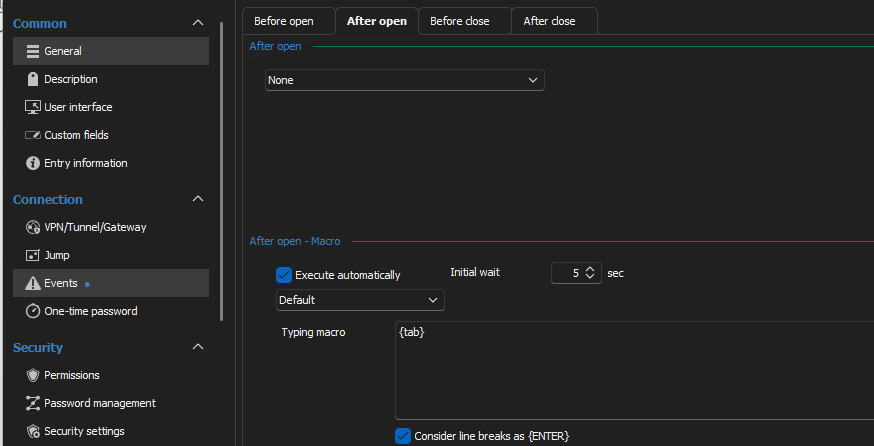
For second issue it appear that the vCenter site detects typing so I added 'After Open' typing macro of just {tab} and that is enough input to "activate" the login button.
Thanks for sharing this is working great :)
RDM - VMware Dashboard and vCenter website
Entra ID authentication: Close browser tab/window after login
Hi François,
Thanks for the update and hopefully you can come up with something nice for this.
Entra ID authentication: Close browser tab/window after login
Yes, this would be great if this could be arranged differently. As a user you now have to close this every time. It would be even better not to have a browser started at all and to have it briefly visible as a window from RDM itself.
JIT Domain admin rights and login to Active Directory Controller
Hi Marc,
To return to our problem for a moment. Our laptops are known only in Microsoft Intune/Azure AD. All of our laptops have a VPN connection to our internal network since not all of our application are running in Azure. Our DVLS server and the database in question are AD joined. What I have noticed is that as soon as I set up a connection from my laptop to an internal server and use my PAM account for this and then specify that my PAM account member should be provided with an AD security group that I see varying results.
Sometimes the login goes well and DVLS/PAM manages to create the AD group and add my account to it. Then I log out of the server and try again after 5 minutes I get the error message that I do not have RDP rights. If I then check this in the AD I see indeed that my account is not added to the AD group. Sometimes it helps to perform a refresh from RDM. Our AD is also set up with a toplevel domain (root) and child with multiple DCs here.
Translated with DeepL.com (free version)
JIT Domain admin rights and login to Active Directory Controller
We have the same isse with our hybrid Azure joined laptop device. In many cases when I set up a connection to a server from RDM and use my PAM account, I see this message. Sometimes it helps to close RDM or perform a refresh.
Obviously this is not desirable and the problem still seems to be present even after replacing the MsRDPEx file
