RDM - VMware Dashboard and vCenter website

I am having difficulties with the vCenter Sessions and RDM passing the correctly formatted credentials.
When I set the VMware dashboard to Inherited and then use a Linked User Vault credential via the User Specific Settings --> Override Credential I get an auth failure. I have tried a username\Password type credential with user/domain/password filled out. I have tried putting user@domain.com in the user field leaving the domain field blank.
If I set the Credentials on the vmware dashboard to None. The session prompts on connect and I input the credentials as:
username@domain.com and the password. The dashboard loads without error.
I have tried to not use the dashboard, but instead to use the website session type. RDM fills in the correct username and pw but the login button never 'activates'
Any advice would be appreciated.
All Comments (4)
I think I may have just figured this out for the first issue Username Format under advanced settings:
https://forum.devolutions.net/topics/36043/formatting-username-to-include-domain-when-using-web-browser-web-authe
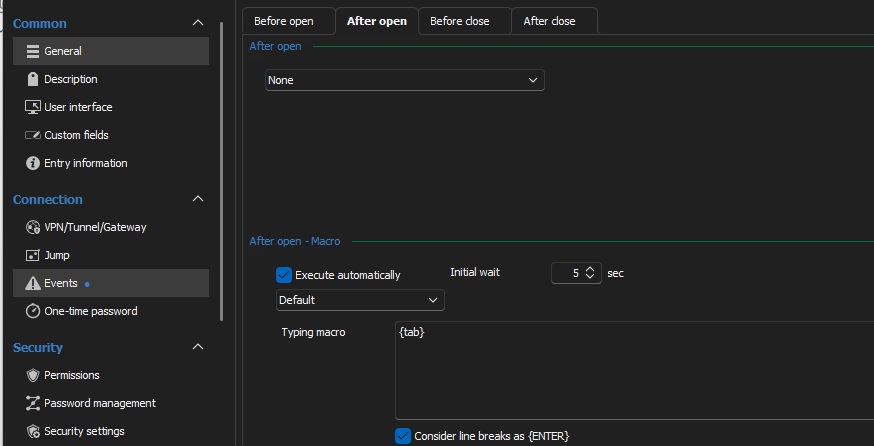
For second issue it appear that the vCenter site detects typing so I added 'After Open' typing macro of just {tab} and that is enough input to "activate" the login button.
Hello,
Thank you for reaching out to us regarding this,
I see. I'm glad to hear you were able to resolve your issue! Feel free to let us know if you have further questions regarding this,
Best regards,
Samuel Dery
28afdb66-9e20-4b27-9b6b-35d73de79253.png
I think I may have just figured this out for the first issue Username Format under advanced settings:
https://forum.devolutions.net/topics/36043/formatting-username-to-include-domain-when-using-web-browser-web-authe
For second issue it appear that the vCenter site detects typing so I added 'After Open' typing macro of just {tab} and that is enough input to "activate" the login button.
Thanks for sharing this is working great :)