JIT Domain admin rights and login to Active Directory Controller
0 vote

We have implemented JIT to grant domain admin rights to a select group of our administrators for their privileged account . This right is needed to make a RDP session to a domain controller. At the moment you complete the JIT process to get domain admin rights the privileged account in Devolutions don't have the group claim and you need to restart RDM to get this claim.
In my opinion this is not how this should work.
All Comments (27)
Hello,
Once the JIT process is completed, refreshing the RDM cache with CTRL+F5 should work.
Could you try it and let us know how it goes?
Best regards,
Érica Poirier
I think this needs to be done automatically instead of manual. Is there a way to build this into the software?
Hello,
You can set the Auto refresh option in the Advanced tab of the DVLS data source in RDM. However, we do not recommend setting this parameter with a too-short value because if the DVLS contains too much data, RDM will constantly reload it and freeze.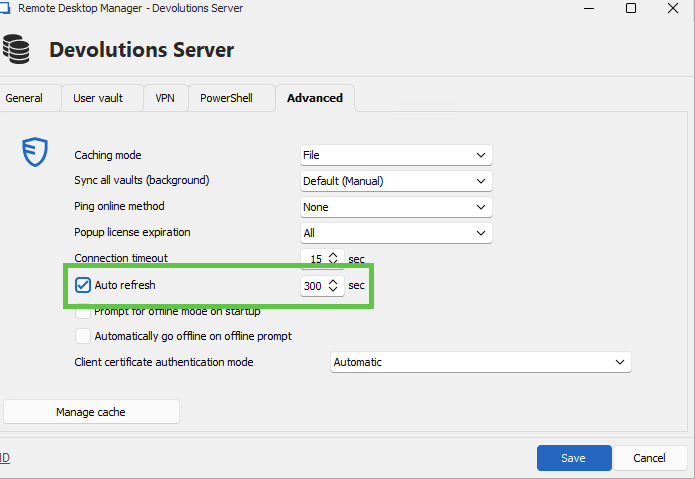
I understand that this is a workaround as well as the manual cache refresh.
Let me check with the developer team if there is another method.
Best regards,
Érica Poirier
4642c4f5-c048-4098-a279-07dd6732736c.png
This is not a good option. Right after the JIT request the administrator is logging into the domain controller. This is part of the workflow where you request additional rights to do the action after this right.
Why can't RDM do an automatic refresh after the JIT request?
Hello,
Thank you for your feedback.
At the moment, RDM needs to reload the entries to get the latest permissions set on DVLS, from a JIT process or an update initiated by an administrator. As this process is not automated in RDM, we need to do it manually.
I have moved this thread to the Feature Request section to improve this process.
Let us know if you have any more questions.
Best regards,
Érica Poirier
Hello,
Before going further, I would like to know exactly what your case is and how you are configured. After being granted access to a group, do you receive more permissions on other entries? Is this how you are configured? I agree with you, the system should be able to detect a change in security and refresh that security automatically. Before proceeding, I just want to be sure that you are configured in such a way that when you elevate your account with a specific group, it grants you more permissions on different entries, and these are the entries that you want to access immediately after the check-out.
In your first message, you wrote
This right is needed to make a RDP session to a domain controller.
What right are you talking about here ? The admin right needed in the RDP session or the admin right that will give you access to another entry in the vault to be able to open the session ?
Thanks in advance for helping me understand the exact request.
Best regards,
François Dubois
The default setting on an Active Directory controller is that a non admin user is unable to RDP to that server. When you need to RDP to an Active Directory controller you have to give yourself more rights in the Active Directory. In this case we use JIT to add the user to the domain admins group in Active Directory: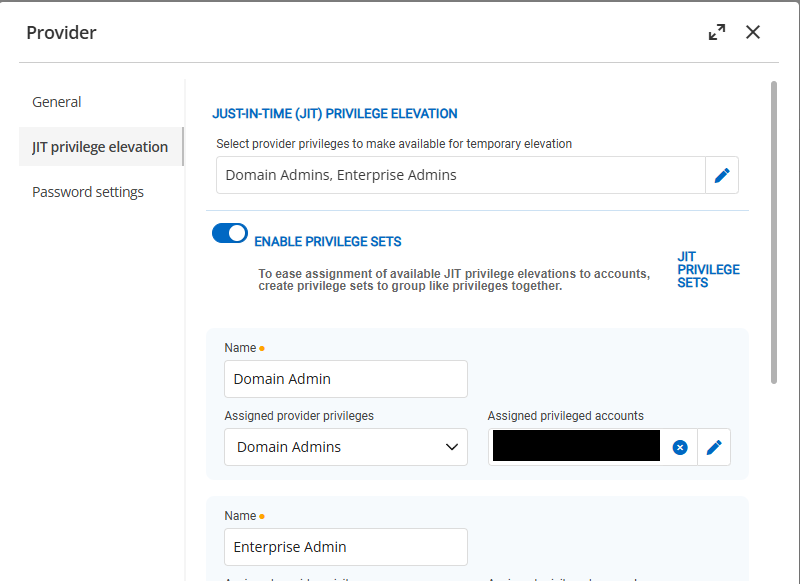
There are no other rights involved. Outside RDM you can immediately login into the Active Directory controller after the JIT flow, but inside RDM this is not working because the Active Directory group token is not refreshed.
1012aba3-076d-4f4b-a3ec-538c0be4f3b3.png
Hi,
I believe you may be encountering an issue we've observed with other customers, and for which we have yet to reproduce internally. If I'm right, then it would only affect the RDP ActiveX in RDM (embedded, default), but not FreeRDP (embedded) or mstsc in external mode. In your RDP connection entry, go the Advanced tab, then change "RDP Version" to "RDP (FreeRDP latest)" and try again: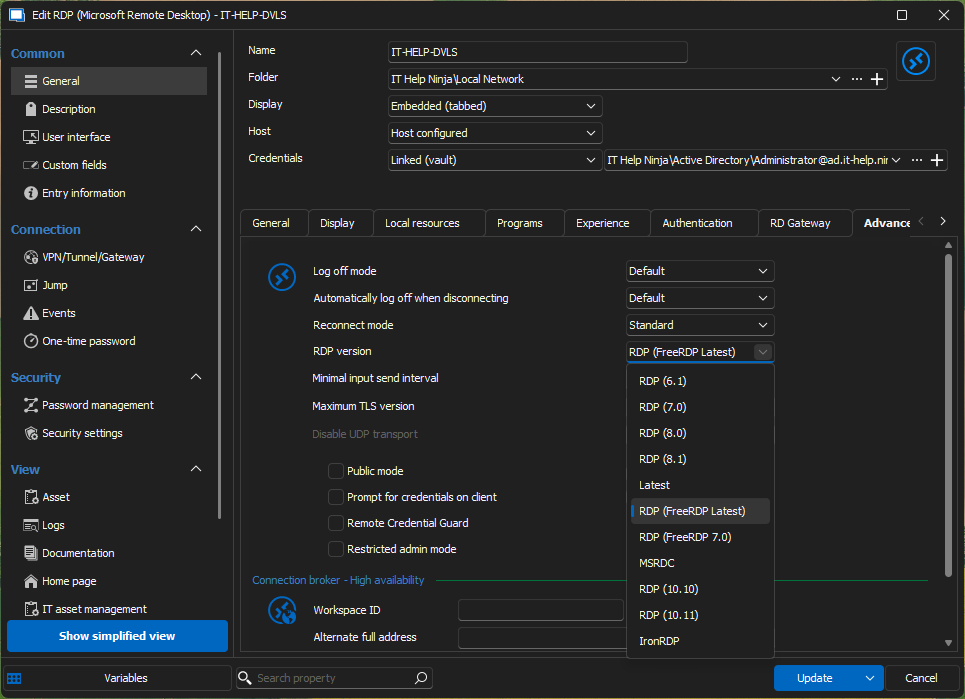
Alternatively, set "RDP Version" to "latest" and set "Display" to "External" to launch mstsc externally: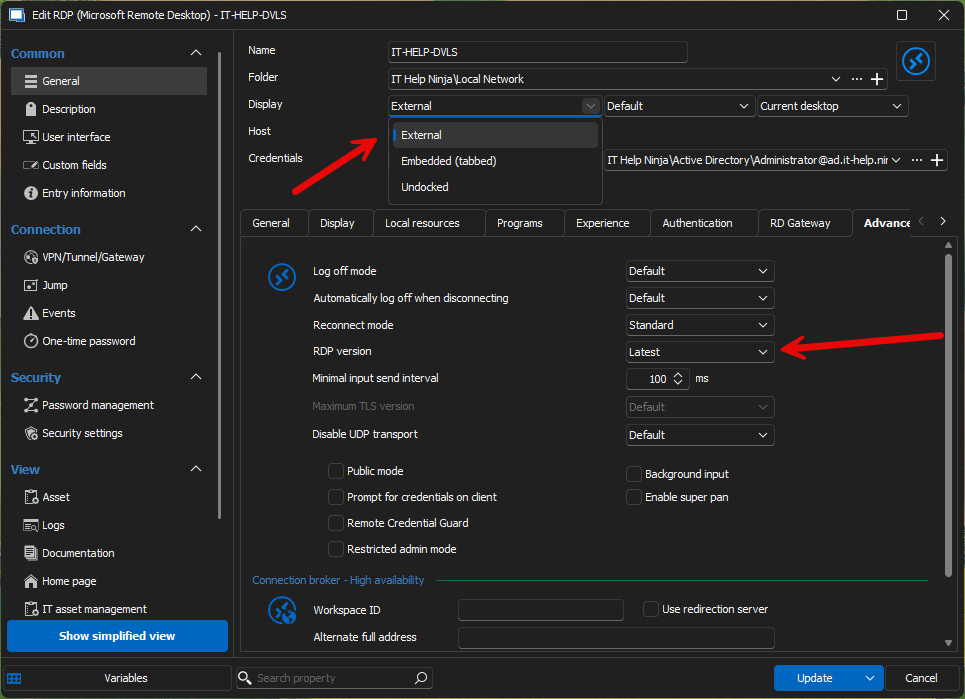
mstsc being a separate process, it should work. FreeRDP worked for other customers, most likely because it is not using the CredSSP module from Windows, but rather implements it using the Negotiate SSPI module in Windows (Kerberos or NTLM authentication).
Why does it matter? There appears to be an undocumented caching behavior in the CredSSP module from Windows, which the RDP ActiveX from Microsoft uses. While the RDP ActiveX is the same one used by mstsc.exe, RDM launches multiple sessions within the same process. It looks like the Windows CredSSP module from Windows has an internal cache associated with the calling process, and where new processes get a new internal cache entry.
Whatever it is, Microsoft hasn't documented it as far as I know, all I could is confirmation from renowned security researcher James Forshaw that he observed similar undocumented behavior with CredSSP years ago, but never went to the bottom of it. I agree it would be better if we could work around this undesirable behavior from the CredSSP Windows component, but so far I have been unable to find a solution, and finding one will definitely be tricky, if possible.
The best you could do is help me better understand the full picture on how users and groups are set up in your environment. From what I understand, you are adding your user to Domain Admins, Enterprise Admins just-in-time, which is sufficient to allow the user to RDP into a domain controller. What error are you getting for the RDP connection? Is it the one for a user not a member of the local Remote Desktop Users group? Can you elaborate on how the Remote Desktop Users group is configured on the destination domain controller? Do you have more than one domain controller in your environment?
Last but not least, it's just a hunch, but I wonder if this could be somehow related to an obscure feature called Kerberos Negative Caching, which caches Kerberos failures for 10 minutes by default. It is mentioned at the end of this blog for a different issue: https://inthecloud247.com/how-i-solved-a-strange-kerberos-issue/
Can you try setting the FarKdcTimeout registry key to zero on your client + rebooting to see if it changes anything? This would disable Kerberos Negative Caching, and avoid its potential interference.
Best regards,
Marc-André Moreau
28f50017-9b4c-4af7-97a9-28a5a41ce49b.png
d31e40a0-dbae-4888-9a6f-f8c7d1ba57e0.png
Hi,
I did some further investigation and found a possible reason why CredSSP would behave this way, but I have no way to test if it actually changes something. We use MsRdpEx to extend the features of the Microsoft RDP client with API hooking, and I made a quick branch where I force an expiration parameter to null, hoping that it would disable the caching behavior. I have analyzed the original code and the code from FreeRDP, this is the main difference between the two when they call InitializeSecurityContext from Windows SSPI.
You can grab a copy of MsRdpEx.dll from this custom build on GitHub: 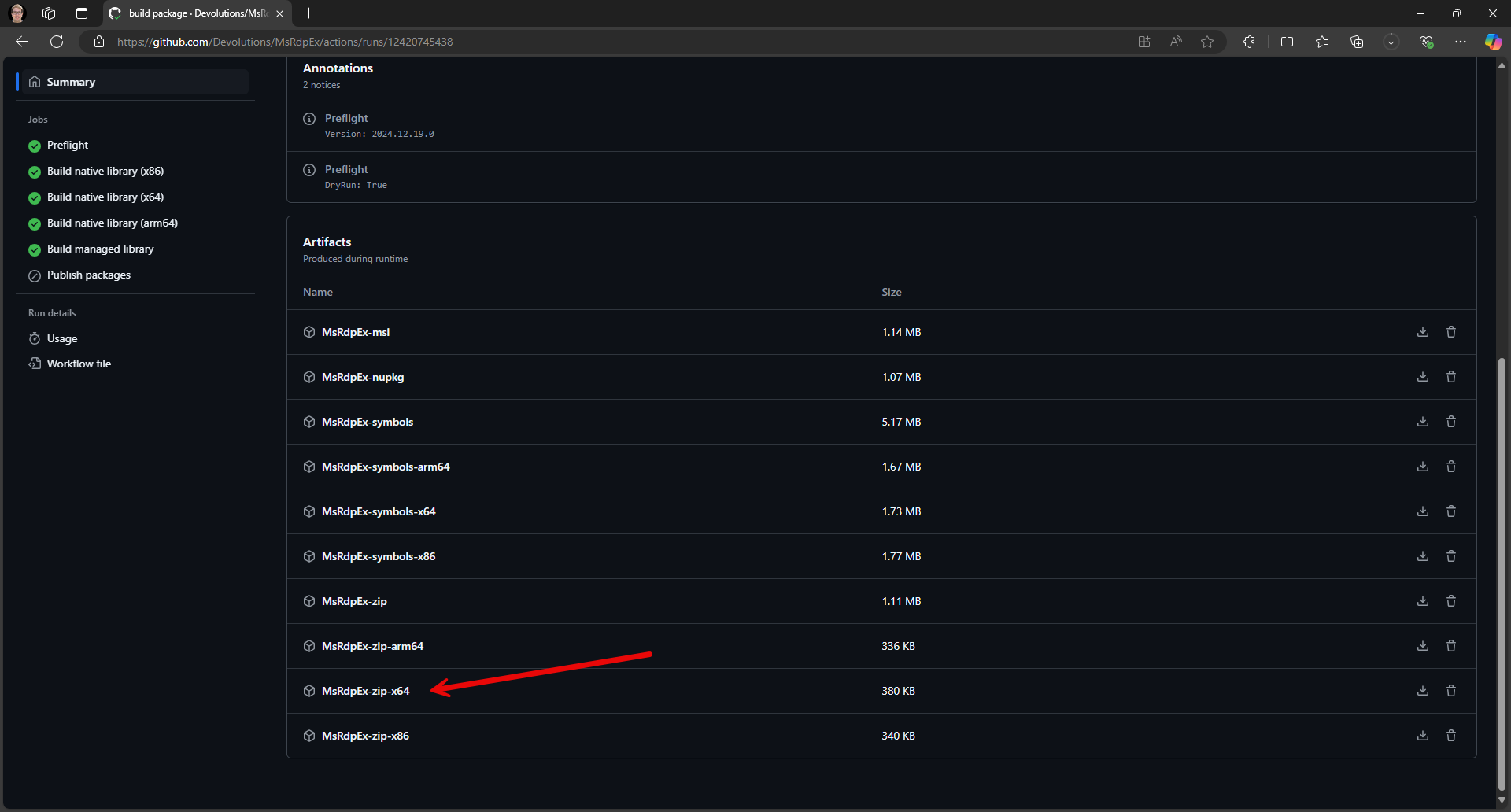
Close RDM, then go to "C:\Program Files\Devolutions\Remote Desktop Manager\runtimes\win-x64\native" in the file explorer. Rename MsRdpEx.dll to MsRdpEx.dll.bak, then copy the custom build of MsRdpEx.dll in its place. Launch RDM, and see if the issue goes away. I'm crossing fingers that this could force the desired uncached behavior. If successful, I'll work on getting this workaround included in future builds of RDM.
Best regards,
Marc-André Moreau
c27941fb-cde1-445e-a104-8fa68e2064c3.png
I just did a test with the new version of MsRdpEx-zip-x64 and this solved the problem! Can this be included in a new version of RDM?
Hi,
Thanks for trying the test build of MsRdpEx! I have cleaned it up and made a new release of MsRdpEx with the workaround for the CredSSP per-process caching issue, and I have updated Remote Desktop Manager to use it. The next build of RDM (2024.3.23) will have the updated version of MsRdpEx.
While this will solve the issue for you, we still have been unable to reproduce the issue on our side, and I suspect it could be related to domain controller replication. Does your Active Directory environment have more than one domain controllers? Also, is the machine running RDM joined to the same domain as the domain controller you are connecting to?
Best regards,
Marc-André Moreau
We have the same isse with our hybrid Azure joined laptop device. In many cases when I set up a connection to a server from RDM and use my PAM account, I see this message. Sometimes it helps to close RDM or perform a refresh.
Obviously this is not desirable and the problem still seems to be present even after replacing the MsRDPEx file
hX2Gn6nfIT.png
Hi,
This could be a different problem. You mentioned hybrid-joined devices, is the account you are using also a hybrid account? If so, how are you connecting with this hybrid account, is it using PKU2U or Entra ID SSO? We only have the (limited) ability to inject credentials for PKU2U for Entra ID accounts, and for Entra ID SSO, we can only enable the feature, with zero control over how it is used. The alternative is often to disable RDP NLA to make it work for Entra ID accounts when PKU2U or Entra ID SSO are not suitable. From your screenshot, it looks like you are getting the error messages over a Winlogon background, which hints that it may not be using regular RDP NLA with CredSSP and Kerberos.
If you are connecting from a hybrid-joined device and using a regular Active Directory account not tied to Entra ID for the RDP connection, can you try using FreeRDP or mstsc in external mode as instructed earlier in this thread and see if it works around the problem? This would help me tell if it's likely the same problem, or a different problem entirely.
Best regards,
Marc-André Moreau
Hi,
Thanks for trying the test build of MsRdpEx! I have cleaned it up and made a new release of MsRdpEx with the workaround for the CredSSP per-process caching issue, and I have updated Remote Desktop Manager to use it. The next build of RDM (2024.3.23) will have the updated version of MsRdpEx.
While this will solve the issue for you, we still have been unable to reproduce the issue on our side, and I suspect it could be related to domain controller replication. Does your Active Directory environment have more than one domain controllers? Also, is the machine running RDM joined to the same domain as the domain controller you are connecting to?
Best regards,
We have multiple domain controllers and two domains (root and child). It's not related to replication. When we make ourself domain admin with JIT we can immediately use RDP to any domain controller outside RDM.
Hi,
Thanks for confirming - while it may not be directly related to replication, you are not the first user encountering this issue that has reported having more than one domain controllers. We've been unable to reproduce with a single domain controller, leading me to believe we'd need to try and reproduce with larger environments that have multiple domain controllers.
Best regards,
Marc-André Moreau
Hi Marc,
To return to our problem for a moment. Our laptops are known only in Microsoft Intune/Azure AD. All of our laptops have a VPN connection to our internal network since not all of our application are running in Azure. Our DVLS server and the database in question are AD joined. What I have noticed is that as soon as I set up a connection from my laptop to an internal server and use my PAM account for this and then specify that my PAM account member should be provided with an AD security group that I see varying results.
Sometimes the login goes well and DVLS/PAM manages to create the AD group and add my account to it. Then I log out of the server and try again after 5 minutes I get the error message that I do not have RDP rights. If I then check this in the AD I see indeed that my account is not added to the AD group. Sometimes it helps to perform a refresh from RDM. Our AD is also set up with a toplevel domain (root) and child with multiple DCs here.
Translated with DeepL.com (free version)
Hi,
Ok, so to summarize: your laptops are Entra ID joined, connected to a VPN to your internal network, where DVLS is running on a machine joined to Active Directory. I assume the PAM account is from Active Directory, unrelated to Entra ID. When you use PAM just-in-time elevation through AD group membership in DVLS, you have observed varying results.
This thread is about an issue affecting RDM embedded RDP sessions with PAM just-in-time elevation through AD group membership, and from what you describe, it looks like the issue could be with DVLS. You said sometimes it works right away, but then you would logout of the server and try again 5 minutes later only to get the permission denied error from RDP. Have you tried launching the RDP connection in external mode when that happens (Display: External, as instructed earlier)? If the issue also affects the RDP external mode, then it would most certainly be a different issue.
It's a long shot, but could you try disabling Kerberos negative caching on both the machine where DVLS is running, and the machine where RDM is running? You can always delete the registry keys later, but by default, Windows returns cached Kerberos failures for 10 minutes instead of trying again, and I suspect it could be the root cause behind many of these weird intermittent issues, especially with multiple domain controllers, and per-process Kerberos caching, which is why not everything would be equally affected:
New-ItemProperty -Path "HKLM:\System\CurrentControlSet\Control\Lsa\Kerberos\Parameters" -Name "FarKdcTimeout" -Value 0 -Force
New-ItemProperty -Path "HKLM:\System\CurrentControlSet\Control\Lsa\Kerberos\Parameters" -Name "NearKdcTimeout" -Value 0 -Force
I wouldn't be surprised if Kerberos negative caching could also affect DVLS PAM, not just RDM. In any case, I would like to rule it out from possible causes.
Best regards,
Marc-André Moreau
Hi Marc-André,
Can you confirm the new MsRdpE version still exists in RDM version 2025.x? We face the same groupclaim issues we had before.
Hi,
The latest version of MsRdpEx still exists in 2025.x, but we now believe the root cause of the problem to be different, through investigation with a few other customers. It looks like the problem may be with a slight delay in Active Directory propagation of the change. It would be a timing issue where it sometimes connects too fast, and the RDP server didn't yet have the updated group membership information. We've got a ticket internally to add a configurable delay in DVLS as a workaround for this.
Best regards,
Marc-André Moreau
Hi,
We may have a quick workaround using a sleep in the "Before open" event on the RDP connection entry: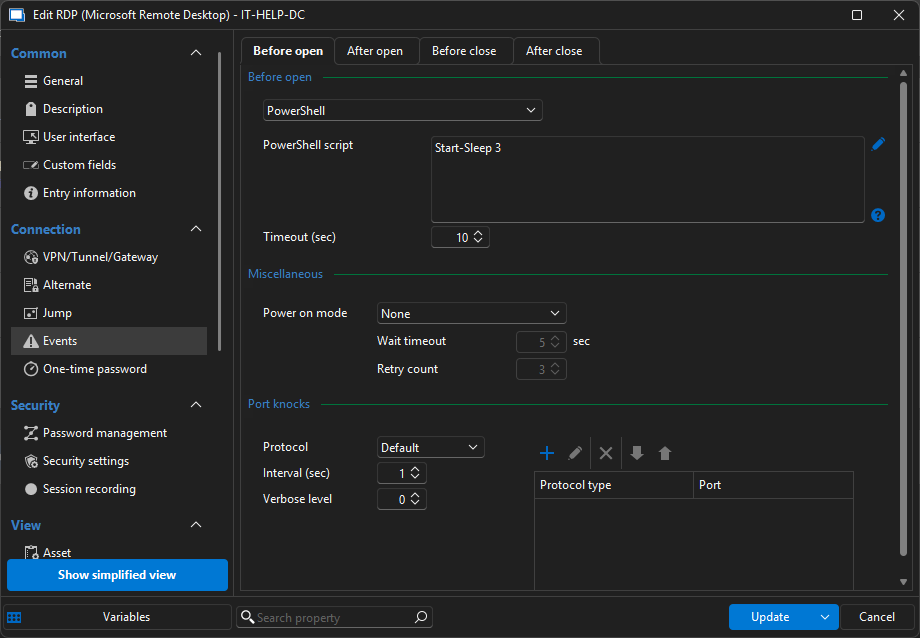
This should normally run in between the PAM checkout and the RDP connection opening. Just experiment with a few sleep statements, I believe this may introduce the required delay for the propagation in Active Directory to become effective.
Best regards,
Marc-André Moreau
b2f01a6d-1d9e-49c2-8158-6b8ecfc0f588.png
I have tested the possible work-around above, but unfortunately this did not work for me. It opened a blank windows PowerShell screen, while continuing the connection as usual. I am using Devolutions Gateway as well, so maybe that is why it still continues the connection?
My work around is having users check out the JIT credential from the PAM vault before opening the RDP connection, which gives it enough time to create the access, but it creates an extra step that is usually forgotten about.
Hello,
I'm not sure why it doesn't work, but we added a new setting in version 2025.2 specifically for that situation. It is now possible to configure a replication latency that allows you to wait a few seconds before opening the connection. The setting is configurable directly on the provider: 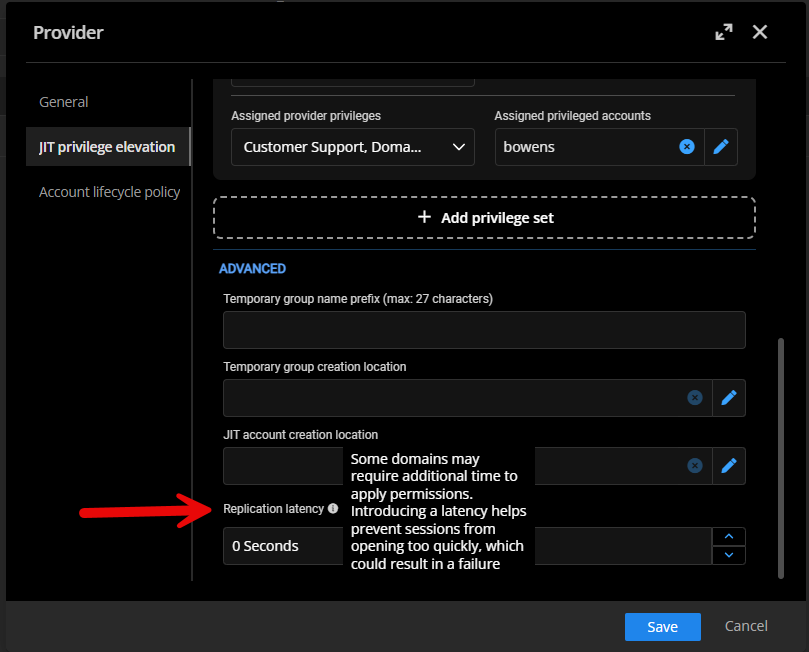
If you set it to a few seconds (2-3 seconds), RDM will wait that duration between the checkout/JIT elevation and the session start. It should be enough to avoid the issue.
Let us know if that helps.
Best regards,
François Dubois
d4c11ce9-9ae7-4d60-ac29-c038d96b2b6f.png
Hi , I have reported the same issue a few years ago which resulted in nothing , the possible CredSSP issu was not known at that time I suppose and as soon as I restarted RDM (to get full functionality again) the issue was gone and it was not on a frequent base to happen again. So I dropped it .
It didn't happen a lot since so I ignored but the last week I have had it a few times. We recently upgraded to 2026.2.7.0 (we constantly follow updates) and the update before . It might be related to 2026.2.x or not at all , who knows .
Case :
AD joined PC , 2 domain controllers , no RDP rights .
When someone needs to RDP I make him member of a dedicated AD group and he has to perform klist purges locally to get new Kerberos tickets containing the new group membership . Then he can RDP .
At the moment for my own setup I have two servers which I should be able to RDP to , membership has been changed 2 days ago . Manually do mstsc works fine.
RDP using RDM doesn't, the security logs show event 4825 (no RDP rights) , before that event 4627 Group Membership enumeration showing the old memberships , so its normal that the server rejects the RDP .
It is 100% clear that RDM sends some cached version of the (I suppose?) Kerberos ticket ? A network trace shows that my client sends a KerberosV5 TGS request for TERMSRV/pwvprint06 , and he receives a TGS Response on that.
I just tried switching to the FreeRDP as mentioned above and that works also . It's a workaround maybe but I'd rather see it working with the default RDP . As an extra test I reverted to RDP (latest) and I couldn't connnect again .
Should I register a case for this or is there a known definitive solution to it (preferable in the RDM software , no manual regkeys/... on the 10 clients using RDM) .
Kind regards, Carlo.
Hi,
A few questions before reporting a bug:
Are you using JIT privilege elevation?
When you say that mstsc works correctly, do you mean after performing JIT privilege elevation with RDM, and then running mstsc?
Have you try to configured a replication latency in the JIT privilege elevation provider settings? If not, I suggest you try a 5-second delay, just for testing. If it's works, you can try lower value.
Best regards
Simon Leroux
Hi,
A few questions before reporting a bug:
Are you using JIT privilege elevation?
When you say that mstsc works correctly, do you mean after performing JIT privilege elevation with RDM, and then running mstsc?
Have you try to configured a replication latency in the JIT privilege elevation provider settings? If not, I suggest you try a 5-second delay, just for testing. If it's works, you can try lower value.
Best regards
Simon Leroux
@Simon Leroux
Hi Simon,
we are not using JIT escalation yet , we purchased the license recently as we do it manual at this moment (just adding accounts manually in the correct AD group which has RDP rights on the server).
If I am correct when we start to use JIT our user account will be automatically added to a newly created group which will be made member of a dedicated AD group with RDP rights . So , in our manual procedure we have one hop less .
Next are the steps we take :
1) add the user account to the dedicated group
2) klist purge on the client to retrieve new Kerberos ticket
3) connect to server using RDM : fails
4) connect to server using Windows mstsc.exe : succes
I checked replication between our DC's , this is 100% Ok.
Even now (3 days after giving myself RDP rights to a server) I still cannot RDP via RDM . I can when I switch to FreeRDP or use mstsc .
Kind regards,
Carlo.
Extra note on the previous . I know from the past that when I restart RDM everything works fine again for a while , mostly for weeks . The before mentioned manual procedure does it , I don't know which exact circumstances trigger the 'seems like wrong caching' problem .
Hi,
If you manually change the group membership and then even after replication finishes between the DC, only FreeRDP and mstsc work until you restart the RDM process, then I'm afraid there's something out of our control in the Windows CredSSP implementation that doesn't get refreshed. FreeRDP doesn't use the system CredSSP implementation and is therefore not affected in the same way as the RDP ActiveX.
I'm not sure we can really work around this one, even with the MsRdpEx API hooking. I would suggest either restarting RDM (not ideal), or using FreeRDP or IronRDP for the embedded mode.
Best regards,
Marc-André Moreau