RDM client always slow to start

We have been using RDM within our team for several years now. From the very beginning up to the most recent RDM client version, I have never experienced RDM starting quickly; it has always been slow. I personally have come to see this as almost normal by now, but I do notice that other colleagues within the team drop off because of this.
I am curious whether other RDM users are experiencing the same behavior.
All Comments (2)
I have found this article : Startup performance - Devolutions Documentation
Is it necessary to set the file RemoteDesktopManager.cfg to read-only after I have made these changes? If I do not do this, it seems that RDM reverts these settings after the first startup.
Hello
You need to have RDM closed when you edit the .cfg file, or it will overwrite your changes next time it saves the file. It will possibly also overwrite your changes if you make an error (syntax or typo) in the file.
It's a good article, but my recommendation would be to jump straight to step 5 - install a ready to run build. The article is a bit out of date because we now have proper installers for these builds. If you're using an installed copy of RDM, you need to manually "switch" the ready to run. Once you've made the switch, the updater will keep you on that track. To switch:
- Uninstall RDM (your settings and so on will be preserved)
- Download an architecture-specific installer (probably x64). This the default option ("Unified Download") or you can manually select from the list
- Install the new version
- Observe that in Help > About, the version is now marked "PreJIT"
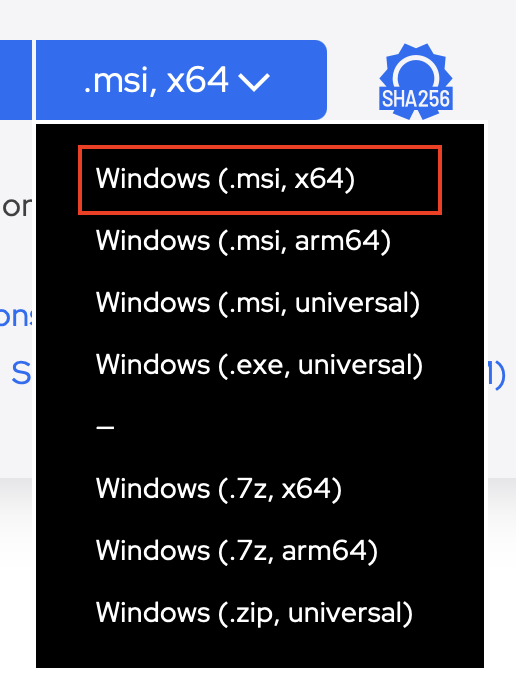
A lot of slow startup time in RDM can be attributed to the way .NET applications work: code is compiled by us into an intermediate language that can then be "just in time" compiled to run on whatever CPU you have. This JIT process can be quite slow and is largely done at startup time. The ready to run builds have the JIT step for specific architectures already "done", so it doesn't need to happen at application launch.
If startup performance is still not satisfactory after making that change, you should post back and let us know what data source you are using. The next major slowdown at startup can be loading vaults and other data from the data source.
Please let me know if something isn't clear
Kind regards,
Richard Markievicz
Screenshot 2025-12-19 at 09.17.19.png