
Brandur
Export Devolutions Cloud vault/entries for other password managers
Hello Brandur,
Thank you for your response!
If possible, I would be interested in seeing the behaviour directly through a session. I opened a ticket and sent you all the information to schedule a session at your convenience.
Please let me know if you haven't received the email.
Best regards,
Hi Maxim
Ok. Sure, we could do that. But I have just stopped working for the day (weekend 😁).
Just a FYI, I have not recieved any other e-mail, other than a notification that you responded to this support thread (yes I have checked my SPAM folder 😉). So you might want to look into that.
But I will make myself available for you early next week. Just shoot me a message on my e-mail, registered to my Devolutions profile and we can continue from there.
Thanks.
Export Devolutions Cloud vault/entries for other password managers
Hi Maxim
I didn't even consider this way of doing it 🫣 That did provide me with the option to do an export as a CSV file.
Thank you for pointing me in the right direction.
I managed to import "some" of my Password data to KeePass, so it's somewhat usable for me. But I am "missing" a lot of passwords/websites that are now just an unstructured mess (and some specific characters are missing in my unstructured entries, which contain multiple website entries in just one KeePass entry) in my KeePass.
I did my best with trying to use the "Generic CSV Importer" in KeePass. I played a lot with the field separator and mappings, but it's not giving me consistent results across all the entries I am trying to import. I guess I can try and sort the data on how many separators there are and what kind of entry it is and then import it in multiple goes.
But this is a bit much time and effort for me to put into this, when I "just" need temporary access to my data inside KeePass for a limited time period. It would send a "good message" from Devolutions if you supported exporting Password Hub entries to something like KeePass (Open Source).
But I think that this is a great use case and opportunity for me to ask (very politely, of course 😇😘), if Devolutions could please consider providing a native and supported export option for KeePass at some point in the future 🤞
Thank you for your help and I hope that you have a great day 🤘
Export Devolutions Cloud vault/entries for other password managers
Hi
I am in a situation where I need a portion (or all, for that matter) of my Password Hub Personal entries available inside KeePass for a period of time and for some offline backup (piece of mind).
I found this "https://docs.devolutions.net/hub/web-interface/tools/import-export/" support article regarding export, but it doesn't consider anything else than Devolutions when it comes to export.

Is there any "more compatible" way of exporting my secure information out of Password Hub Personal?
I want to make sure I don't lose any data in the import process into KeePass?
Please, don't get me wrong; I use Password Hub Personal every day, but I, for some technical reasons, need it available inside KeePass for a temp period (and I might just consider keeping an offline backup in an encrypted form, just to not be 100% dependent only on Devolution [no offense]).
Any help would be very much appreciated 😘
Thank you
Unable to connect to any RDM session that uses RD Gateway (Win11/RDM 2022.3.15.0 64-bit)
If I run RDM (2022.3.16.0 64-bit) from the same AD user from a Windows 10 Enterprise (10.0-19044). It works without any issue and the OS/laptop has the exact same GPO's applied to it.
But I just figured out a way to make it work (without asking me for my password, but using my User Vault that has been set on a higher level with "User Specific Settings").
I removed/unchecked the to option "Use same RD Gateway credentials as remote computer" and set the Credentials option in the bottom to "Inherited".

This looks like it has resolved my issue.
I'm going to try/test this out for the rest of the week. Then I'll be confident enough to view this as a permanent fix (for my use case at least 😉).
I'll confirm here early next week.
Unable to connect to any RDM session that uses RD Gateway (Win11/RDM 2022.3.15.0 64-bit)
Becouse:


And I believe that we have some kind of GPO/security applied to all clients that does not allow to pass the saved credentials in RDM to a RDP session (we have a AD server Tiering setup. So everyone in IT has multiple accounts, depending on what server (in what Tier) you are connecting to.
I might be a bit bad at explaining this. But I don't think your suggestion can work in our AD Tierd setup + Client GPO's that restrict the input of saved credentials inside RDM into an RDP connect/session.
But let's enjopy the weekend and continue this on Monday 😁
Thank you very much for the help so far. I'm sure that we will figure this out sooner or later 😉
Unable to connect to any RDM session that uses RD Gateway (Win11/RDM 2022.3.15.0 64-bit)
Minor update on this.
I updated RDM to version 2022.3.16.0 64-bit.
Unfortunately it did not change anything ☹️
And I submittet a ticket from inside RDM and wrote the URL to this forum post in the Message area of the ticket.
Unable to connect to any RDM session that uses RD Gateway (Win11/RDM 2022.3.15.0 64-bit)
Hi
I deduced the same. But I dismissed it becouse I never even get a prompt. But I guess you must be right (it's certainly not magic 😁).
An export of the mentioned REG settings should be attaches to this forum post.
I olso did a quick search for the GUID in registry and found these entries (attached as reg exports).
Please let me know if I can provide anything else.
Thank you.
Unable to connect to any RDM session that uses RD Gateway (Win11/RDM 2022.3.15.0 64-bit)
Hi Richard
Thank you for the quick response.
I tried turning off the option and restarting RDM. Unfortunately the same issue is persisting ☹️
I'm open to any suggestion.
Thank you.
Unable to connect to any RDM session that uses RD Gateway (Win11/RDM 2022.3.15.0 64-bit)
Hi
I have just installed Windows 11 Enterprise (Version 10.0.22621 Build 22621) on to a HP EliteBook 845 14 inch G9 Notebook PC + RDM (2022.3.15.0 64-bit).
My issue is (from what I can deduce from the Event log) that all RDM (RDP sessions) that use a RD Gateway just hang (authentication never pops-up). I can see that the Even't log starts to constantly generate the following event below (until I kill the connection attempt from inside RDM. RDM does not crash):
Log Name: Application
Source: Application Error
Date: 02-11-2022 16:03:14
Event ID: 1000
Task Category: Application Crashing Events
Level: Error
Keywords:
User: DOMAIN\USERNAME
Computer: COMPUTERNAME.DOMAIN.COM
Description:
Faulting application name: CredentialUIBroker.exe, version: 10.0.22621.1, time stamp: 0x1a80a4b0
Faulting module name: Windows.UI.XamlHost.dll, version: 10.0.22621.608, time stamp: 0x6d3357a5
Exception code: 0xc0000409
Fault offset: 0x0000000000006bea
Faulting process id: 0x0x99C
Faulting application start time: 0x0x1D8EECC3B23D358
Faulting application path: C:\Windows\System32\CredentialUIBroker.exe
Faulting module path: C:\Windows\System32\Windows.UI.XamlHost.dll
Report Id: 34d4016f-4092-4d33-aec2-5ff2f853812e
Faulting package full name:
Faulting package-relative application ID:
Event Xml:
<Event xmlns="http://schemas.microsoft.com/win/2004/08/events/event">
<System>
<Provider Name="Application Error" Guid="{a0e9b465-b939-57d7-b27d-95d8e925ff57}" />
<EventID>1000</EventID>
<Version>0</Version>
<Level>2</Level>
<Task>100</Task>
<Opcode>0</Opcode>
<Keywords>0x8000000000000000</Keywords>
<TimeCreated SystemTime="2022-11-02T15:03:14.2107248Z" />
<EventRecordID>6513</EventRecordID>
<Correlation />
<Execution ProcessID="16008" ThreadID="1860" />
<Channel>Application</Channel>
<Computer>COMPUTERNAME.DOMAIN.COM</Computer>
<Security UserID="S-1-5-21-1564231992-3771108174-723954249-44571" />
</System>
<EventData>
<Data Name="AppName">CredentialUIBroker.exe</Data>
<Data Name="AppVersion">10.0.22621.1</Data>
<Data Name="AppTimeStamp">1a80a4b0</Data>
<Data Name="ModuleName">Windows.UI.XamlHost.dll</Data>
<Data Name="ModuleVersion">10.0.22621.608</Data>
<Data Name="ModuleTimeStamp">6d3357a5</Data>
<Data Name="ExceptionCode">c0000409</Data>
<Data Name="FaultingOffset">0000000000006bea</Data>
<Data Name="ProcessId">0x99c</Data>
<Data Name="ProcessCreationTime">0x1d8eecc3b23d358</Data>
<Data Name="AppPath">C:\Windows\System32\CredentialUIBroker.exe</Data>
<Data Name="ModulePath">C:\Windows\System32\Windows.UI.XamlHost.dll</Data>
<Data Name="IntegratorReportId">34d4016f-4092-4d33-aec2-5ff2f853812e</Data>
<Data Name="PackageFullName">
</Data>
<Data Name="PackageRelativeAppId">
</Data>
</EventData>
</Event>
If I connect to same server by using RD Gateway with built-in mstsc.exe, it works without any issue.
This works with RDM on another Windows 10 Enterprise client with same domain login, without any issue.
I don't know if this is a Microsoft or RDM issue (or a combination). But I would be really glad for any assistance/pointers/hints that can be given by anyone 😊
Some URL's I found interesting (but did not solve anything in my case):
https://forum.devolutions.net/topics/30992/faulting-module-path-cwindowssystem32windowsuixamlhostdll
Thank you
Devolutions Cloud on my Galaxy S21 keeps crashing
Ok. That sounds great.
I'm looking very much farward to the app update/fix, becouse this is a multiple-times-a-day annoyance for me :)
Thanks.
Devolutions Cloud on my Galaxy S21 keeps crashing
Hi
I started getting the crash occurrences when (I believe) the Autofill functionality is supposed to kick in.
Please see attached screenshots.
Hopefully it will help with debugging the issue I'm having🤞


Devolutions Cloud on my Galaxy S21 keeps crashing
Thank you for the quick response.
I will await the new version and give my feedback after having tried it out.
Thanks 👍
Devolutions Cloud on my Galaxy S21 keeps crashing
I just tried again after having rebooted my phone and it works "better". But the Autofill just disappears.
So it's better than crashing earlier ;)
I'll post a screen recording. Give me a minute.
EDIT: I have now attached a screen recording.
Devolutions Cloud on my Galaxy S21 keeps crashing
The application keeps crashing when i there are input fields in apps or webpages. It has all the permissions needed to do this. So I don't really get what is happening!
If I just open the app and login, I can see/access all my credentials and copy paste from there. But not really optimal ;)
Please tell me if you need more information (I don't see a possibility to create/send a debug log). But I did send the crash reports to Google a couple of times.
I think that my phone dosen't like the app so much now, so it has stopped informing me about it crashing all the time.
Password Hub (Personal) version: 2021.2.3
Samsung Galaxy S21 5G (SM-G991B/DS)
One UI version: 3.1
Android version: 11, patch level: August 1, 2021
Let me know if I can provide some more info that can help.
"An unknown server error has occurred" when entering password in Android app
Thanks for the information @Maxime Morin
But FYI. It's working now (don't know if it made a difference, but I setup/configured Time-based One-time Password (TOTP)) on my Devolutions account, then first whiping app data and then trying again, successfully 😊
Another quick question.
If the login was to fail again for any reason, does the (Android) app cache the entries (so I could access the information if my mobile phone was "offline")?
"An unknown server error has occurred" when entering password in Android app
Hi
I decided today to try and go all-in on the Password Hub with my personal account (to really test it in my daily usage, before giving it another go in the workplace).
I exported/imported from/to LastPass/Password Hub and that worked surprisingly well (compared to last time I tried, long ago) 👍
And the browser extension I installed on Chrome & Edge. This also worked fine (+ logging into my Devolutions account).
Where I did run into an error was when I installed Password Hub (v 2021.2.3) on my Android, Samsung Galaxy S21 and tried logging in (username worked, but failed with error message below, when entering my password).
Please see the attached screengrab.

Do you have any advise for me how I could try and solve this or is it a backend issue?
Thank you 😘
Not working to send special command (Ctr+Alt+Del)
That sounds great. Thank you 😀
I'm sure my college (which actually pointed me to this issue, he was having) will be looking forward to that release.
Thanks for the very efficient support (as usual) and have a great day.
Not working to send special command (Ctr+Alt+Del)
Hi
I can confirm that it is set to "Latest" here as well.

Please let me know if you need me to test or lookup anything else.
Thank you.
Not working to send special command (Ctr+Alt+Del)
Hi
I haven't changed anything from default settings. So I can only assume it's MS RDP.
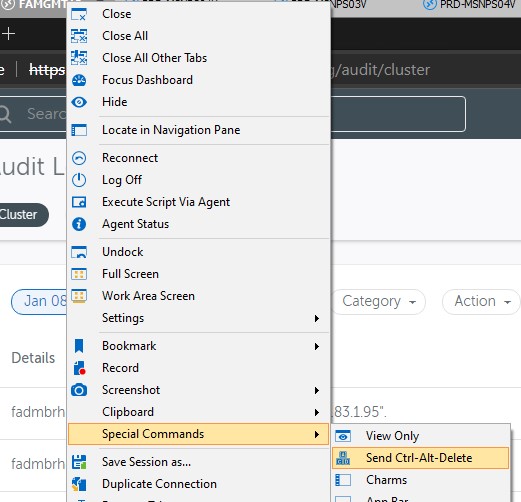
This is a screenshot from a session:

Not working to send special command (Ctr+Alt+Del)
Hi
I can confirm that this setting has been set "On the remote computer" on the sessions I tested it on and it's a part of our default RDP session templates as well.
We have implemented a lot of new internal security policies (GPO's) lately. But I'm not aware of any that would block this. But I have not implemented all of these myself, so I can't rule this out.
Any hint/suggestion would be much appreciated :)
Thank you.
Not working to send special command (Ctr+Alt+Del)
Hi
I have an issue sending Ctrl+Alt+Del to a RDP session via right-clicking -> Special Commands -> Send Ctrl+Alt+Delete.
This doesn't work for me (I'm running RDM as a RemoteApp where people use it from MacOS. This is why this functionality would be beneficial under these circumstances). But I have the same issue if I run RDM locally on a Windows 10 client.
Basically noting happens when I try using the functionality and I have tried it on multiple Windows servers to no avail.
Any help is much appreciated 😊
I'm running RDM version 2020.3.24.0 64-BIT
Powershell Script to extract Metadata from sessions
Hi @jason13
As far as I can see, it should be possible.
The method below should work:
$Session = Get-RDMSession -Name 'RDPName'
$Session.MetaInformation.IP
Here is a list of all the available MetaInformation:
PasswordHistory :
CustomField1Hidden : False
CustomField2Hidden : False
CustomField3Hidden : False
CustomField4Hidden : False
CustomField5Hidden : False
IsHyperVServer : False
IsJumpHost : False
IsTerminalServer : False
IsVirtualMachine : False
IsVMwareServer : False
IsXenServer : False
JumpForceNewSession : False
JumpShowWaitDialog : True
AllowMultipleConnections : Default
ContactMode : Default
ContactType : Default
Gender : Unspecified
HyperVVersion : Default
VendorMode : Default
AgentConnectionTimeOut : -1
CPUCoreCount : 0
LogicalCPUCount : 0
SocketCount : 0
Address :
Architecture :
AssetTag :
BirthdayDateTimeString :
Blade :
BladeDetails :
Cell :
City :
Company :
ConnectionSubType :
ContactDomain :
ContactLinkID :
ContactUsername :
Country :
Cpu :
CustomerNumber :
CustomerNumberLabel :
CustomField1Title :
CustomField1Value :
CustomField2Title :
CustomField2Value :
CustomField3Title :
CustomField3Value :
CustomField4Title :
CustomField4Value :
CustomField5Title :
CustomField5Value :
Domain :
Drives :
Email :
Fax :
FirstName :
Hardware :
HypervisorParentID :
HypervisorParentName :
IP :
Keywords :
LastName :
MAC :
MachineName :
Manufacturer :
Memory :
MiddleName :
ModelInformation :
Monitors :
Notes :
OS :
Phone :
Prefix :
Rack :
SafeContactPassword :
SafePasswordHistory :
SerialNumber :
ServerHomePageUrl :
ServerRemoteManagementUrl :
ServerRemoteManagementUrlLabelOverride :
ServiceTag :
Site :
Skype :
Softwares :
State :
SupportServiceLevel :
Title :
Vendor :
VendorLinkID :
Version :
VirtualMachineName :
VirtualMachineType :
Website :
WorkPhone :
ZipCode :
CustomServerFeatureRoles :
ServerFeatureRoles :
Expiration :
LastLoadFromInventoryDate :
PurchaseDate :
Warranty :
Or am I misunderstanding something (wouldn't be the first time ;) )?
Built-in SCP
Merci beaucoup, mon ami ;)
Built-in SCP
Hi
Please expand to support renaming of files and folders :)
And by the way, if I use drag&drop to copy remote file to local storage, I receive the following error:
"[Window Title]
Error Copying File or Folder
[Content]
Not implemented
[OK]"
If I right-click and Upload or Download it works.
Some technical and business thoughts regarding WaykNow, WaykDen and licensing
Hi
(Before I start, please remember that this is "as usual" just me thinking out loud and certainly not ment as any kind of demand.)
Regarding the self-hosting of WaykDen.
Please remember that this would be a requirement for many of our financial customers (and even tho some of them can afford many things, they don't enjoy spending any money at all and are very easily swayed/convinced by the really big players in the market [they like rubbing elbows with important people]).
So please take extreme care how the licensing model it put together regarding this feature.
I personally believe this will be play a very big factor how all this is going to be adopted by many. I will try an explain how I would perfeer this to work.
A real world scenarios/challenge I'm imagining is:
We (a small IT company, we'll call it Itbest [fictional name]) have client A, B, C and have 5 RDM Enterprise lics. Now we want to purchase WaykNow to provide remote support for all of our clients. But client A, B has compliance requirements that states that there has to be 99,999% guarantee that all sessions connections have to be established in/trough there own hosted datacenter (they could be using VPN to do that before).
And of course for other clients, you would use your own WayekDen.
By this realistic example, we would need to begin with a minimum of 3 WaykDen's. 1. Our own / Client A / Client B. And the list would just grow for more financial clients.
If we are pay for every Den deployment, I can only imagine that it would become ver expensive if you are going to charge per WaykDen deployment. It would never become scalable
If you ask me, you should be able to create/spawn as many WaykDen's deployment's from your own one as you like.
For example: We purchase 1 WaykDen Server (example: wss://remote.itbest.com) that is self hosted and from that Den server installation we could create/spawn as many sub WaykDen's as we like (example: wss://clienta.remote.itbest.com / wss://clientb.remote.itbest.com...) and install them in our clients hosting centers and etc.
This way we could fulfil all the complected compliance demands by guaranteeing that the connection always goes through the clients own hosted (remote/or on-prem) network and everything was logged and could be audited.
Also it would be important that all the WaykDen server installations (spawned or not) should have a very clear and detailed logging to fulfil even the toughest compliance demands (everything should be logged and this should not be able to be turned off, especially on spawned WaykDen installations. Basically no setting could be changed on a spawned WayekDen, but rather all setting should be controlled centrally from the "mother" WaykDen). And the primary WaykDen (mother) should always have synced logs with all it's spawned children installations (if they lose connection they should sync up ASAP when connection was back). This should even be extended to log full video recordings of all sessions going through a WaykDen.
It would also be very important that the logging records cannot be changed in any way, shape or form under any circumstances... EVER (this goes, even for the owner of the data itself). Then it would just be up to the customer for how long these logs/session recordings should go back in time, and what quality the sessions should be recorded in and other settings.
(quick note. An option to receive alarms/notifications if specific settings are changed).
WaykNow /Den:
And one other major hindrance I see in WaykNow becoming a future favorit amongst IT people, is the licencing is not offered as a concurrent user licence.
This is very frustrating. I completely understand that you have to earn a living, but this is one of the things I love most about Bomgar. All licenses are concurrent, not named.
That means of course that everyone in the company can use the product (as per concurrent count of licences purchased). And not just specific people.
Maybe you could make an alternative license available that would cover concurrent lics. and they could perhaps have a higher price point to cover "a bit" of overhead /loss of income.
But it would most certainly draw many new customers in and loyal ones at that (just look at others doing this).
Hehe ok, this became a way longer post then intended.
Whatever direction Devolutions goes with this product, I'm sure I'll be following closely and using it ;)
Have a great weekend :)