Not working to send special command (Ctr+Alt+Del)

Hi
I have an issue sending Ctrl+Alt+Del to a RDP session via right-clicking -> Special Commands -> Send Ctrl+Alt+Delete.
This doesn't work for me (I'm running RDM as a RemoteApp where people use it from MacOS. This is why this functionality would be beneficial under these circumstances). But I have the same issue if I run RDM locally on a Windows 10 client.
Basically noting happens when I try using the functionality and I have tried it on multiple Windows servers to no avail.
Any help is much appreciated 😊
I'm running RDM version 2020.3.24.0 64-BIT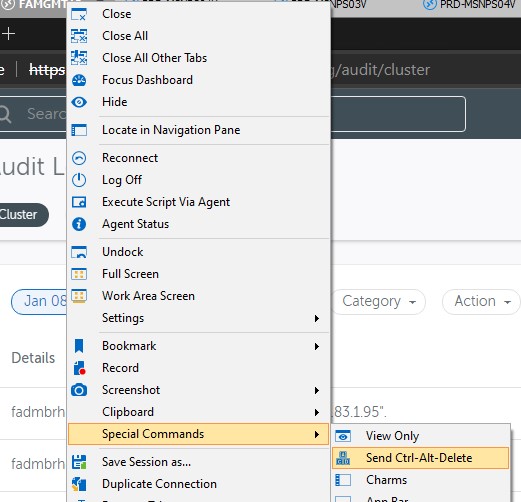
//Brandur
Screenshot 2021-01-15 130440.jpg
All Comments (10)
Hello,
Could you validate the Properties of one of the entries in the Local Resources - Keyboard section, if On the remote computer is selected?
Let me know 😊
Best regards,
Christine Breault
Hi
I can confirm that this setting has been set "On the remote computer" on the sessions I tested it on and it's a part of our default RDP session templates as well.
We have implemented a lot of new internal security policies (GPO's) lately. But I'm not aware of any that would block this. But I have not implemented all of these myself, so I can't rule this out.
Any hint/suggestion would be much appreciated :)
Thank you.
//Brandur
Hello,
We have been able to reproduce your issue internally.
A ticket has been opened to our engineering department.
Best regards,
Jeff Dagenais
Hello Brandur,
Could you tell me if your RDP entry is using FreeRDP or the microsoft ActiveX? After looking into it, I seem to reproduce the issue only when using FreeRDP. I would like to confirm that this is the same issue as you.
Regards,
Hubert Mireault
Hi
I haven't changed anything from default settings. So I can only assume it's MS RDP.
This is a screenshot from a session:
//Brandur
Hello,
Can you also confirm that it's set to Latest if you go in File > Options > Types > RDP, under the "RDP" setting (it should be the first one in the list).
Regards,
Hubert Mireault
Hi
I can confirm that it is set to "Latest" here as well.
Please let me know if you need me to test or lookup anything else.
Thank you.
//Brandur
Thanks Brandur! Unfortunately we seem to have reproduced on FreeRDP (which we will take a look at), but not on Microsoft's control. We'll keep investigating and if we have any questions we'll update this topic.
Regards,
Hubert Mireault
Hello Brandur,
Good news, we were able to reproduce the issue on Microsoft RDP, and we have a fix as well. This is going to be available in RDM 2020.3.26.0 which we plan to release soon with other bug fixes and improvements. As a note, the issue on FreeRDP will be resolved as well.
Regards,
Hubert Mireault
That sounds great. Thank you 😀
I'm sure my college (which actually pointed me to this issue, he was having) will be looking forward to that release.
Thanks for the very efficient support (as usual) and have a great day.
//Brandur