Built-in SCP
0 vote
Hi
Please expand to support renaming of files and folders :)
And by the way, if I use drag&drop to copy remote file to local storage, I receive the following error:
"[Window Title]
Error Copying File or Folder
[Content]
Not implemented
[OK]"
If I right-click and Upload or Download it works.
//Brandur
All Comments (44)
Hello,
I will assign this to our dev.
Regards
David Hervieux
Merci beaucoup, mon ami ;)
//Brandur

If i may offer an additional suggestion for the sftp client: it now uses up a lot of screen-estate AND you have to open a separate connection to have ssh access to the same server on the same port. May i suggest a solution like the tabbed ssh client from https://mobaxterm.mobatek.net/ where you have an sftp client and ssh terminal session in one handy screen ;-)
The built-in xserver is optional ;-)
@Luc
Could you post a print screen?
Regards
David Hervieux
Of course, gladly. I've attached it to this message.
It's basically a simple 2 part screen that takes up 1 tab with an sftp/explorer window in treeview with files on the left side and an normal ssh terminal window on the right side. The sftp client window supports 2-way drag and drop.
It's really very handy. You can make the sftp client follow the directory used (pwd) in the ssh session.
Video on https://www.youtube.com/watch?v=n-tTKUOtNtw
Thx.
MobaXterm.png
It's nice indeed.
Regards
David Hervieux
Hello,
I had a quick conversation with our engineering department today and the download/upload via drag-and-drop has been implemented in RDM in our native session type.
What type of session we're you using?
Could you post a screenshot of the properties of the session?
Best regards,
Jeff Dagenais
Hi,
i used an sftp session...
This currently has the following layout:
I think it would be nicer to implement this like moba and use one of these 4 windows (upper right) as the ssh session command prompt (both sftp and ssh use the same port 22). That way there would be no real need to integrate putty as a separate terminal ? The bottom left window is really not needed. You can see the files in the uppper left window tree view... You could use the bottom two windows for the sftp (one for the folders and one for the files). Would be neat.
Or you could ofcourse use a layout like moba: no local explorer, just the sftp view on the left and the terminal window on the right.... more than enough ;-)
Just a thought.
Kind regards.
Hello,
Just to let you know that a similar request is already opened on our ToDo list regarding this.
Thank you for your post.
Best regards,
Jeff Dagenais
Was this implemented? Integrated SFTP over SSH session would be really nice and handy.
Thank you.
Trying to move from MobaXterm and been trying to figure out how to do this in RDM.
One of the best features I use it for along with MultiExec.
Has this ever been integrated ?
Specifically the split window sftp/ssh
Hello,
This is implemented in the SSH Shell entry, you need to check "use SFTP connection for remote file transfer":
Regards,
Hubert Mireault
Nice. But is it jailed to the user's home directory?
Thank you.
Hello,
It is only the user's home directory by default, but if you set the "starting location" field to "/" it should allow you to view the full list of folders on the remote machine.
Regards,
Hubert Mireault
Hi, where is this option, starting location..? I don't see it.
Thank you,
Claudiu
It's located in the same window here:
If it's not there for you, you would need to update your RDM version.
Regards,
Hubert Mireault
Ah sorry, that was it.. I wasn't on the last version.
Thank you again.
Claudiu
No problem! Glad this is now working for you.
Regards,
Hubert Mireault
Hi, nice feature with SFTP, for us, we don't use it on a daily basis, so it would be great to start a SSH connection with SFTP but in minimized mode.
So we can enroll the SFTP window with a short click on the minimized bar on the right side.
a new checkbox with "Start minimized" in the properties menu would be great (and i think easy to implement )
Thanks in advance
Reagards,
Thorsten
Hello Thorsten,
I understand the need for this, it would indeed make it easier to use. I've opened a ticket so we can add this option. Thanks for the suggestion!
As a note, you can currently click on the bar separating the terminal and the SFTP to hide it. A bit annoying to do every time you open an entry, but at least you won't need to edit the entry every time you need to use the SFTP.
Regards,
Hubert Mireault
Hello,
The Start Minimized feature has been added and should be available as early as next version (it will be located directly under the Use SFTP checkbox.) Thanks for bringing this to us!
Regards,
Jafran Majeau
Hi,
thanks again for adding this feature. in the last two versions, the minimized checkbox has no effect anymore.
Can you please fix this issue?! :)
Thanks in advance
Thorsten
Hello Thorsten,
This issue was reported by another user earlier this week, and it will be fixed in our next minor update, RDM 2022.1.22.0.
Regards,
Hubert Mireault
is it normal that the source SFTP pannel only shows folder and zip files, I dod have other files in the designated folder with a different extension but they dont show up.
How can I tell it, show me everything regardless of extension?
Hello,
Seems to work properly on my side, could you confirm your Remote Desktop Manager version?
Best Regards,
Etienne Lord
Hi,
I am aware I am bumping an ancient thread, But I too am looking to step over from MobaXterm to RDM (Mainly because Moba is not available on Mac, but on windows I though about leaving it as well because of the may bugs and glitches in there. However some of the features just rock ;-). )
Am running version 2022.2.5.0 (free) on Mac and want to use this with ssh sessions. Is this in there (cannot find it and the screens posted above seem a bit outdated to me)? If not, could this be done. If only I could just right click and choose 'open scp window here'. Another very cool, related feature of Moba is that in that scp window on can just choose 'edit' and a local copy is created and monitored and as soon as locally you save, Mona transfers this to the remote file as well (of course only if the remote rights permit you to write)
Cheers
Hi ericmvandenhout,
Is this in there (cannot find it and the screens posted above seem a bit outdated to me)?
If you are referring to the screenshot from my colleague Hubert, those shows a feature that is only supported in RDM Windows. Also, it is, to my knowledge, only for SFTP, not SCP.
If only I could just right click and choose 'open scp window here'.
If you had an item to open an SCP or SFTP entry in the tab button menu, would that work for you? It would open it in a new tab, but you could split the dashboard if you wanted afterwards.
is that in that scp window on can just choose 'edit' and a local copy is created and monitored and as soon as locally you save, Mona transfers this to the remote file as well
This is already supported in FTP, SFTP and SCP entries (you can edit files and the changes are uploaded back to the server). If we implemented the precedent point, this would already work.
Best regards,
Xavier Fortin
Hi Xavier,
The thing I find frustrating is that I have a heap of SSH sessions defined, but with SFTP off in all of them.
It's only very rarely that we need SFTP to get something to/from the server.
I'd love to be able to, from an existing entry (or open SSH session) be able to either right click, and go to something like 'Macros/Scripts/Tools > SFTP'. Or a button at the top of the open SSH session for SFTP.
Then it can just connect using the already defined session details and credential settings to open the SFTP window.
This seems like the most logical way it should work - currently I just ignore the SFTP functionality in RDM and fallback to WinSCP if I need to do a transfer file(s) task.
Hi,
This should be fairly easy to implement. I will open a ticket and we will post back when it is done.
Best regards,
Xavier Fortin
Hi stoopendis,
RDM 2022.2.15.0 is now available and it's possible to launch an SCP or SFTP entry directly from an SSH entry: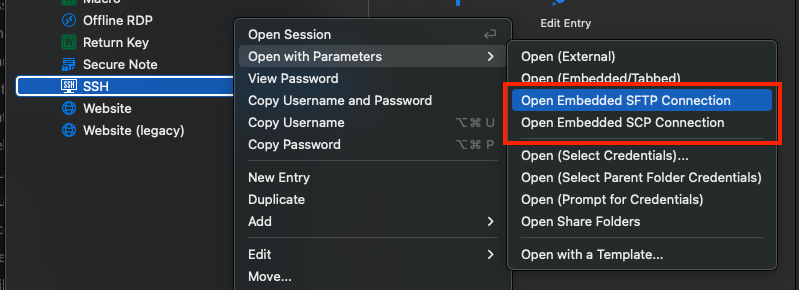
Best regards,
Xavier Fortin
OpenSSHAs.png
Hi stoopendis,
RDM 2022.2.15.0 is now available and it's possible to launch an SCP or SFTP entry directly from an SSH entry:
Hi Xavier - have just updated the Windows version to 2022.2.29.0 and the option as shown isn't there.
I went into the settings and enabled SFTP as well and it still didn't show up under the "Open with Parameters" menu.
Is there anything else that needs done to get those options to show up?
Hi,
I did not realize you were using RDM for Windows (I was originally answering to someone who was using Mac 😅).
This has not been done for RDM Windows yet (although the ticket was already opened). We will post back when it is done for RDM Windows.
Best regards,
Xavier Fortin
Hi,
I did not realize you were using RDM for Windows (I was originally answering to someone who was using Mac 😅).
This has not been done for RDM Windows yet (although the ticket was already opened). We will post back when it is done for RDM Windows.
Best regards,
Hi Xavier.
I see there has been several releases of the Windows version between 2022.2.29.0 and now (just installed 2022.3.18.0) and the feature still hasn't shown up.
Is there any timeline for release available?
Thanks.
Hello,
We currently have a developer assigned to this task and they will start working on this soon. I can't give you an exact time but we will post in this thread once we have an update on the subject.
Regards,
Hubert Mireault
Hello,
We've added the Open Embedded (SFTP) and Open Embedded (SCP) features to windows (They will be located in the Open with Parameters, same as Mac), these will be available for 2023.1, and will hopefully provide the behaviour you are looking for.
Regards,
Jafran Majeau
Hello,
Actually we're going to be able to include this in the upcoming version 2022.3.24, rather than the 2023.1
Regards,
Jafran Majeau
@Jafran,
Thanks for adding this feature to Windows port of RDM as well. I'm afraid there may be some issues though. The SCP one seems to work fine, however Open Embedded (SFTP) only shows local fıles, and doesn't even make a connection to remote server (as observed by TcpView - (SFTP-enabled SSH sessions do establish 2 port-22 TCP connections for an SSH session for example, and does log lines to log file, and show folders)
Also, is the embedded SFTP session not expected to show remote files pane?? Then, unless "Show files in tree view" option is checked, there doesn't seem to be way to download individual files, only upload to folders I guess? Was that intentional?
Version 2023.2.18.0 64-bit on Win7
(BTW, while trying to see if a log file was created or not, I noticed RDM checks for David H's home directory!? Was that intentional for some custom debugging alternative probably? :) )
Thanks,
Özgür
Hello,
We are currently investigating, and will provide an update when possible.
Regards,
Jafran Majeau
Hello OzgurH,
I've done some testing on our latest versions available to users (2023.2.24) and I haven't been able to reproduce your issues, the Open Embedded (SFTP) works fine (note that we also support directly using the SFTP file transfer in the properties of SSH Shell entries, in the Advanced section of the Terminal tab).
When opening an SSH Shell entry as SFTP I was able to access remote files without issues. I similarly did not find the file logging issue that refers to David H's directory.
For the first issue, could you test this again on our latest version? And for the directory issue, could you post a screenshot or otherwise specify exactly where you found this?
Regards,
Jafran Majeau
Hi Guys,
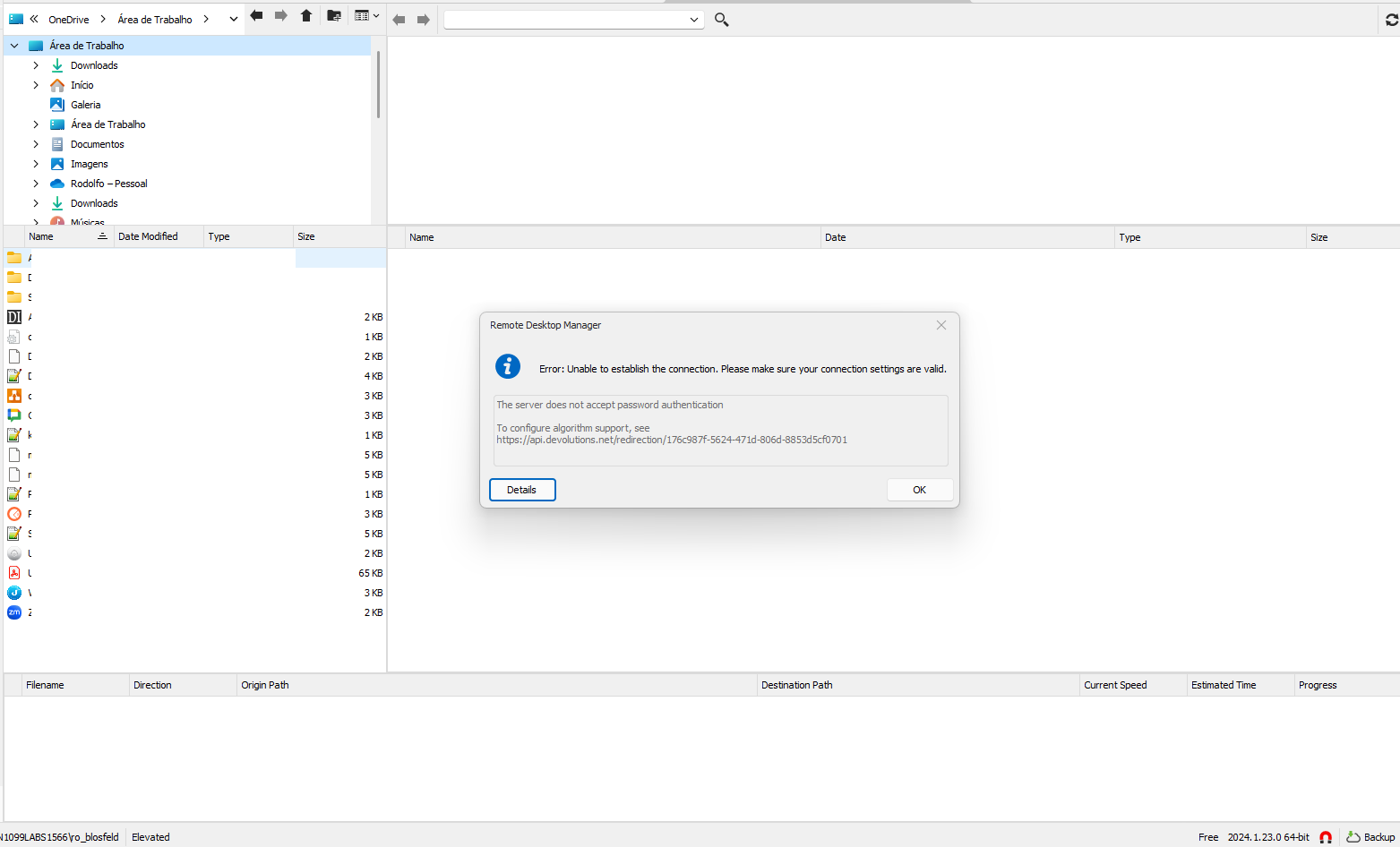
I try use SCP runing With Parameter and Open Embedded (SCP) but, for me doesnt work
We use SSH over Key File and Works fine and use WinSCP fine too.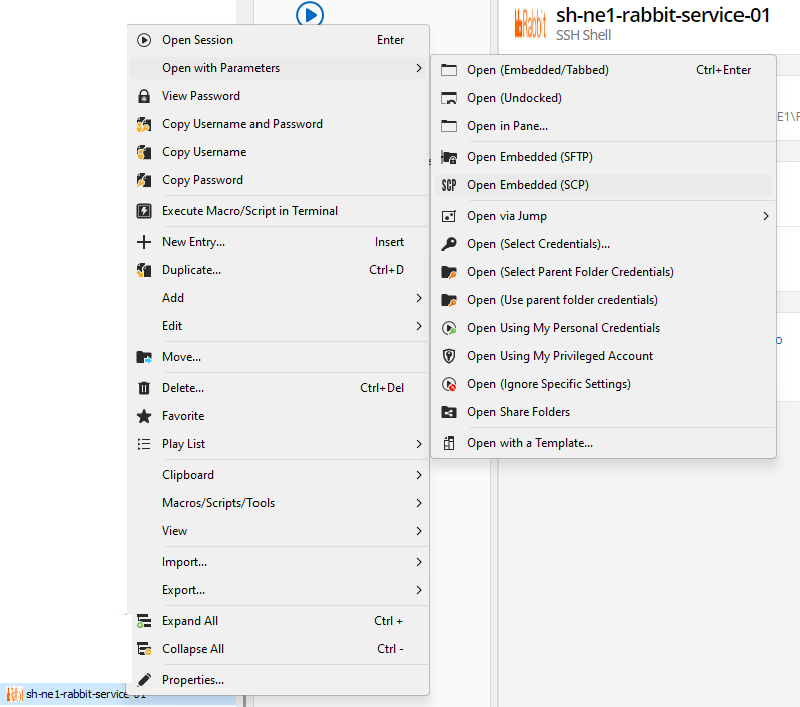
2.png
1.png
Hello rodolfoblosfeld,
Thank you for this information.
The dev team will investigate this.
Could you tell me which data source this issue occurs in?
Could you give me the version of this data source if this is DVLS?
Could you tell me if you can establish a connection without the "Open with parameter" when you launch it?
Have you had a look at the link mentioned in detail:
https://api.devolutions.net/redirection/176c987f-5624-471d-806d-8853d5cf0701
Best regards,
Patrick Ouimet
For the first issue, could you test this again on our latest version?
Hi again @Jafran Majeau ,
Sorry for not getting back to you earlier (and also for resurrecting this old thread after so many months)!
After making another post in the forum, I remembered this "to do item" that has been sitting in the back of my head for 2 years and tried again. I have noticed the same issue again. The SFTP window opens up with the local folders, but it doesn't load the remote folders. Checking the packet capture, I noticed that RDM is trying to set up the connection at port 65,535! (Sending SYN packets, but not getting SYN+ACK back).
Checking my connection properties, I noticed, I left the SSH port at "Default" (=0). Enforcing it to be 22 in the connection properties got rid of the problem I was having... I think the "default" port number handling could/should(?) be the same for both embedded SCP, and SFTP sessions, no?
(I'll make another post for the user directory issue).
Thanks,
Özgür
And for the directory issue, could you post a screenshot or otherwise specify exactly where you found this?
Hi again,
I was using the Process Monitor tool from SysInternals. It tracks several kinds of activity on the system at the OS level.
Using the "Stack" tab in its "Event Properties" window, I was hoping to provide you with an exact call stack of the point in the program that triggers this lookup into dhervieux profile folder, but managed code stopped me from doing that!?! :( (If you have a symbol server, of are somehow making PDB files available, let me know the process, and I can try to get a proper call stack - I'm more familiar with native debugging of the C++ world, ignore this last sentence if it doesn't make sense for .NET binaries! :) ).
Native code call stack for the first reference was like this [1].
Thanks,
Özgür
[1]
0	FLTMGR.SYS	FltPerformSynchronousIo + 0x2651	0xfffff800752dc7a1	C:\WINDOWS\System32\drivers\FLTMGR.SYS
1	FLTMGR.SYS	FltPerformSynchronousIo + 0x1ce1	0xfffff800752dbe31	C:\WINDOWS\System32\drivers\FLTMGR.SYS
2	FLTMGR.SYS	FltPerformSynchronousIo + 0xc38	0xfffff800752dad88	C:\WINDOWS\System32\drivers\FLTMGR.SYS
3	FLTMGR.SYS	FltPerformSynchronousIo + 0x7ed	0xfffff800752da93d	C:\WINDOWS\System32\drivers\FLTMGR.SYS
4	ntoskrnl.exe	IofCallDriver + 0xbe	0xfffff800e38bffde	C:\WINDOWS\system32\ntoskrnl.exe
5	ntoskrnl.exe	NtDeviceIoControlFile + 0x1b18	0xfffff800e3e82e38	C:\WINDOWS\system32\ntoskrnl.exe
6	ntoskrnl.exe	NtQueryDirectoryFile + 0xe0	0xfffff800e3e84b70	C:\WINDOWS\system32\ntoskrnl.exe
7	ntoskrnl.exe	setjmpex + 0x91f5	0xfffff800e3c8ef55	C:\WINDOWS\system32\ntoskrnl.exe
8	ntdll.dll	NtQueryDirectoryFile + 0x14	0x7ffc2779c664	C:\WINDOWS\SYSTEM32\ntdll.dll
9	windows.storage.dll	GetFindDataForPath + 0x811	0x7ffc224bfce1	C:\WINDOWS\SYSTEM32\windows.storage.dll
10	windows.storage.dll	GetFindDataForPath + 0x219	0x7ffc224bf6e9	C:\WINDOWS\SYSTEM32\windows.storage.dll
11	windows.storage.dll	GetFindDataForPath + 0x1512	0x7ffc224c09e2	C:\WINDOWS\SYSTEM32\windows.storage.dll
12	windows.storage.dll	GetFindDataForPath + 0x17ed	0x7ffc224c0cbd	C:\WINDOWS\SYSTEM32\windows.storage.dll
13	windows.storage.dll	Ordinal765 + 0xa445	0x7ffc22512665	C:\WINDOWS\SYSTEM32\windows.storage.dll
14	windows.storage.dll	SHGetIDListFromObject + 0x2fa	0x7ffc2256a0ba	C:\WINDOWS\SYSTEM32\windows.storage.dll
15	windows.storage.dll	Ordinal765 + 0xd08e	0x7ffc225152ae	C:\WINDOWS\SYSTEM32\windows.storage.dll
16	windows.storage.dll	SHGetIDListFromObject + 0x2fa	0x7ffc2256a0ba	C:\WINDOWS\SYSTEM32\windows.storage.dll
17	windows.storage.dll	SHParseDisplayName + 0x205	0x7ffc22517155	C:\WINDOWS\SYSTEM32\windows.storage.dll
18	windows.storage.dll	ILCreateFromPathEx + 0x9f	0x7ffc225e90af	C:\WINDOWS\SYSTEM32\windows.storage.dll
19	windows.storage.dll	ILCreateFromPathW + 0x2f	0x7ffc22a3999f	C:\WINDOWS\SYSTEM32\windows.storage.dll
20	<unknown>	0x7ffb54128e9b	0x7ffb54128e9b
6ed301cd-ba2d-4f6f-b427-7cd291e0ae5a.png
Hello Ozgur,
For the issue with the port, we'll take a look. Could you confirm your RDM version you're using as well? Are you on our latest version, 2025.1.33.0?
As for the path, I would also like to know if it reproduces with our latest version. I remember this is an issue that happened a long time ago with the third party component we used where a default path from our development computers was configured in the UI control, and it caused this behavior when first opening the entry.
We're also reworking our file explorer entries so they can be more maintainable, as well as reusable across our different platforms. At the same time, we're removing certain third party UI controls so if the issue is still there currently, it shouldn't be once we rework these entries.
Regards,
Hubert Mireault