
frankpuma
Open link in new window
I have many Sessions to Websites in RDM for Admin consoles etc. When i right click a link and choose to Open in link in new window it automatically switches to that new window. This is different behavior that when i do this directly in Chrome. I cant seem to find a setting to change this.
What i need to do is go through and open several new windows and then start working.
Right now i have to:
Right Click > Open link in new window
Then go back to the first window and do the next one.
Kind of a pain.
HP OneView
I tried this on the latest version and its working.
My other question is there a way to change the Directory drop down box? I tried a few things but couldnt get it to work. Right now it autofills my UN and PW. Then i need to change the drop down box and login manually.
Not a huge deal but would be nice if i can get it to autologin like everything else.

HP OneView
We are switching over to HPE for our servers and using OneView to manage everything. I have the admin console setup and working fine. The issue i am facing is when i try to launch iLo through html5. It just opens to a blank page. When i do this in a regular Chrome window everything works fine.


Credential Management
Thank you for this. I didnt know about it. That solves a differnt issue i have but not this one since they are use a different domain in that case. The SSH connection is a bit different. Its AD integrated but requires using its own domain name in the login syntax. Its strange.
Credential Management
I thought this wasnt available in the free version. Is that correct?
Credential Management
Is there a way to have multiple username/password setup to link to be able to share the same password?
Here is what i have. We use CyberArk for our admin passwords and the password changes everyday. So i have to go in and update this manually each day. Today i found a case where my username format is different but uses the same password. So i had to create 2 seperate username/passwords and will have to update each manually everyday.
Not a huge deal right now but i can see this becoming more common as i add more devices in RDM.
Below i pasted a pic of the username/passwords i have setup currently. I would like to be abler to tie them to a password so i would be able to just update the password once each day.

Autofill not wokring
Is there documentation on setting this up? I have not used this before.
Autofill not wokring
Its not a public site.
Autofill not wokring
I am not able to get autofill working on my Citrix App Layering Portal. I was hoping for some help

Cisco Intersight
I am trying to get my Cisco Intersight setup in RDM. For some reason its not populating the user credentials even after i hit the key button. What am i missing?
I have
Username ID: username
Password ID: password
Also is there a way to select the LDAP/AD button instead of the defaullt Local?

UCS Manager not auto filling
I am coming back to work on this issue. I have 2 open issues at this point.
Can something pass the pre login banner? I have to click ok before getting to the login page.
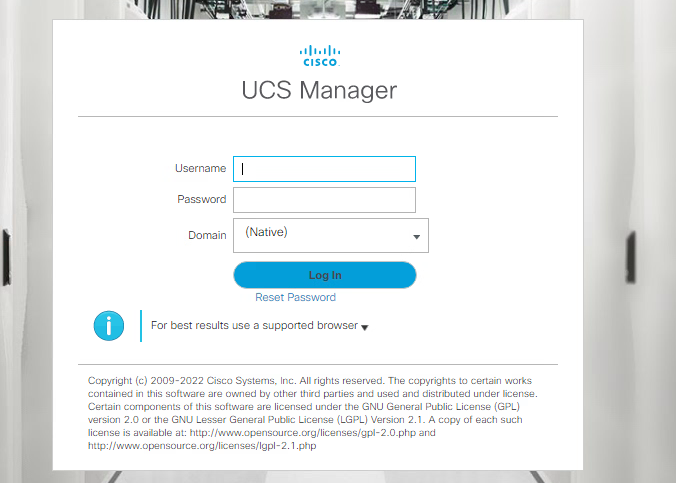
Then once on the login page my username and password are autofilled but i need some way to change the drop down Domain from Native to UHH.com. It has to be chosen from the drop down and cant be typed in.
RDM in VDI session as an AppStack
I created an AppStack and installed RDM so we can use it in our VDI pool for our support team. Everything works good except every time i get a new session i have to resetup RDM. It looks like RDM saves the user setting in local appdata. Is there a way i can change this?
UCS Manager not auto filling
Yes the autofil is checked.
I changed the autofill delay to 1000ms and its now doing the autofill. Its not auto submitting though. I have to change the domain drop down manually and and hit submit to login.
How can i auto fill the domain drop down and submit ?
UCS Manager not auto filling
I made this change but and seeing the same issue. Its not populating the username and password fields.
UCS Manager not auto filling
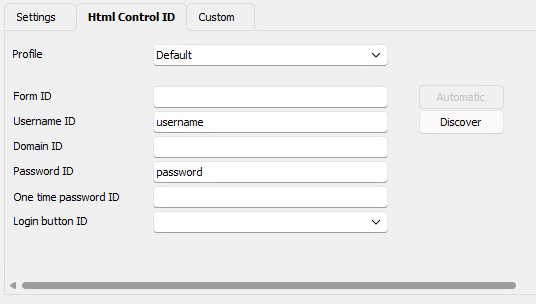
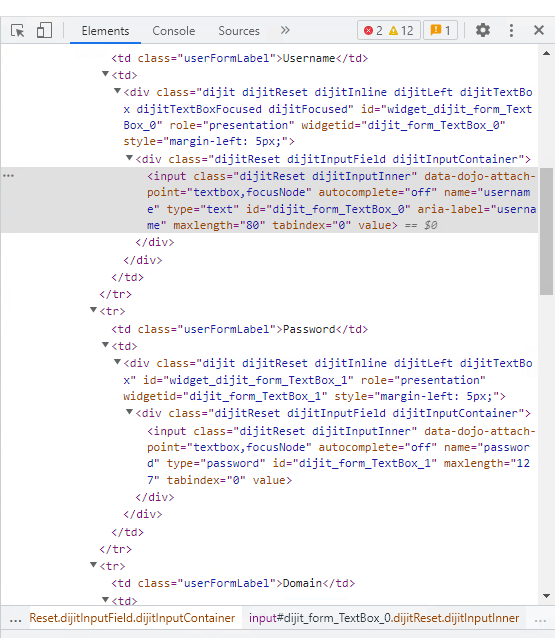
I see. I tried the Discover but it failed. So i filled in manually after doing an Inspect on the login page like i normally do.
UCS Manager not auto filling
Version 2023.1.29.0 64 Bit
Believe they are static
None of the fileds are getting filled.
UCS Manager not auto filling
I am trying to setup web sessions to UCS Manager. It doesnt seem to populate any of the fields. When i do the inspect i was able to find the correct field names.
Why is this?
Also is there a way to send over the domain from the drop down box?
Before this page is a pre login banner. Any way to accept this automatically?
VMWare Horizon Admin Dashboard
Thank You. #1 fixed the certificate issue.
I tried using embedded Edge but it doenst even fill in the username and password. I switch back to Chrome and it fills in those fields again. The Sign in Button wont activate until i click in each field. I was really hoping to figure out a way to have it login automatically for me like everything else with no clicks.
VMWare Horizon Admin Dashboard
I have this setup and working but when i open it i get prompted for a certificate. My only options are:
-> Select Certificate
or
-> Continue withoiut providing a certificate
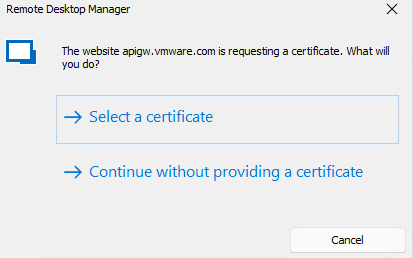
I can contiue without providing a certificate but it will not auto login. It fills my username and password in but the Sign In button stays gray. I have to click in the username field then click in the password field before the Sign In button turns green and allows me to manually press it to login.
When i use this dashboard straight from a chrome browser i dont have any issue.
Anyone run into this issue?
Logging into vCenter
This is awesome. Where did you find this info? This works great for me.
Logging into vCenter
I tried them all. I first tried all VMWare entrys. Now i am just trying a Website Session. This takes me to the vcenter login page but it doesnt pass the username and password i have specified for the other RDP entrys.
Logging into vCenter
I just got RDM Free installed and want to see if i can setup connections to my vcenters. I have multiple enviroments and would help to be able to have these added. Right now i just have them setup as We sessions but my username and passwords doesnt get passed through to login me in. This works great for my RDP sessions.
Is there anyway to make this work?