VMWare Horizon Admin Dashboard

I have this setup and working but when i open it i get prompted for a certificate. My only options are:
-> Select Certificate
or
-> Continue withoiut providing a certificate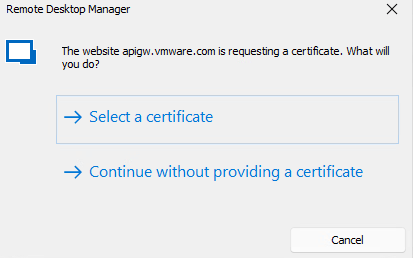
I can contiue without providing a certificate but it will not auto login. It fills my username and password in but the Sign In button stays gray. I have to click in the username field then click in the password field before the Sign In button turns green and allows me to manually press it to login.
When i use this dashboard straight from a chrome browser i dont have any issue.
Anyone run into this issue?
20cb2629-8e19-4dd9-8a27-f49e871f109e.png
download.png
All Comments (2)
Hello,
I suspect that there is two different issues here:
- You can configure the certificate validation to ignore it here:
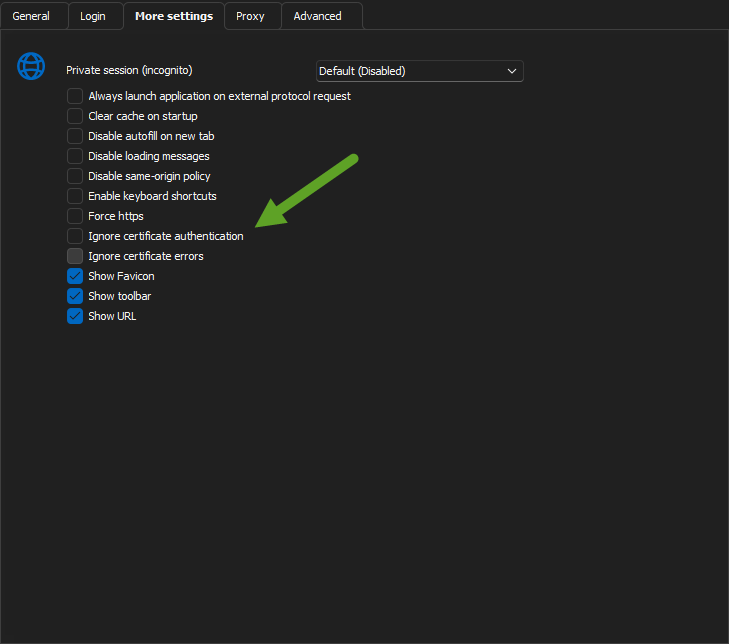
2. The other issue must be related at the way WMware handle the keypress. RDM autofill must not trigger the event but I'm not sure we can do anything for that. Could you try to use embedded Edge for a test?
Regards
David Hervieux
de6aa06e-83dc-4c6a-97c0-1990cefb5580.png
Thank You. #1 fixed the certificate issue.
I tried using embedded Edge but it doenst even fill in the username and password. I switch back to Chrome and it fills in those fields again. The Sign in Button wont activate until i click in each field. I was really hoping to figure out a way to have it login automatically for me like everything else with no clicks.