
Griffeth Barker
Search results pop-up visible while RDM application is in background
Here is the requested screenshot. To my knowledge I've done no customization here:
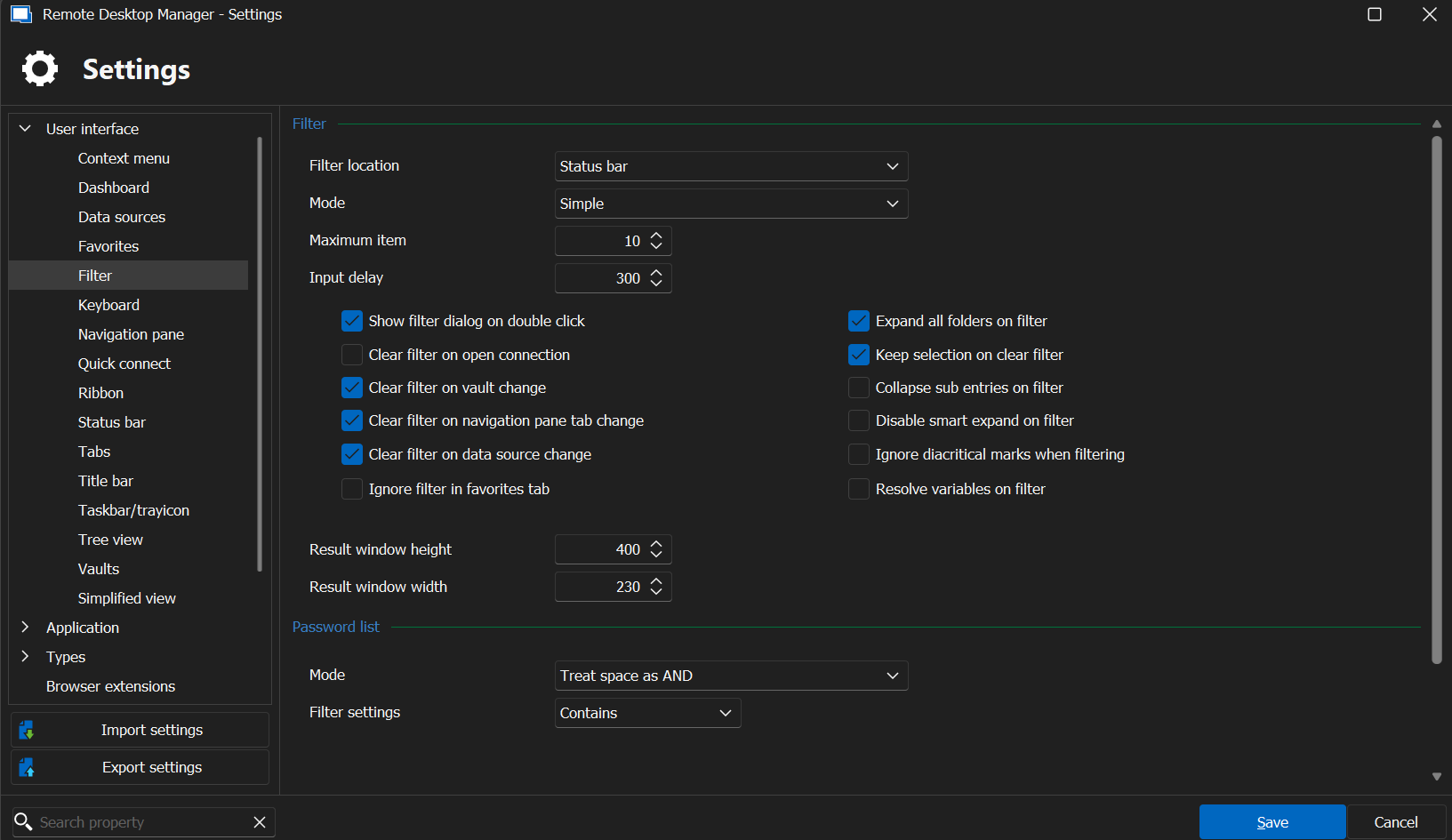
Thank you!
Search results pop-up visible while RDM application is in background
Description
The pop-up containing the results of a search of entries performed in Remote Desktop Manager remains visible even once the main Remote Desktop Manager window is moved to the background or another application window is in the foreground.
Steps to Reproduce
Launch the Remote Desktop Manager application.
Perform a search with valid results using the search bar in the bottom left corner of the main application window (results should appear).
Place any other application in the foreground and the search results will remain visible over the foreground window.
If you clear the search query from the search bar, the search results pop-up will then disappear.
Environment
Windows 11 23H2 (OS Build 22631.3880)
Remote Desktop Manager Enterprise 2024.2.16.0 (64-bit)
Devolutions Server 2024.2.3.0
PowerShell query for filtered list of entries
Hello, all,
I ended up having the reinstall Windows on my laptop due to some OS stability issues I was having, and when I set the PowerShell module back up again, it worked just fine.
This thread can be archived or whatnot.
Thank you for your assistance!
Devolutions Gateway Tunnel - How to use for SSH port forwarding?
We found that we were able to just use the regular Devolutions Gateway option in the VPN setting for SSH connections, so no need for the tunnel connection type.
We did successfully get the tunnel type working for SOCKS5 proxy. I think we're good on this. Thank you!
Devolutions Gateway Tunnel - How to use for SSH port forwarding?
Hi, Michel!
Thank you for your response! That is the documentation I've been using, however I'm afraid I must not fully understand it, as I have been unable to get an SSH connection working.
Thank you,
Devolutions Gateway Tunnel - How to use for SSH port forwarding?
Hello,
Wondering if anyone here would be able to help me with how to configure the Devolutions Gateway Tunnel session type so we can use it to tunnel SSH. Right now we use Linux jump servers and set them as the SSH Gateway on our normal SSH entries, but we are wanting to replace that setup with just using the Devolutions Gateway Tunnel since we now have the Devolutions Gateways.
Thank you!
PowerShell query for filtered list of entries
Hi, Erica,
I checked on this and can confirm I do have rights to create and modify files in that location:
PS C:\Users\REDACTED>
PS C:\Users\REDACTED> $rdmPath = (Get-RDMInstance).OptionFileName

PS C:\Users\REDACTED> (Get-Acl -Path ((Get-RDMInstance).OptionFileName)).Access | Format-Table -IdentityReference, FileSystemRights -AutoSize

IdentityReference      FileSystemRights
-----------------      ----------------
NT AUTHORITY\SYSTEM         FullControl    # I also tried from the SYSTEM context, but had the same issue
BUILTIN\Administrators      FullControl    # This is the local administrators group of which I am also a member
REDACTED\REDACTED           FullControl    # This is my privileged account that is running my PowerShell session

PS C:\Users\REDACTED>
Not sure what is causing the issue, but I'll keep poking at it. I appreciate your help along the way!
PowerShell query for filtered list of entries
Hello,
Have you updated the Devolutions.PowerShell module to the latest version 2024.1.5? To get the current installed version, you can use the Get-RDMInstance cmdlet.
https://www.powershellgallery.com/packages/Devolutions.PowerShell/2024.1.5
Here is the command to update it.
Update-Module -Name Devolutions.PowerShell -RequiredVersion 2024.1.5 -Force
The command you use should work on a DVLS data source. Are you connected to your DVLS data source from PowerShell?
Method 1 from the following article explains how to create a DVLS data source in RDM using an Application Key. To list the entries, you need to grant proper permissions to the application key on the vault where the entries are located.
https://docs.devolutions.net/kb/devolutions-powershell/devolutions-server/powershell-connectivity/
Let us know if you have any more questions.
Best regards,
Hi, Erica,
Thank you for your quick response! I forgot to update the module when I upgraded my RDM client. I used the command you provided to upgrade it and it showed successful but Get-RDMInstance still returns an ApplicationVersion of 2024.1.3.0 for some reason.
I figure I need to resolve that before tackling the error I'm getting when setting the data source using Method 1 from the documentation you linked, which is as shown below:
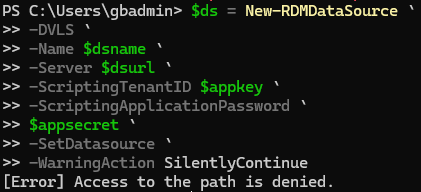
PowerShell query for filtered list of entries
Hello all,
We previously used the MSSQL shared data source and in one of my scripts I would pull a filtered list of entries from RDM using this:
Import-Module -Name Devolutions.PowerShell -Force
$RdmList = Get-RDMSession | Where-Object { $_.ConnectionType -like "RDP*" -or $_.ConnectionType -like "SSH*" }
Now we use the Devolutions Server data source and this no longer appears to work. Can someone point me in the right direction of how I would go about getting a filtered list of entries from the data source using PowerShell 7, Remote Desktop Manager 2024.1.25.0 or newer, and Devolutions Server 2024.1.11.0 or newer?
Thank you!
Always accept fingerprint
Hi !
This feature has been implemented and will be in the next version of RDM !
Cheers
Hi, David!
Thank you very much for the information and the attention to this! We appreciate you all.
SSH Algorithm Support for RDM Linux
It's not possible to configure algorithm support for all entries under Linux, only individually, but I've created a ticket to add this to the options menu.
Thanks for pointing it out!
Thank you very much for your attention to this! We have it configured globally in Devolutions Server data source, so it would be very convenient for us to be able to utilize that functionality for those of us on our team who would prefer to be daily-driving Linux instead of Windows. RDM is the only thing that's keeping us back from being able to get to Linux, so the addition of these features is appreciated tremendously!
SSH Tunnel Auto-Hide After Successful Connect
Hi, Gabriel,
Thank you for your attention on this! We appreciate all you and the team do.
SSH Algorithm Support for RDM Linux
Hi, Simon,
That is great news, thank you! Is the Algorithm support option able to be set globally from the Options menu as well, similar to how you can in the Windows version, that way entries that inherit that setting function properly?
Thank you!
SSH Tunnel Auto-Hide After Successful Connect
Hello, all,
We would like to submit a feature request for the SSH tunnel entry type to auto-hide in the tab bar after a successful connection (and also tunnel auto disconnect when the subsequent entry's session is closed). This functionality is present in RDM Windows.
Thank you!
RDM Linux – Broadcast, Macros, and VPN Support Requests
I understand it is no small undertaking and that things are prioritized based on needs, but I just wanted to take a moment to +1 vote the feature request for feature parity between RDM Windows and RDM Linux.
Thank you,
Always accept fingerprint
Hello, all,
We would like to add a feature request to implement the "Always accept fingerprint" option for the terminal type as there is in the Windows version of RDM.
Thank you,
SSH Algorithm Support for RDM Linux
Hi, Simon and team,
I just wanted +1 vote this feature request. This would be very helpful to us!
Thank you,
User-Specific Settings Support
Thank you, Gabriel!
Web session mouse input tracks incorrectly after display change
Hi, Patrick,
I've just noticed something that might indicate this is a bug with Microsoft Edge WebView 2, rather than with Remote Desktop Manager. The "New Outlook" which I believe uses WebView, also suffers from this same issue in the same scenario. I suppose it could still be an issue with Remote Desktop Manager, but it could also be a bug with the WebView2 dependency.
Just wanted to provide that new discovery. Thank you!
Web session mouse input tracks incorrectly after display change
Hello, all! I've noticed an inconvenient issue that may or may not be a bug.
Expected Behavior
Mouse movement and input is tracked normally inside web sessions, allowing you to accurately click and interact with content inside the web session, even after a display change has occurred on the device running RDM.
Actual Behavior
Mouse movement is tracked incorrectly and input does not work after a display change as occurred on the device running RDM.
First Recognized Occurrence
This issue appears to have existed as long as our company has been using RDM, which goes back to at least 2022.x.x.
I can currently reproduce the issue in my environment:
Software
Remote Desktop Manager 2023.2.32.0 (64-bit)
Windows 11 23H2 Build 22631.2506
Hardware
1 qty. Microsoft Surface Laptop Studio
Inbuilt Intel Iris Xe Graphics
Inbuilt LQ144P1JX01 display 2400x1600 @ 120 Hz
1 qty. Dell P2722HE, D6500 monitor with inbuilt USB-C dock - 1920x1080 @ 60 Hz
1 qty. Dell P2722H monitor - 1920x1080 @ 60 Hz
Steps to Reproduce
Laptop is standalone without additional monitors, RDM web sessions work as expected
Connect laptop via USB-C to dock which adds two additional monitors
Troubleshooting
I've tested and this appears to happen only in this direction. If you have RDM open and disconnect your laptop from a dock, web sessions appear to track mouse movement and input correctly.
Additionally, I tested this with a slightly different hardware setup and was able to replicate the issue the same using:
Same laptop
Anker PowerExpand A8394 USB-C dock
2 qty. MSI G2712 at 1920x1080 @ 144 Hz
I had hoped that simply closing the session and re-opening it would resolve the issue, however it does not.
Workaround
In the meantime, closing RDM entirely and re-opening it appears to resolve the issue.
If this is indeed some kind of bug, I hope that some of the above information is helpful. If not a bug and this is expected behavior, I will pass that information along to our team. Thanks!
DVLS PAM Account Support
Hi, Gabriel!
No, I am referring to the My privileged account option just below that:
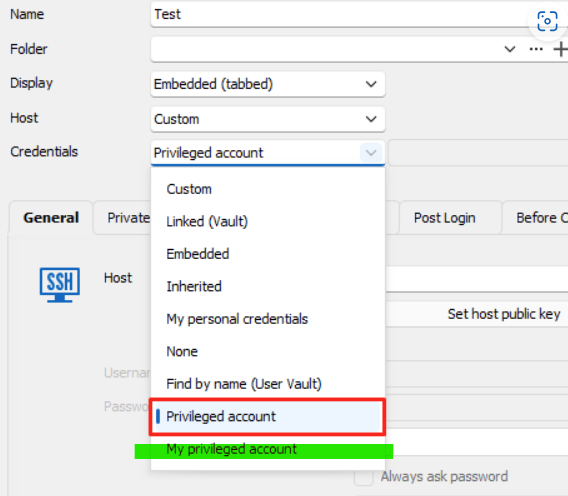
This allows the PAM cred to be set in the RDM settings in the File menu once, and then all of our entries that have their credentials to My privileged account just work without any further configuration. This works perfectly on Windows, however if you attempt to use the My privileged account credential option in the Linux application, you get the following popup:

I now realize this might actually be a feature request for Devolutions Server and not Remote Desktop Manager...I apologize if this is in the wrong place. Please let me know if that makes sense or if you have other questions about the request!
Thank you as always for your time and attention.
User-Specific Settings Support
Thank you for the response, Gabriel! I understand there's always a ton of stuff in the pipeline/roadmap and that one individual request isn't the most important. We appreciate you guys having the forum and listening to our requests! We'll anxiously await the day the feature is added, whenever that is.
Thanks again!
User-Specific Settings Support
Greetings, all!
Hoping that we can get support for User-Specific Settings in the Linux version of the application like there is in the Windows version. This would be hugely helpful to our team, and I wonder if it might also be helpful to others, too. This and one other unrelated feature request which I just posted are the main things keeping our infrastructure team using Windows at all instead of moving back to our preferred Linux distributions.
As of RDM for Linux version 2023.2.2.7 and DVLS version 2023.2.10.0 this does not appear to be supported.
Thank you!
DVLS PAM Account Support
Greetings, all!
Hoping that we can get support for DVLS PAM accounts in all the currently supported account types in the Windows version of the application, but in the Linux version of the application. This would be hugely helpful to our team, and I wonder if it might also be helpful to others, too. This and one other unrelated feature request which I'll post shortly are the main things keeping our infrastructure team using Windows at all instead of moving back to our preferred Linux distributions.
As of RDM for Linux version 2023.2.2.7 and DVLS version 2023.2.10.0 this does not appear to be supported.
Thank you!
Embedded powershell tools - potential bug found with it..
Alright. If I find myself with some free time outside of work may I will tinker with that. that's many thousands of possible combinations of values for those two fields, which is an inconceivable amount of shots in the dark so to speak. And if I don't find the time I suppose we'll just have to continue to do our PowerShell administration outside of RDM, unfortunately.
I've made two random changes which seem to allow the PowerShell Remote Console to work.
Setting the Buffer size Rows and Cols, as well as the Window size Rows and Cols in Options > Types > Others > PowerShell to the values we discovered earlier using your code snippet.
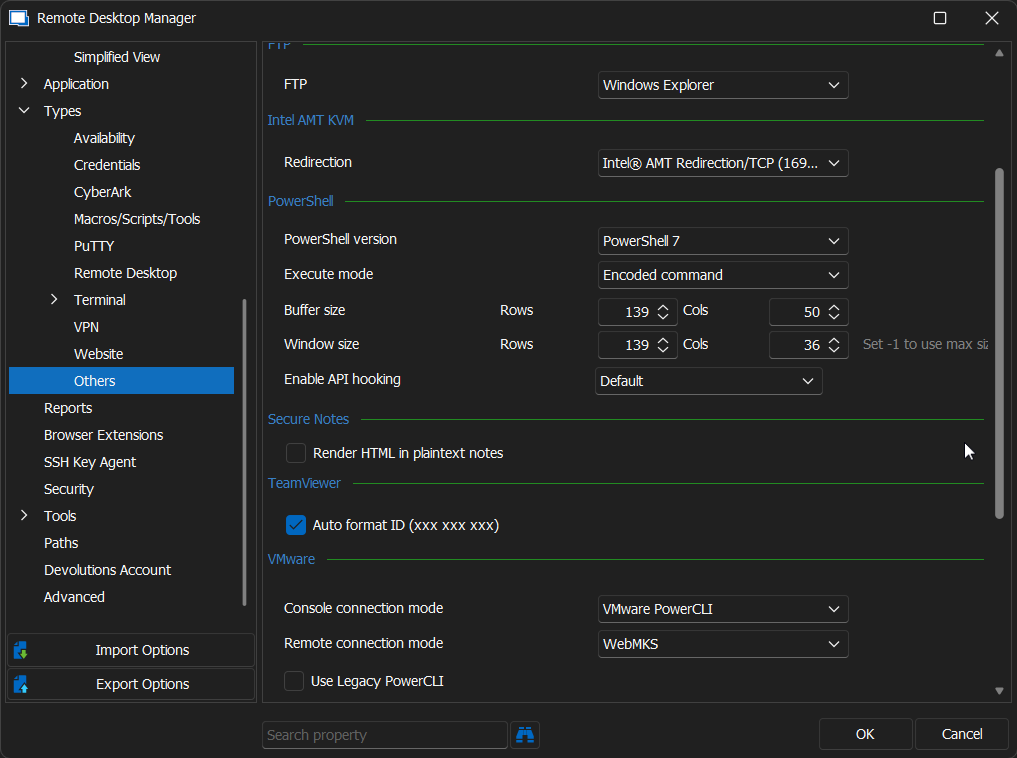
2. Unchecking the Resize window check box in the session entry's Properties > General > Advanced.
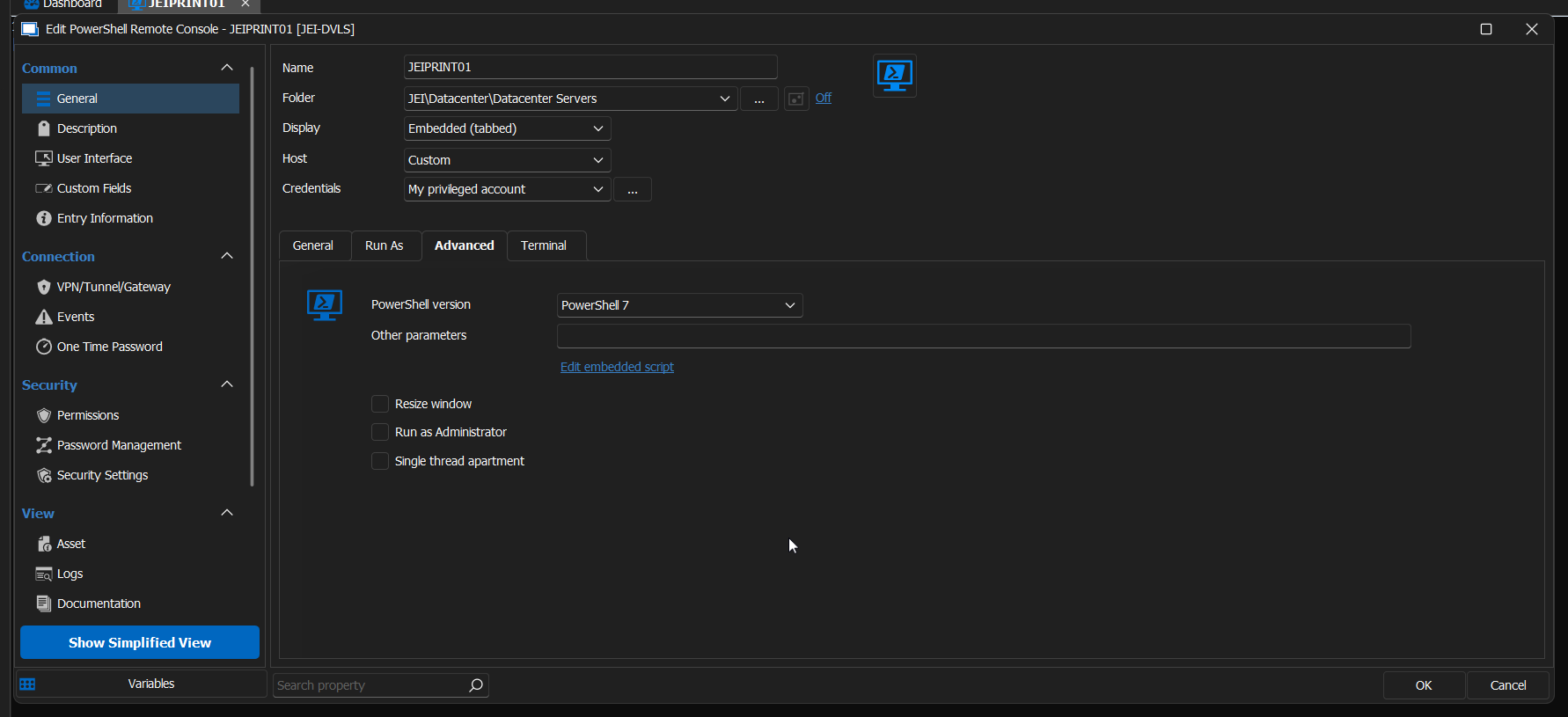
These two changes in conjunction are somehow allowing it to work, albeit with a weird string of number characters:

I've confirmed this resolved it for me both in PowerShell 7.3.9 as well as Windows PowerShell 5.1 as well, which is the default environment shipped in Windows. It also appears to work regardless of whether your have Console Host or Windows Terminal selected in the session entry's Properties > General > Terminal tab.
If I find the time, I'll write an internal KB for our team on this and potentially push it to my blog a well in case anyone else encounters this issue.
I appreciate your quick responses today and willingness to assist!