DVLS PAM Account Support
0 vote

Greetings, all!
Hoping that we can get support for DVLS PAM accounts in all the currently supported account types in the Windows version of the application, but in the Linux version of the application. This would be hugely helpful to our team, and I wonder if it might also be helpful to others, too. This and one other unrelated feature request which I'll post shortly are the main things keeping our infrastructure team using Windows at all instead of moving back to our preferred Linux distributions.
As of RDM for Linux version 2023.2.2.7 and DVLS version 2023.2.10.0 this does not appear to be supported.
Thank you!
--
Griffeth Barker
💻 Call/Chat on Microsoft Teams
📧 Send me an email
🔗 Connect on LinkedIn
All Comments (3)
Hi Griffeth,
I'm not sure if I understand your request correctly. Do you mean the credential method "Privileged account" in all connection settings view?
(Screenshot from RDM Windows)
Best regards,
Gabriel Dubois
Screenshot from 2023-10-30 17-10-39.png
Hi, Gabriel!
No, I am referring to the My privileged account option just below that: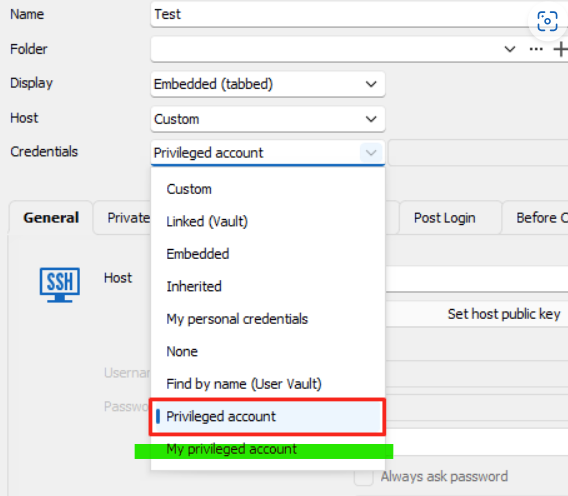
This allows the PAM cred to be set in the RDM settings in the File menu once, and then all of our entries that have their credentials to My privileged account just work without any further configuration. This works perfectly on Windows, however if you attempt to use the My privileged account credential option in the Linux application, you get the following popup:
I now realize this might actually be a feature request for Devolutions Server and not Remote Desktop Manager...I apologize if this is in the wrong place. Please let me know if that makes sense or if you have other questions about the request!
Thank you as always for your time and attention.
--
Griffeth Barker
💻 Call/Chat on Microsoft Teams
📧 Send me an email
🔗 Connect on LinkedIn
8b290b03-d43d-40d3-ad0b-6bf8f21f22c3.png
171de1af-34c6-4d5b-b92b-93c91bd6e0b9.png
Hi Griffeth,
Thank you for the clarification. This error message is normally prompted depending on how the usage policies are configured in the Devolutions Server (Administration > Privileged Access > Usage Policies).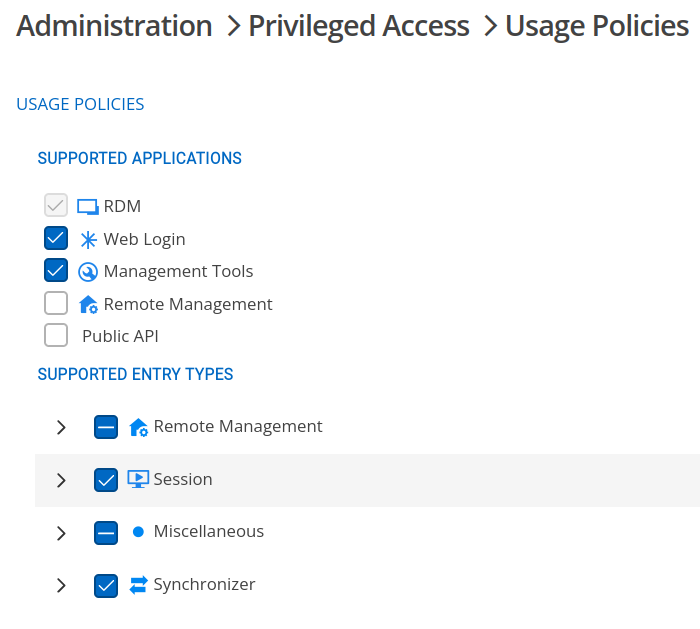
I was able to reproduce your issue; the policies are ignored in RDM Linux and it fails the connection. I fixed the bug and it should be released in the second release of 2023.3 versions (more precisely: 2023.3.1.0).
Best regards,
Gabriel Dubois
Screenshot from 2023-10-30 18-57-46.png