
jm2
Scheduled PAM heartbeats failing
Hi Maxim,
Confirming this appears to be resolved since updating to 2026.2.2.6. Thanks for your assistance.
Joe
Browser based RDP sessions not launching via WebUI
Sounds good, thanks @oujunyiirving.
The gateways are non-virtual, and as far as I recall the last time I tested that it was working was with one of the 2026.1.x releases
Joe
Browser based RDP sessions not launching via WebUI
Hi @oujunyiirving ,
Thanks for assisting with this.
Preauth is currently disabled for /jet/health and /jet/diagnostics/logs, so the health check works ok. Ideally these urls could also be protected by Cloudflare Access pre-auth, but I imagine that would require hub/cloud to support using a static authorization token in order for the platform to independently monitor gateway status.
The browser based RDP sessions launch fine if /jet/rdp is also excluded from pre-auth, but not when its enabled. Browser developer mode trace shows that /jet/rdp connection is initiated via wss:// connection which doesn't succeed because pre-emptive https:// connection hasn't occurred.
I don't know when specifically, the issue started to occur, but it was working with pre-auth enabled for /jet/rdp a few months ago.
Could hub/cloud be updated to do a simple GET https://gateway.domain.tld/jet/rdp call (or something equivalent) prior to upgrading to wss://, which will inherently trigger the pre-auth process?
If a HAR file is required for further analysis, please DM an upload link, but not sure it should be necessary since its already confirmed recent change resulted in browser making direct websocket connection to /jet/rdp, and google search (shown below) indicates that beforehand browser needs to obtain CF_Authorization cookie.
Please let me know if you would like any additional information.
Thanks
Joe

Domain User PAM attributes not being populated until initiating a password reset
Hello,
It appears that the read only attributes of Domain User PAM credential entries are not being populated/updated, either when added manually or imported via account discovery, or when a heartbeat occurs.
If a password reset is initiated, then the attributes do get populated, however this is problematic for credentials which are static and cannot be reset without impacting a system actively using it.
The absence of the attribute values inhibits RDM being able to use the credential to logon to systems which require specific username formats (i.e. UPN or DOMAIN\Username).
In the case of the SID attribute, if this is not populated (such as when a PAM account is added manually), then when running an account discovery it is unable to detect that the credential already exists.
Please let me know if you would like any additional info.
Joe

Devolution Cloud Backup
Hi Yevgeniy,
Thanks for the update. Confirmed removing the empty line resolved the import issue.
Joe
RDM reauthentication each time PAM entry accessed when ‘Force prompt login’ enabled in the Hub/Cloud
Hi Patrick,
Thank you for the detailed explanation of why the duplicate reauthentication prompt occurs.
Regarding the provided work arounds:
1) Disabling the 'Force prompt login' setting potentially results in a 'session hijacking' security exposure whereby an existing token could be used to gain access to the workspace
2) Explicitly linking the 'Devolutions Cloud privileged account' entry/credential to session entries (i.e. RDP, Web, SSH etc) is incompatible with shared vault workflows where each user has their own unique PAM account/s. Doing so would result in having to create duplicate session entries, each linked to a different users' PAM credential.
While it is understandable that possibly in the interest of development effort, the current architecture may have been done in such a way as to use a second temporary background connection to the workspace, that approach unfortunately results in an extremely poor user experience, i.e. having to reauthenticate up to 50 times a day.
In this context, and due to the behavior being specific to 'Devolutions Cloud privileged account' type entries, can you ask the development team to re-assess classifying this limitation as being 'by design', to instead be recognized as a bug warranting an expedited fix?
Please let me know if you would like any additional information.
Thanks
Joe
RDM reauthentication each time PAM entry accessed when ‘Force prompt login’ enabled in the Hub/Cloud
Hello,
When ‘Force prompt login’ is enabled in the Hub/Cloud settings, it seems to cause RDM to prompt for SSO re-authentication every time a ‘Devolutions Cloud privileged account’ credential is used/viewed.
Please let me know if any additional information is required.
Thanks
Joe
Browser based RDP sessions not launching via WebUI
Hi Yevgeniy,
Wondering if there was any update on this one?
Thanks
Joe
Devolution Cloud Backup
Hi Dominic,
Just managed to get around to testing the updated script, and it seems to work correctly now.
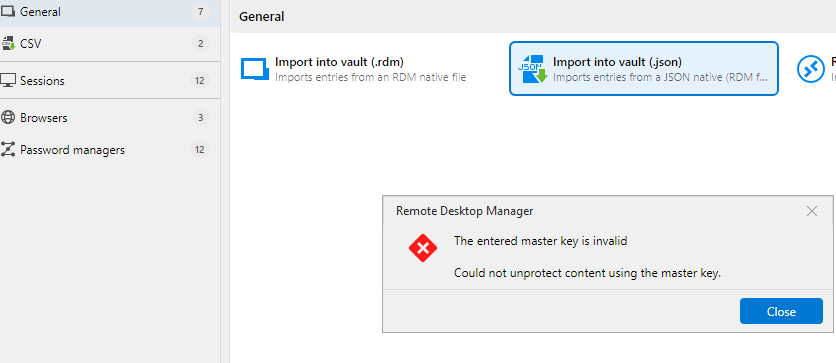
However, when I try to restore the json file via either Hub/Cloud UI or RDM, it reports that the master key is invalid. I copy/pasted the master key string from the backup script into the restore dialogs, so it should be exactly the same.
Joe
Scheduled PAM heartbeats failing
Hi Sayed,
Any eta on when the updated version of the PAM service will be released?
Thanks
Joe
Scheduled PAM heartbeats failing
Sounds good, thanks for the update Sayed
Devolution Cloud Backup
Hi Yevgeniy,
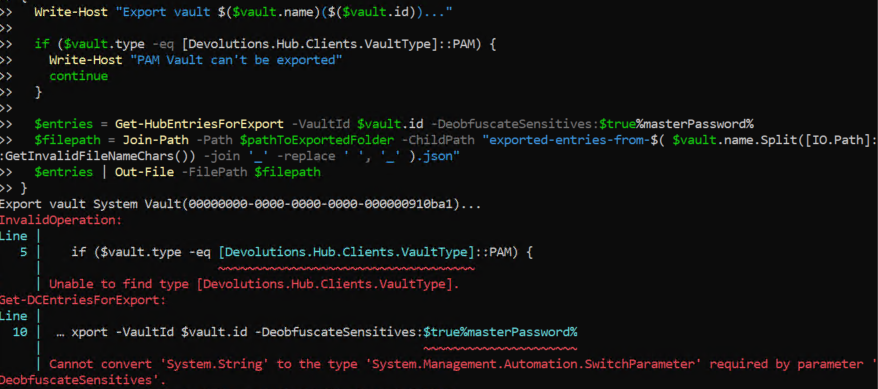
When attempting to use the powershell backup script generated by hub/cloud, it fails to run in PowerShell 7 due to the following:
1) Unable to resolve '[Devolutions.Hub.Clients.VaultType]::PAM'
2) Presence of '%masterPassword%' string appended to the per vault Get-HubEntriesForExport
Is there an additional command needed for '[Devolutions.Hub.Clients.VaultType]::PAM' to resolve properly, and does the 'Get-HubEntriesForExport' support a master password parameter?
Thanks
Joe
Open In Browser button greyed out unless entry set to always connect via gateway
Hi Dominic,
Thanks for looking into this. I'm also not able to reproduce the issue today, perhaps there was an issue with the browser session I was using at the time, as was also concurrently experiencing add/update button greyed out in WebUI for non administrative users.
Please consider the issue resolved, and I'll circle back if it reoccurs.
Joe
Scheduled PAM heartbeats failing
Hi Sayed,
Thanks for your assistance with this. The Hub service was updated to latest version on Friday, and it appears the scheduled heartbeats are still failing. Can you send me a file upload link to provide the log please?
There are errors present saying:
1) '[Error] - Could not connect to Provider', however manually testing the PAM provider is successful.
2) 'Unable to find PAM provider with id <GUID> in vault <GUID>: 403. Trying in global vault.'
Thanks
Joe
Browser based RDP sessions not launching via WebUI
Hi Yevgeniy,
Thanks for assisting with this. Further investigation identified that the issue was being caused by WAF policies in Cloudflare which proxies the gateway traffic.
The browser based sessions were working with the existing WAF policies prior to a recent release, so perhaps something may have changed so that now when a user launches a browser rdp session it immediately upgrades to a websocket without sending any preliminary https requests. The absence of the initial https request to the gateway fqdn from the client inhibits the ability for cloudflare to enforce pre-authentication on the connection before it upgrades to websocket. Is it possible to restore that preliminary https request to the gateway before upgrading to websocket?
Please let me know if you would like any additional info.
Thanks
Joe

add/update button greyed out in WebUI for non administrative users
Hi Dominic,
Thanks for assisting with this. Today after logging back in, the non-administrative user can add/update entries via WebUI without issue. Not sure why it wasn't able to yesterday, there have been no changes to permissions or roles. Will circle back on this thread is the issue reappears.
Joe
Scheduled PAM heartbeats failing
Hello,
The automated scheduled PAM heartbeats for Domain User type entries seem to be failing, even though initiating a manual heartbeat succeeds.
Entry is set to inherit lifecycle from vault root, which is set to custom\Default.
Default lifecycle policy heartbeat schedule set to Default (custom).
Default (custom) Heartbeat schedule set to once per day in PAM system settings.
Please let me know any additional information is required.
Thanks
Joe


Browser based RDP sessions not launching via WebUI
Hello,
RDP sessions via gateway have recently stopped launching using WebUI. The same entries launch successfully using RDM.
Nothing is logged in gateway log file.
Hub/Cloud activity logs report 'Gateway terminated session for entry'.
Happens irrespective of whether gateway is farm member.
Happens for both admins and regular users.
All users enabled on gateway, along with access to all vaults.
All users assigned a PAM license in Hub/Cloud.
Have tried restarting Hub PAM and gateway services.
Not sure what else to try, or if this is a known issue from recent release?
Please let me know if any additional information required.
Thanks
Joe

add/update button greyed out in WebUI for non administrative users
Hello,
When using WebUI, non-administrative users are unable to create or update entries in user (or shared vaults) because button is greyed out.
Same user can create entries successfully using RDM.
Please let me know if you would like any additional info.
Joe

Open In Browser button greyed out unless entry set to always connect via gateway
Hello,
A recent upgrade seems to be inhibited the ability to launch WebUI browser-based RDP sessions unless the entry is set to 'always connect' via a devolutions gateway.
Previously it was possible to set entry to 'connect if unable to ping/port scan', and WebUI would automatically connect via gateway, which accommodated a single entry being used both by RDM and WebUI with or without line of sight to destination system.
Could the previous functionality be restored please? i.e. WebUI automatically interprets 'connect if unable to ping/port scan' as 'always connect' since pings/port scans are not possible via browser.
Please let me know if you would like any additional info.
Thanks
Joe
Enhance performance for "large" vaults
Thats great, thanks Jafran
Pooled Contractor Subscription/License
+1 vote for solution on this front
Unable to update user object account expiry in AD dashboard
Thanks Maxim. Confirmed this is resolved.
Joe
Support for linked account credentials in propagation script parameters
sounds good, thanks Luc
Email alerts for administrators
sounds good, thanks Luc