
dd3fd4
Server backup not running
Turns out it was working fine the entire time, it was just triggering at a weird time :P Thanks for the help!
Server backup not running
Good evening everyone,
I have just moved over to using Devolutions Server (Server 2024.2.10.0) and RDM (2024.2.20.0 64bit) mainly for having backup codes for MFA.
So far everything is working fine. Moved the database from MsSQL to Dev Server, setup users and it is working great. However, I cannot get automated backups to work.
This is what I have in options:
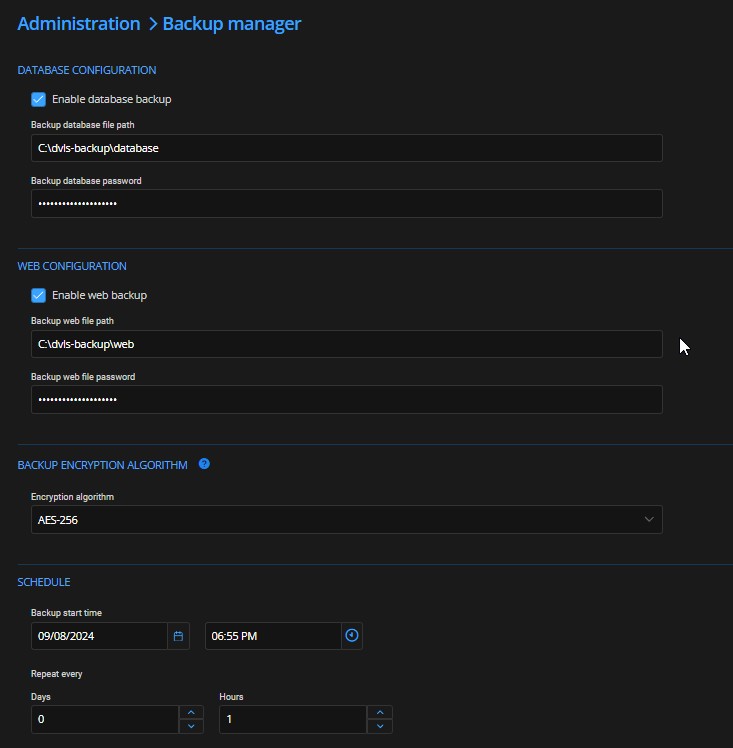
(Note: Repeat every 1 hour is just for testing. When working, it will only be 1 day).
Here is the permissions on the folder:

(Note: Everyone permission is just for testing. Once working, I will lock it down)
The Scheaduler service is running using my user account.
When I set the backup to run, the time comes and passes and nothing comes up in the folder. I set logging debug but looking at the log, there is nothing there about the backup.
Is there a specific log I should be looking at?
Copy Username and Password not working
Ok, narrowed it down. It only happened if I was connected to one computer. When I installed RDM on that machine and did a clipboard debug, it turns out AnyDesk on that machine was interfering. Removed it (Not really needed, just as a backup) and boom, working fine now :) Thanks heaps for the help.
Copy Username and Password not working
Ok, this is just weird. I do not understand it but it is working again. There must be something hijacking the clipboard. Thanks for you help :)
Copy Username and Password not working
Ok, found a fix but it is bloody weird.
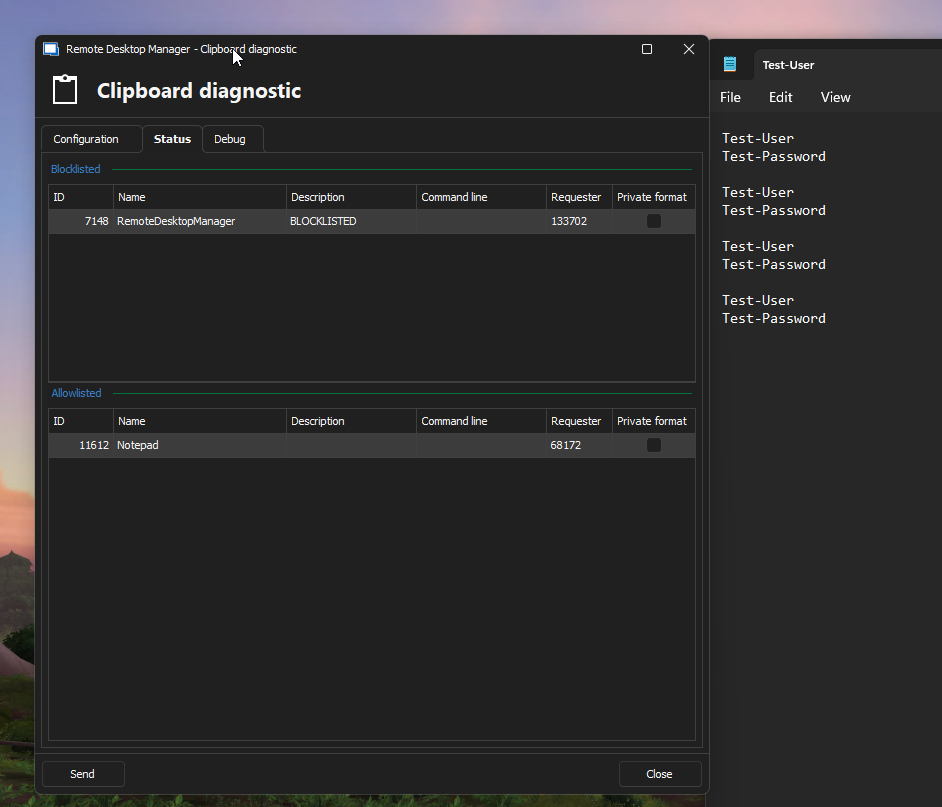
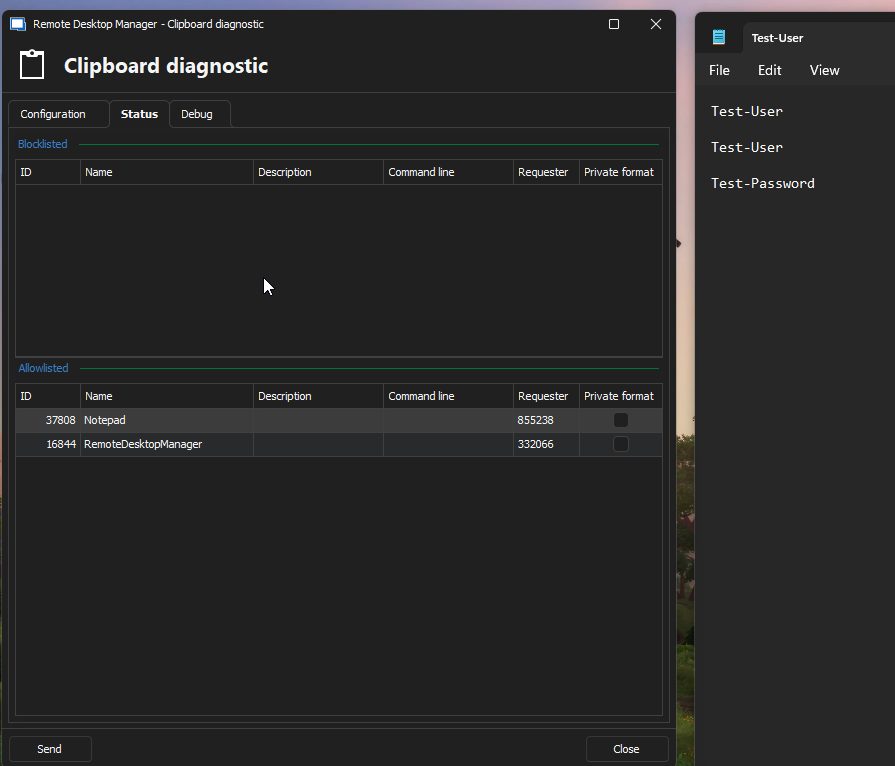
Looking at the Clipboard Diagnostic, there are only 2 applications accessing the clipboard. One was Notepad (Which I was pasting into) and the other was RDM itself. If I block RDM, it works perfectly fine so it looks like RDM is interfering with itself.
Screenshots attached
Working:
Not working:
Block:

Copy Username and Password not working
Running RDM 2024.2.20.0 64-Bit and a MsSQL database.
Up until a few versions ago, if I select an session > right click and select "Copy Username and Password", your next two pastes will be the username followed by the password.
Now, when doing it, I get nothing. If I copy the username and password separately, they work fine. But when I use the combined "Copy Username and Password", I mostly get nothing (Sometimes I get just the password but most of the time it is nothing).
The test session I am using to test it does have a username and password.
Any idea what is going on?
Apple School Manager showing up in a foreign language
Thank you :) I am glad I wasn't going insane :P
Apple School Manager showing up in a foreign language
Could you please specify the version of RDM you are currently using?
We are using RDM 2024.1.30.0 64-bit
What type of data source are you using?
Microsoft SQL Server Database
Was this working without issues for you previously with the Web Browser set to Google Chrome?
I have used it in the past this way yes, but I only just noticed it so it could have been from a couple of upgrades ago. We only log into this site maybe once a month at most.
Apple School Manager showing up in a foreign language
Good morning everyone,
We are using RDM at our school and we use ASM (Apple School Manager) to purchase apps for our Apple devices. ASM is a website located here https://school.apple.com/
When I create a session using the Google Chrome session type, instead of English it is in some other language (See attached screeenshot). If I go into Google Chrome properly and go there it is fine, it just seems to be via RDM. Interestingly, if I change the "Web Browser" selection to Edge, it works fine.
RDM is set to English. They are both going through the same proxy. I am not sure what is going on.
Just an oddity :)
Thanks

Database not asking to update
If I go into the Data Source and go to Upgrade and click on Upgrade Schema, it does nothing. No alerts or prompts
Database not asking to update
I just upgraded to RDM 2023.1.25.0 64-bit and noticed the out of my 2 databases, one asked if I want to update (Using Microsoft SQL) and the other didn't (Using MariaDB).
This is a bit of a problem as I use both databases on my iPhone and when I go to the MsSQL database it works fine but the second says it cannot connect.
Is there anyway I can check the database versions in RDM? I believe when the MsSQL one updated it said 898.
Raspberry Pi Raspbian VNC and RDM
I ended up changing the auth method from UNIX password to VNC Password. Then it works just fine.
Raspberry Pi Raspbian VNC and RDM
Hey David,
I just updated to the latest (2022.1.17.0) and when I try using UltraVNC, I get:
"No supported authentication methods"
VNC on the server is set to unix authentication.
Raspberry Pi Raspbian VNC and RDM
Good afternoon everyone,
I am having a hard time trying to VNC into a Raspbian instance from RDM.
When I use VNC Viewer from RealVNC, when I go to the IP, it asks for a username and password. I enter the username and password and boom, I am in.
With RDM, it is a different story. I setup the session using the default VNC application, and I can only find a place for the password. So I enter the password and when I try to connect, it says "Unable to connect to host [ IP Address ]" (Note it shows the correct IP address). I cannot find anywhere to enter a username.
I tried setting the VNC application to RealVNC and it made no difference.
Is there any way to get this working?
Thanks
Cisco SSH Post Login Command Not Running
Awesome :) Thanks
Cisco SSH Post Login Command Not Running
Good evening everyone,
We have a Cisco switch we are accessing via SSH. On this session, we have a post login command that runs to show us some ports. When we login using RDM on Windows, it works perfectly as expected. However, when we run the same session in RDM on IOS, the command does not run. Is this a limitation of the IOS version?
Thanks
Dark Theme Cannot read text in description
Awesome, thanks :) I'll do that :)
Dark Theme Cannot read text in description

If I go to text, it works as expected but it also deletes any text I have in the field.
Dark Theme Cannot read text in description
I should point out that it is only happening on the web page session type, SSH and RDP work fine.
Dark Theme Cannot read text in description
When I do that, it works fine. However, when I add my data source (MySQL/MariaDB), it goes back to being black again so it must be something in my data source.
Dark Theme Cannot read text in description
Good morning Christine,
We are using Ent 2021.2.18.0 but it was happening in 2121.2.16.0 as well. Tried reset layout, made no difference.
Thanks
Dark Theme Cannot read text in description
Good morning everyone,
I am using Dark Theme and when I go to description inside a session, the text is black making it next to impossible to read. I have attached a photo of what I mean.
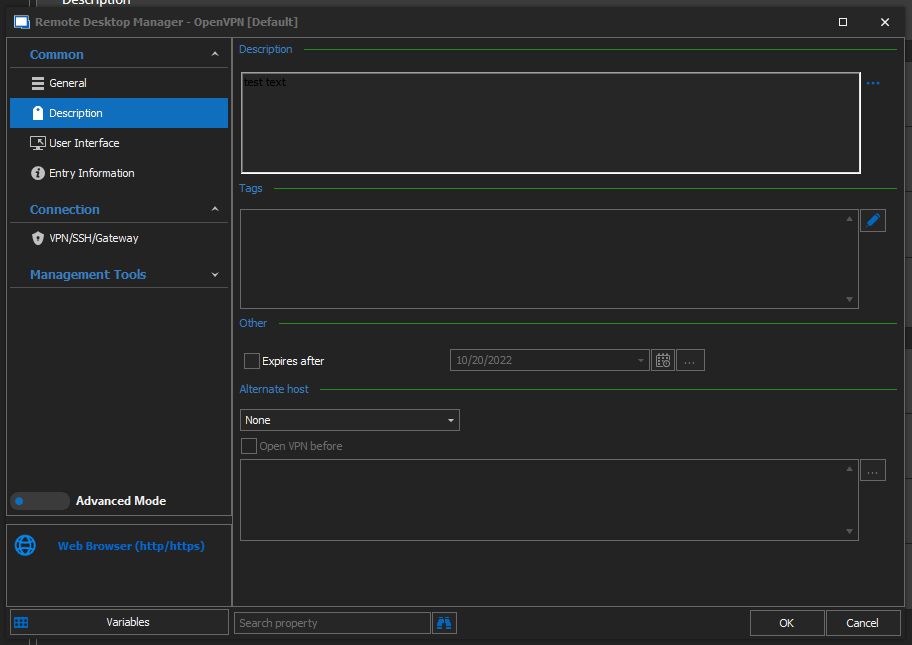
Thanks
Cannot connect to RDP or SSH from IOS RDM
Figured it out. I had to go to "Settings" > "RDM" and the slider for "Local Network" was off. Turned it back on and Poof, working again
Thanks heaps for all your help.
Cannot connect to RDP or SSH from IOS RDM
Damn, ok then.
I did work ages ago (Like a few months back), but then I kinda stopped using it and it now doesn't work.
It comes back saying "Could not reach". When I use an external app on my iPhone (Network Tools"), ping is successful.
No change.
Sure, where would you like it sent to?
Cannot connect to RDP or SSH from IOS RDM
In addition: The version of RDM on IOS I have is 2021.2.7 and RDM on Windows is 2021.2.16.0 64Bit.
Edit:
And I have removed the app from my phone and re-downloaded it and it has made no difference.
Edit 2:
If I use the Microsoft RDP app, it works fine.