
alalexiev
Batch Edit options in RDM 2025.3.2.3 x64 on Nobara 43 (actually Fedora)
Thank you, sir!
Batch Edit options in RDM 2025.3.2.3 x64 on Nobara 43 (actually Fedora)
Hi Gabriel,
Yes, that's the one in question.
It's very helpful when switching environments Servers/Network/etc
Greets,
Alex
Batch Edit options in RDM 2025.3.2.3 x64 on Nobara 43 (actually Fedora)
Thank you for the prompt reply, guys!
Since you mentioned ... it looks like the text highlighting is not in the Linux version as well.
You know, the RDM flexibility is what is making it so good, multi-functional client. Please keep it on Linux the same "swiss army knife" as it is on Windows!
With the last Windows 11 weird moves, many professionals will move completely away from the Microsoft OS and RDM could be "The Client" for many them ....
Greets,
Alex
Batch Edit options in RDM 2025.3.2.3 x64 on Nobara 43 (actually Fedora)
Hi guys,
I gave a try to the Free edition on Linux and it seems like most of the Batch Edit options are unavailable (greyed out)

Is that expected or I'm missing something?
Thank you!
SSH Hardening | RDM SSH Login failed
Thank you, Min!
Exactly as you said - the upgrade added the additional algorithms in the crypto stack:
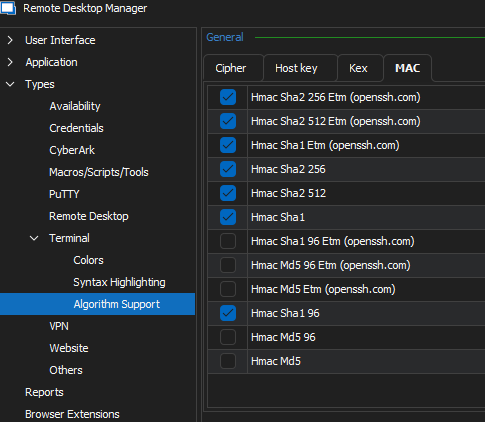
Greets,
Alex
SSH Hardening | RDM SSH Login failed
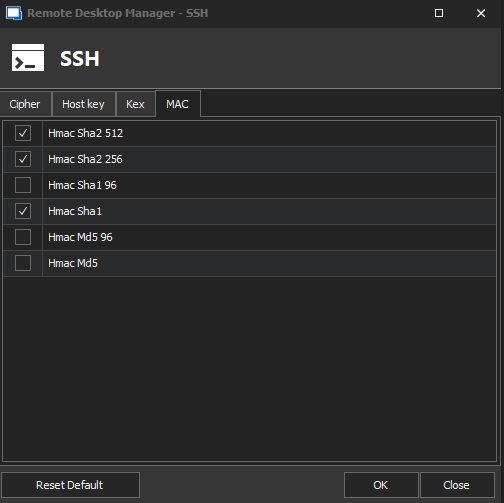
That's everything I can see... should I add those in some way via PowerShell or something else?
SSH Hardening | RDM SSH Login failed
Hi guys,
I see that's an old topic, but I found it when looking for the same issue.
The RDM version is 2021.2.27.0 (64 bit) Windows and after hardening an OpenGear box to comply with FIPS the SSH attempt is producing SSH_FAIL_NO_MATCH error:
___________
No match for mac algorithm (client to server):
Client sent: hmac-sha2-512,hmac-sha2-256,hmac-sha1
Server sent: umac-128-etm@openssh.com,hmac-sha2-256-etm@openssh.com,hmac-sha2-512-etm@openssh.com
To configure algorithm support, see
https://api.devolutions.net/redirection/176c987f-5624-471d-806d-8853d5cf0701
___________
The session is configured according RDM FIPS related documentation: https://docs.devolutions.net/kb/remote-desktop-manager/how-to-articles/ssh-configuration-rdm-fips140-2-compliance/
Is that because the ETM is still not supported?
Thank you in advance,
Alex
Plug-in incompatibility with KeePass 2.48.1
Hi guys,
As you can see in the bellow attached screenshots, the RDM plug-in for KeePass is not "happy" ;-)
Greets,
Alex


Can't hide useless toolbar
Some additional information about this BUG side effects.
Since the default behavior for the new parameter "Enable remote monitoring" (in General>Terminal>Advanced) is 'Yes' for any existing 'SSH Shell' sessions type, two annoying things will happen:
for Cisco devices it will crash, because there are no way the client to establish monitoring channel to the IOS/IOS-XE/IOS-XR or NXOS
for Linux host, the additional status bar, added on the bottom, will overlap the last terminal window line (most likely incorrect sizing)
IMHO, even when the BUG is corrected, the default value for that setting should be 'No'
Greets,
Alex
Windows Subsystem for LINUX
Hi guys,
It seems like nobody shared the way to access the WSL environment from RDM.
I'll share my way:

Greets,
Alex
Cisco IOS / IOS-XE / IOS-XR Syntax Highlighting
It's my pleasure.
That's the polished highlighting for a DARK theme.
Enjoy
Cisco IOS / IOS-XE / IOS-XR Syntax Highlighting
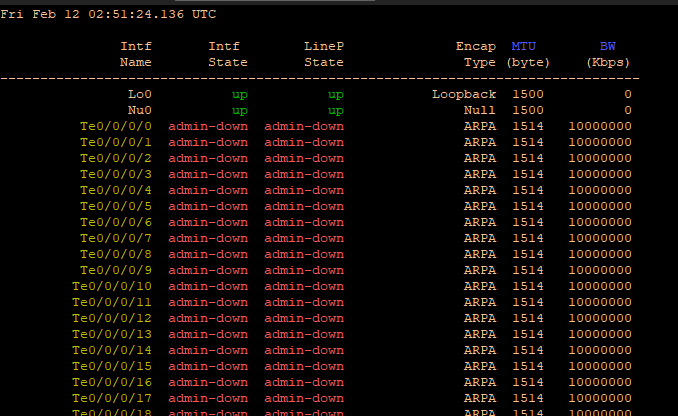
It's an initial version, but it can serve pretty well:
Thank you for the great product!