SSH Hardening | RDM SSH Login failed

Hi,
we hardening our SSH Servers, but after that, RDM Login failed.
testing/hardening:
https://www.sshaudit.com/
https://www.sshaudit.com/hardening_guides.html#ubuntu_18_04_lts
Our SSH Settings:
KexAlgorithms diffie-hellman-group18-sha512,diffie-hellman-group14-sha256,curve25519-sha256@libssh.org,diffie-hellman-group16-sha512
Ciphers chacha20-poly1305@openssh.com,aes256-gcm@openssh.com,aes128-gcm@openssh.com,aes256-ctr,aes192-ctr,aes128-ctr
MACs hmac-sha2-256-etm@openssh.com,hmac-sha2-512-etm@openssh.com,umac-128-etm@openssh.com
Login is possible with putty > 0.63, also Mobaxterm ~ V9
Regards
Sebastian
All Comments (17)
Hello,
What version of RDM are you running?
If it's RDM 2019.x, have you enabled the Legacy Terminal option in File -> Options?
Best regards,
Jeff Dagenais
Hi Jean,
Version: 2019.1.35.0 64bit (Windows)
The error occured, with and without the legacy Terminal.
SSH Log:
Unable to negotiate with XX.XX.XX.XX port 5943: no matching key exchange method found. Their offer: diffie-hellman-group-exchange-sha256,diffie-hellman-group-exchange-sha1,diffie-hellman-group14-sha1,diffie-hellman-group1-sha1,diffie-hellman-group-exchange-sha256,diffie-hellman-group-exchange-sha1 [preauth]
Best Regards
Sebastian
Hello,
With Legacy terminal Uncheck, could you save Verbose and Log by following the help topic below. I will send it to the engineering department.
https://devolutions.atlassian.net/servicedesk/customer/portal/1/topic/dddd3564-78f7-4943-941e-45d9117806be/article/608731251
Just asking but have you update in RDM your RSA or ED25519 SSH private key, after hardening the SSH server?
Best regards,
David Grandolfo
Hi David,
i dont have access to the atlassian link.
Verbose mode enabled and write a Log File:
[08.07.2019 15:38:58] Starting SSH, verbose level: 2
[08.07.2019 15:38:58] Setting up connection
[08.07.2019 15:38:58] Connecting as root
[08.07.2019 15:38:58] SSH banner: SSH-2.0-OpenSSH_7.4p1 Debian-10+deb9u6
[08.07.2019 15:38:58] Sending kex init
[08.07.2019 15:38:58] Received kex init
[08.07.2019 15:38:58] No match for mac algorithm (client to server):
Client sent: hmac-sha2-512,hmac-sha2-256,hmac-sha1-96,hmac-sha1,hmac-md5-96,hmac-md5
Server sent: hmac-sha2-256-etm@openssh.com,hmac-sha2-512-etm@openssh.com,umac-128-etm@openssh.com
[08.07.2019 15:38:58] Disconnection in progress
[08.07.2019 15:38:58] Disconnecting
i think the Problem is ETM ( https://tools.ietf.org/html/rfc7366 )
Regards
Sebastian
Hi,
After reviewing the log with the engineering department, ETM is not supported in RDM.
But, we also see that we have an issue with Ciphers chacha poly. Fixing this issue will also fixe your issue.
When Ciphers chacha poly is used, no MACs verification is performed.
A ticket has been open with the engineering department regarding this issue.
Best regards,
David Grandolfo
Thank you :)
Best regards
Sebastian
We get news from the engineering department and the fix will be in RDM 2019.1.38.0.
Best regards,
David Grandolfo
sorry, RDM 2019.1.38.0. dont fix my Problem :( I can still connect with putty / mobaxterm but not with RDM 2019.1.38.0 (64bit)
Thanks for the test, could you enable Logs and Verbose of the SSH Session and us the logs at ticket@devolutions.net.
Best regards,
David Grandolfo
after some more tests, i see the Problem is fixed in the new Terminal, but not in the legacy Terminal! It is like expected?
Hi,
Glad that the issue is solved, we fix the new integration of SSH Shell. The legacy terminal will be removed in futur version of RDM and this is why we work really hard to add features and solve every issue in our new integration.
Best regards,
David Grandolfo
Hi guys,
I see that's an old topic, but I found it when looking for the same issue.
The RDM version is 2021.2.27.0 (64 bit) Windows and after hardening an OpenGear box to comply with FIPS the SSH attempt is producing SSH_FAIL_NO_MATCH error:
___________
No match for mac algorithm (client to server):
Client sent: hmac-sha2-512,hmac-sha2-256,hmac-sha1
Server sent: umac-128-etm@openssh.com,hmac-sha2-256-etm@openssh.com,hmac-sha2-512-etm@openssh.com
To configure algorithm support, see
https://api.devolutions.net/redirection/176c987f-5624-471d-806d-8853d5cf0701
___________
The session is configured according RDM FIPS related documentation: https://docs.devolutions.net/kb/remote-desktop-manager/how-to-articles/ssh-configuration-rdm-fips140-2-compliance/
Is that because the ETM is still not supported?
Thank you in advance,
Alex
Hello Alex,
Could you please check the MAC tab?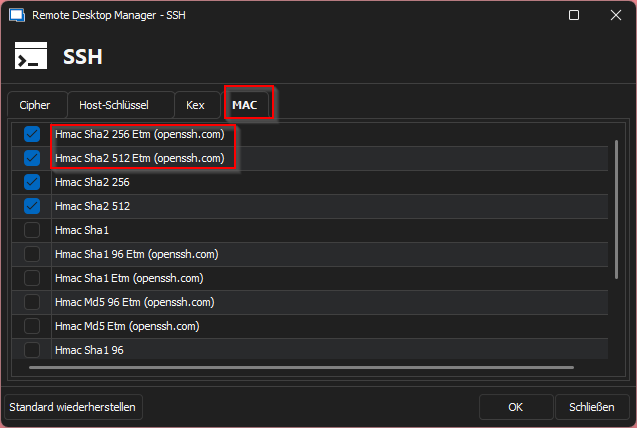
Regards,
Min
4d3670b7-ba28-4f82-a56a-ea8e638feb0c.png
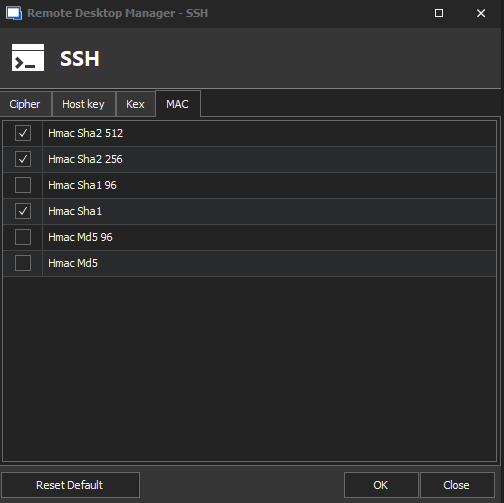
That's everything I can see... should I add those in some way via PowerShell or something else?
bea42c84-ffbd-4cb3-858d-80af9e0259a6.png
Hello Alex,
No, I would suggest to update your RDM version - my screenshot was taken from version 2023.3.39.0.
It is also possible to try the portable version.
Regards,
Min
Thank you, Min!
Exactly as you said - the upgrade added the additional algorithms in the crypto stack: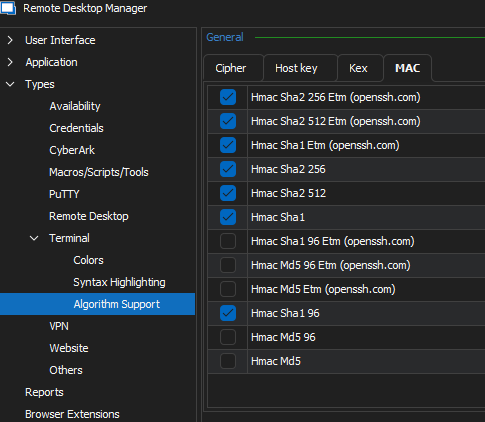
Greets,
Alex
41ec9a93-3f48-4d08-bfc2-e08073da3f1f.png
Hello Alex,
Great, thank you for your feedback! 👍
Regards,
Min