
Richard Boisvert
Kubernetes Deployment Documentation
Hello,
Thanks for the screenshots, your guess is spot on. The issue is that your AD certificate is signed by a private/internal CA, and the container doesn't trust that CA by default. This causes the LDAPS connection to fail.
We are looking into adding a way to inject a custom CA cert bundle via the container entrypoint configuration, which would allow you to register your internal CA on the fly. We will keep you posted once confirmed.
Best regards,
External Secrets Operator Integration
Hello,
Small update, we also added name support for the entries, vault, and paths in this PR: https://github.com/external-secrets/external-secrets/pull/6099
Please note it will require DVLS version 2026.1.x
Best regards,
Kubernetes Deployment Documentation
Hello Derek,
Glad to hear the deployment worked! Could you clarify which AD authentication method you're using: LDAP or Kerberos/NTLM?
LDAP-based authentication is supported cross-platform so it should be working. Windows-native auth (Kerberos/NTLM) however is not supported in Linux environments, as it requires Windows-specific infrastructure.
Best regards,
Kubernetes Deployment Documentation
Hello Derek,
Yes, you can run multiple replicas. If you have emails configured, however , each instance will send it at the same time, so you will receive multiple emails. That is the only issue we noticed so far with running more than 1 replica.
Best regards,
Kubernetes Deployment Documentation
Hello @derek06,
Great news! The Helm chart for Devolutions Server (DVLS) is now publicly available.
Here are the relevant links:
- Helm chart repository: https://github.com/Devolutions/devolutions-server-helm
- Documentation: https://github.com/Devolutions/devolutions-server-helm/blob/master/chart/README.md
- Helm chart registry: https://github.com/Devolutions/helm-charts
We migrated our internal DVLS deployment to this chart and it has been running well. The chart version matches the DVLS version, and new chart releases will be published automatically when a new DVLS version comes out.
On the networking side, the chart currently uses Gateway API with Istio, as that is what we run internally (rip ingress-nginx).
If you run into any issues or have questions during your deployment, feel free to reach out.
Best regards,
Kubernetes Deployment Documentation
Hello @derek06,
Thank you for the request. I am part of the DevOps team at Devolutions and I helped write the documentation for the Docker deployment.
We have been running DVLS internally on Kubernetes for the last few months using a Helm chart, and it has been working well. We are looking into making this chart publicly available along with supporting documentation. I will create a ticket to track this request.
In the meantime, if you have specific questions about running DVLS on Kubernetes, feel free to reach out and I would be happy to help.
Best regards,
External Secrets Operator Integration
Hello,
The release 1.3.0 https://github.com/external-secrets/external-secrets/releases/tag/v1.3.0 contains the DVLS support. Let us know if you have any issues!
Best regards,
External Secrets Operator Integration
Hello @csudderth,
A PR has been submitted to add support to DVLS to external-secrets: https://github.com/external-secrets/external-secrets/pull/5712.
Looking at other similar PRs, it takes about 1.5 months before they are merged, however.
Best regards,
External Secrets Operator Integration
Hello,
We have opened an issue with external-secret for your request, if ever you want to follow it: https://github.com/external-secrets/external-secrets/issues/5682
I will work on implementing it later this week, we will keep you posted.
Best regards,
Winget source needs updating
Hello,
The 2025.3.22 version of RDM should now be available; it was just approved on the winget end.
We had an issue with our template, which we fixed, so the new releases should be all set.
Best regards,
Winget Version
Hello,
The 2025.3.22 version of RDM should now be available; it was just approved on the winget end.
We had an issue with our template, which we fixed, so the new releases should be all set.
Best regards,
HAProxy Web site works, but RDM can't connect
Hello Lars,
Here is the documentation relating to the X-Forwarded-For and more general information: https://docs.devolutions.net/kb/devolutions-server/knowledge-base/deploy-high-availability-load-balanced-env/#preparation
Would it be possible to show the error you are encountering? Could you also go Help > Profiler, go to the debug tab, set the level to 2049, and try to connect to the DVLS data source afterward? You can then post (or send it to service@devolutions.net) the content of the profiler - https://docs.devolutions.net/kb/remote-desktop-manager/troubleshooting-articles/debugging/#method-ad-hoc-debugging
Best regards,
Powershell command to Synchronize PAM account
Hello,
It is not possible to synchronize the PAM account with a cmdlet, but you can automate a checkout and check-in request after the account is added. Once completed, the account(s) will be synchronized. You can also use the $Response if you want to validate anything else at the same time.
$Response = Invoke-DSPamCheckout -PamCredentialID '92e1d27f-6e7b-4c62-86da-a04fc22603c2'  -Verbose
$CheckoutInfo = $Response.Data.CheckoutInfo
Invoke-DSPamCheckin $CheckoutInfo
Best regards,
Upgrade from 2023.2.11 to 2023.3.13 failed with access denied
Hello,
You can try the following:
Verify that the Devolutions Scheduler service (services.msc) is stopped - most common issue
If it was stopped already, close IIS in an elevated cmd with -
iisreset /stopIf the upgrade still fails, verify what is locking the file with https://learn.microsoft.com/en-us/sysinternals/downloads/process-explorer
Please note that if you did the second step, you will need to do an issreset /start after the upgrade.
Best regards,
Upgrade from 2023.2.11 to 2023.3.13 failed with access denied
Hello Lars,
This usually occurs when the file is locked, for example if multiple users are logged to the machine. Simply rebooting the server should fix the issue.
As for your question, the console will use the context of your user, unless you did a run as when opening the console.
Best regards,
Entry not deleting from Data Source
Hello,
I'm glad it fixed the issue; thank you for letting me know.
Best regards,
Entry not deleting from Data Source
Hello,
Could you try to run the following query in Powershell to see if more than 1 result is returned?
$sessions = Get-RDMSession | where {$_.group -like "123ABCD*"}
$sessions.count
If only one result is returned, you can try to delete the entry with the module:
Remove-RDMSession $sessions -Refresh
Please note you will need to set the PowerShell version to 7 - https://docs.devolutions.net/kb/devolutions-powershell/remote-desktop-manager/change-default-powershell-version/ first, if you have not done so already.
You can then launch it Tools > PowerShell (RDM CmdLet):
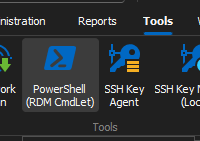
It will install the Devolutions.PowerShell module automatically if needed.
Best regards,
Log off all servers that i have opened (RDP)
Hello,
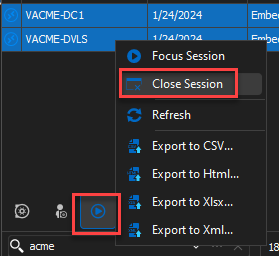
You can go to the Opened sessions tab, select the sessions, or all of them, right-click and close the sessions:
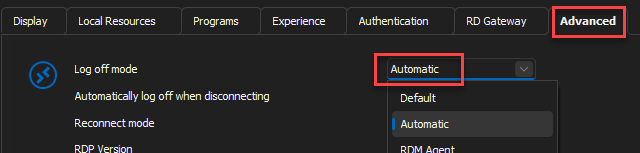
As for logging off the sessions, you can set the "Log off mode", under the advanced tab of the entries, to Automatic:
Best regards,
sync from Active Directory - All computers are treated as Windows (RDP)
Hello,
You can use the following filter in the AD synchronizer to exclude the Windows machine:
!(operatingSystem=*Windows*)You can the apply an SSH template (second tab) to import the machine as SSH entries: https://docs.devolutions.net/rdm/windows/commands/file/templates/
For more details: https://forum.devolutions.net/topics/37994/mixed-environment-windowrhel--how-to-configure-rdm-sync-jobs-to-automa#166122
Best regards,
RESOLVED: Unable to Remove 2FA from Local Data Source
Hello James,
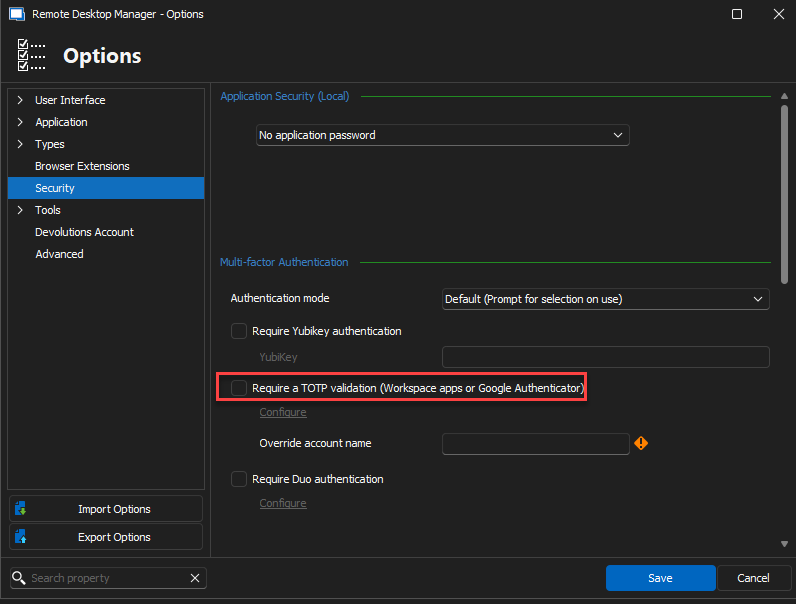
The 2FA may be configured at the RDM level. Could you go to File > Options > Security and verify that the "Required a TOTP validation" option is not checked?
Best regards,
Entry not deleting from Data Source
Hello Chuck,
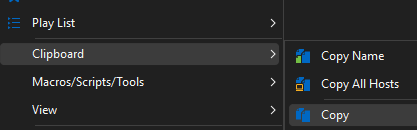
Would it be possible to do a right click on the folder, go to Clipboard > Copy
Go to the preview tab and post the contents here:
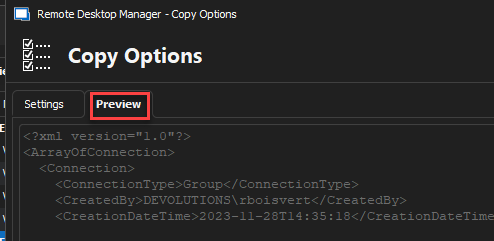
Quickly validate there is no sensitive information before posting it! If you prefer, you can send it to service@devolutions.net
Best regards,
securing Devolutions Sever Authentication
Hello Guenther,
Both can be accomplished in Administration > Conditional Access Policies - https://docs.devolutions.net/server/web-interface/administration/configuration/server-settings/security/conditional-access-policies/
You can put IP restrictions in place and require the MFA for all accounts or only certain ones.
Let us know if you have any questions or issues!
Best regards,
Entry not deleting from Data Source
Hello Chuck,
Sorry for the confusion; I assumed your signature referred to your data source type. Could you clarify what type of data source you are using?
Best regards,
Entry not deleting from Data Source
Hello Chuck,
Could you try to go directly on the web interface of your Hub Personal - https://hub.devolutions.com/ - and see if deleting the entry works from there?
Best regards,
Entry not deleting from Data Source
Hello Chuck,
Would you mind accessing the folder's properties and making some changes such as adding a number at the end of its name, saving the changes, and then attempting to delete it again? It's possible that the folder may be virtual, and by making these changes you can convert it into a "real" folder, which can be removed afterward.
Best regards,