Entry not deleting from Data Source

Good morning support staff.
I have been fighting with an entry for a week now to try and delete. I have the following "ABCD" Entry: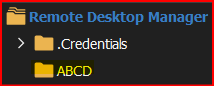
I simply right click and select delete: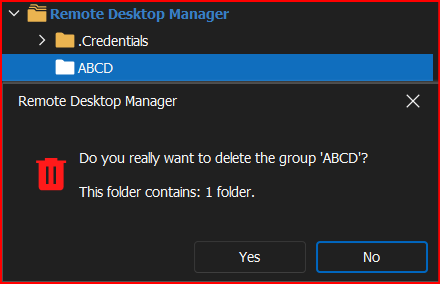
After clicking Yes, the entry still exists: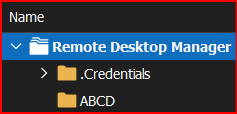
Is there anyway to "force" delete the entry, other than exporting the Vault, deleting all current 800+ entries, then reimporting the vault minus that entry?
Thanks!
--- Chuck
Overgaard, AZ (-7 MST / Zulu Year-Round)
RDM Version: 2026.3.2.0 64-Bit - Free
990a1c2c-3aea-4d70-8e98-bfd662011f4e.png
218cfb2d-70d3-404f-b8d1-f1f8de9d0b96.png
5ce21036-43b1-496d-b0f0-c7f78a4774b3.png
All Comments (11)
Hello Chuck,
Would you mind accessing the folder's properties and making some changes such as adding a number at the end of its name, saving the changes, and then attempting to delete it again? It's possible that the folder may be virtual, and by making these changes you can convert it into a "real" folder, which can be removed afterward.
Best regards,
Richard Boisvert
Hello Chuck,
Would you mind accessing the folder's properties and making some changes such as adding a number at the end of its name, saving the changes, and then attempting to delete it again? It's possible that the folder may be virtual, and by making these changes you can convert it into a "real" folder, which can be removed afterward.
Best regards,
Good afternoon, Richard.
That did not resolve either: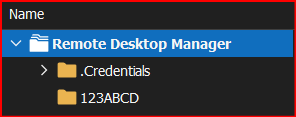
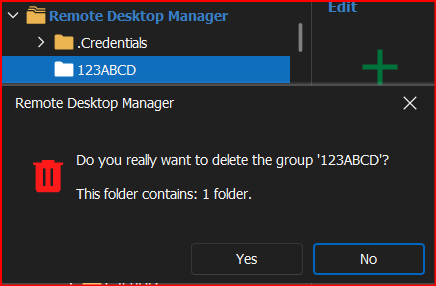
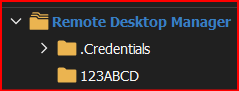
--- Chuck
Overgaard, AZ (-7 MST / Zulu Year-Round)
RDM Version: 2026.3.2.0 64-Bit - Free
133a2603-10be-473a-b9f2-796d38f1dc03.png
9886a1c8-5f37-4959-9d98-abda0f9bb7f7.png
95f9f872-df5d-42f1-97dc-e42244f8536a.png
Hello Chuck,
Could you try to go directly on the web interface of your Hub Personal - https://hub.devolutions.com/ - and see if deleting the entry works from there?
Best regards,
Richard Boisvert
Hello Chuck,
Could you try to go directly on the web interface of your Hub Personal - https://hub.devolutions.com/ - and see if deleting the entry works from there?
Best regards,
Richard,
I don't have my Personal Hub integrated with RDM, so that folder doesn't exist.
--- Chuck
Overgaard, AZ (-7 MST / Zulu Year-Round)
RDM Version: 2026.3.2.0 64-Bit - Free
Hello Chuck,
Sorry for the confusion; I assumed your signature referred to your data source type. Could you clarify what type of data source you are using?
Best regards,
Richard Boisvert
Hello Chuck,
Sorry for the confusion; I assumed your signature referred to your data source type. Could you clarify what type of data source you are using?
Best regards,
The standard built-in SQLlite I believe it is?
--- Chuck
Overgaard, AZ (-7 MST / Zulu Year-Round)
RDM Version: 2026.3.2.0 64-Bit - Free
Hello Chuck,
Would it be possible to do a right click on the folder, go to Clipboard > Copy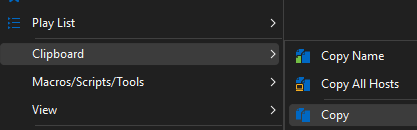
Go to the preview tab and post the contents here: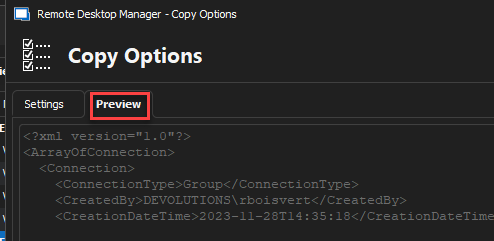
Quickly validate there is no sensitive information before posting it! If you prefer, you can send it to service@devolutions.net
Best regards,
Richard Boisvert
6b84b959-837e-4cd1-bdbe-21b647e4e485.png
7415e243-bda3-42ba-8518-d36537ed1139.png
Hello Chuck,
Would it be possible to do a right click on the folder, go to Clipboard > Copy
Go to the preview tab and post the contents here:
Quickly validate there is no sensitive information before posting it! If you prefer, you can send it to service@devolutions.net
Best regards,
<?xml version="1.0"?>
<ArrayOfConnection>
<Connection>
<ConnectionType>Group</ConnectionType>
<Group>123ABCD</Group>
<ID>058aebeb-3bfd-4180-9852-00bfd91a2a06</ID>
<Name>123ABCD</Name>
</Connection>
</ArrayOfConnection>
--- Chuck
Overgaard, AZ (-7 MST / Zulu Year-Round)
RDM Version: 2026.3.2.0 64-Bit - Free
Hello,
Could you try to run the following query in Powershell to see if more than 1 result is returned?
$sessions = Get-RDMSession | where {$_.group -like "123ABCD*"}
$sessions.count
If only one result is returned, you can try to delete the entry with the module:
Remove-RDMSession $sessions -Refresh

Please note you will need to set the PowerShell version to 7 - https://docs.devolutions.net/kb/devolutions-powershell/remote-desktop-manager/change-default-powershell-version/ first, if you have not done so already.
You can then launch it Tools > PowerShell (RDM CmdLet):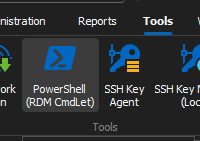
It will install the Devolutions.PowerShell module automatically if needed.
Best regards,
Richard Boisvert
6a2aec0a-9457-463e-a349-d57c010a050d.png
05410d61-d8f1-4b6d-89d8-c24c8372b96b.png
Good afternoon.
The 1st powershell command resulted in three returns.
None of which show any connection to that 123ABCD folder, so I went ahead and deleted them. They are easily re-createable.
Upon completion, after exiting and restarting RDM, the ghost entry is now gone.
Thank you!
--- Chuck
Overgaard, AZ (-7 MST / Zulu Year-Round)
RDM Version: 2026.3.2.0 64-Bit - Free
Hello,
I'm glad it fixed the issue; thank you for letting me know.
Best regards,
Richard Boisvert