HAProxy Web site works, but RDM can't connect

Hi
I have changed from pfSense to OPNSense, and therefor had to setup my HAProxy setup once again.
I had no issues using HAProxy on my pfSense box, but with OPNSense RDM fails to get /.wellknowid or something and the says datasource offline.
Unfortunately I didn't setup DVLS strait away, so I delete the pfSense before, so can't compare setup.
I'm fairly sure, I have read somewhere that somthing had to be enabled, I remember it as the X-Forwarded-For header but I have enabled this and it is still doing the same.
My DVLS installation is the second newest, but I don't think it is version specific, so I'm not checking :) RDM is .39
Can anyone give a tip as to what I might have to change to get it working?
Regards Lars.
Remote Desktop Manager connected with Devolutions Server running newest versions.
------------------------Signature------------------------
Sorry if any of above sounds harsh or provoking, it is NOT meant as such, but I have Asperger's and don't always know.
My intentions is always to be friendly.
-------------------------------------------------------------
All Comments (4)
Hello Lars,
Here is the documentation relating to the X-Forwarded-For and more general information: https://docs.devolutions.net/kb/devolutions-server/knowledge-base/deploy-high-availability-load-balanced-env/#preparation
Would it be possible to show the error you are encountering? Could you also go Help > Profiler, go to the debug tab, set the level to 2049, and try to connect to the DVLS data source afterward? You can then post (or send it to service@devolutions.net) the content of the profiler - https://docs.devolutions.net/kb/remote-desktop-manager/troubleshooting-articles/debugging/#method-ad-hoc-debugging
Best regards,
Richard Boisvert
I will take a look on the documentation you provided.
The error I see is this: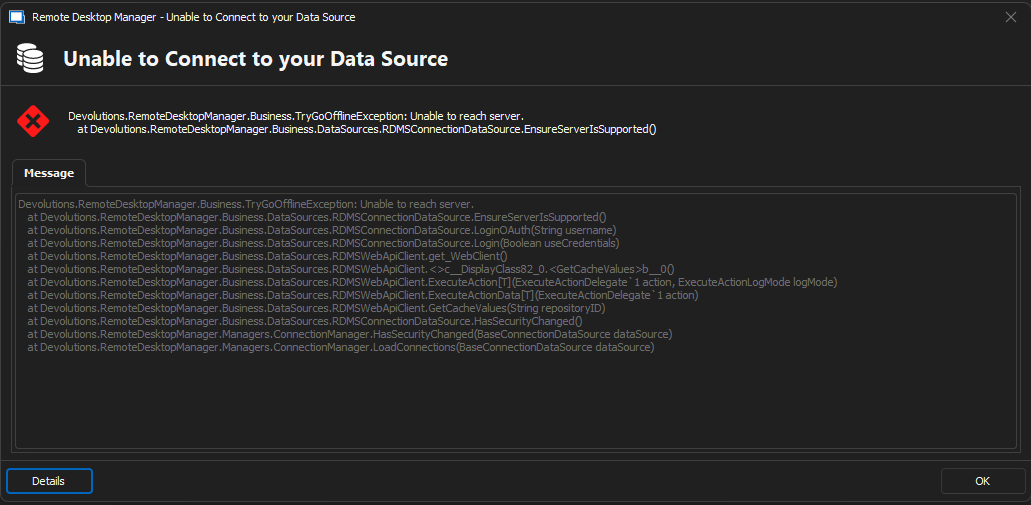
The error shown in the debug profiler:
Refresh Widget Layout - Failed to get user ID
Refresh Widget Layout - Failed to get user ID
Refresh Widget Layout - Failed to get user ID
Refresh Widget Layout - Failed to get user ID
Remote Desktop Manager connected with Devolutions Server running newest versions.
------------------------Signature------------------------
Sorry if any of above sounds harsh or provoking, it is NOT meant as such, but I have Asperger's and don't always know.
My intentions is always to be friendly.
-------------------------------------------------------------
b505cef1-82da-47d8-8100-5c8708ddf7f3.png
Hmm
I changed a bunch of setting, which broke the the website also, and then I change some other settings, and now it works, and RDM can now connect to my DVLS server.
The biggest thing I changes was disabling of support for HTTP/2 could this be the culprit?
Regards Lars.
Remote Desktop Manager connected with Devolutions Server running newest versions.
------------------------Signature------------------------
Sorry if any of above sounds harsh or provoking, it is NOT meant as such, but I have Asperger's and don't always know.
My intentions is always to be friendly.
-------------------------------------------------------------
Hello,
I'm sorry for the delay in response, I wanted to let you know that I'm talking with our development team to see if HTTP/2 might be the cause of the issue you were facing.
I will let you know as soon as I have more information.
Best regards,