Upgrade from 2023.2.11 to 2023.3.13 failed with access denied

Hi
I'm upgrade Devolutions server from 2023.2.11 to 2023.3.13. I get the following error saying "Access to the path 'C:\inetpub\wwwroot\dvls\Devolutions.dll' is denied."
I'm logged in to the windows server with and Admin account. I started the upgrade from the Console on the server. Everything is installed on a single server running Windows 2022 (21H2).
Is the upgrade script running in the context of my user or the service account for the IIS ? My account seems to be able to access the Devolutions.dll file.
Any idea what could be the problem?
Error from log:
2024-01-27T00:40:09 INFO: [UI - server upgrade - Default Web Site/dvls] Downloading content from the Internet...
2024-01-27T00:40:34 INFO: [UI - server upgrade - Default Web Site/dvls] Unzipping content...
2024-01-27T00:40:41 INFO: [UI - server upgrade - Default Web Site/dvls] Done!
2024-01-27T00:40:41 INFO: [UI - server upgrade - Default Web Site/dvls] Removing previous content...
2024-01-27T00:40:41 ERROR: [UI - server upgrade - Default Web Site/dvls] System.UnauthorizedAccessException: Access to the path 'C:\inetpub\wwwroot\dvls\Devolutions.dll' is denied.
at System.IO.__Error.WinIOError(Int32 errorCode, String maybeFullPath)
at System.IO.File.InternalDelete(String path, Boolean checkHost)
at System.IO.File.Delete(String path)
at Devolutions.Utils.FileUtils.DeleteDirectory(String path, Boolean deleteStartingDirectory, Boolean recursive, Boolean deleteSubDirectories, Boolean throwError, String[] excludingFiles, String[] includingFiles, String[] excludeDirectories)
at DPS.Console.Common.Business.Action.Server.Upgrade.Steps.DeployContent.Run()
2024-01-27T00:40:41 INFO: [UI - server upgrade - Default Web Site/dvls]
2024-01-27T00:40:41 INFO: [UI - server upgrade - Default Web Site/dvls] Upgrade failed. Initiating rollback...
All Comments (9)
Hello Lars,
This usually occurs when the file is locked, for example if multiple users are logged to the machine. Simply rebooting the server should fix the issue.
As for your question, the console will use the context of your user, unless you did a run as when opening the console.
Best regards,
Richard Boisvert
I tried to reboot the server and made sure I was the only one logged in. I alto tried to exclude the C:\inetpub\wwwroot\dvls folder from Defender. Still god the same error.
I also checked the Resource Monitor/Disk Activity. Nothing seem to be reading the Devolutions.dll.
Just to check my Access and if the file was locked I tried to rename the Devolutions.dll. That worked fine. So I'm not sure the error is caused by someone using the file.
Anything else I can try?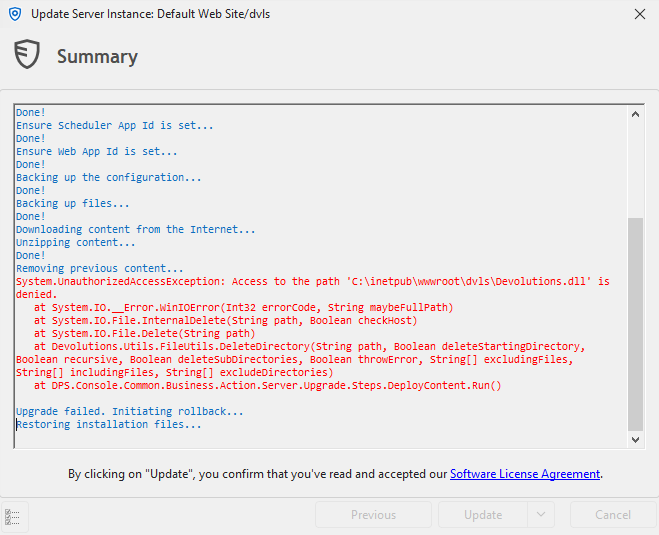
Devolutions Update Error.png
Hello,
You can try the following:
- Verify that the Devolutions Scheduler service (services.msc) is stopped - most common issue
- If it was stopped already, close IIS in an elevated cmd with -
iisreset /stop - If the upgrade still fails, verify what is locking the file with https://learn.microsoft.com/en-us/sysinternals/downloads/process-explorer
Please note that if you did the second step, you will need to do an issreset /start after the upgrade.
Best regards,
Richard Boisvert
I made a clone of the server to be able to troubleshoot. I tried all your suggestions, changes rights, excluded processes and folders from the Antivirus. I think I finally found the solution. Going to update the production server during the weekend.
Is seems that if the Scheduler server was started once, you can forget all about updating. Even stopping the service did not help.
The solution was :
- Set scheduler service to "manual".
- Reboot the server.
- Start the upgrade job.
- Change Scheduler server back to "Auto"
@larsbjerringjensen: Thanks for the tip. Just ran into the same issue trying to upgrade from 2024.2.6.0 to 2024.2.8.0. None of the suggestions worked except for yours.
Tried the following:
- Give allow all permissions to dll (didn't work, so in use)
- Stop IIS website (didn't work)
- Stop DVLS server (didn't work)
- Stop DVLS scheduler (didn't work)
- Reboot (didn't work)
- Set DVLS scheduler to manual + reboot = magic fix (probably in combination with some of the above steps but still, this was needed)
Hello,
Thank you for bringing us that information to our attention. We will try to see why you got that issue. We will try to reproduce and keep you posted if we can find something. Meanwhile, I'm glad to know that you have a workaround, but will try to figure out why you have this issue.
Best regards,
François Dubois
Could also just be something on our end to be honest. Our servers do have some hardening and generally run several agents/tools (Rapid7, SentinelOne, Guardicore) that could interfere.
Just glad I bumped into this thread because it was a bit of a head-scratcher. ;-)
Hello,
Our QA tried to reproduce without success. When you have the issue, maybe you could try to figure out who is locking the file by using Handle available here : https://learn.microsoft.com/en-ca/sysinternals/downloads/handle Let me know if that could help.
Best regards
François Dubois
Had the same issue so glad I found this. For me the locked file was "azure.core.dll" or "derconverter.dll". Handle.exe showed the scheduler service account had the file locked despite being stopped. Mathieu's solution worked for me.