
atakacs
Credentials in RDS connections
Hi
Thanks for the clarification - yes using "external mode". As this was / is working with Windows I thought to continue on my Mac. Clearly hitting some limitation.
Credentials in RDS connections
Hi
Long time user of RDM / Win I am testing the Mac version.
Overall things are working fine except that my RDS (MS Remote desktop) connexions don't seem to have the password (or a valid password at the very least) passed to them.
I.e the MS Remote desktop would load, connect to the desired server but I would systematically get a password prompt (the username is pre-entered correctly).
Am I missing something?
RDM 6.1.0, RDS client 10.2.3, OSX 10.13.6
Copy / paste not working in latest release 4.9.1
Done
BTW I also have "out of memory" warnings poping up form time to time (but with no ill effect)
Copy / paste not working in latest release 4.9.1
Hello
for some reason copy / paste (at least when trying to enter credentials) is not working with the latest release. "paste" won't. Was ok so far.
Iphone 8 / ios 11.4.1

Performance enhancements
Well for instance launch time is about 30 sec... that's until I get the UI (after that I guess I have to wait it assets are retrieved from online drive). Will give you more examples.
Forum: I have my own account (not cloud based).
Performance enhancements
Here is my "about my mac"

Using the app since beta (0.9) and never found it to be real fast, although possibly even slower recently.
PS: Why does the forum "expire" editing sessions after 1-2 minutes, thus trashing all you input ?!
Performance enhancements
Hello
I have done that and I can't see any significant difference. Still really sluggish.
To be honest the Windows version (which I also use) isn't super responsive either but the Mac build is super, super slow...
Performance enhancements
Hello
I am using RDM on a fairly high end Mac (latest generation i7 / SSD) with storage using devolution online drive.
If the application is (mostly) working I am really seeing very poor performances - it takes ages to open, any UI interaction take a noticeable time, all in all very sluggish.
I think there is real room for improvement on that front...
Soap error
I keep getting these errors on a regular basis:
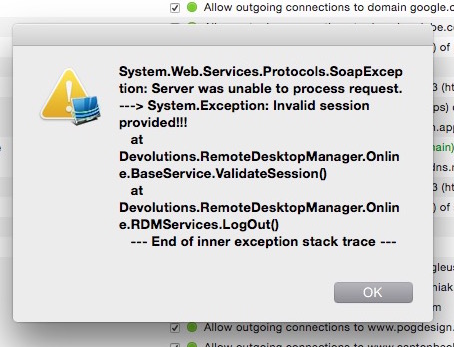
Not quite sure what's causing that - RDM open but NOT used - just sitting idle...
v3.0.4 on MacOS 10.10
Best practice sharing credentials on same machine
i am running Win 8.1.1
Manual authentication allowed to to have the UI to (successfully) validate the Dropbox link.
Interestingly enough I could then setup the Dropbox data source on the mac side without any problem (it actually reported "no validation required").
Bit kludgey but it works now :)
Best practice sharing credentials on same machine
BTW just tried on the Windows side (running in VMWare Fusion) and there... nothing happens at validate - no error message, no pop up, just hangs... Dropbox itself just load fine in browser. Direct Internet connexion (no proxy).
Best practice sharing credentials on same machine
Tried - does not help
Dropbox website loads just fine
Best practice sharing credentials on same machine
Thanks
There is an improvement to the effect that the app does not crash... but I just get an empty dialog:

10.10.1 dropbox 2.10.52
Performance improvments
I'd say marginally better ... thanks for your efforts
Best practice sharing credentials on same machine
Anything I can do to test / debug ?
Best practice sharing credentials on same machine
Thanks
Trying to setup a dropbox data source generate an "Exception of type 'DropNet.Exceptions.DropboxException' was thrown" error.
The error submission mechanism hangs and reports "Error report failed to send".
Pasting the error report create a asp.net error in the forum software: "A potentially dangerous Request.Form value was detected from the client (ctl00$AspNetForumContentPlaceHolder$tbQuickReply="...51c47d3e24<A.cdd520c65dd8e9225...")." - I'd say you should catch it to present the user something nicer...
All 3 point 100% reproducible. Macbook running 10.0.1
Best practice sharing credentials on same machine
I am running RDM on my Mac both in the native OS and in Windows 8 under a VM.
What is my best approach to share the same credentials database between the two ?
Suggestions most welcome.
Performance improvments
Is is just me that find RDM to become really sluggish at time ? I'm running it in various environments but (especially with v10) it's just slow as molasse...
Use LasrtPass credentials to Putty / SSH
That's great news !
I am still very surprised that this was not requested by other users but in any case looking forward to it.
As we are at it I would also suggest a "dynamic credential creation" feature. let me explain:
At the moment (at least this is my understanding how things work) I have to first create a LastPass credential for a given site, then create a RDM entry for said site and finally use the credential to populate the entry.
I would be nice that, assuming RDM has my main Lastpass credentials, I could, when creating a new RDM entry, say "oh, let me show you which credentials in LP we should use for this site", ie now need to preventatively do it. Hope it makes sense !
Use LasrtPass credentials to Putty / SSH
Ouch
I keep most (hundreds) of credentials as notes (which can themselves be of various types, we use, quite naturally, the "server" type.
Am I the first person to report this ? Sites are, IMHO, more suitable for web sites. I might convert all the notes but it is a definite PITA...
Use LasrtPass credentials to Putty / SSH
thanks. That's pretty much what I did (and yes I have RTFD). Putty come up but I still get prompted for username / pass...
Use LasrtPass credentials to Putty / SSH
Hello
I might be missing something but for the life of me I can't seems to find a way of using LastPass credentials to open an SSH session via Putty.
Is this supported ? If so any pointer most welcome !
Confused about LastPass integration
that's GREAT news !
edited by atakacs on 2/27/2014
Confused about LastPass integration
Well as far as I understand RDM does NOT "see" LP shared folder so it will not work at all in this scenario. I'd love to be proven wrong on this one :)
Confused about LastPass integration
> They are not listed when you browse them?
No
> Does it work with LastPass mobile?
Yes - at least in iOS devices