
stoopendis
Sessions using Delinea won't connect - fails with "Requires multifactor authentication"
Hello,
Thank you for the follow-up.
After setting up an environment similar to yours, I was able to reproduce the issue with the OTP challenge not working in RDM, while it functions correctly in Delinea. I’ve reported this bug to our development team, and they will begin working on a fix shortly.
I will follow up with you as soon as a resolution is deployed in a future update.
Best regards,
@Jacob Lafrenière
Has there been any advancement on this issue? I've just retried on 2026.2.7.0 after seeing the Delinea improvements that were added, and still no luck. Get the same error as first reported.
Sessions using Delinea won't connect - fails with "Requires multifactor authentication"
Unfortunately, I get the same result in the 2025.3.16.0 version:

Sessions using Delinea won't connect - fails with "Requires multifactor authentication"
Version is 2025.2.30.0 and data source is SQL Server.


Sessions using Delinea won't connect - fails with "Requires multifactor authentication"
Credential entry setup with either the resolving mode set to "Connection through proxy" or "Injection" and Authentication mode set to SSO allows me to retrieve a list of valid credentials from the list view.
However, when I attempt to start a session where those credentials are selected, I get an onscreen prompt that just says "Requires multifactor authentication" and all I can click is OK, with the session not starting.
On the Delinea side, I can request a secret and be granted it, but I do sometimes get another prompt on the website for a challenge for my OTP code - if my site login was recent, this just passes through when I click the challenge button. If not, I'm prompted for my OTP code again, then it lets me through.
I've tried exiting RDM and then opening again to force a re-sign in to the platform, but that hasn't helped. When I walk through the sign in process, sometimes I can select the login I want , other times in the browser box I do briefly see something about generating a token, but the box disappears before I can do anything, then the session never opens either.
I've also tried clearing the inbuilt browser cache, but that hasn't made a difference either.
After duplicating a VPN session and opening, they all show as open
Hi Tommy,
This issue has been observed across multiple FortiClient versions:
7.0.2
7.2.10
7.4.3
Sessions that require multiple VPN/Tunnel/Gateway connections to be opened in order, don't work
Consider the following layout, where there is a company I connect to (parent object), where I have to connect to a VPN, before I can access the remote gateway:
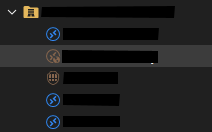
At the company level, I have the VPN/Tunnel/Gateway settings set to always connect for RD Gateway, and link to the gateway as shown above (2nd child object).
Then, on the RD Gateway connection, under the VPN settings, I have the session set to always connect (but have tried ping/port scan/HTTP code) and type VPN Link, with the VPN Link set to the FortiClient session (3rd child object) above.
Open one of the RDP sessions, which has the VPN/Tunnel/Gateway settings set to inherit (1st/4th/5th child objects above), and it should open the RD Gateway session to connect - this works, when I manually open the VPN connection.
Expected result should be that (assuming all connections are closed), I open one of the RDP sessions, it goes to connect via the RD Gateway session, which depends on the VPN being open, and if it's not open, then the VPN session should start (either because of the always connect setting, or ideally via one of the supported ping/port-scan/HTTP code detection methods).
All the parts of this work individually - ie the VPN session can be told to open, and then RDP via the RD Gateway session works fine, it just doesn't combine it all together and open the sessions, if needed, as I'd expect it to.
Is it possible to get this to work, or should it already work?
After duplicating a VPN session and opening, they all show as open
Hi Samuel,
Thanks for the reply.
This has been ongoing for quite a lot of versions, but I'm currently on 2025.2.13.1 on 3 machines where I see it (one ARM version, and 2 x64 versions).
Data source is MSSQL.
And yes, if I right click any of the VPN sessions marked as open (whether it is the actual one I opened from, or any of the duplicated ones) and select close, it closes the connection, and clears the open status for all.
After duplicating a VPN session and opening, they all show as open
For ease of configuration, I duplicate a previously created VPN session to another company folder, then amend the VPN host and credentials to match the connection I need.
This has shown up a bug, where if I open any of the duplicated VPN's, all the one's it's been duplicated from also show as open in the Navigation pane - see screenshot (these are all FortiClient VPN sessions below):
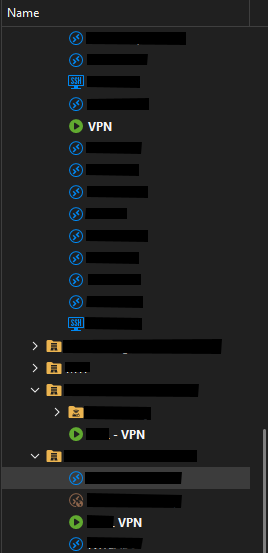
So that shows three different VPN sessions open, all with different hosts and credentials configured, all duplicated either from a single a source VPN session, or each other. Only one of these sessions is actually open - in this case the bottom one.
If I close RDM whilst it's in this state, the open sessions box pops up and only shows the individual session that is open (ie not all three), so it seems like more of a display bug than anything else.
Could this be looked into?
RDM on Windows can't open new RDP
@Richard Markiewicz - thanks for the quick reply - I've grabbed the version for you below - you'll see it is on Insider Preview (Dev), so that may have a lot to do with it - both my PC's are on the same dev build.
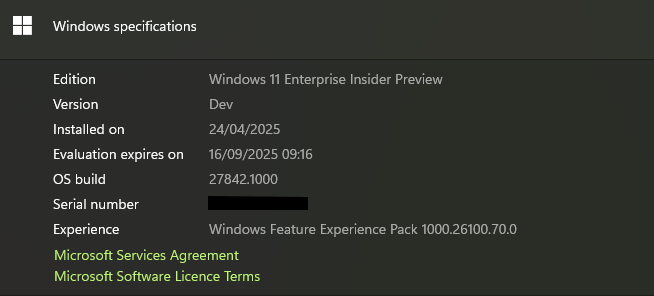
I'll PM you the requested file shortly as well.
In the meantime, I reverted the problematic machine to RDM version 2025.1.34.0 - it also has the Feb version of MsRdpEx.dll included, and I'm not experiencing any of the original reported issues.
RDM on Windows can't open new RDP
I believe I have a related issue on 2025.1.37.0 - in my case, opening an RDP session hangs the app for a bit, then just crashes it.
Event Viewer shows a fault in MsRdpEx.dll:
Faulting application name: RemoteDesktopManager.exe, version: 2025.1.37.0, time stamp: 0x67d30000
Faulting module name: MsRdpEx.dll, version: 2025.5.1.0, time stamp: 0x68138040
Exception code: 0xc000041d
Fault offset: 0x000000000001fd34
Faulting process id: 0x7344
Faulting application start time: 0x1DBC44AEC24C391
Faulting application path: C:\Program Files\Devolutions\Remote Desktop Manager\RemoteDesktopManager.exe
Faulting module path: C:\Program Files\Devolutions\Remote Desktop Manager\runtimes\win-x64\native\MsRdpEx.dll
Report Id: 680c5482-70fb-4a1b-b37c-b41a41816247
Faulting package full name:
Faulting package-relative application ID:
On another machine, running RDM 2025.1.33.0, I don't have this issue - looking at the versions of MsRdpEx.dll, I see that it is on 2025.02.26.0.
Doing something marginally silly, I've replaced the MsRdpEx.dll file on the broken machine with the one from the working machine, and now I can connect to RDP sessions absolutely fine from RDM 2025.1.37.0.
Hopefully this info is of use.
Windows Hello Face Unlock Requires Two Attempts
Present for several versions of RDM, but still occurring in current version 2025.1.27.0.
The first attempt for Windows Hello face unlock always fails, and requires another attempt before it unlocks. This is the screen presented, after the first attempt fails:
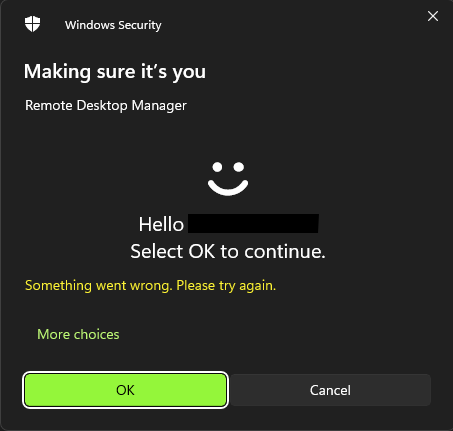
I've got Windows Hello PIN on another computer (no face unlock on that one) and it works first time, every time, once I put the PIN in and hit enter, so it seems like something specific to the face unlock.
I do note, if you leave it on the second attempt screen for short period, it will fail again, so potentially related to some sort of approval timeout that is reached by the time the prompt loads, verifies the face and presents the OK button the first time, the timer runs out?
Built-in SCP
Hi,
I did not realize you were using RDM for Windows (I was originally answering to someone who was using Mac 😅).
This has not been done for RDM Windows yet (although the ticket was already opened). We will post back when it is done for RDM Windows.
Best regards,
Hi Xavier.
I see there has been several releases of the Windows version between 2022.2.29.0 and now (just installed 2022.3.18.0) and the feature still hasn't shown up.
Is there any timeline for release available?
Thanks.
Built-in SCP
Hi stoopendis,
RDM 2022.2.15.0 is now available and it's possible to launch an SCP or SFTP entry directly from an SSH entry:
Hi Xavier - have just updated the Windows version to 2022.2.29.0 and the option as shown isn't there.
I went into the settings and enabled SFTP as well and it still didn't show up under the "Open with Parameters" menu.
Is there anything else that needs done to get those options to show up?
Built-in SCP
Hi Xavier,
The thing I find frustrating is that I have a heap of SSH sessions defined, but with SFTP off in all of them.
It's only very rarely that we need SFTP to get something to/from the server.
I'd love to be able to, from an existing entry (or open SSH session) be able to either right click, and go to something like 'Macros/Scripts/Tools > SFTP'. Or a button at the top of the open SSH session for SFTP.
Then it can just connect using the already defined session details and credential settings to open the SFTP window.
This seems like the most logical way it should work - currently I just ignore the SFTP functionality in RDM and fallback to WinSCP if I need to do a transfer file(s) task.
How to Transfer files to a Linux Target?
Hi Alessandro - if you're using the inbuilt SSH Shell, you can use SFTP in session like this:

It will display a view of your local filesystem and the remote filesystem on the Linux host. You can drag files from Windows Explorer into the folder structure on the Linux host as displayed in RDM, or you can browse your local filesystem in RDM and drag them up to the Linux folder structure on the host.
Unfortunately, I have had it make RDM unresponsive quite regularly when I've closed the session (or it has terminated in the background due to a timeout for example). So, I haven't used this as much as I probably should.
And the "Start minimized" button as shown in the screenshot doesn't work (I'd expect that the folder view on the left wouldn't open at all when the SSH session is started - ie the folders view would only be made available when the SFTP button in the session toolbar is clicked).
It would be great to have a couple of additional tickboxes here actually - the first to choose whether or not the local filesystem is displayed (as in the filesystem from the machine RDM is displayed on) and another to select that the remote filesystem starting location is expanded one level when first connected - ie in my screenshot that shows the starting location as being /, if the box was ticked, this would expand it out to show:
/
/bin
/boot
/dev
/etc
and so on.
$MACHINE_DOMAIN$ no longer expanded for HOST
Quite a lot of my hostnames for sessions are defined as:
$NAME$.$MACHINE_DOMAIN$
This used to pickup the hostname from the session name field, and the domain from the asset domain field.
Now I just get the following for the host:
hostname.$MACHINE_DOMAIN$
Eg for a session with the name "hostA" and the asset domain field "mydomain.ab" I would expect:
hostA.mydomain.ab
But I get:
hostA.$MACHINE_DOMAIN$
This used to work until one of the last two updates as I've got it scattered all through entries in my datasource.
Currently broken on version 2022.1.12.0
SSH Session Page Up/Down keys don't function correctly
I've just started switching some of my SSH sessions from the legacy PuTTY type, to the new SSH type.
However, I've noticed one thing that isn't working well, and that is sending page up and page down commands to the terminal.
In my inputrc on a Linux server I usually have the following to allow search forward and back of previous commands:
"\e[5~": history-search-backward
"\e[6~": history-search-forward
When I set the terminal session to use ESC[n~ to send function keys (or Linux or Xterm), nothing at all seems to be sent for these keys.
I've checked this by running showkey on the server, and I see nothing sent using the SSH session, but in the PuTTY session, I do see keys sent.
Can we get this functionality looked at?