Windows Hello Face Unlock Requires Two Attempts

Present for several versions of RDM, but still occurring in current version 2025.1.27.0.
The first attempt for Windows Hello face unlock always fails, and requires another attempt before it unlocks. This is the screen presented, after the first attempt fails: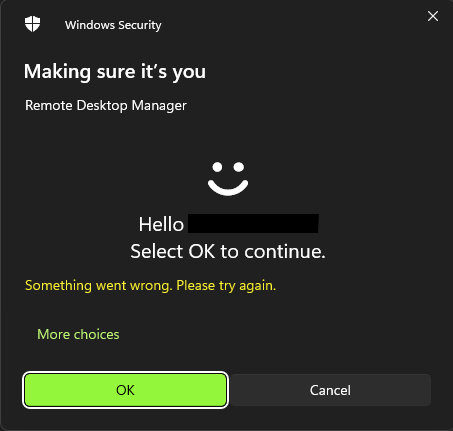
I've got Windows Hello PIN on another computer (no face unlock on that one) and it works first time, every time, once I put the PIN in and hit enter, so it seems like something specific to the face unlock.
I do note, if you leave it on the second attempt screen for short period, it will fail again, so potentially related to some sort of approval timeout that is reached by the time the prompt loads, verifies the face and presents the OK button the first time, the timer runs out?
13141ebc-aac6-4d23-816d-0cde88485cb5.png
All Comments (1)
Hello,
Thank you for contacting us on that matter,
I've not been able to reproduce with the exact same setup. My Windows Hello works at the first attempt.
Could you please try to remove the Windows Hello and re-add it again?
If it's not working, would it be possible for you to create a portable installation of the latest version of RDM and see if this issue still occurs? To do so, you will need to do the following:
1- Download the .zip file below:
https://devolutions.net/de/remote-desktop-manager/download/thank-you/?platform=RDMbin&edition=team&os=windows
2- Create a new folder on your Desktop
3- Extract the content of the .zip file into the folder created at #2
4- Go to this folder once the .zip file has been extracted and run remotedesktopmanager.exe
5- Connect to your data source
Best regards,
Tommy Sanders