After duplicating a VPN session and opening, they all show as open
After duplicating a VPN session and opening, they all show as open

For ease of configuration, I duplicate a previously created VPN session to another company folder, then amend the VPN host and credentials to match the connection I need.
This has shown up a bug, where if I open any of the duplicated VPN's, all the one's it's been duplicated from also show as open in the Navigation pane - see screenshot (these are all FortiClient VPN sessions below):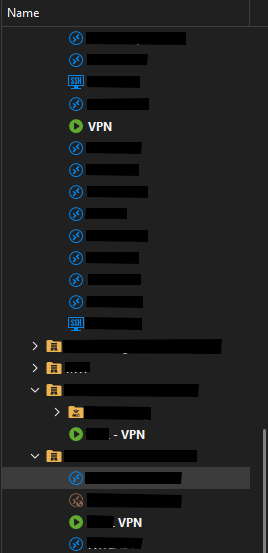
So that shows three different VPN sessions open, all with different hosts and credentials configured, all duplicated either from a single a source VPN session, or each other. Only one of these sessions is actually open - in this case the bottom one.
If I close RDM whilst it's in this state, the open sessions box pops up and only shows the individual session that is open (ie not all three), so it seems like more of a display bug than anything else.
Could this be looked into?
2832d660-76fb-414b-9efb-2e4be8c0bbb1.png
All Comments (6)
Hello,
Thank you for reaching out to us regarding this,
Could you please specify the version of RDM you are currently using?
What type of data source are you using?
I'm also wondering, when you use the "Close" option on one of the entries is the status of all 3 changed?
Let me know,
Best regards,
Samuel Dery
Hi Samuel,
Thanks for the reply.
This has been ongoing for quite a lot of versions, but I'm currently on 2025.2.13.1 on 3 machines where I see it (one ARM version, and 2 x64 versions).
Data source is MSSQL.
And yes, if I right click any of the VPN sessions marked as open (whether it is the actual one I opened from, or any of the duplicated ones) and select close, it closes the connection, and clears the open status for all.
Hello,
Thank you for your patience.
We attempted to replicate the issue on our end but were unable to establish a VPN connection to RDM. To ensure we are testing under the same conditions, could you please confirm the version of FortiClient you are currently using?
Once we have this information, we will proceed with testing on the same version.
Best regards,
Tommy Sanders
Hi Tommy,
This issue has been observed across multiple FortiClient versions:
- 7.0.2
- 7.2.10
- 7.4.3
Hello,
Thank you for your response.
I’ve forwarded your issue to our development team for further investigation. I’ll follow up with you as soon as I receive an update.
Best regards,
Tommy Sanders
Hello,
Thank you for your patience.
Could you please send me a screenshot of the Advanced and Connection sections in the properties of your VPN entry?
Also, could you confirm how you are attempting to duplicate the entry (e.g., Ctrl+D, right-click > Duplicate, or copy/paste via clipboard)?
Best regards,
Tommy Sanders