RDM on Windows can't open new RDP

Hi Once you have a open session on RDM and close it down lor log off and then while the application is still open, you open a new connection to any of the RDP connections it does not show the screen, it does show however there is an active session but does not display it in the workscreen window
All Comments (10)
Hello,
Thank you for reaching out to Devolutions Support.
Could you please confirm the version of RDM you are using, along with the data source type and its version?
Can you share screenshots so I can better understand the active session not showing up?
Looking forward to your response.
Best regards,
Jacob Lafrenière
I believe I have a related issue on 2025.1.37.0 - in my case, opening an RDP session hangs the app for a bit, then just crashes it.
Event Viewer shows a fault in MsRdpEx.dll:
Faulting application name: RemoteDesktopManager.exe, version: 2025.1.37.0, time stamp: 0x67d30000
Faulting module name: MsRdpEx.dll, version: 2025.5.1.0, time stamp: 0x68138040
Exception code: 0xc000041d
Fault offset: 0x000000000001fd34
Faulting process id: 0x7344
Faulting application start time: 0x1DBC44AEC24C391
Faulting application path: C:\Program Files\Devolutions\Remote Desktop Manager\RemoteDesktopManager.exe
Faulting module path: C:\Program Files\Devolutions\Remote Desktop Manager\runtimes\win-x64\native\MsRdpEx.dll
Report Id: 680c5482-70fb-4a1b-b37c-b41a41816247
Faulting package full name:
Faulting package-relative application ID:
On another machine, running RDM 2025.1.33.0, I don't have this issue - looking at the versions of MsRdpEx.dll, I see that it is on 2025.02.26.0.
Doing something marginally silly, I've replaced the MsRdpEx.dll file on the broken machine with the one from the working machine, and now I can connect to RDP sessions absolutely fine from RDM 2025.1.37.0.
Hopefully this info is of use.
Hi @stoopendis
I'm not sure what you've observed is the same as OP's issue, but it might be the "canary in the coal mine".
Actually your post did catch my attention because it's the second report I've seen of this today; it does seem we have a regression in that DLL but it's not obvious what it is. I'd really appreciate if you can give me two pieces of information to help troubleshoot this:
(1) Can you send me your precise Windows version, including the build number? The easiest might be to send a screenshot of winver (Start > Run > winver)
(2) Can you send me a copy of the Microsoft ActiveX RDP DLL from your machine? You'll find it in %systemroot%\system32\mstscax.dll (e.g. C:\windows\system32\mstscax.dll). You could send that to me by PM or to service@devolutions.net, mentioning this forum thread
Otherwise, your workaround of copying an older version of MsRdpEx.dll was not silly at all, it's actually a good idea. However if you'd like a safer workaround, you can keep the updated DLLbut go to File > Settings > Entry Types > Sessions > Remote Desktop (RDP) > API Hooking and change the API Hooking option to "Disabled". Save the changes and restart RDM, and the DLL will no longer be loaded. You'll lose some advanced feature but it sounds like it's not something you're using (mainly related to Devolutions Gateway, session recording, a few other things).
Please, let me know if something isn't clear and I appreciate the help
Kind regards
Richard Markievicz
@Richard Markiewicz - thanks for the quick reply - I've grabbed the version for you below - you'll see it is on Insider Preview (Dev), so that may have a lot to do with it - both my PC's are on the same dev build.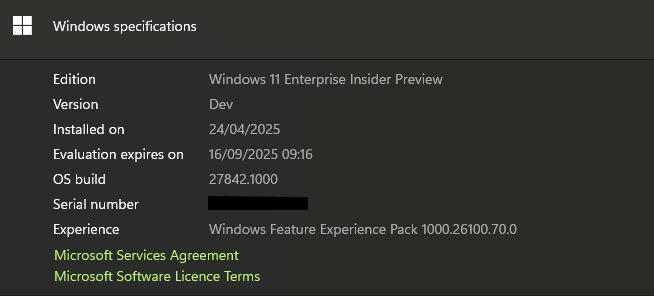
I'll PM you the requested file shortly as well.
In the meantime, I reverted the problematic machine to RDM version 2025.1.34.0 - it also has the Feb version of MsRdpEx.dll included, and I'm not experiencing any of the original reported issues.
27e9d886-8501-4c52-8d0d-78d720e7df73.png
Hi
Thanks for the info and sending the file over so quickly. This is almost certainly related to the Insider build. I've forwarded the details to my colleague that works on this. In the meantime, please use one of the workaround (2025.1.37 w/API hooking disabled, using the MsRdpEx.dll from the previous release, or staying with 2025.1.34).
Thanks again and kind regards,
Richard Markievicz
Hello,
Thank you for reaching out to Devolutions Support.
Could you please confirm the version of RDM you are using, along with the data source type and its version?
Can you share screenshots so I can better understand the active session not showing up?
Looking forward to your response.
Best regards,
Hello Version 2025.1.37.0 64-bit
Hello,
Thank you for the follow-up.
Could you please send me a screen recording of the issue you're encountering?
This will help me better understand the problem, reproduce it, and work toward a solution.
I’ll send you a link via private message so you can upload the video securely.
Best regards,
Jacob Lafrenière
Hello,
Thank you for the screenshot.
Unfortunately, I still can’t reproduce the issue on my end.
Could you please provide a step-by-step guide to consistently reproduce the problem, if possible? Additionally, could you let me know which data source you are currently using with RDM?
Can you also confirm whether this behavior occurs with all entries or only with specific ones?
Lastly, if you're able to set up a portable version of RDM in a clean, default environment to test whether the issue persists, that would be very helpful. You can follow this guide to set it up:
https://docs.devolutions.net/rdm/kb/how-to-articles/portable-rdm-installation/
I look forward to your reply.
Best regards,
Jacob Lafrenière
Hi Jacob,
Sorry for only getting back to you now thought the update would have resolve the problem please see attached recording.
Kind Regards
Error.webm
Hello,
Thank you for reaching out to Devolutions Support.
I have reviewed your previous messages and noticed that you were using a Windows Insider build in the past. Could you confirm if that is still the case?
If you are still using the Windows Insider build, please refer to the following forum
threads for information on RDM support with Insider builds:
https://forum.devolutions.net/topics/30298/windows-insider-preview-builds
https://forum.devolutions.net/topics/43176/my-rdm-crashes#199830
If you are no longer using the Windows Insider build, please follow these troubleshooting steps before reaching out to us:
1. Close the Remote Desktop Manager (RDM).
2. Navigate to the following directory: `%localappdata%\Devolutions`
3. Rename the RemoteDesktopManager folder to RemoteDesktopManager.old.
4. Restart RDM.
Important: Resetting the configuration will remove all your data source information, and you will need to re-enter it.
If you are using a Local data source, ensure that you move the Connection.db file from the RemoteDesktopManager.old folder to the new RemoteDesktopManager folder.
After completing Step 4, please do the following:
- Restart RDM.
- Close RDM.
- Return to `%localappdata%\Devolutions`.
- Move the Connection.db file from the RemoteDesktopManager.old folder to the new RemoteDesktopManager folder.
- Start RDM again.
If the issue persists after completing these steps, please contact service@devolutions.net
Best regards,
Carl Marien