
dbrunt
Bring back ConnectWise Control
I would be very interested in this, please let me know if you need Beta testers, I have participated in several Beta releases and would love the chance to help bring this forward. This would be huge for my current employer. We have over 1,000 active/online endpoints in our ConnectWise Automate
Unable to Connect to your Data Source
Thank you for your help. Just followed your steps and submitted a ticket.
Unable to Connect to your Data Source
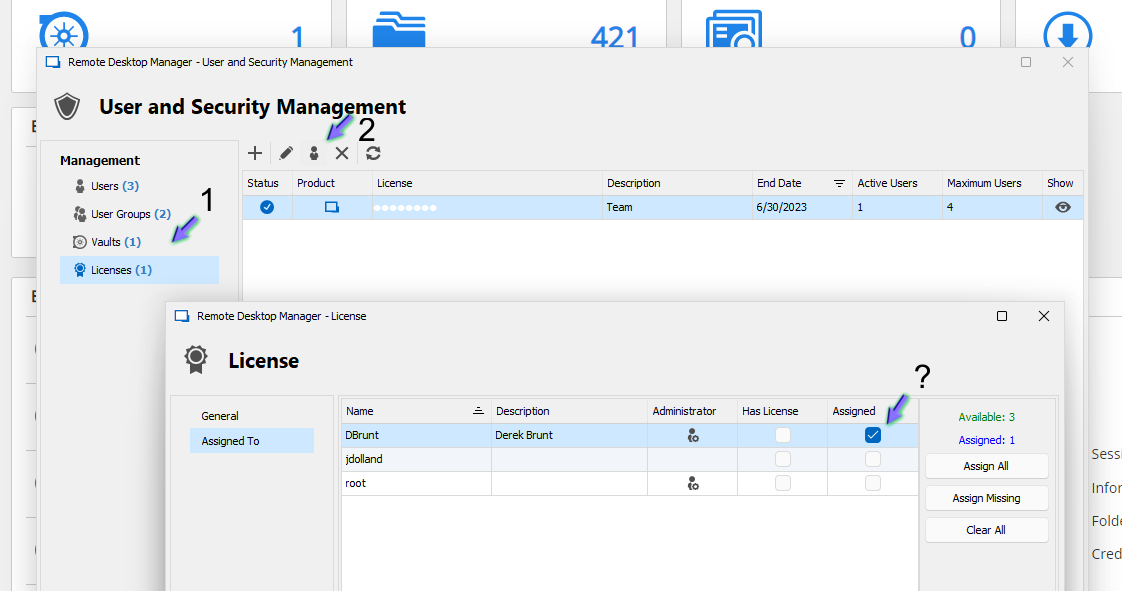
I hadn't done those steps before, but when I followed them, it looks like it was already done....see the screenshot and let me know if I'm missing something please.
Unable to Connect to your Data Source
Hello,
Could you confirm what type of Data Source you are using?
Best Regards,
MySQL enterprise, which I know is now depreciated, but we have not spun up our new database server yet.
Unable to Connect to your Data Source
After the upgrade found that 2022.3.26.0 is available, downloading and installing that version now.
I did also take a look at past release notes and saw that 2022.3.14.0 states that "User license must be set in the data source" How does this affect users that aren't able to connect to the data source while on site?
Unable to Connect to your Data Source
Saw that there is a newer version, 2022.3.24.0, downloading and installing it now, but I don't see anything in the release notes that would say it's address in a update.
Unable to Connect to your Data Source
Running version 2022.3.21.0 64-bit, and a new behavior that I've been dealing with is if I'm connected to a client's VPN where I don't have direct access to our team database, I am told "Unable to Connect to your Data Source" multiple times, which is probably due to the nested Inharidences we have, but it eventually launches the requested connection.
It's even worst when I'm on-site and boot my computer and launch RDM for the first time that session. Here I am not given a cached version of the connections anymore and am told "No Enterprise license found" If I double-click on that phrase I get a dialog box that says "You don't have access to license management. Ask your administrator to assign you a license."
This renders RDM useless as a tool when I'm onsite and I have forgotten to keep my laptop running while traveling.
Any help would be great.
Automatically reconnect to RDM Database when available.
Thank you so much for adding this feature request. Just watched it go online without user intervention after disconnecting from a client's VPN.
Automatically reconnect to RDM Database when available.
Okay, that works, thank you for sharing that.
A self-healing option would still be much appreciated for times when we get disconnected outside of an RDM VPN connection. e.g. momentary loss of internet, connecting to a client's VPN that we have not been able to fully automate in RDM, etc.
About half to maybe two-thirds of our clients now provide VPN as the sole source of access, and I will start adding the "Go online on disconnect after" option to each of the root folders for our clients. Thankfully we use the "inherit" feature on the VPN section as it's a pretty long list.
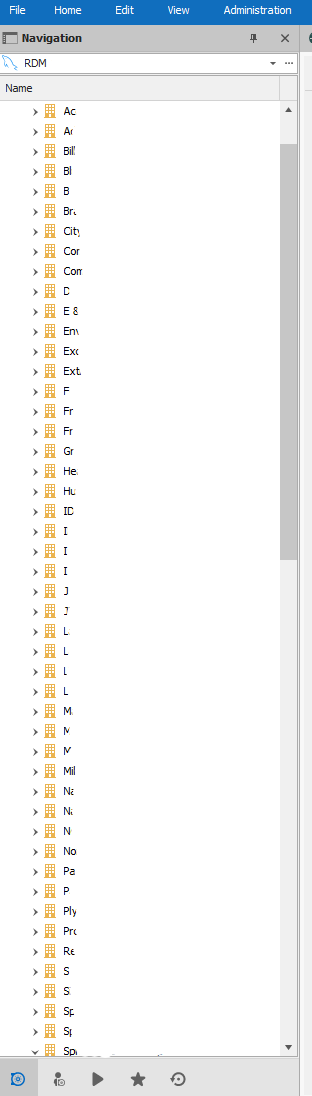
Each folder is a different client, and this only shows "A" through about half of our "S" clients. lol
Automatically reconnect to RDM Database when available.
Hello, I've done some Googling and some poking around in RDM and have not found an answer to my request. We support a large number of clients that we connect to with RDM via VPN. Unfournitly, many of them configure their VPN as a forced tunnel, thus breaking our connection to our locally hosted RDM DB, giving us the dreaded "Red Globe" in the bottom right.
My request is; can a feature or option be added to have RDM check to see if the database server is available again, and if so, simply "Self-Reconnect" instead of us having to click on the red globe to "Go Online"?
Now there might be times when someone might want to "Go Offline" for a reason, and so, a little bit of logic would be great. If the "Offline" event was due to a time out, check every X minutes or seconds, but if the "Offline" event was user-initiated, stay "Offline" till the user initiates a "Go Online" event.
As always, please let me know if you have any questions about my request, or if any part of it was unclear.
Thank you for your consideration. :)
Return of Red X after upgrading to Enterprise 2021.2.7.0 (Beta)
Yes, in the linked thread there are multiple suggestions that I have already tried:
Etienne Lord
try going to the Window tab and click Reset Layout
Did not work, was tricky to do as I was clicking blind and having to see which menu would pop up.
close RDM, then navigate to %localappdata% -> Devolutions -> RemoteDesktopManager and delete every file with the .lyt extension.
Did not work
If neither of those methods does the trick, you will have to move the RemoteDesktopManager folder from localappdata to your desktop, then uninstall RDM, reboot your computer, reinstall RDM and move the RemoteDesktopManager folder back in its original place. Once you reopen RDM, the red X should be gone.
Have not done this yet in case anyone from the Devolutions dev team wanted logs or would like to interact with my RDM while the issue is occurring.
David Hervieux
workaround is to delete remotedesktopmanager.ext if reset layout does not work.
Did not work
James Lafleur
Could you please go under File -> options -> Advanced -. Hardware acceleration, select "DirectX" and see if this issue still occurs afterward?
This was also tricky as I'm clicking blind, but was able to fumble my way to File -> Options. Interestingly, changing this setting and restarting RDM does display the menu again, but if I try to restore back to full screen the Red X comes back and the program space does not redraw to full screen either. However, after a restore of RDM, with no Red X issues, I can manually size the application to more than full screen (Full vertical usage, and full usage of middle monitor with RDM spanning slighting onto Monitor 1 and 3) without the Red X returning. It's just if I click the "Full Screen" window control icon or "Windows+↑" full-screen keyboard combination that the Red X returns. Any change between, DirectX, Auto, or Disabled (GDI +), and restarting RDM does consistently restore the top navigation bar, but regardless of which setting is selected, attempting to go back to full screen, brings the Red X back.
Return of Red X after upgrading to Enterprise 2021.2.7.0 (Beta)
After installing, I have the return of the dreaded Red X, which I'm happy to say, I haven't seen in quite a long time.
I have followed all steps in the old thread here:
https://forum.devolutions.net/topics/31285/red-cross-in-navigation-list
Except for the full uninstall and reinstall suggestion. I can get it to appear momentarily, but attempting to go full screen brings it back.
Here's a screenshot:
Remote Desktop Manager 2021.2 BETA
Created a separate thread as requested. Just didn't see that before posting first.
User Vault keeps duplicating some entries
Great! Looking forward to the update.
User Vault keeps duplicating some entries
They say a picture is worth a thousand words. This started right after the upgrade to 2021.1.15.0 64-bit

Additional Option on "Check Is Online" dialog box
Thank you very much. You guys are the best! Looking forward to the new build.
Cisco AnyConnect GUI instead of CLI?
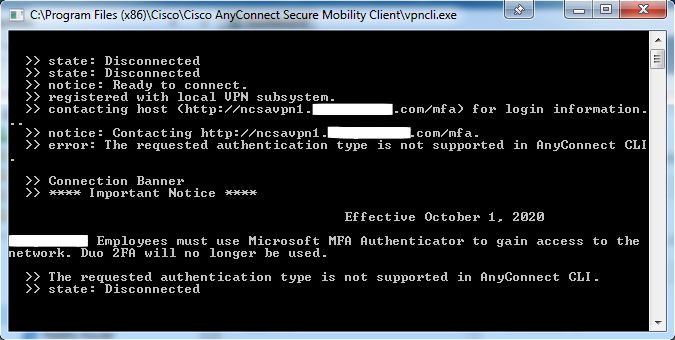
One of our main clients has changed from Cisco AnyConnect and DUO to now using Cisco AnyConnect and Microsoft MFA. The problem I'm running into is it doesn't seem that it will be possible to get this to work with the CLI. When I try I get the following message:
"The requested authentication type is not supported in AnyConnect CLI."
When I use the GUI, AnyConnect spawns a small web page window showing the Microsoft login page, where I put in my email address, then it loads the second page where it asks for my password, then after that it either sends me a text message code that I have to put in or I use a 6-digit 2FA/MFA token.
I don't mind sharing screen shots or even a short video if it helps to understand the changes we're facing, just let me know if and how I can help.
Thanks
Additional Option on "Check Is Online" dialog box
I've played with the delay, but it just isn't quite satisfying the requirement I would like to see. The biggest hurdle is never knowing how long a system is going to need for the delay before it stops responding to port queries.
Additional Credentials option
Outstanding! Does exactly what I needed.
Thanks for always being awesome and taking the time to review the feature request section. As an end user it means a lot to me that a company wants to be the best they can, and actively engaged with their user base.
Additional Option on "Check Is Online" dialog box
I would love if there was an additional check box or button that would tell the dialog box to "Connect When Available" but only after the "Scan port (####)" timed out once. This would be very handy for reboots, where the RDP service is still up while the server is shutting down.

Additional Credentials option
We use the Inherited credentials a LOT and have recently run into a problem.
On the folder of the client, we fill out all the General tab for "Username", "Domain", and "Password" which works very well until today when we added some new connection types. These new connection types require our "Username" to be in the form of "Domain\Username".
Any chance we can get an additional "Credentials" option of something like "Inherited (Domain\Username)"
Layout configuration request: Allow snapping of tabs as panes
I would love to see the ability to drag the Tabs on a connection entry and snap them to zones or sections of the screen.
In my crude mock layout, I would love to be able to snap the Documentation tab as a pane across the whole lower section of the connection entry, and be able to "snap" out other sections and dock them as shown in my example where "Overview" is drug out and docked to the left side and "Macros/Scripts/Tools" is now docked to to the top and the standard tabs of things like "Asset", "Permissions", "Management Tools", etc are docked to the bottom of the "Macros/Scripts/Tools" pane.

Can't connect to Unattended session with RDM, but CAN with the standard Wayk Now client
That was it! Thank you!
Additionally, I have three feature questions and I'm wondering if I'm just not doing something correctly, or if it's a feature that is planned for a future release or not considered currently. Please let me know, and I can create a new thread for a proper feature request if needed.
1. Login. I see that there is the ability to send Ctrl+Alt+Del to bring up the login screen, but then, the tech needs to know the password for that account. With GoToAssist, we can store the password on the far-end device in the Unattended Client systray app. Then when we connect and send the "Ctrl+Alt+Del" GTA responds with:
"You have a stored password for Server123\Administrator.Log in."
Clicking on the words "Log in." will log you in and no one needs to know what the password is. For a team with a bit of a high turn over, it is nice to be able to allow people to connect to systems without having to share the password with them. This is one of the things we love about RDM. Tier 1 techs can connect to systems, but never know the password they are using to connect to the system. Being that a Wayk Now system already has a section for Username and Password, which I assume can be controlled via user profile as to whether they can unmask a password or not like an RDP session; it seems that this could be used to prompt a login to the remote system after "Ctrl+Alt+Del" is sent.
2. File Transfer. I can see that I can send a file to the remote system, but I do not seem to be able to pull a file from the remote system to my local system. This is important for gathering log files or packet captures that we want to review on our local machine as the tools used to review these items are not always installed on the remote system.
3. Scroll wheel support
Can't connect to Unattended session with RDM, but CAN with the standard Wayk Now client
Also, just to share additional information, the error I get is nearly instantaneous after clicking "Open" in RDM, maybe a ¼ of a second. I am able to see that there is some other dialog box that spawns, but the error comes so quickly I can never see what the other dialog box is.
Can't connect to Unattended session with RDM, but CAN with the standard Wayk Now client
Thank you for engaging, I have sent the export to you via PM.