Red Cross in navigation list
Hi!
I'm seeing a red cross in my navigation list, sometimes when I'm trying to see my favorites and sometimes the entire vault.
If I double click anywhere in the navigation list, it tries to open a connection.
So I believe the list is fully updated and available, but I cannot see it.
I have attached a picture to show how it looks. Has anyone of you ever seen this before?
2019-02-06_10h55_43.png
All Comments (33)
Hello,
There are a few things you can try to get rid of the red X.
First, try going to the Window tab and click Reset Layout
Sometimes, that can fix some Red X issues.
If that doesn’t work, you can try to close RDM, then navigate to %localappdata% -> Devolutions -> RemoteDesktopManager and delete every file with the .lyt extension.
If neither of those methods does the trick, you will have to move the RemoteDesktopManager folder from localappdata to your desktop, then uninstall RDM, reboot your computer, reinstall RDM and move the RemoteDesktopManager folder back in its original place. Once you reopen RDM, the red X should be gone.
Best regards,
Etienne Lord
Clearing the .lyt files first didn't do anything.
Resetting the navigation didn't do anything.
But removing the .lyt files AFTER resetting the navigation worked....
@motz
Thank you very much. This worked like a charm
@motz, thank you for that! I know this is an old post, but this has been driving me crazy and your suggestion worked!
Thanks!!
@motz, Same as for Atari007, I know it's an old post but your suggestion worked and made my day much better, thank you :)
Hi Devolutions,
I wonder if this issue will ever get a real fix?
Yes, these workarounds do resolve the issue.
But in fact it's a long existing bug in the software that eventually should get fixed, so the issue can't happen anymore...
@dsacross,
We have made some enhancements regarding this issue lately. We have been able to reproduce internally and this will help for a permanent resolution.
What version of RDM are you running? What type of data source are you using?
Best regards,
Jeff Dagenais

Disabled
I got this again today too.
RDM 2019.2.24.0 64bit
Using Devolutions Online Drive as data source
Win 10 1909
Resetting the layout and then deleting the .lyt files fixed it for me.
Hello,
We are working on a permanent fix but the workaround is to delete remotedesktopmanager.ext if reset layout does not work.
Regards
David Hervieux
Disabled
Hi David
Do you have a rough ETA on this fix? I have several users complaining about this problem, resetting layout is not an option as the red crosses cover where the button would normally be. The other alternatives here also do not seem to fix the problem, unless the client requires a reboot after these changes have been made in which case it does work. Although it isn't really viable to constantly have to close and reopen RDM to get it to work properly. Any guidance appreciated!
Hello,
This is already available in RDM 2020.1.4.0. You can download this version here
https://remotedesktopmanager.com/home/download#Beta
Best regards,
Jeff Dagenais
Hello,
This is already available in RDM 2020.1.4.0. You can download this version here
https://remotedesktopmanager.com/home/download#Beta
Best regards,
Our company has the latest version installed 2020.1.20.0 64-BIT and this problem still happens. It happens to us at least once a day. Is there a permanent fix for this in any of your versions?
@benja,
The red X issue in the navigation pane should have been resolved in 2020.1.20.0.
Could you post a screenshot of the issue, I just wanted to be sure we are referring to the same thing.
Best regards,
Jeff Dagenais
@benja,
The red X issue in the navigation pane should have been resolved in 2020.1.20.0.
Could you post a screenshot of the issue, I just wanted to be sure we are referring to the same thing.
Best regards,
Here there is a picture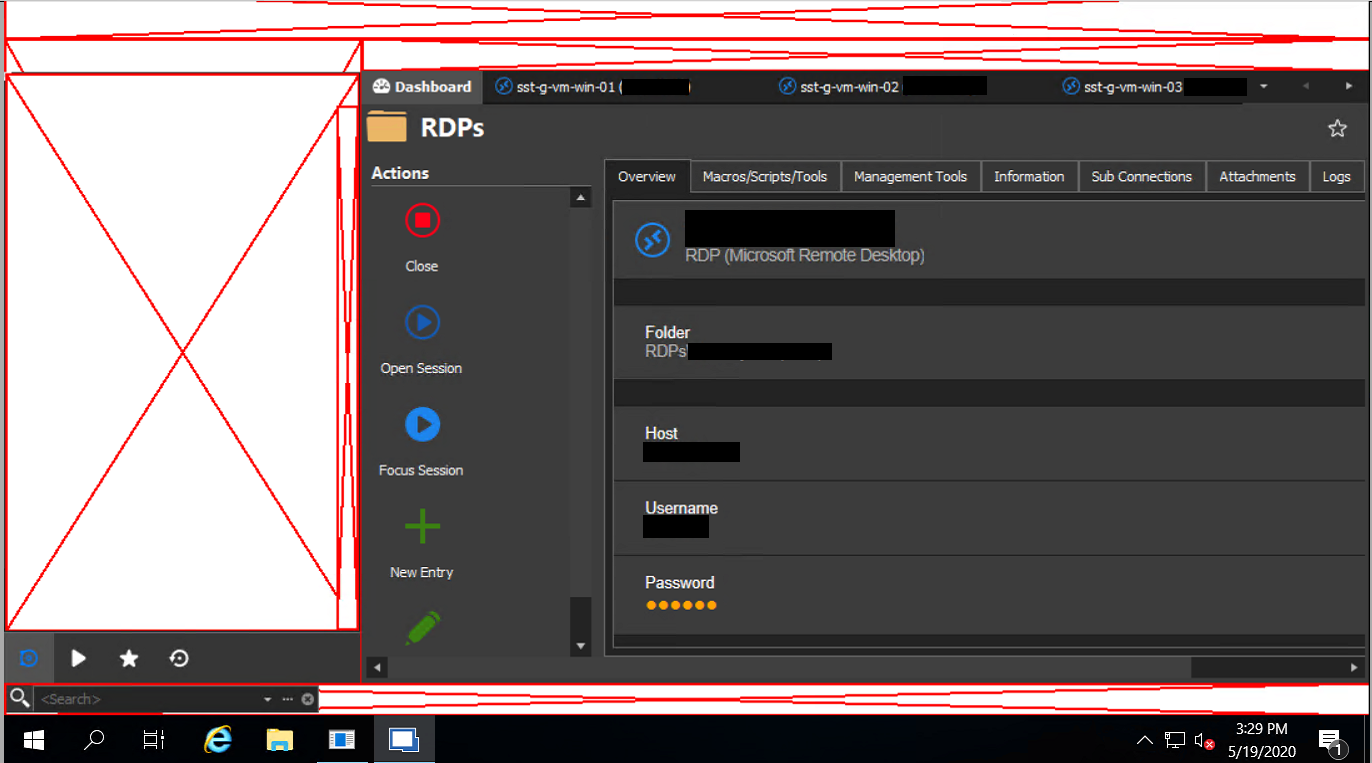
And this is the version that we are using
Edition2.PNG
image.png
Hello,
Could you try the solution(s) proposed in this help article
https://devolutions.atlassian.net/servicedesk/customer/kb/view/555352106
Best regards,
Jeff Dagenais
Hello,
Could you try the solution(s) proposed in this help article
https://devolutions.atlassian.net/servicedesk/customer/kb/view/555352106
Best regards,
Yes those solutions work, but temporarily. We are looking for a permanente fix because we are using the enterprise edition for production stuff that works at night.
So it appears that it is still something without a permanent solution.
Hello,
Is it possible that you are running a multi-monitors setup? As example, 2 or 3 screens + HDPI?
Could you provide us more information on your display configuration please?
Best regards,
Jeff Dagenais
Hello,
Is it possible that you are running a multi-monitors setup? As example, 2 or 3 screens + HDPI?
Could you provide us more information on your display configuration please?
Best regards,
It is not running in a multi-monitor setup. The program is running in a Virtual Machine Environment.
Hello,
What is your DPI setting? Is it more than 100%?
The next time that the red X occurs, could you go in Windows Event Viewer and let us know if there's some relevant information's in that area regarding RDM?
Best regards,
Jeff Dagenais
Hello,
What is your DPI setting? Is it more than 100%?
The next time that the red X occurs, could you go in Windows Event Viewer and let us know if there's some relevant information's in that area regarding RDM?
Best regards,
The problem still persist. How can I see the DPI settings? and if it is more than 100%, which % do you recommend?
Hello,
To view your DPI settings under Windows 10, please go under Settings -> Display -> Under "Scale and Layout" you will see the scaling that is currently selected. The recommended value is 100%.
That being said, have you found anything related to this issue in your Windows Event Viewer?
Best regards,
James Lafleur
Hello,
To view your DPI settings under Windows 10, please go under Settings -> Display -> Under "Scale and Layout" you will see the scaling that is currently selected. The recommended value is 100%.
That being said, have you found anything related to this issue in your Windows Event Viewer?
Best regards,
Regarding the first:
the machines running your software are VM, so the DPI settings are disabled

and for the second: nothing strange in the Windows Monitor Viewer, not a single error.
This issue is very urgent for us, because is affecting our business. We've been paying the Enterprise edition but sadly we are starting to look other alternatives.
BTW: We have your software deployed in a VM Windows Server 2019. This instance open about 70 RDP Sessions and consumes roughly 3 GB of RAM, so is not a problem of memory.
Hello,
What type of datasource are you running?
Is it possible for you to update your RDM to version 2020.2.13.0?
https://remotedesktopmanager.com/home/download
Please note that if you are running SQL Server as your backend datasource, a database upgrade is required.
https://help.remotedesktopmanager.com/database_upgrade.html
Best regards,
Jeff Dagenais
70 opened RDM is a lot of connections. You might have enough memory but I don't think that you will have enough of GDI object. We will try to help you but I suspect that you will get some problem with other solution as well.
Regards
David Hervieux
Hello,
What type of datasource are you running?
Is it possible for you to update your RDM to version 2020.2.13.0?
https://remotedesktopmanager.com/home/download
Please note that if you are running SQL Server as your backend datasource, a database upgrade is required.
https://help.remotedesktopmanager.com/database_upgrade.html
Best regards,
We updated the software yesterday to that version and today the problem happened again.
We are not using a datasource like that, it is just local.
Hello,
Could you please go under File -> options -> Advanced -. Hardware acceleration, select "DirectX" and see if this issue still occurs afterward?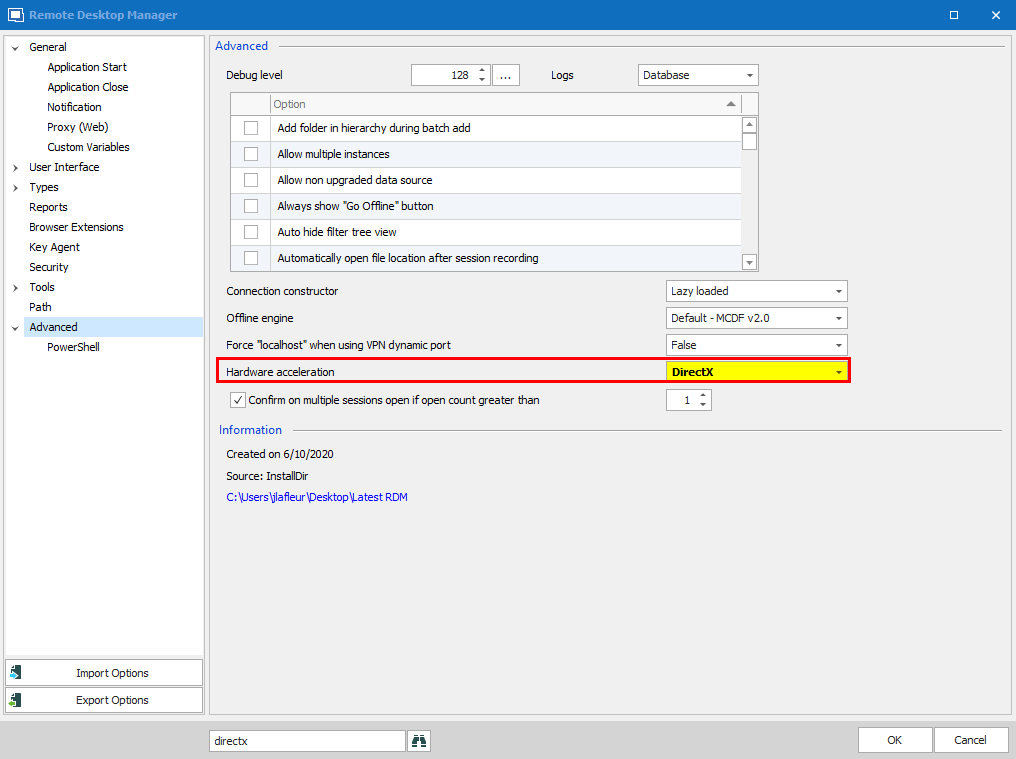
Best regards,
James Lafleur
DirectX.png
70 opened RDM is a lot of connections. You might have enough memory but I don't think that you will have enough of GDI object. We will try to help you but I suspect that you will get some problem with other solution as well.
Regards
Would you mind to expand a little bit on that please? For example: What do you mean by GDI object and if you say that 70 opened connections is too much, then how many do you recommend or how many your software is capable to handle?
Hello,
Could you please go under File -> options -> Advanced -. Hardware acceleration, select "DirectX" and see if this issue still occurs afterward?
Best regards,
Thank you for the suggestion, we'll try that and I will let you know how that goes.
Hello,
Thank you for your quick reply!
In general, 30 RDP connections would be the maximum. That being said, this number varies depending on which tasks are performed on the remote system.
To increase the maximum amount of GDI objects, I would recommend consulting this link: https://stackoverflow.com/questions/38612364/how-to-increase-the-maximum-amount-of-gdi-object-for-windows-10
Best regards,
James Lafleur
Hello,
Thank you for your quick reply!
In general, 30 RDP connections would be the maximum. That being said, this number varies depending on which tasks are performed on the remote system.
To increase the maximum amount of GDI objects, I would recommend consulting this link: https://stackoverflow.com/questions/38612364/how-to-increase-the-maximum-amount-of-gdi-object-for-windows-10
Best regards,
Thank you for your suggestions. We will try that and let you know how it goes.
FYI: What we do in those RDP sessions is that we run some RPA programs that we develop. We only need to have the RDP sessions active and open for the bots to run.
Hello,
Perfect! Also, after having a discussion on that matter with our Engineering Department, they mentioned that you could also run 2 instances of RDM at once, each running half of your RDP entries.
In order to be able to do this, you would need to go under File -> Options -> Advanced and check the "Allow multiple instances" option: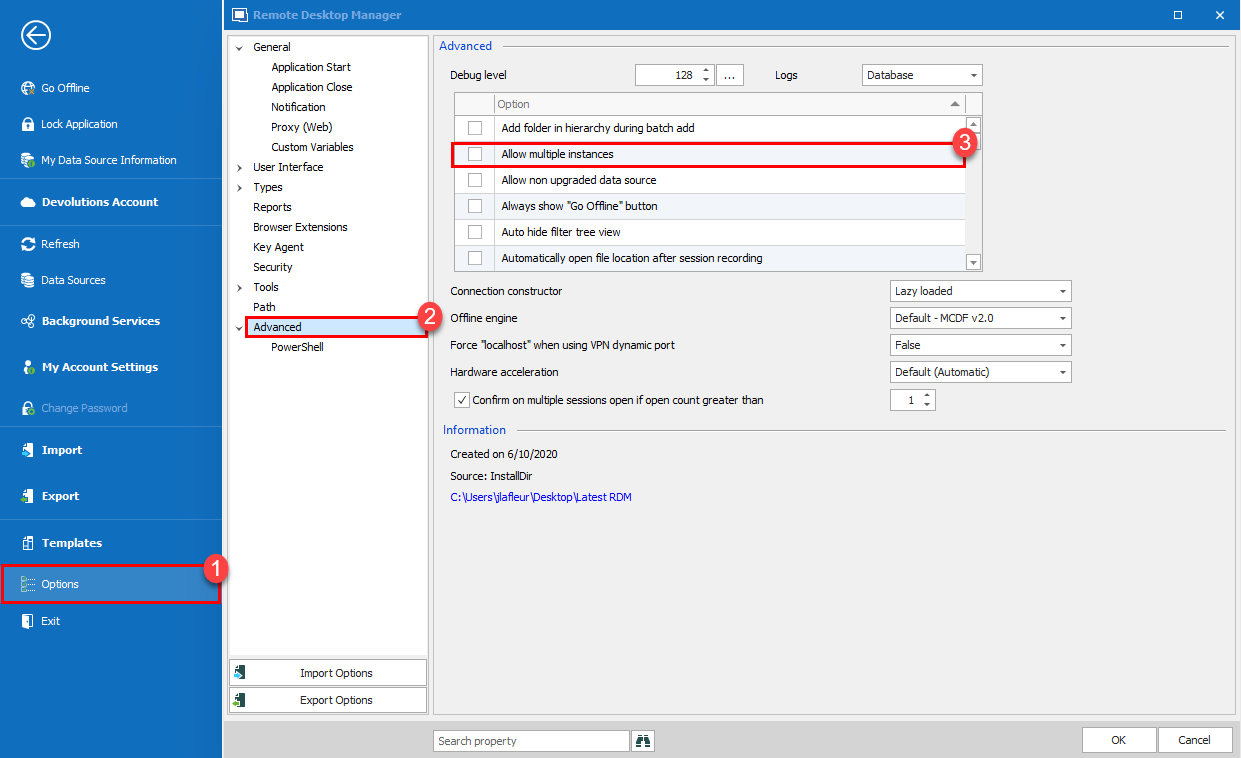
Best regards,
James Lafleur
AllowMultiplesInstances.png
Hello,
Perfect! Also, after having a discussion on that matter with our Engineering Department, they mentioned that you could also run 2 instances of RDM at once, each running half of your RDP entries.
In order to be able to do this, you would need to go under File -> Options -> Advanced and check the "Allow multiple instances" option:
Best regards,
Thank you for your suggestions, but we've already implemented that option in the past.