Unable to Connect to your Data Source

Running version 2022.3.21.0 64-bit, and a new behavior that I've been dealing with is if I'm connected to a client's VPN where I don't have direct access to our team database, I am told "Unable to Connect to your Data Source" multiple times, which is probably due to the nested Inharidences we have, but it eventually launches the requested connection.
It's even worst when I'm on-site and boot my computer and launch RDM for the first time that session. Here I am not given a cached version of the connections anymore and am told "No Enterprise license found" If I double-click on that phrase I get a dialog box that says "You don't have access to license management. Ask your administrator to assign you a license."
This renders RDM useless as a tool when I'm onsite and I have forgotten to keep my laptop running while traveling.
Any help would be great.
All Comments (11)
Saw that there is a newer version, 2022.3.24.0, downloading and installing it now, but I don't see anything in the release notes that would say it's address in a update.
After the upgrade found that 2022.3.26.0 is available, downloading and installing that version now.
I did also take a look at past release notes and saw that 2022.3.14.0 states that "User license must be set in the data source" How does this affect users that aren't able to connect to the data source while on site?
Hello,
Could you confirm what type of Data Source you are using?
Best Regards,
Etienne Lord
As for the "No enterprise license" message, this is most likely due to the fact that a license of RDM has not been registered into your data source.
Could you please verify if that is your case, to do so, please refer to this link: https://help.remotedesktopmanager.com/installation_registration_enterpriseedition.html
James Lafleur
Hello,
Could you confirm what type of Data Source you are using?
Best Regards,
MySQL enterprise, which I know is now depreciated, but we have not spun up our new database server yet.
Hello,
Thank you for your swift reply!
Even though the MySQL data source is marked as deprecated, you should be able to add your license by going under Administration -> Licenses and then assign it to your users by going under the "Assigned to" section. Have you been able to do these steps?
Best regards,
James Lafleur
I hadn't done those steps before, but when I followed them, it looks like it was already done....see the screenshot and let me know if I'm missing something please.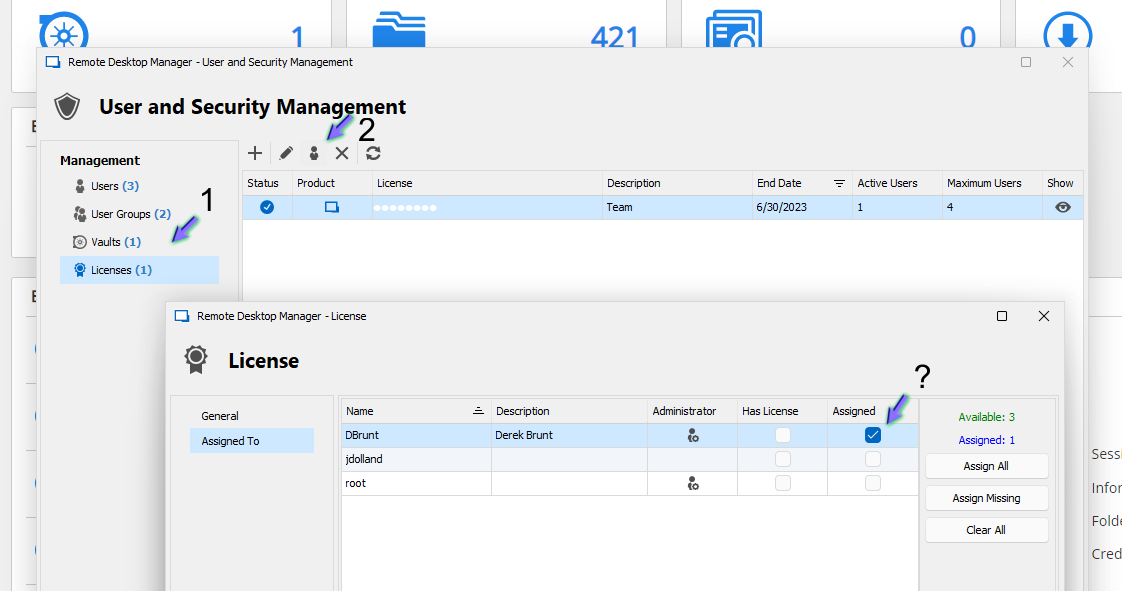
RDM License assignement screenshot.png
Hello,
In that case, would it be possible for you to go under Help -> Submit a Support Ticket to open a support case with us? Just make sure to check both options offered in the prompt. I will consult the information it provides and see what could be causing these issues.
Just make sure to mention this thread in the description of your case.
Best regards,
James Lafleur
Thank you for your help. Just followed your steps and submitted a ticket.
Perfect! You should receive an email from me shortly. For further reference, your case number is 00016315.
James Lafleur
Hello,
Thank you again for opening a case with us! I am happy to see that enabling the offline mode under Administration -> System Settings has done the trick.
Do not hesitate to contact us again if you require further assistance.
Best regards,
James Lafleur