
john16
Generic OIDC/SAML client for SSO login
As Devolutions Server is able to run on Linux or Docker with a Postgres backend it would make sense to also start supporting other IdP's next to EntraID, Octa and PingOne like KeyCLoak and Authentik
Please add support for this as we do not want to be bound to using specific IdP's.
Remember Trusted Devices and Apply Risk-Based Device Authorization
Hello,
As a small suggestion, the dialog shows "a new device is waiting to be signed in from your account"
From a user perspective this suggests that the platform has information about my devices which it doesn't.
A suggestion might be to change the text to reflect this.
Limit MFA device types for the datasource MFA option
Hello Érica,
Thank you for your response, we have already followed these steps to enroll Yubikey, but I am searching for an option to prevent the usage of TOPT and DUO as 2nd factor.
Or an option for the admininstrators of RDM so they can not only see that MFA is enrolled for a user, but also which types.
More or less how Microsoft can show the registered MFA options on an user basis
Kind regards
John
Limit MFA device types for the datasource MFA option
Hello,
We have enrolled Yubikey as MFA factor on the datasource and that works great.
But Is there an option to prevent users from using DUO and TOPT as datasource MFA option?
I know this might be a strange feature, but our company policy for now is only allowing the usage of Yubikey.
And we also require Yubikey for access to our customers Office 365 tenants from a hardening perspective.
Best regards
John
View all users with MFA enabled
Hello,
We are currently using RDM 2023.3.24 and are starting with implementing MFA.
The datasource we are using is MSSQL server
Under administration => users I can see the list of users, and I can reset MFA for a specific user if required.
But I don't see the status of MFA for the users, I was hoping to add the required column with the column chooser, but there is no column with that information. Running the Users report also does not contain any info about MFA
Is there another way to see the MFA status for the users, or am I just just overlooking something
Best regards
John Hoogeveen
Office 365 Sharepoint entry using embedded microsoft account
I would be nice to have an option to be able to create entries in the vault for specific sharepoint locations.
The validation for the Microsoft account is already available in RDM as it is being used for the Microsoft OneDrive Explorer entry.
We work on a "per customer" basis and are also using Sharepoint for specific data for the customers.
For ease of use my idea is to create a web entry per customer in RDM that point to the correct sharepoint location and use the verified Microsoft account for validation.
Perform shift tab with typing macro
Hello Etienne,
I tried it, at first it didn't work but it helped me a lot solving this issue.
Below is the final typing macro that is working correctly.
$USERNAME${DELAY}{ENTER}{DELAY}{DELAY}$PASSWORD${ENTER}{DELAY}{SHIFT}{TAB}{ENTER}
As you can see I removed the first tabs in the user and password dialog as they are not needed, just {ENTER}
Also I increased the delay time a bit, it went from 300ms to 1000ms
When we use these settings a firefox private browsing window is opened and the user is logged on without any dialogs.
Attached is the RDM file for this setup.
Best regards,
John Hoogeveen
Perform shift tab with typing macro
Hello Jeff,
I am not specifically looking for an embedded version, currently it is working almost perfect as external session on Firefox with private browsing.
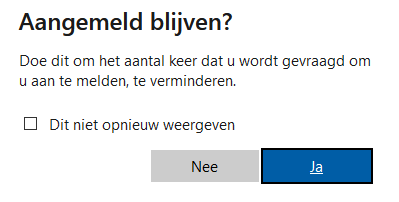
When I start the session everything is filled in correctly, but it stops at the screen shown in the attachment.
This dialog is something like "Stay logged in" with the focus on "Ja" (yes)
My idea is to perform shift-tab to move to "Nee" (no) and press enter.
The session provided in the other topic indeed runs embedded but has the same issue with the last dialog.
Perform shift tab with typing macro
I am trying to create a login option for the Office 365 portal.
Most of it works correctly, I start an private session of Firefox, open the page and perform the typing macro
$USERNAME${TAB}{TAB}{TAB}{TAB}{ENTER}{DELAY}{DELAY}$PASSWORD${TAB}{TAB}{ENTER}{+TAB}{ENTER}
The last dialog of the login is the question if I want t remain logged in, and I need to perform a shift tab to move to NO, but it doesn't work
I tried {+TAB} and +({TAB}) without success.
Any suggestions on how to fix this?