alex10
ARM64 dialog illlegible
Thanks...no rush.
I wasn't able to respond to your previous request for additional info due to a hurricane near me. Now, it appears you won't need it.
ARM64 dialog illlegible
Is this what you are looking for?
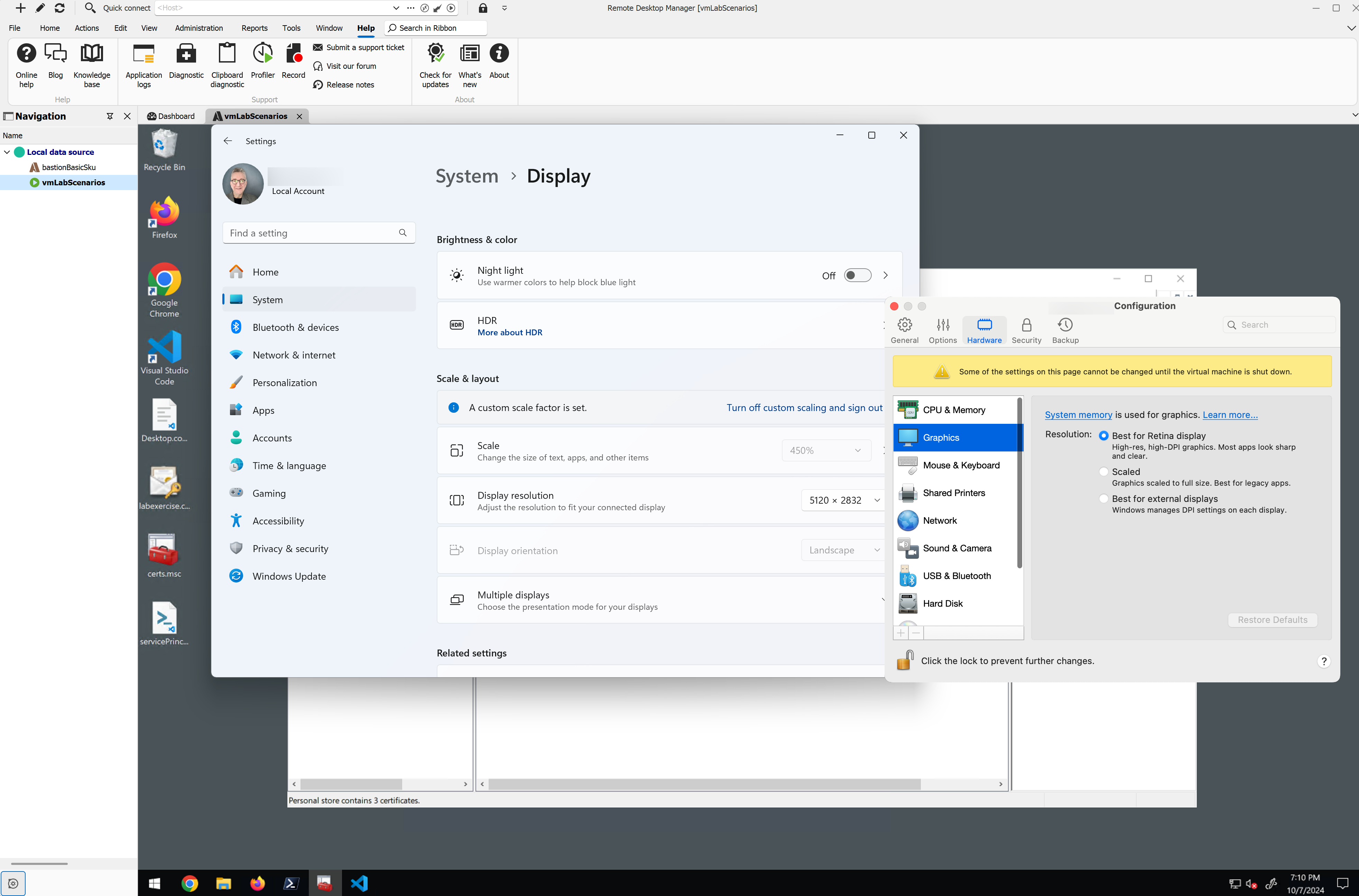
ARM64 dialog illlegible
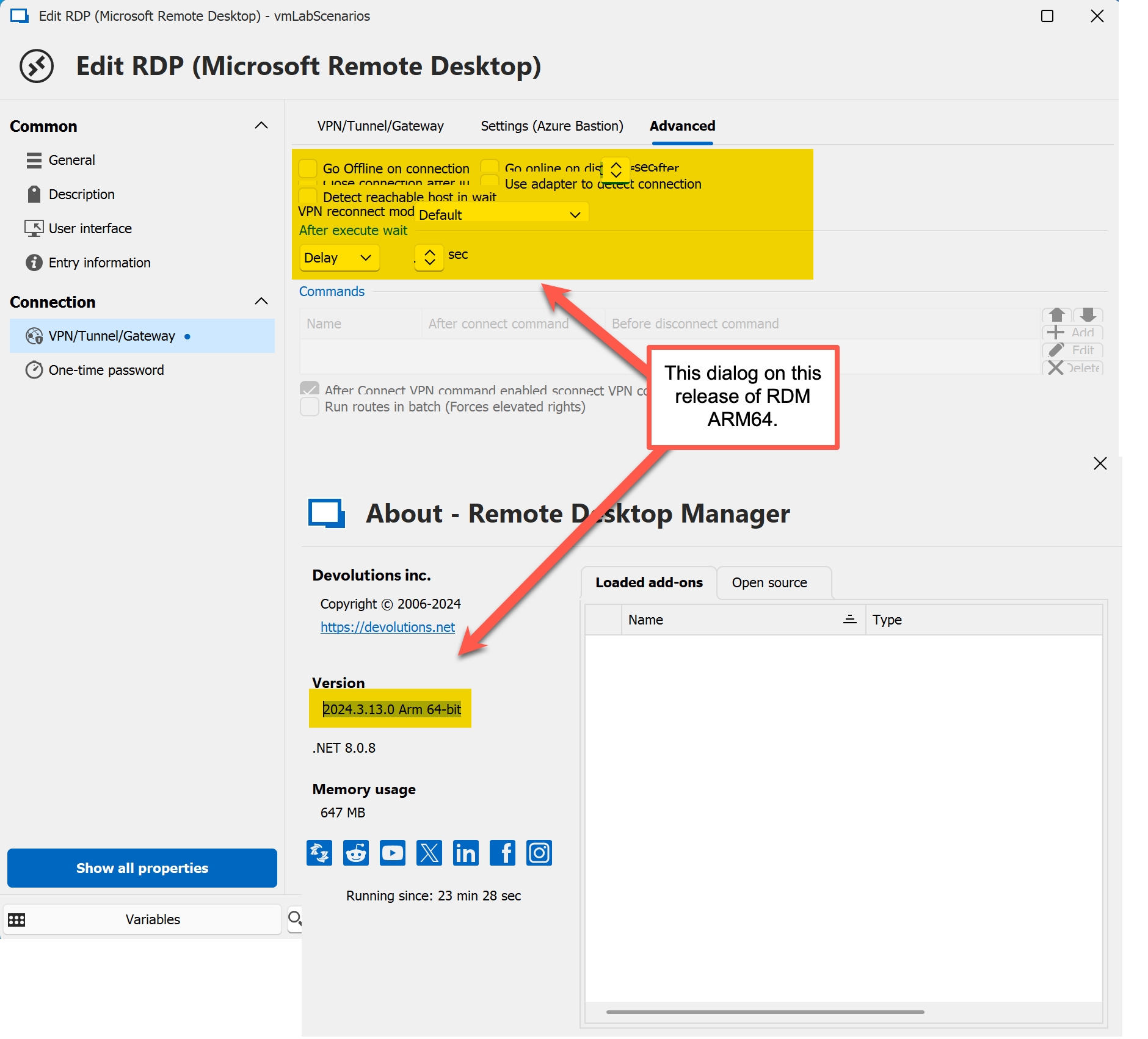
It took some doing but I finally got an Azure Bastion RDP session working via the VPN settings.
Naturally, that prompted me to start looking through all the dialogs to see what I could see -- and I came across this one.
This is on Windows 11 ARM64 22H2 with current maintenance in a Parallels VM.
I hope this helps and, as always, I appreciate the free edition more than you can know.
Does 2024.1 on Win ARM64 REALLY want an x64 version of dotnet?
Wow! That was fast. Thanks.
All good here...though you may wish to let Win Arm64 users know they will need to install dotnet 8. As you can see in the recording here, RDM (or maybe it's Windows) knows the system doesn't have dotnet 8 installed, installs it and all is well. But this happens _after_ RDM upgrade. One kinda doesn't expect it after-the-fact. Still, it's not an issue.
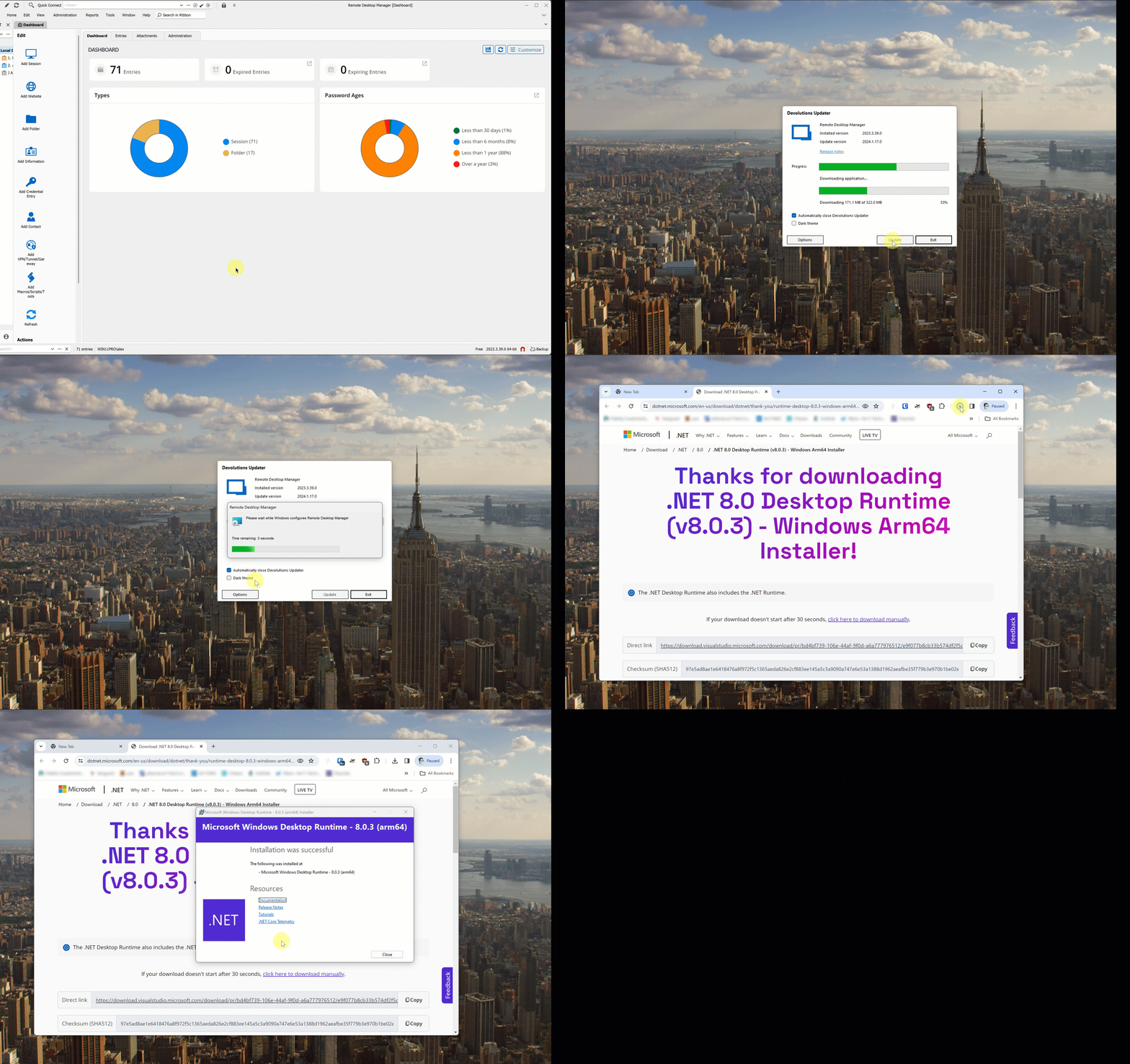
Does 2024.1 on Win ARM64 REALLY want an x64 version of dotnet?
Thanks for the detailed information. Nice of MSFT to change it on you, eh?
There's no urgency in running 2024.1 in my VM; it's the backup for the macOS version I use. Usually, when there's an update for one, I update the other (esp. as there's a warning in the dashboard about Hub not being on a matching version).
I'll fall back to a previous version.
There's no rush but if you can remember, please update this post when you think it's been resolved.
Does 2024.1 on Win ARM64 REALLY want an x64 version of dotnet?
After a failed automatic update, here's what I see:
.gif)
Does 2024.1 on Win ARM64 REALLY want an x64 version of dotnet?
Auto update on Win11 ARM (Parallels VM) is requesting x64 version of dotnet 8. See image.

macOS desktop icons disappearing in 2023.1.12.0
AWS EC2 Windows instances are really stock Windows provided in image form with an associated license (so the user just pays AWS or they can use software subscription portability in some cases for licenses). Other than being able to launch them directly from AWS, they are plain-vanilla Windows Server. AWS does regularly update these images to current maintenance levels, but that's a good thing.
I'll wait for the update and get back to you.
Meanwhile, I prefer the distorted icons to to the visual artifacts so I am going to reset to the prior settings.
macOS desktop icons disappearing in 2023.1.12.0
All off produces all desktop icons but leaves detritus like what's shown below.
Could this be something specific to EC2 instances running Windows Server in AWS?

macOS desktop icons disappearing in 2023.1.12.0
Sorry for the delay. I am still experiencing this.
Rather than me hacking at this which, unfortunately, I don't have time for, below is a screenshot of the way all of my RDP sessions are configured. Do you have a single option you want me to test? Also, note I am at your latest release.
In order to change any of the options, I need to uncheck detect network automatically.
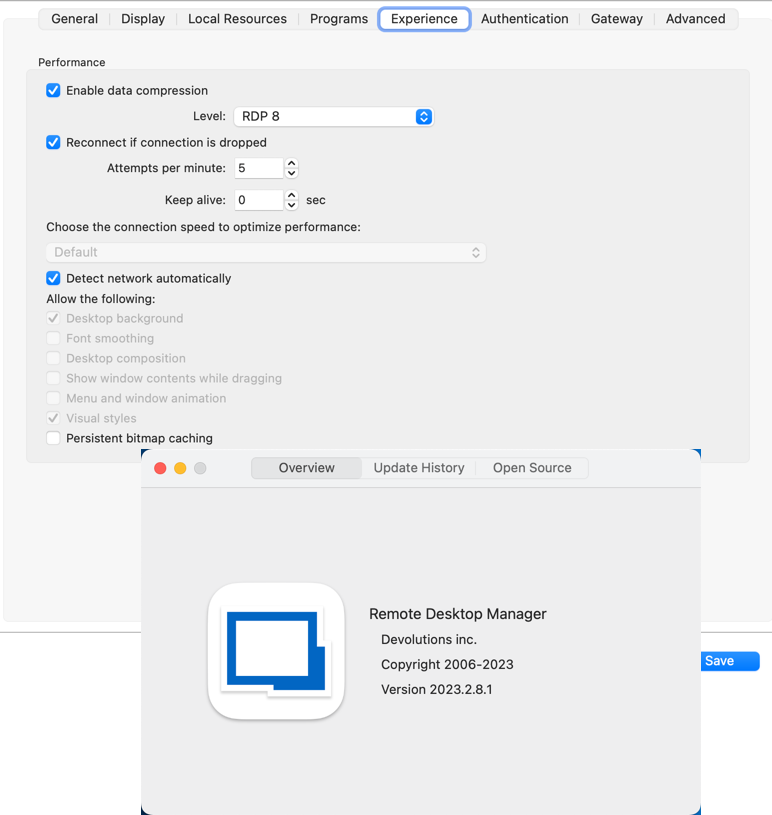
macOS desktop icons disappearing in 2023.1.12.0
Unfortunately, changing the cache setting did not help.

macOS desktop icons disappearing in 2023.1.12.0
Hi.
You mean the experience tab for the individual RDP session, right?
I changed that for one host and it seems to be better.
Thanks.
macOS desktop icons disappearing in 2023.1.12.0
Unfortunately, that didn't help.
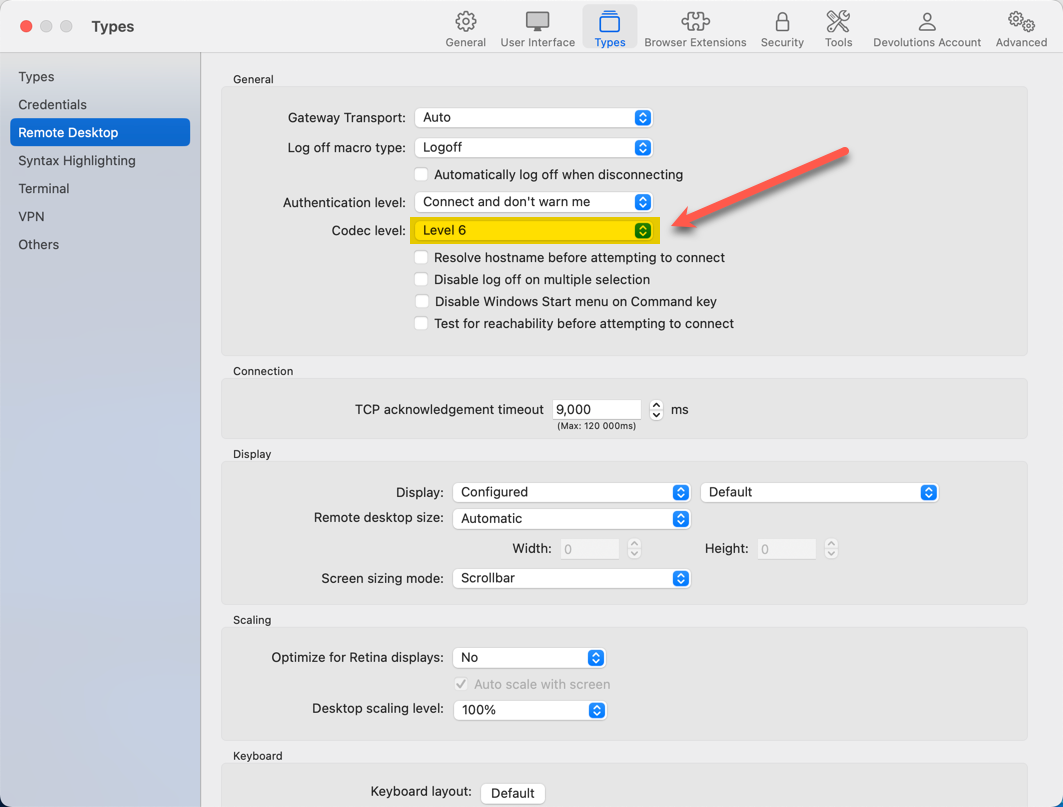

macOS desktop icons disappearing in 2023.1.12.0
Still happening in 2023.2.6.2.
All sessions. Don't remember which version was last OK.

macOS desktop icons disappearing in 2023.1.12.0
Hello Alex,
Thank you for reaching out to us regarding this matter. We are happy to assist you in resolving this issue.
To help us better understand the situation, could you kindly inform us if this problem occurred after an update or if you just installed RDM from scratch? Additionally, could you let us know if the issue persists even when RDM is closed?
=> No, this is an RDM macOS only issue. It began after an update to an existing installation.
Furthermore, we recommend restarting your computer to see if the issue persists. In case it does, could you try installing an older version of RDM to check if the issue still occurs?
=> Ever heard the old joke about three engineers in a broken down car? The electrical engineer: it's a dead battery. The chemical engineer: it's water in the gas. The Microsoft engineer: just open the doors, get out, close the doors, get back in and it'll start right up. Yes, this problem persists after restarts.
We hope this helps and please do not hesitate to reach out if you have any further concerns or questions.
Best regards,
macOS desktop icons disappearing in 2023.1.12.0
.gif)
Windows key passed to OS X AND remote session & Win-X not passed at all
[removed]
Windows key passed to OS X AND remote session & Win-X not passed at all
It's baaaaccckkk...
Where in the UI is this switch surfaced? Seems like updates are removing the manual .cfg option and resetting back to the default.
(Seven years and counting...)
.gif)
Cannot apply license to RDM Mac
Let me ask you, would you be happy if:
The Mac version didn't offer to convert
The ARM64 version does, but crashes ugly?
Not to mention:
To keep creds in the product synced -- oh, sorry, I mean to use a license I paid for -- I have to adopt a password vault system that is
Proprietary
Largely undocumented
Subject to who knows what product development whims you guys come up with next.
No thanks.
I just lived through the LastPass debacle and waited seven years for a keyboard fix in the Mac version that got dropped and then -- magically!! -- got put back in via an undocumented config file change.
Again, would you be happy with this sequence?
But in the hopes that you fix the ARM64 migration thing, here's a recording of it and the text from the (misshapen) crash dialog.
.gif)
Cannot apply license to RDM Mac
I see.
So, to recap:
I was downgraded without any real awareness or consent.
I have to convert a data source -- also unclear on when or how that was publicized or what the impact is to my use case.
The blog post referenced in the answer above says, "If a user switches from Remote Desktop Manager Free to Enterprise, there is no need to uninstall/re-install anything. Simply purchase and add your license to your RDM data source."
All this work just to use a product I wanted to support by purchasing a license.
What have you guys been thinking? It's almost as much work to set up this thing up as it is to use it.
Cannot apply license to RDM Mac
I bought a license in July 2022 for what was then called the Enterprise edition. Somewhere in the upgrade process, I got switched to the Free edition and now, I cannot find a way to upgrade that edition to today's Teams edition by entering the license. The selection to enter a license in the Administration tab of the ribbon is missing.
Deleting the app and re-downloading it, even using the Teams selection on the downloads page as well as a link sent by sales does not resolve the issue.
I cannot use Bitwarden integration with the Free edition.

Windows key passed to OS X AND remote session & Win-X not passed at all
This appears to work. Is it going to be in the UI eventually?
Windows key passed to OS X AND remote session & Win-X not passed at all
Thanks.
Though I think the default behavior should be like it is on Windows where if keys are sent to the remote session, they don't also perform a local function.
I've felt like I've described and described and described this and have struggled to understand how it can be OK to have the focus in a remote session, press a local key combination that is not configured to be sent to the remote host to be "partially" sent to the remote host and to have it perform the function on the local machine it as intended.
It would be a "better" bug if cmd-spacebar was sent to Windows and that's all that happens. But my experience is that cmd-spacebar performs the "Open Spotlight" function as intended on macOS and is simply the Windows key in the remote session. It's illogical and frustrating because the focus changes to the local machine but something happened in the remote session.
So, I am not sure why you wouldn't make the behavior I am seeking the default as anything else makes little sense.
Windows key passed to OS X AND remote session & Win-X not passed at all
Works for me.
Windows key passed to OS X AND remote session & Win-X not passed at all
I'm confused -- again.
After the post shown below, this incredibly old problem was fixed. Now, it's back. I never enabled or disabled any features -- and the whole discussion of key settings was, and is I assume, a diversion as you pointed out.