macOS desktop icons disappearing in 2023.1.12.0

.gif)
2023-06-15_11-45-49 (1).gif
All Comments (17)
Hello Alex,
Thank you for reaching out to us regarding this matter. We are happy to assist you in resolving this issue.
To help us better understand the situation, could you kindly inform us if this problem occurred after an update or if you just installed RDM from scratch? Additionally, could you let us know if the issue persists even when RDM is closed?
Furthermore, we recommend restarting your computer to see if the issue persists. In case it does, could you try installing an older version of RDM to check if the issue still occurs?
We hope this helps and please do not hesitate to reach out if you have any further concerns or questions.
Best regards,
Patrick Ouimet
Hello Alex,
Thank you for reaching out to us regarding this matter. We are happy to assist you in resolving this issue.
To help us better understand the situation, could you kindly inform us if this problem occurred after an update or if you just installed RDM from scratch? Additionally, could you let us know if the issue persists even when RDM is closed?
=> No, this is an RDM macOS only issue. It began after an update to an existing installation.
Furthermore, we recommend restarting your computer to see if the issue persists. In case it does, could you try installing an older version of RDM to check if the issue still occurs?
=> Ever heard the old joke about three engineers in a broken down car? The electrical engineer: it's a dead battery. The chemical engineer: it's water in the gas. The Microsoft engineer: just open the doors, get out, close the doors, get back in and it'll start right up. Yes, this problem persists after restarts.
We hope this helps and please do not hesitate to reach out if you have any further concerns or questions.
Best regards,
Hi,
Could you provide any additional information? I've tested with a couple RDP (with RDM 2023.1.12.0) sessions and couldn't reproduce. Is it with all sessions? Or some of them? In which case, any particularity about the entries exhibiting the issue? You say the issue is in 2023.1.12.0, it wasn't happening before updating to this version? Do you remember the last version you were using before that? If you don't you should be able to see this from the Main Menu -> Remote Desktop Manager -> About... -> Update History tab.
Best regards,
Xavier Fortin
Still happening in 2023.2.6.2.
All sessions. Don't remember which version was last OK.
2023-07-13_11-30-32.png
Hi alex10
From the images you posted, it does look like a problem at the codec level.
Somewhat recently the default codec level was upped to RDP 8.1. Can you try lowering this to 6 or 7 in either the "Advanced" tab of a particular RDP session or globally in Settings > Types > RDP (noting that the individual session settings can override this value).
Let us know if that changes something, it can help to isolate the problem.
Thanks and kind regards,
Richard Markievicz
Unfortunately, that didn't help.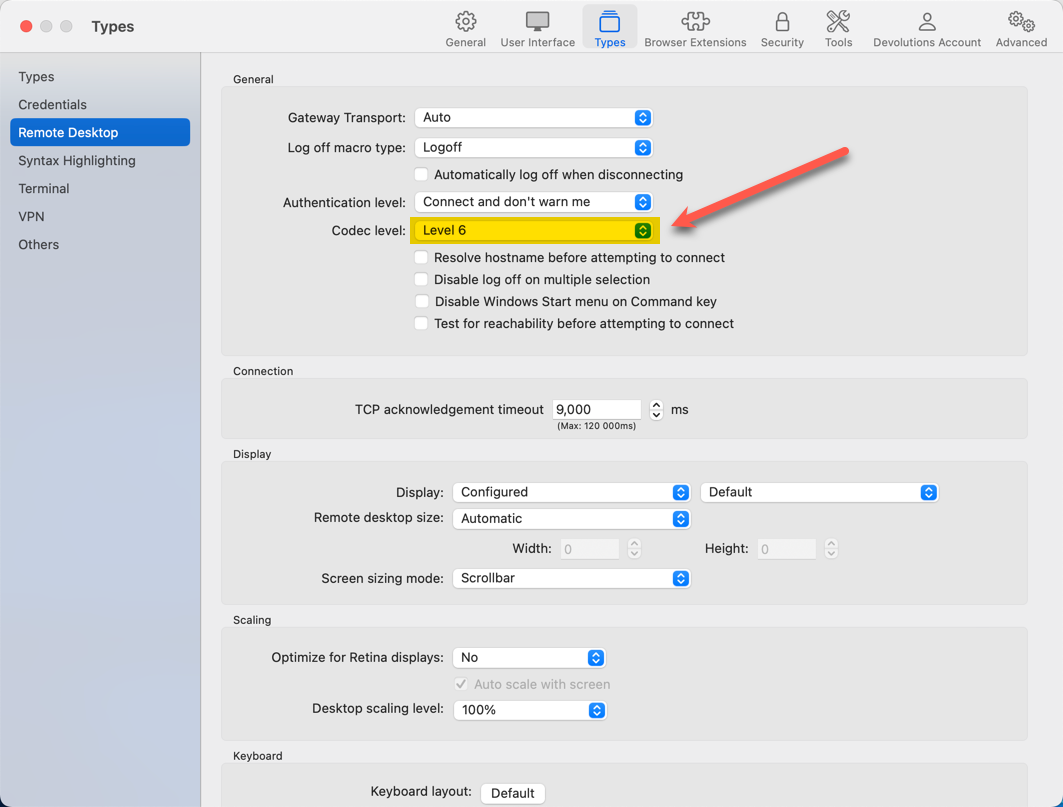

Nope.gif
2023-07-13_16-52-00.png
Hello again
Thanks for the update. What settings do you have in the "Experience" tab? This might be related to bitmap caching on the client. Can you try toggling the "Persistent bitmap caching" option and let me know if it changes something?
Please let me know if you have a question or something isn't clear
Thanks and kind regards,
Richard Markievicz
Hi.
You mean the experience tab for the individual RDP session, right?
I changed that for one host and it seems to be better.
Thanks.
Hello again
Thanks for confirmation. That's correct, in the session "experience" tab.
The bitmap cache is a performance feature that allows the client to store a local copy of small bitmap images received from the server. If the server wants to present the same image again, it doesn't need to send it a second time since the client already has a copy. This can speed things up over a slow connection, but over fast networks the difference is probably negligable.
We have multiple ways to tweak and tune the bitmap cache and I did discover at least one slight issue in how we're configuring it. However, it doesn't reasonably explain why you would see this problem but as far as I know, yours is the only report we've had of that.
I'm opening a ticket on my side to address the problem that I found and I'll update this post once that fix is available. In the meantime, please experiment with that setting as a workaround and let me the know if the problem shows up again.
As always, don't hesitate to post back if something isn't clear or you have further questions
Kind regards,
Richard Markievicz
Unfortunately, changing the cache setting did not help.
2023-07-17_14-41-09.png
Hello again
Thanks for the information. I remain confused why I don't see any other reports of this issue, but the problem for sure lies somewhere at the server or protocol level. We just need to isolate the cause.
Can you experiment with disabling all the "experience" options, like in my screenshot? If it fixes the problem, you can try re-enabling the options one-by-one to try and determine if a specific setting changes things.
Please let me know if something isn't clear or you have further questions.
Thanks and kind regards,
Richard Markievicz
Screenshot 2023-07-18 at 09.19.44.png
Sorry for the delay. I am still experiencing this.
Rather than me hacking at this which, unfortunately, I don't have time for, below is a screenshot of the way all of my RDP sessions are configured. Do you have a single option you want me to test? Also, note I am at your latest release.
In order to change any of the options, I need to uncheck detect network automatically.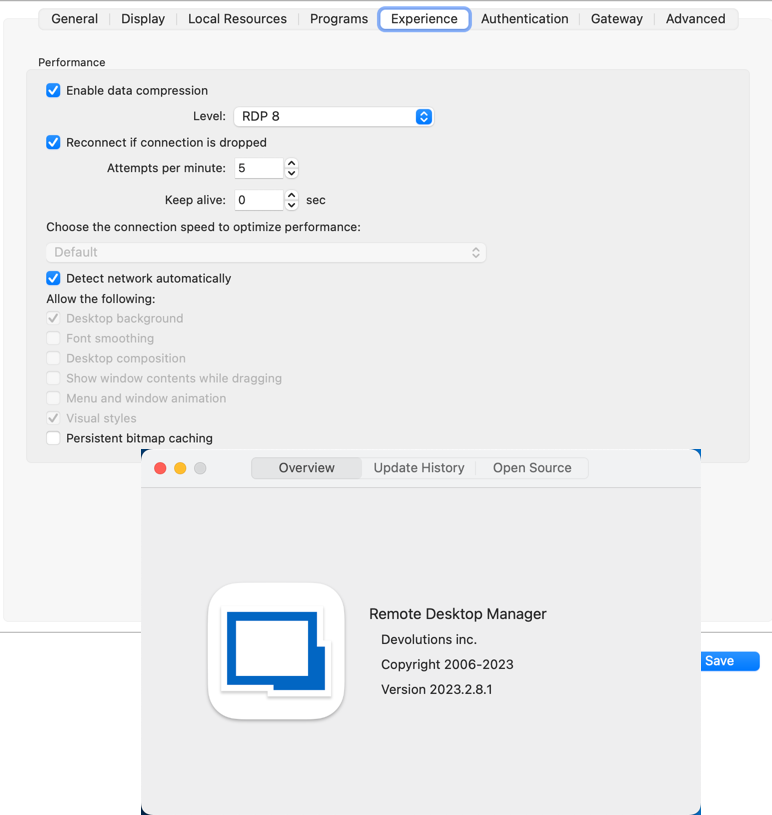
rdm.png
Hi
You can start by disabling all the options under "Allow the following" (and yes, you'll need to disable "Detect Network Automatically", which tries to choose the best options based on network conditions).
If the problem doesn't occur any more, we'll know it relates to a specific experience setting.
I do remain confused by the issue, as we've had zero other reports of the same problem.
The next release of RDM Mac does contain an update to FreeRDP, that fixes various codec related issues and corrects one problem with the bitmap cache. Although you still experience the issue with the bitmap cache disabled, the fix might change something at the protocol level.
I'm sorry I don't have anything more firm for you right now, but disabling the experience options and looking if it makes a difference will be helpful.
Thanks and kind regards,
Richard Markievicz
All off produces all desktop icons but leaves detritus like what's shown below.
Could this be something specific to EC2 instances running Windows Server in AWS?
2023-08-14_13-50-04.png
Ah, I think this might be a separate issue. There was a regression in the progressive codec implementation in FreeRDP that looks like this - it's interesting that it only cropped up once you started tweaking the experience options.
It's already patched on our side and will be on the next RDM Mac release, in the meantime you can try downgrading the codec level to 6 or 7.
It's interesting that the experience options change something, they are really telling the server the performance settings to use in the remote session and don't directly affect the codec or protocol. They just make the drawing "simpler" (and more performant). Possibly the fact that it's EC2 could make a difference. Are these plain VMs that you setup yourself or built from some kind of Amazon provided template (I'm mainly wondering what I need to do to make a simple recreation of your environment to test with).
Thanks and kind regards,
Richard Markievicz
AWS EC2 Windows instances are really stock Windows provided in image form with an associated license (so the user just pays AWS or they can use software subscription portability in some cases for licenses). Other than being able to launch them directly from AWS, they are plain-vanilla Windows Server. AWS does regularly update these images to current maintenance levels, but that's a good thing.
I'll wait for the update and get back to you.
Meanwhile, I prefer the distorted icons to to the visual artifacts so I am going to reset to the prior settings.
Ok, thank you. Sometimes there could be custom display drivers, middleware, etc that can change things but that doesn't sound like the case here.
Let us know how things look after the next update, and I appreciate your patience.
Thanks and kind regards,
Richard Markievicz