Windows key passed to OS X AND remote session & Win-X not passed at all
Windows key passed to OS X AND remote session & Win-X not passed at all
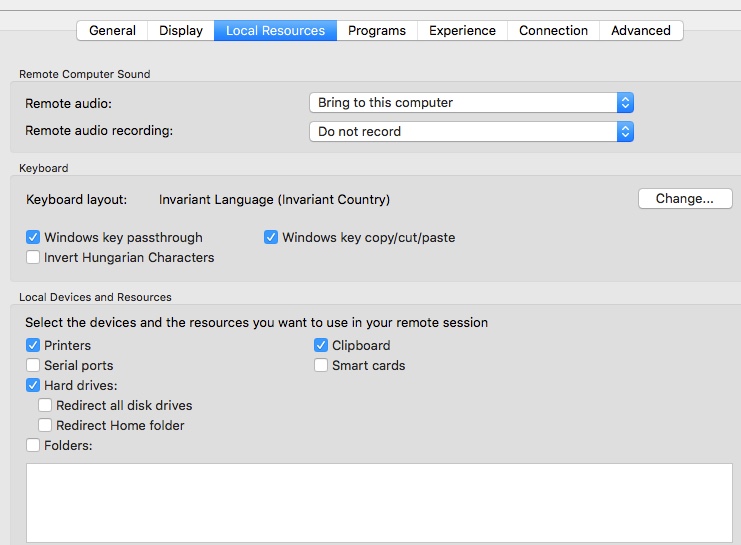
In RDM Mac, if the keyboard is set to passthrough the Windows key, when a session has the focus, if a Mac Cmd-key combo, such as Cmd-Space, is entered, RDM also passes the Cmd key through. This is astonishingly annoying and has been this way for many releases. As you can see in the screenshot below, using the Mac keyboard to bring up Spotlight search while a session has the focus also passes (at least) the Cmd key to the session.
Plus, Windows-X (what you'd expect to be Cmd-X) isn't passed at all.
This really needs to be fixed or at least a passable workaround.
Thanks.
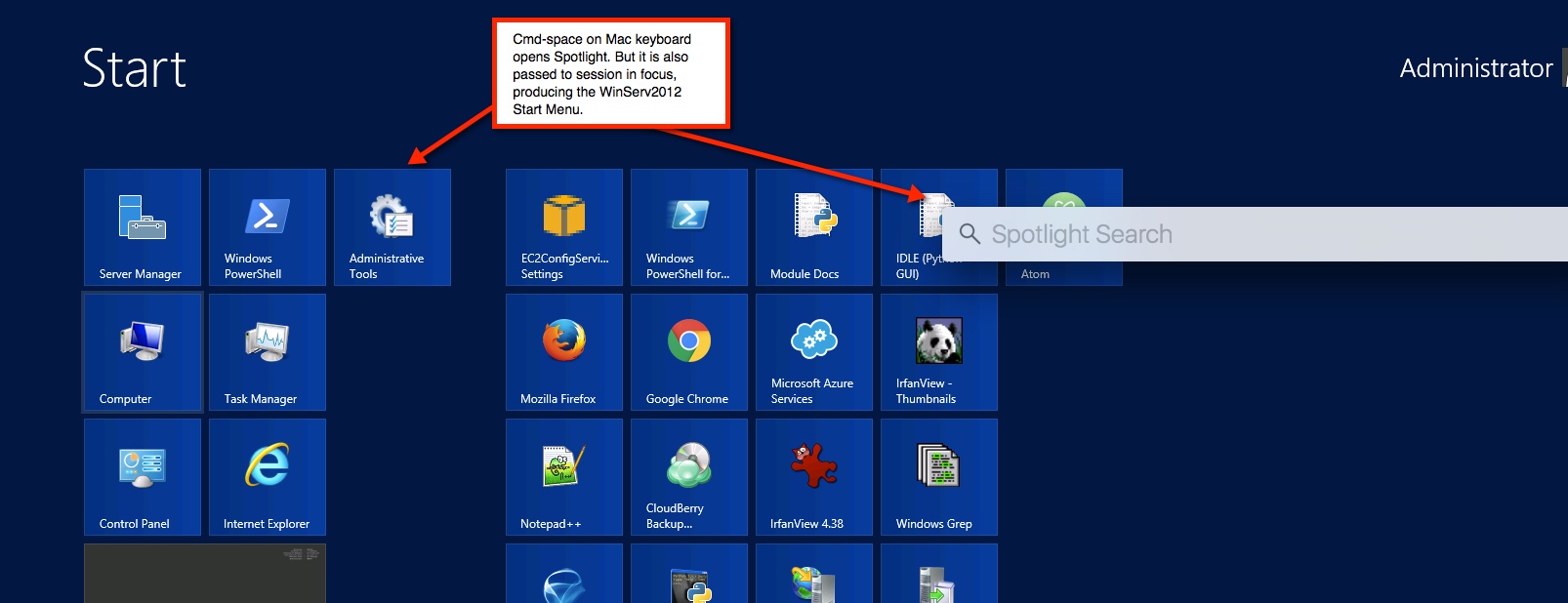
2016-04-20_09-33-34.jpg
2016-04-20_09-36-30.jpg
All Comments (52)
Hi yobyot,
For the cmd+space passing the cmd key to your windows we are looking for a solution but we are not there yet. The only hint I can give you right-now is to set the focus on something else before calling up the spotlight search.
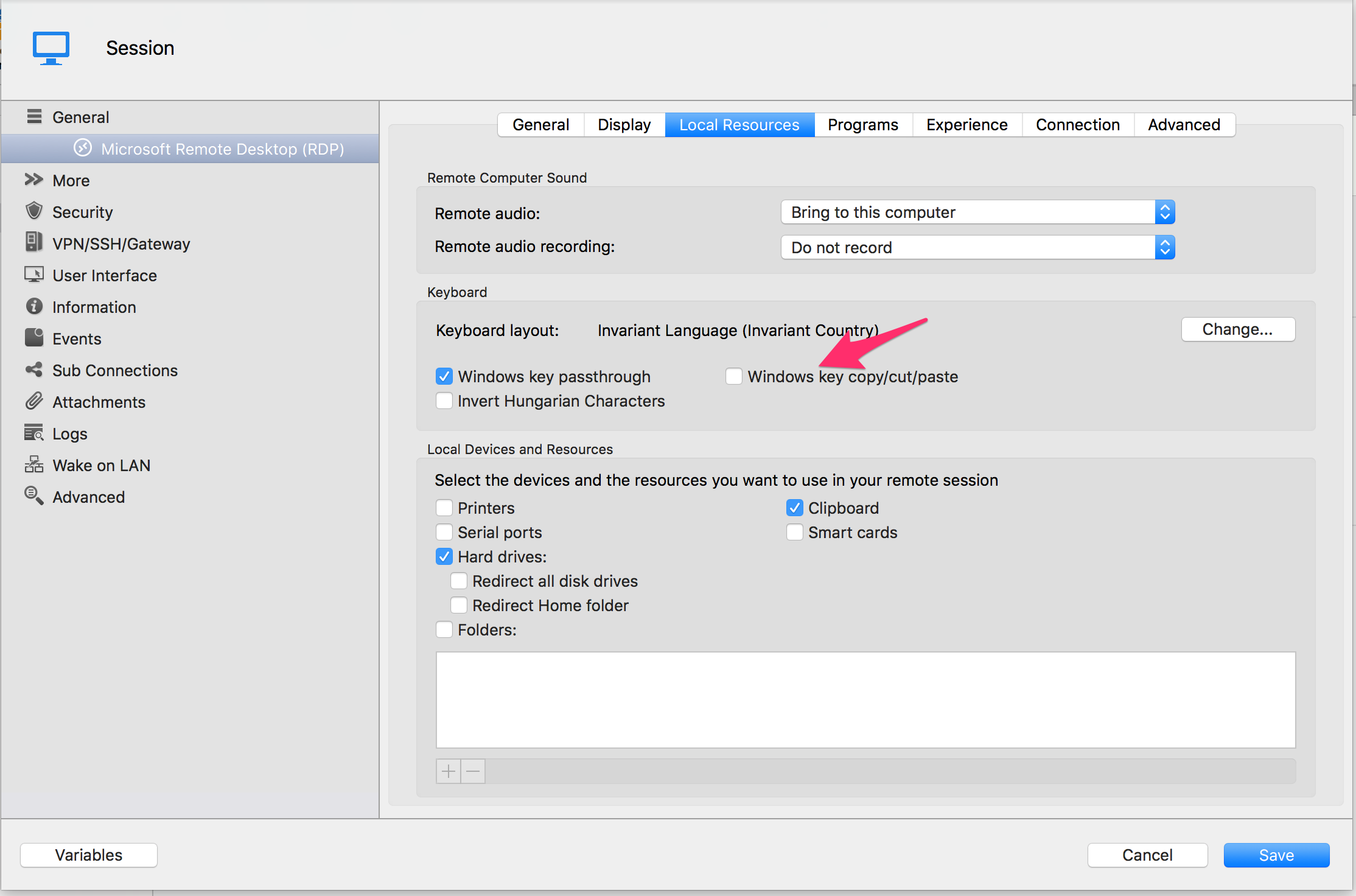
For the Windows+X shortcut you are currently having a shortcut conflict.
Since the Windows key copy/cut/paste is checked in your Local Resources configuration a ctrl+x is send to the windows machine.
Simply uncheck it and you'll get the Power User Menu
Best Regards,
Benoît Sansregret
Dashboard 20160420.png
Thanks.
But the right way out of the second problem is to permit the Windows-X (or Cmd-X) key to be mapped to something else. For example, running RDM Windows in Parallels on a Mac, the Cmd-X/V/Y keys are mapped to (Windows) Ctrl-X/V/Y and one can map the "naked" OS X Cmd key to something else (in my case, I use Option-cmd). This allows any Windows + other key combination.
Your suggest to not map the clipboard management keys is like shooting oneself in the foot. It gives one a good excuse for not being able to walk but hurts like hell. Why should an RDM Mac user not either either (broken) Windows key passthrough OR Windows clipboard shortcuts. BOTH are absolutely necessary to effectively use the keyboard with Windows.
For experienced admins, using the mouse slows you down.
Hi yobyot,
Checking or Unchecking Windows key copy/cut/paste doesn't prevent the ctrl+c/x/v from working. This allow mac user to keep there habit for those shortcuts. I know it's not ideal but it should allow you be able to work with most of the keyboard shortcuts you need.
Allowing users to configure there own shortcut list is on our todo list and I will signify your interest in the feature.
Regards,
Benoît Sansregret
Only an engineer could suggest that it's acceptable to NOT have the Windows clipboard keyboard shortcuts working so that Mac users could "keep their habits."
You suggestion means I a user cannot use ANY keyboard shortcuts to paste something into the Mac RDP session.
For a user accustomed to using the keyboard, this "workaround" (actually, a loss of functionality) renders RDM Mac almost useless.
It's been this way in RDM Mac since the beta. How can't it not have risen to the top of the to-be-implemented features list?
I'm sorry if my last post was not clear.
While your RDP session is active your mac and remote session clipboard are synchronized.
Which mean that you can use ctrl+c/x in your remote session to put something in the mac and windows clipboard.
You can also use ctrl+v in your remote session to paste something from the clipboard to the RDP session even if you copied it from your Mac.
As an example: I can copy a text from a Mac Text Editor using cmd+c and paste it in my Mac RDP session using ctrl+v.
As for the shortcut configuration it will be added in version 4.0 of Remote Desktop Manager for Mac.
Regards,
Benoît Sansregret
I get it -- but that's about as natural as pigs flying. You should experiment with Parallels -- it manages Cmd-c/v/y/x perfectly. Works in OS X, works in Windows and doesn't stupidly send the keystrokes to the Windows vm unless it has the focus.
We will look into that.
Thank you for your feedback
Benoît Sansregret
I need the too.
I wan to user View -> Show navigation bar shortcut (Cmd N) even if I'm on an RDP session.
Please solve this.
Parallels, RoyalTS and many other have this function.
Thanks

I get it -- but that's about as natural as pigs flying. You should experiment with Parallels -- it manages Cmd-c/v/y/x perfectly. Works in OS X, works in Windows and doesn't stupidly send the keystrokes to the Windows vm unless it has the focus.
but that still doesnt solve the win+x/cmd+x problem.
how does parallels deal with that?
Hi m1,
We already exclude some shortcuts to the keys that are sent to remote sessions (namely ⌘←, ⌘→ and ⌘`), we can add ⌘N to the list, but this would mean that the key would systematically not be sent to any remote host. So, let's say, if the remote server uses Windows + N for anything, it would never receive the shortcut (not through the keyboard anyway).
We might considering adding a table in the Preferences to manage this at this point.
Best regards,
Xavier Fortin
Hi m1,
We already exclude some shortcuts to the keys that are sent to remote sessions (namely ⌘←, ⌘→ and ⌘`), we can add ⌘N to the list, but this would mean that the key would systematically not be sent to any remote host. So, let's say, if the remote server uses Windows + N for anything, it would never receive the shortcut (not through the keyboard anyway).
We might considering adding a table in the Preferences to manage this at this point.
Best regards,
Fantastic, I think that the better way is to create a preference where a Mac user can config wich Mac OS key is the corresponding Windows Key.
Example:
I wan't to user CMD+SHIFT ad my windows key on rdp session
so I can use CMD+N on my Mac and CMD+SHIFT+N on my Windows
In this way I can remap CMD+N with (for example) CMD+E to hide show panel on preference on my Mac Keyboard
Thank you
Hi m1,
We already have a panel to map local shortcuts to remote shortcuts for RDP sessions. It can be found in the Preferences: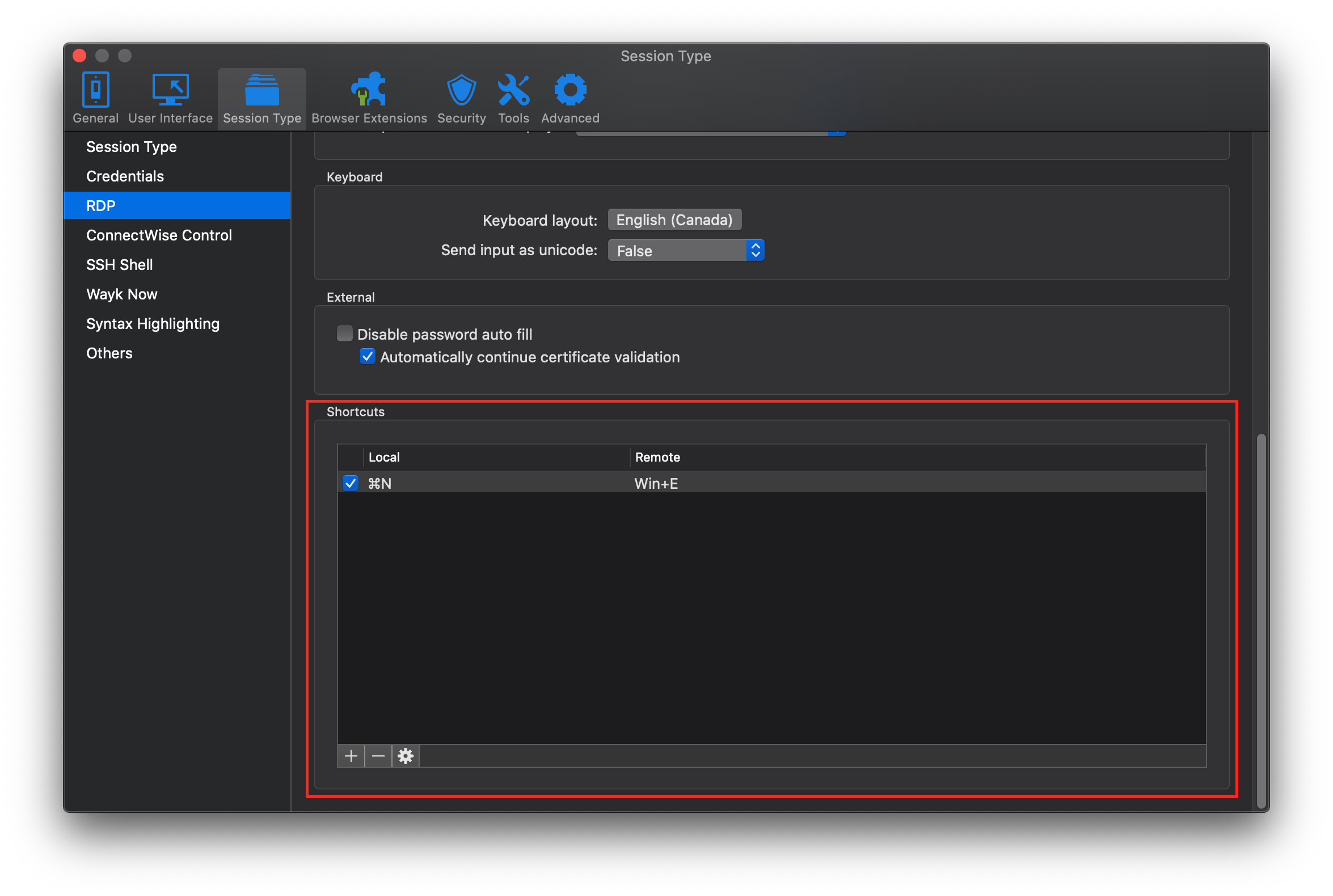 Is this what you mean?
However, it does not allow preventing a shortcut from being sent to the remote host and therefore being handled locally. I will also note that it is only supported for RDP. The keys that I mentioned in my previous posts are not sent in most remote hosts, be it RDP, ARD, VNC or Wayk.
Best regards,
Xavier Fortin
RDPShortcuts.png
No, I was talking about this: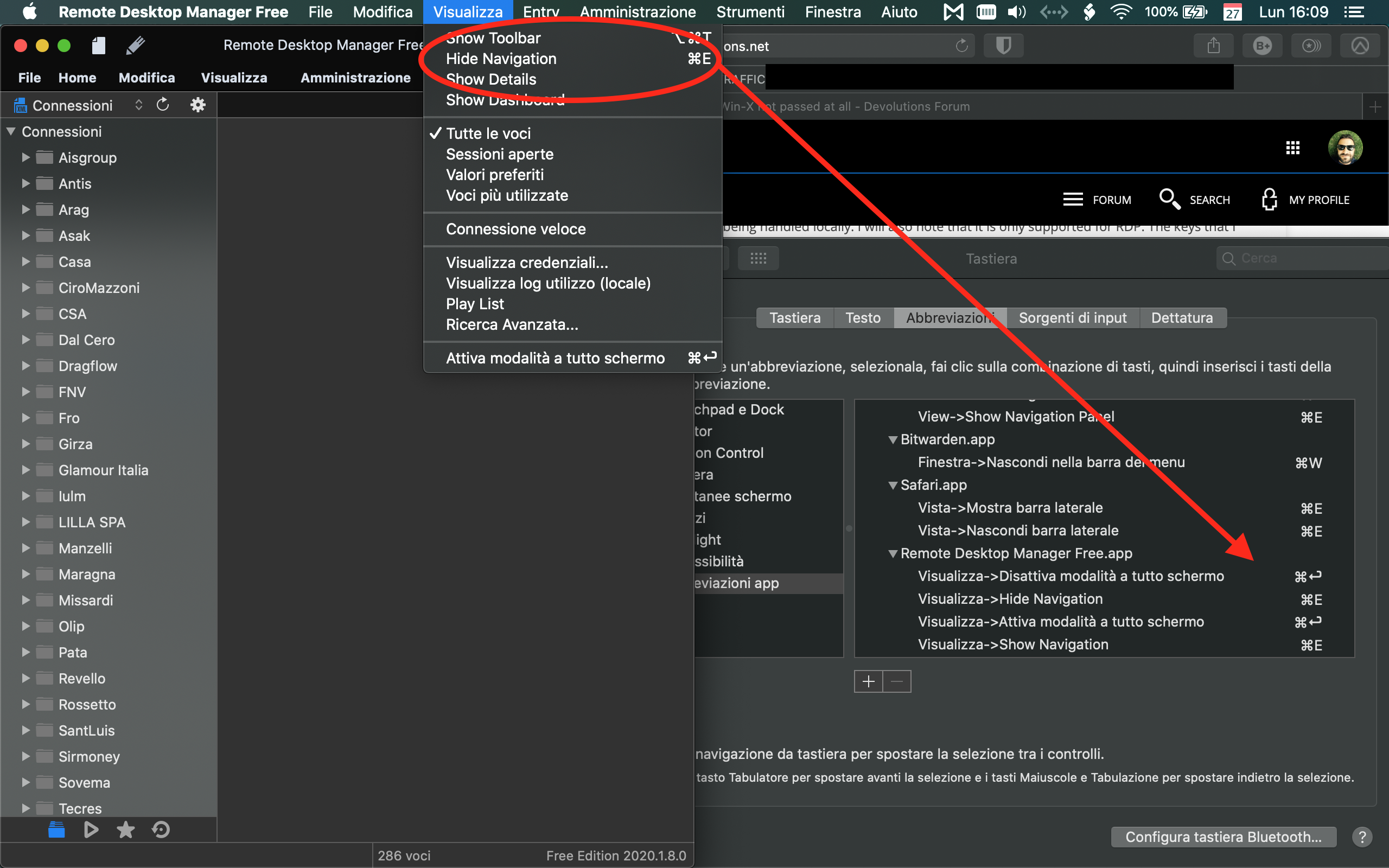
Because I Prefer CMD+E instead of CMD+N for example!
In other RDP Clients this works correctly because is handled by Mac OS and not Windows RDP.
Screen Shot del 08.01.2020 alle 10.29.45 - Martino Roberto.png
As the OP for this thread, I'd advise users to not waste their time. I've been using RDM since 2014 -- and never once in all that time has the company responded to the (obvious) issues in RDM Mac or, AFAIK, Windows. Sometimes, when I download an update I wonder who, exactly, the update is trying to serve. It gets bigger, slower and more cumbersome with every "enhancement" while basic stuff -- keyboard shortcut handling! -- remains on the (very) back burner.
Sorry to say (as I am still a user of RDM Windows -- which has its own issues I've tried to document for the company), but I most use Microsoft's Mac client these days. I miss lots of things about RDM when I use that client. But at least I know that Microsoft isn't even pretending to listen to user requests.
Hi,
You want to be able to customize RDM shortcuts? I will add this to our TODO list. That being said, this on it's own would not be sufficient to fix the problem as all key combinations (except the 3 I mentioned earlier) are sent to remote sessions (including ⌘E).
So what we will do is as followed:
1) We will add settings to exclude shortcuts from being sent to RDP (and ARD, VNC, Wayk) sessions that will contained shortcuts by default (⌘←, ⌘→, ⌘` and ⌘N).
2) We will add settings to customize RDM local shortcuts so, for instance, the Show/Hide Navigation menu can be bound to ⌘E instead of the default ⌘N.
Best regards,
Xavier Fortin
Hi,
You want to be able to customize RDM shortcuts? I will add this to our TODO list. That being said, this on it's own would not be sufficient to fix the problem as all key combinations (except the 3 I mentioned earlier) are sent to remote sessions (including ⌘E).
So what we will do is as followed:
1) We will add settings to exclude shortcuts from being sent to RDP (and ARD, VNC, Wayk) sessions that will contained shortcuts by default (⌘←, ⌘→, ⌘` and ⌘N).
2) We will add settings to customize RDM local shortcuts so, for instance, the Show/Hide Navigation menu can be bound to ⌘E instead of the default ⌘N.
Best regards,
Thank you Xavier!
Hi m1,
In RDM 2020.2.0.0, it will now be possible to edit keyboard shortcuts natively inside the app: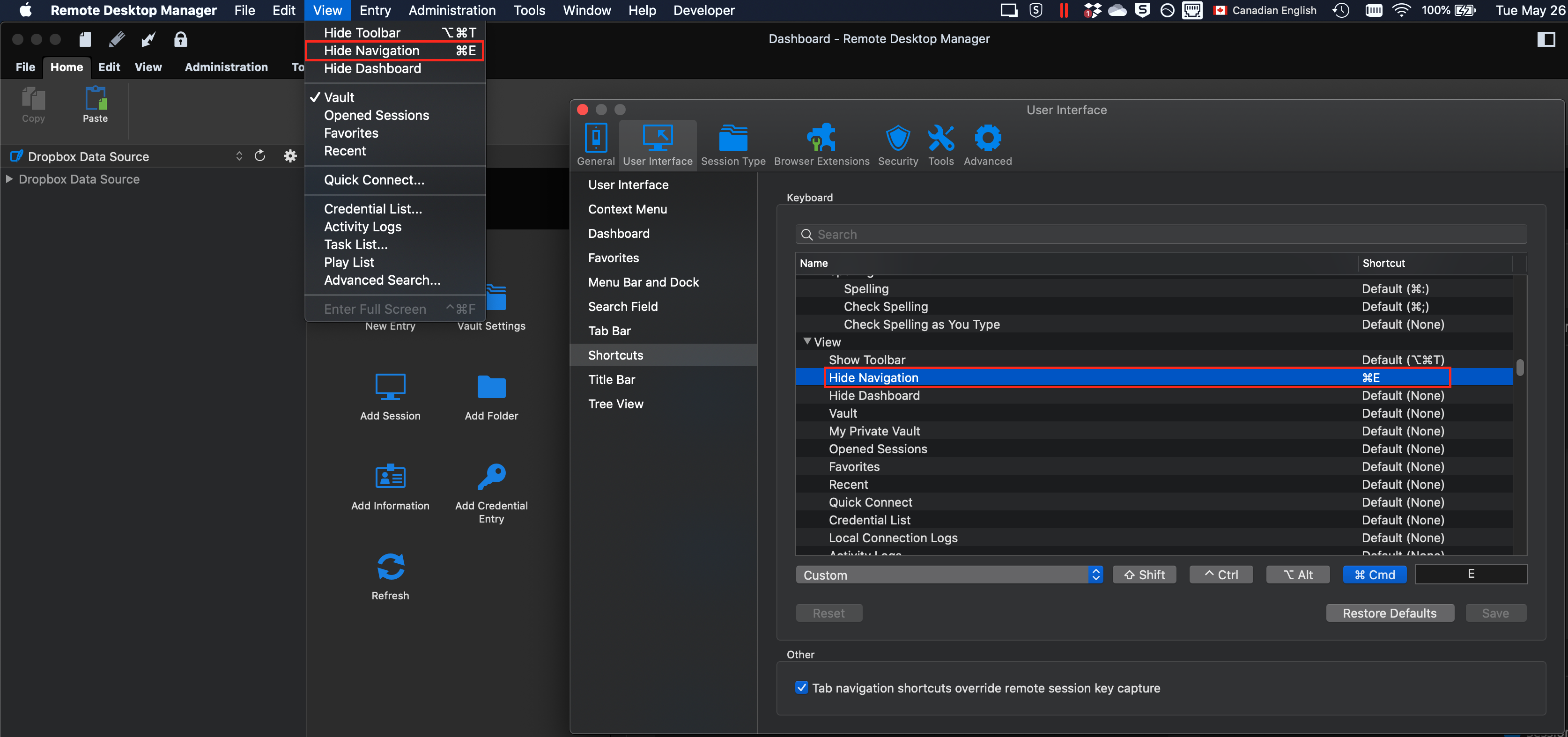
As I mentioned earlier, this on itself will not solve your issue, we still need to implement the way to exclude some key combinations from being sent to RDP (and other embedded entries). Sadly, this won't be done for the 2020.2.0.0 release. We should be able to have this done for a patch thereafter (e.g. 2020.2.1.0).
I just wanted to keep you posted.
Best regards,
Xavier Fortin
RDMShortcuts.png
@Xavier thank you so much.
Where I can download the 2020.2.0.0 2020.2.0.0 version
Hi m1,
It will be available next week (most likely Tuesday during the day). You will be notified when launching RDM of the availability of the new version.
Best regards,
Xavier Fortin
Hi m1,
The feature to customize which key combinations are ignored in embedded sessions has been done: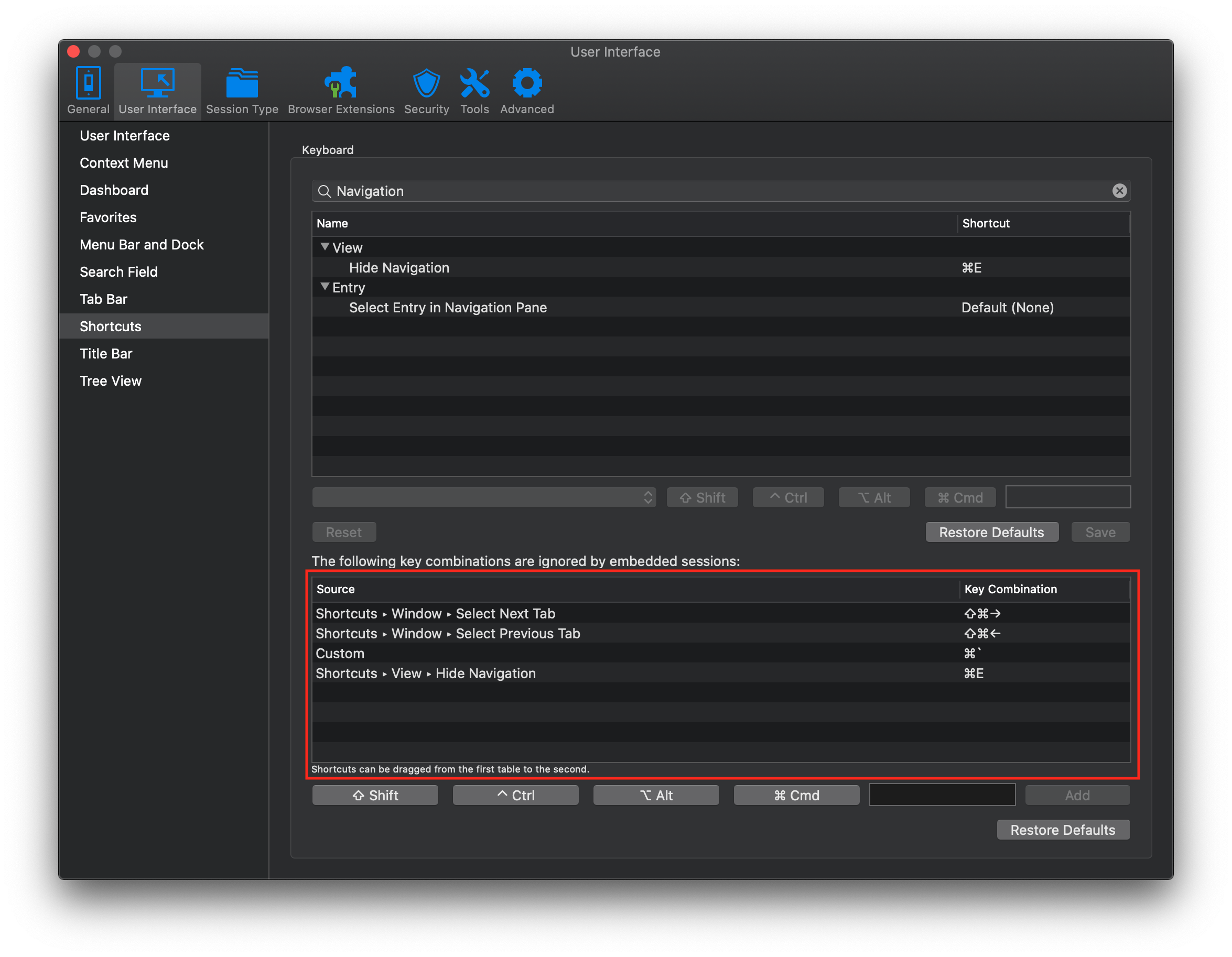
You will be able to add new combinations by either dragging a shortcut from the first table or adding them manually with the bottom text field/add button. In the example above, I've dragged the "Hide Navigation" shortcut to the bottom tab (shortcut that I've changed to ⌘E) to reflect what I believe is your use case.
This will be in the 2020.2.1.0 release. It will most likely not be released for a couple of weeks though. If you want to try the feature ahead of time, you can download this preview version.
Best regards
Xavier Fortin
IgnoredKeyCombinations.png
Thank you! Works like a charm!
As the OP for this thread, I'd advise users to not waste their time. I've been using RDM since 2014 -- and never once in all that time has the company responded to the (obvious) issues in RDM Mac or, AFAIK, Windows. Sometimes, when I download an update I wonder who, exactly, the update is trying to serve. It gets bigger, slower and more cumbersome with every "enhancement" while basic stuff -- keyboard shortcut handling! -- remains on the (very) back burner.
Sorry to say (as I am still a user of RDM Windows -- which has its own issues I've tried to document for the company), but I most use Microsoft's Mac client these days. I miss lots of things about RDM when I use that client. But at least I know that Microsoft isn't even pretending to listen to user requests.
Problem solved in 2 month (that is acceptable)! So you are wrong.
Glad to hear it!
Do not hesitate if you have any other issues.
Best regards,
Xavier Fortin
Coming up on renewal time and I'd really like this to be fixed.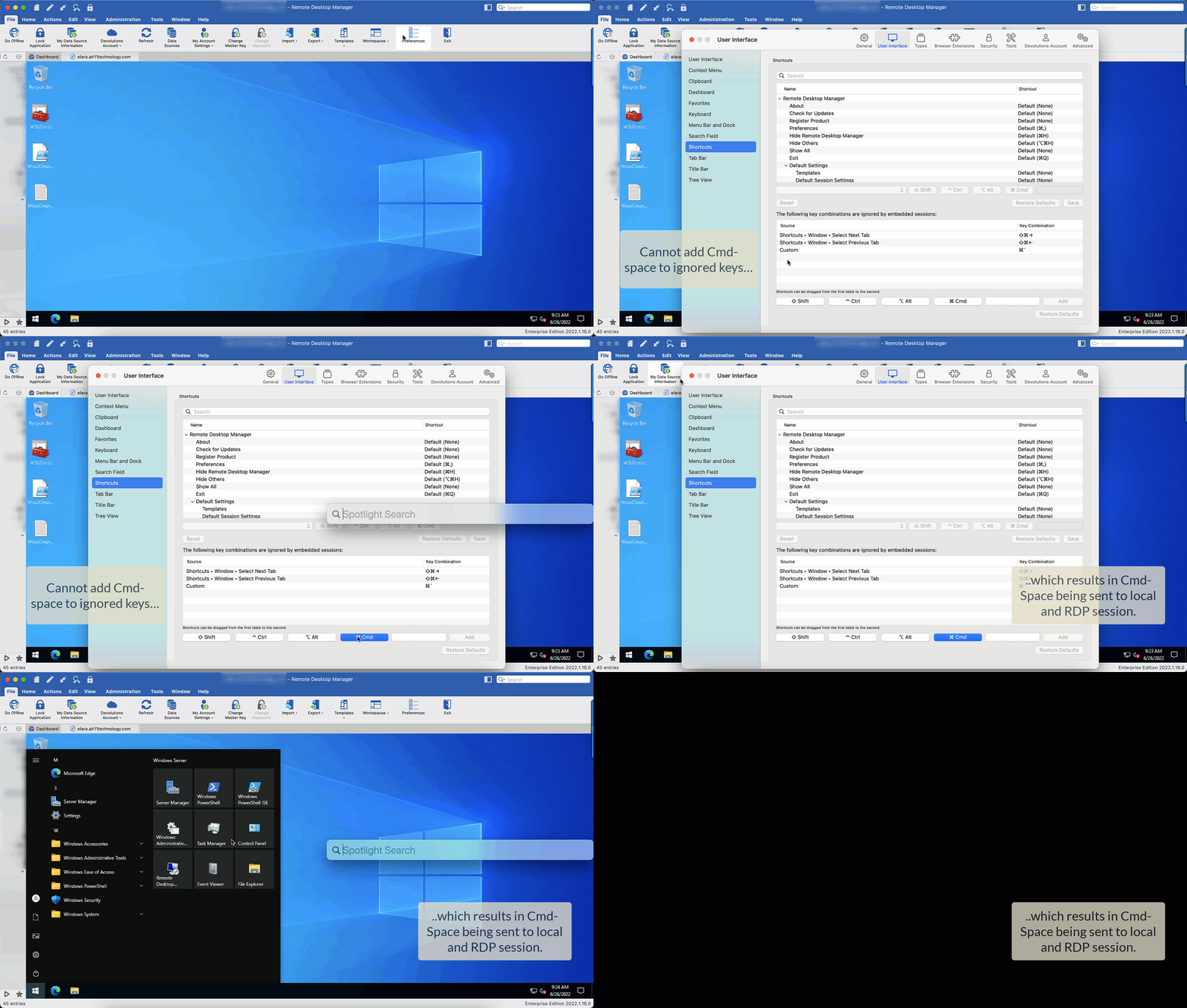
rdm.gif
Hello Alex,
Simply click in the text field first, press the space bar, select the cmd button and then press Add
It should then be ignored:
Let us know if it does not work for you.
Best regards,
Richard Boisvert
OK, so that's the magic sequence (documented where, exactly, I wonder?). But it still doesn't work. When the remote session has focus, Cmd-Space (the macOS Spotlight shortcut key) is still sent to the remote site as the Windows key, same as in 2016.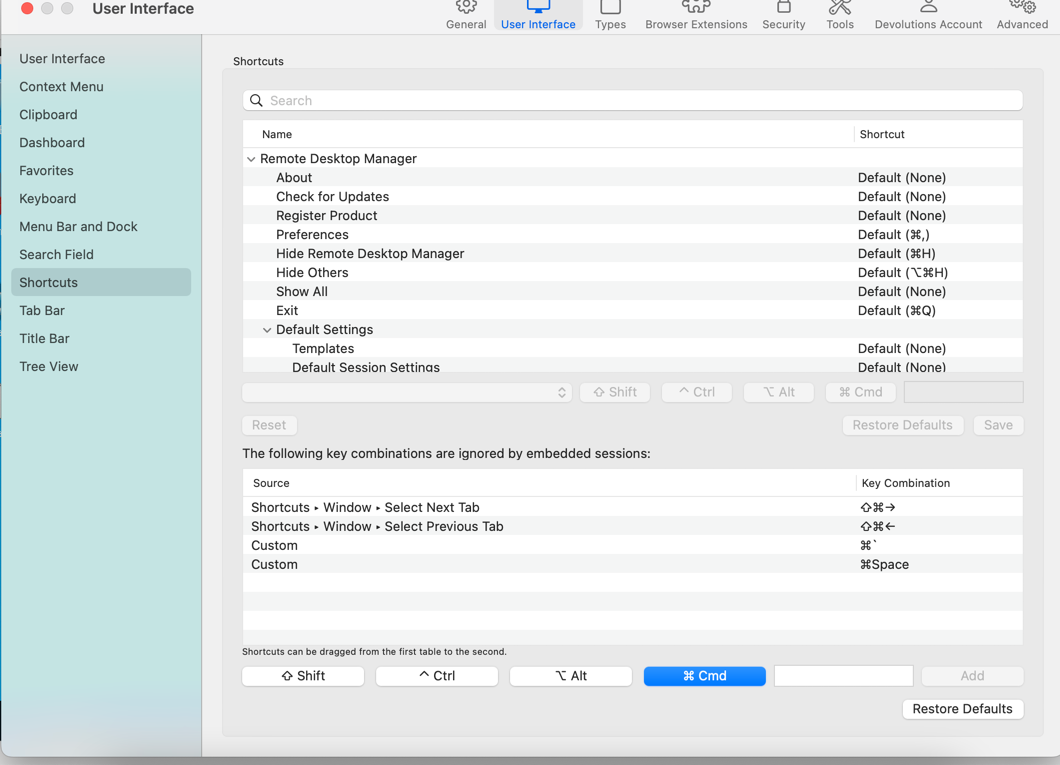
.gif)
2022-06-26_10-06-43 (1).gif
2022-06-26_10-05-35.png
Hello Alex,
I was able to replicate the issue, the Windows key is still pressed in the embedded session. I have created an internal ticket (RDMM-3328) for the engineering team so they can verify it.
As for the documentation, that shortcut section should at least be mentioned here - https://helpmac.remotedesktopmanager.com/rdm_preferences_ui.html - but it is not. I will ask the documentation team to have a look.
Best regards,
Richard Boisvert
Finally…s...i…x years later. The original description is as accurate today as when shown on Windows Server 2012. It could have been reproduced then had anyone tried it on any Mac at the time.
The “fix” that was added missed the mark, as did the snarky comments that all was well.
Hi alex10,
I think the original issue might have derailed from your actual issue.
I've had to go back through all the original posts since this is quite an old issue. And I'm pretty sure looking at all the posts past the original one that you and my colleague were simply not talking about the same thing.
If I understand correctly (and correct me if I'm wrong), but the two original issues were:
1) When showing the Spotlight with the ⌘Space shortcut, the Windows key still get sent to the RDP session when the Command key is released. This is indeed an issue. The reason it does it with the Spotlight shortcut (and not, let's say, with ⌘D) is because this is a System shortcut and we therefore do not receive key press notifications on the Space when it is pressed. This has the result of RDM not realizing that any keys were pressed between the pressing and releasing of the Command key (hence why RDM send the Windows key). This is definitely a bug, but it will need some fiddling to properly correct it (we are most likely loosing the focus, so we can probably use that).
2) The Windows+X (⌘X) shortcut not being forwarded to the RDP session. I'm guessing this works now? At least, for me, disabling "Windows Key Copy/Cut/Paste" makes it work properly.
Best regards,
Xavier Fortin
- Correct (finally)
- I wanted Cmd-X/C/V/A to work in the remote session. They now do.
The Cmd key is also sent to the remote session when combined with another standard macOS keyboard shortcut, in this case Cmd-Tab.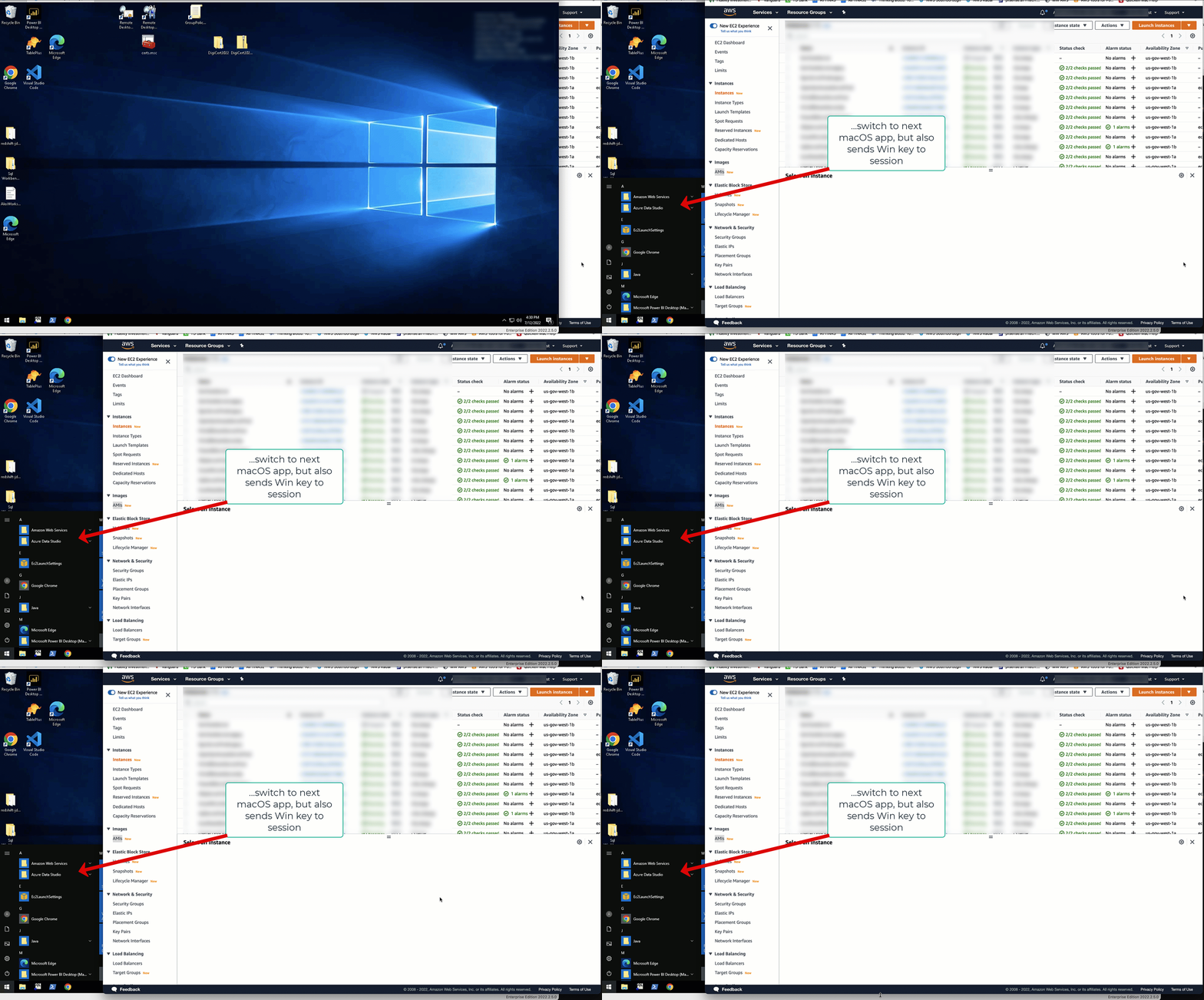
alttab.gif
Any shortcuts that are handled at the OS level, and that make uses of a Command key press, will produce the same issue. ⌘~ to navigate between the windows of the application are another example of this.
Best regards,
Xavier Fortin
Hi Alex10,
RDM and RDM Free 2022.2.11.0 are now available with a fix for this. We've tested the following three scenarios:
- Spotlight - Pressing the Spotlight shortcut (⌘Space by default) should not toggle the Windows Start menu when releasing the Command (⌘) key.
- App navigation - Pressing the shortcut to navigate between tab (⌘Tab) quickly (without making the app list bar appears) should not toggle the Windows Start menu when releasing the Command (⌘) key.
- Window navigation - Pressing the shortcut to navigate between the windows of the application (⌘~) from a window with an RDP session focused (Main or Undocked) to another window (e.g. Preferences) and back to the original window should not toggle the Windows Start menu when releasing the Command (⌘) key.
It should be noted that we've used event taps to fix this issue. I'm mentioning this because during my test, at some point the entire event tap mechanism seems to have broken down and only a restart of macOS solved the issue.
Please, do tell us if the issue is not properly solved, of if you find other scenarios that might have escaped our notice.
Best regards,
Xavier Fortin
Sorry, no joy.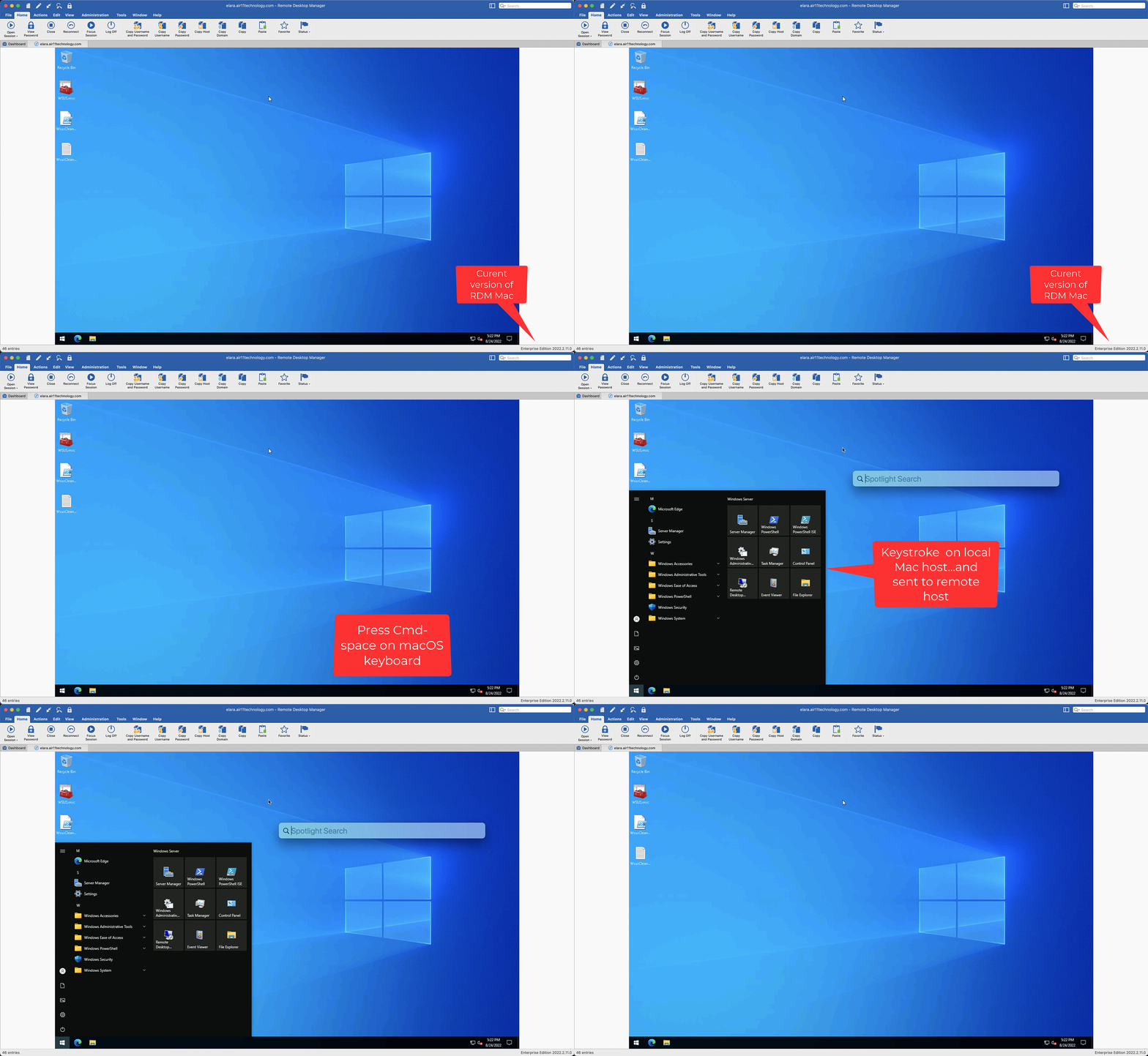
nope.gif
Hi,
Up front, I can think of two possible reasons.
The first is that Remote Desktop Manager is not authorized to monitor keyboard input (System Preferences -> Security & Privacy -> Privacy -> Input Monitoring):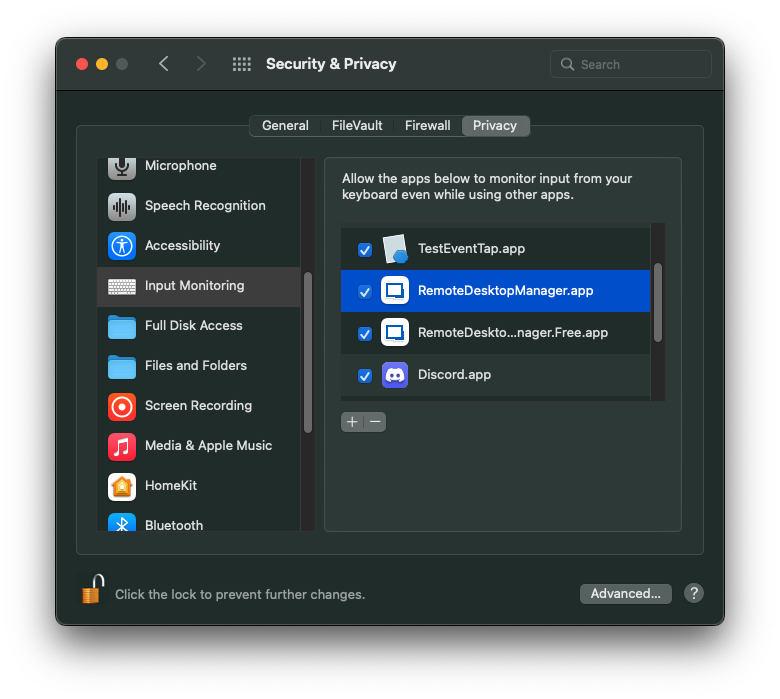
If it was already checked, is it possible that you are using the Legacy engine of RDP. This can be set globally: Preferences -> Types -> RDP -> Advanced -> Use legacy engine -> "Yes", or on a per session basis: Entry properties -> RDP (Microsoft Remote Desktop -> Advanced -> Advanced -> Use legacy engine -> "Yes"). If so, the fix wasn't applied to this engine (as it is not being updated anymore).
Best regards,
Xavier Fortin
InputMonitoring.png
Well, it's back. A regression?
Any chance we can go back to the 2022.2.11.0 version's handling of the key?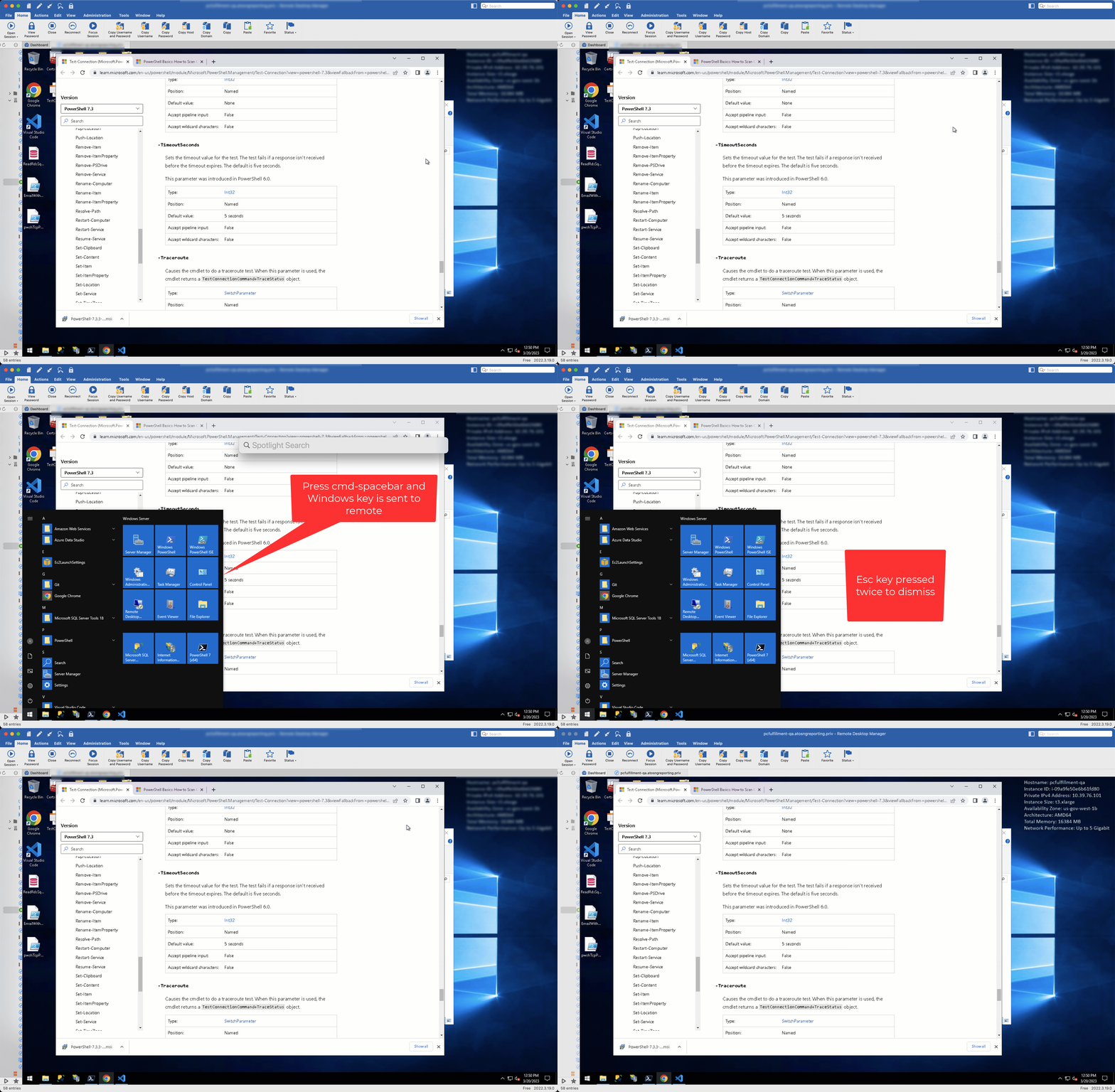
again.gif
Have you updated just recently? We've rollbacked the change for a while now because the registering of Event Taps caused an issue of key being randomly pressed when closing the application (as if the event taps withheld those events). The ticket was reopened (and still is), but we've lacked the time to work on this.
I did not update this thread since you never confirmed if it solved your issue or not.
Best regards,
Xavier Fortin
Actually, I did confirm that this issue had been fixed.
Sorry, 2023.1.7.0 doesn't fix the regression.
The last message I have from you regarding the Command + Space shortcut is "Sorry, no joy." After which I've suggested to check the "Input Monitoring" permission. After that, I never got any other reply.
Regardless, as mentioned earlier, we are aware of the regression, I mentioned the version because it's been like that for a while (since December). That being said, if you did not have any issue with random key input, I could re-enable the feature but through an option. This wouldn't affect other users but should still work for you.
Xavier Fortin
I'm confused -- again.
After the post shown below, this incredibly old problem was fixed. Now, it's back. I never enabled or disabled any features -- and the whole discussion of key settings was, and is I assume, a diversion as you pointed out.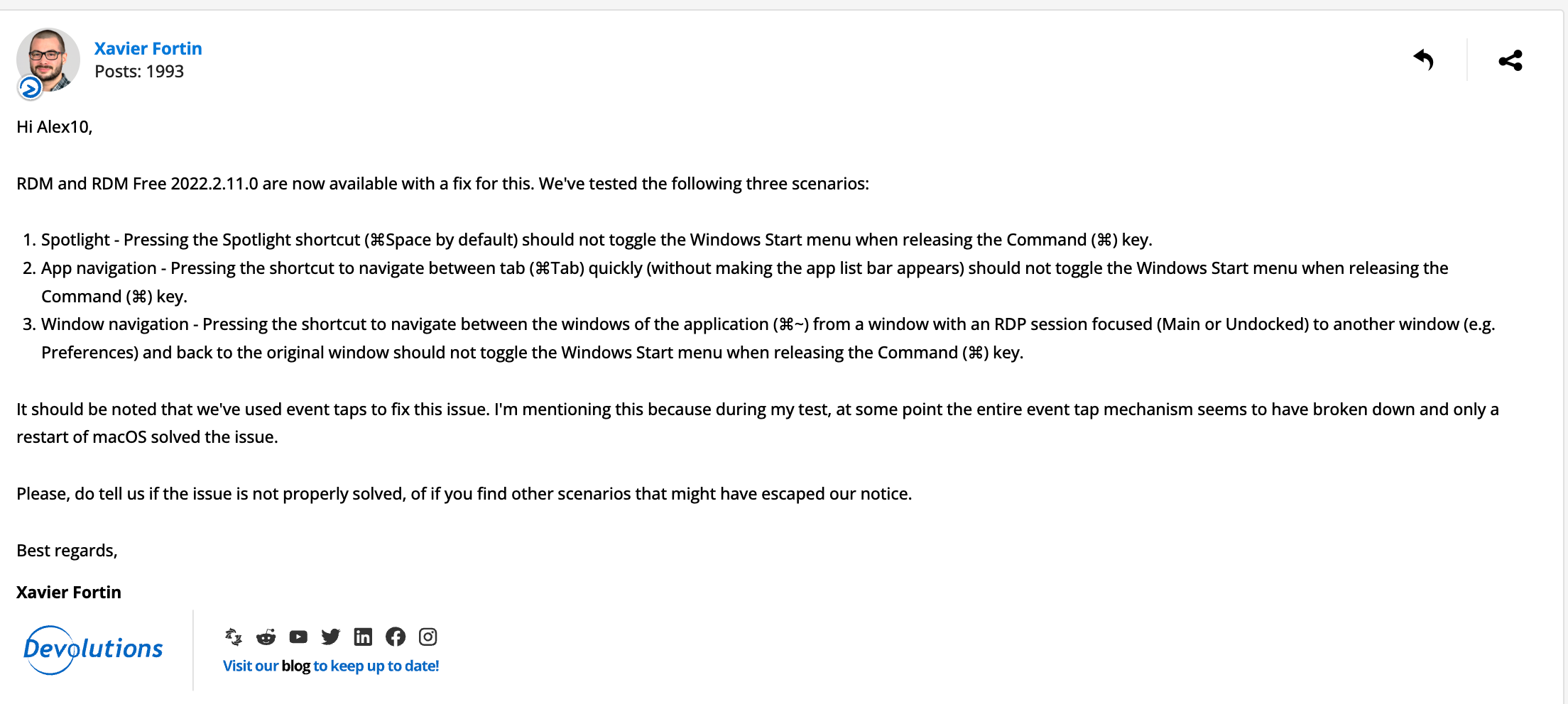
1.png
I'll recap everything from the start.
Last August, we released a version with a fix for your original issue with the Command + Space shortcut in RDP entries.
Somewhere between the release of the version with the fix (in August) and December, we started receiving multiple user reports of random key presses when closing the application. While we couldn't reproduce on our side, the issue was narrowed down to the change that were made to fix the Command + Space issue (more specifically, with the Event Taps that were used to get notification on system shortcuts).
To fix this (new) issue, since it was not quite clear what was causing it (the issue with random key press) and since I hadn't receive a reply from my message (the one you just linked with a screenshot), we just decided to disable the event taps entirely (therefore removing the fix to your issue).
Now, I'm talking about adding an option because I am not willing to re-enable event taps if it means that users will start having random key presses again. That is pretty much it, if you were satisfied with you experience before, I can re-enable the feature, behind a global setting that you'll have to enable.
Best regards,
Xavier Fortin
Works for me.
Alright, I'll put the ticket right back in Development and we will inform you when a version is available with the option.
Best regards,
Xavier Fortin
Thanks.
Though I think the default behavior should be like it is on Windows where if keys are sent to the remote session, they don't also perform a local function.
I've felt like I've described and described and described this and have struggled to understand how it can be OK to have the focus in a remote session, press a local key combination that is not configured to be sent to the remote host to be "partially" sent to the remote host and to have it perform the function on the local machine it as intended.
It would be a "better" bug if cmd-spacebar was sent to Windows and that's all that happens. But my experience is that cmd-spacebar performs the "Open Spotlight" function as intended on macOS and is simply the Windows key in the remote session. It's illogical and frustrating because the focus changes to the local machine but something happened in the remote session.
So, I am not sure why you wouldn't make the behavior I am seeking the default as anything else makes little sense.
Alex, no one is saying you are wrong on this. Sometime, the most obvious behaviour is not the most straightforward to implement. The problem here is not that we don't agree with you, it's that we are fighting the system (here, macOS).
I will explain the exact behaviour we are struggling against, but before that, I want you to remember that macOS does not, through the default means, notify applications of system shortcuts (i.e. shortcuts that are handled on the OS layer, for instance, Command + Space).
In RDM Mac, to take what you press on your keyboard, and send it to the remote session (in this case, an RDP session), we override conventional methods called KeyDown, KeyUp and FlagsChanged. For the overwhelming majority of cases, there are no problem with this and ensure we receive the proper key event and only if the view in question has the focus. Unfortunately, the overwhelming majority of cases does not cover all cases. Such cases include, as you've noted, Command + Space.
Command + Space, and others, such as Command + Tab or Command + ~ are system shortcuts. Such shortcuts are never passed directly to application, they are handled directly by the OS and not propagated further.
The bug originates from the different nature of the Command key (on a macOS) vs the Windows key (on a Windows). The former is only what we call a "modifier", which means, a key that does nothing on it's own, it only "modifies" other keys (as in shortcuts). The later acts both as a modifier AND a regular key, that is, if it's pressed and release it acts as a key (and shows the Windows Start menu) but if other keys are pressed between it being pressed and released, it acts as a modifier.
We must, for the Command key, handled both behaviour (i.e. the key and the modifier). And so, if you press the command key and release it, without pressing anything in-between, we send a Windows key press and release to the server, without doing anything else (the server will then interpret this as a single key press of the key, and shows the Start menu). Alternatively, if you press any other key in-between, we end up sending Windows down, followed by whatever combination of key were pressed followed by Windows up, and therefore treating the Windows key as a modifier.
Here lies the issue, when you press Command + Space, we cannot see any difference between that and if you only had pressed Command key and released it. The reason for that is because of what I mentioned initially. macOS does not notify of the Space key press in that instance (since it's handle on the OS layer and not propagated), so the only thing that appears on our side is a key down and key up of the Command key, and nothing else. Which, as I described earlier, translate to a key down and key up of the Windows key, showing the Start menu.
The fix to this was to register an Event Tap, a sort of lower-level mean of getting notified of key presses, even those initiating system shortcuts. By having this event, we could finally "know" if a key resulting in a system shortcut was pressed in between the Command key down and key up. But this event tap led to the other issue I mentioned earlier of user having random key presses on closing RDM.
You are right that this should be the default behaviour, but unfortunately, another bug is preventing us from pushing this at large for everyone.
I hope this made things a bit more clear.
Best regards,
Xavier Fortin
Hi alex10,
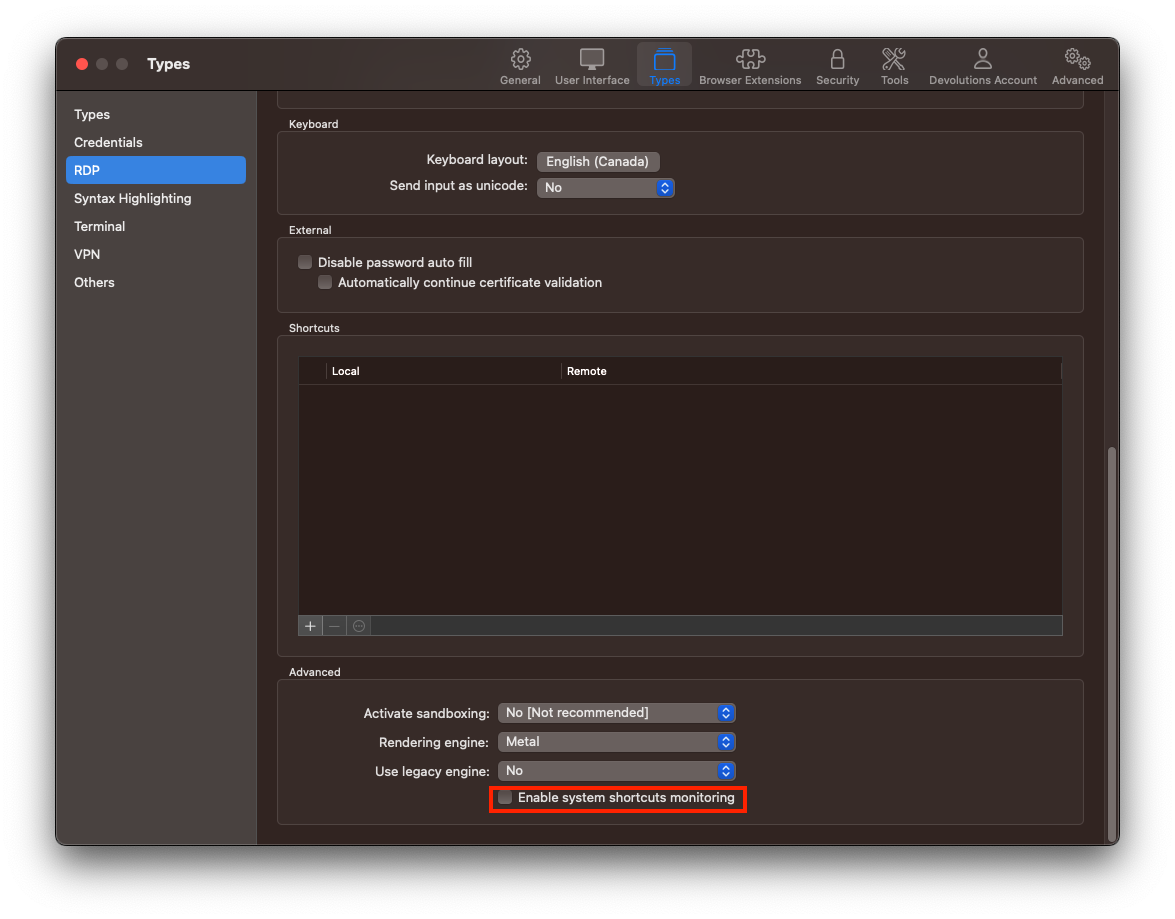
I started working on this and realized that we had already added an option for this (with the default value of "false"). You can already enable this, although not from the UI. Simply close RDM, add the following <EnableSystemShortcutsMonitoring>true</EnableSystemShortcutsMonitoring> to the ~/Library/Application Support/com.devolutions.remotedesktopmanager/RemoteDesktopManager.cfg file and launch RDM.
Please, do tell me if this works or not.
Best regards,
Xavier Fortin
This appears to work. Is it going to be in the UI eventually?
Yes, I've added it today and it should be available for the next release.
Best regards,
Xavier Fortin
It's baaaaccckkk...
Where in the UI is this switch surfaced? Seems like updates are removing the manual .cfg option and resetting back to the default.
(Seven years and counting...).gif)
2023-05-19_13-09-58 (1).gif
Xavier Fortin
EnableSystemShortcutsMonitoring.png
[removed]