
briangw
RDM dropping connection from SQL Data source
Thanks Tommy,
Sorry for the late reply; apparently your notification email went to junk so I wasn't notified on a reply.
I haven't had an issue since I posted the question, so I went ahead and changed my setting to 10 secs today and will have the couple of coworkers who mentioned it to me change theirs too.
Brian
RDM dropping connection from SQL Data source
Hi all,
We have our DS hosted on a SQL server. We're getting this error periodically.
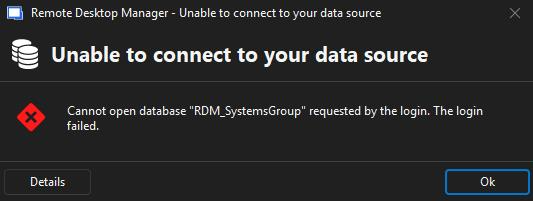
I've spoken with our DBA and he replied with this: it's a SQL Server Always On availability group. The database is hosted on both nodes, but only the primary node is setup for clients to hit. when there's a network/comm blip, then the traffic has to wait until the primary is verified and then starts flowing again.
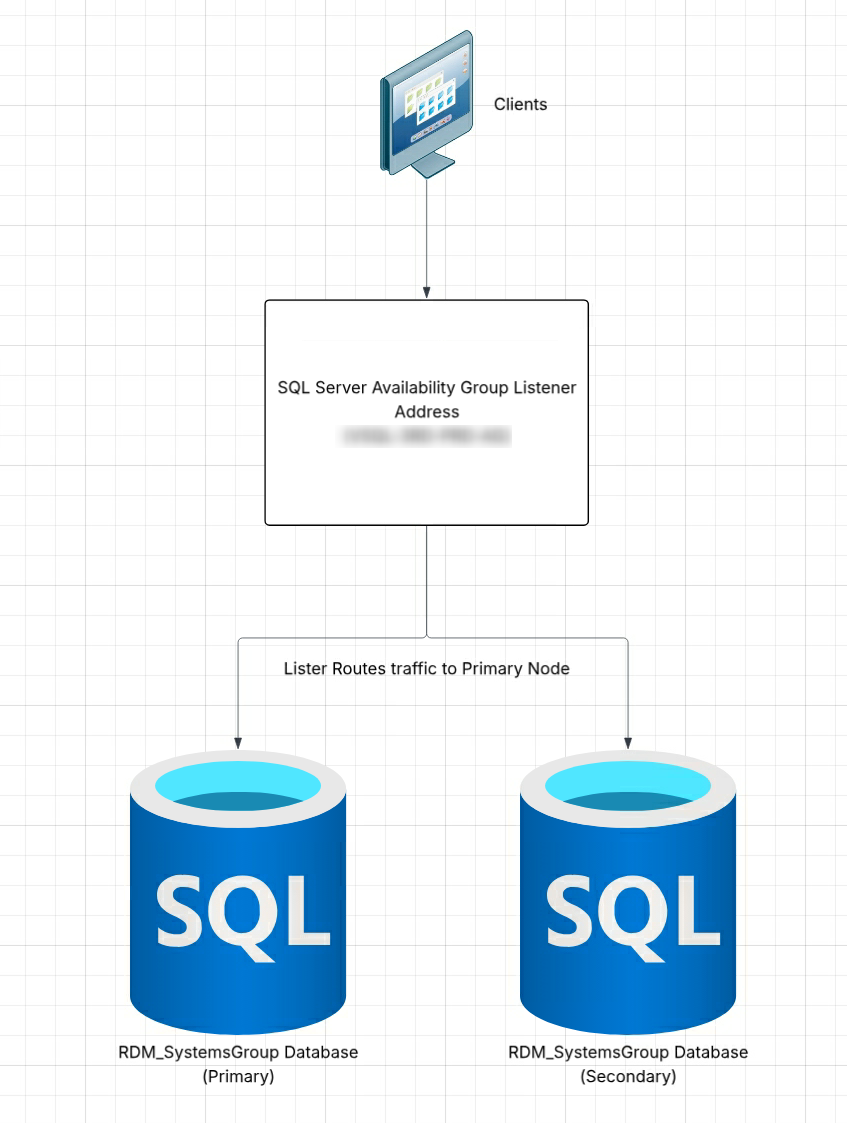
So, we're wondering if there is a setting in the app where we can increase the timeout option to where it doesn't notify us right away/gives time for the connection to reestablish itself?
Brian
User vault not showing up for a user
We got it figured out. There was miscommunication on what I communicated to the user, and got it fixed. Took a Teams session but I saw what was wrong.
Thanks for your help, Maxim. Sorry I didn't do this sooner and take you away from other things. But you did give me some good info in the last post for the future. 👍
User vault not showing up for a user
so, the reset didn't work. I am concerned about this "unregistered" entry
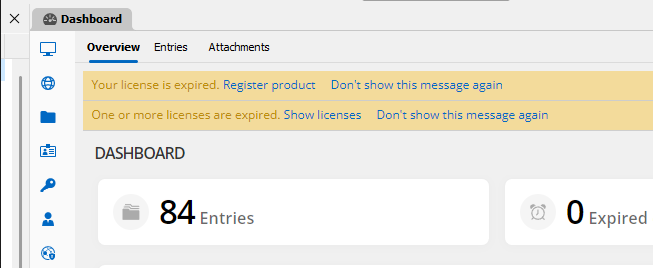
but he shows it here
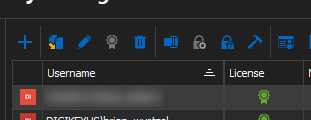
User vault not showing up for a user
Having him try it. One thing he told me is that he is showing his product is unregistered but I am seeing an active license on his account.
User vault not showing up for a user
Hi,
I just notified some of my department that we are importing into SQL now and I have one user who doesn't have his user vault at all, but he did import his sessions into the one on the left.

So, I had him right click down there and User Vault is not an option, just what's listed there. I also checked his user account area and the "Disable user vault" under Administration>Users>User Management>Settings and that is unchecked.
Is there anywhere else we can check to get that user vault back?
SQL questions for upcoming deployment in conjunction with license renewal
Thanks.
That will probably not work for us because our SQL Team who is managing the database, is using the main vault for sharing their RDP sessions amongst their team. What I think we'll have to do is go with each of the data stores and then just count the users on each. It is still better than pulling up KACE and having to count/compare all of the users to the various versions of RDM being reported.
Thanks for all of the info. That really helps us out!
SQL questions for upcoming deployment in conjunction with license renewal
Thanks for the info Samuel. You were right about the database. And that leads me to my next question. If we create separate data sources per team, how can we track the total number of licenses used outside of having each admin report how many licenses are being used each of their DS's? Also, I was doing some testing with our SQL admin and we found that when he added my username to their DS, it increased the license count. Since I am already attached to another DS, does that remove my license from there or does this now count as 2 being used under my name?
SQL questions for upcoming deployment in conjunction with license renewal
Hi Samuael,
Thanks for the info that answers a lot.
As for that other question, I'll try to explain but first I learned something yesterday.
So, all but one SQL Team members that set up this DB in our env. do not show up in the current Administration/Users view that I see, yet they have the same key in our environment. I am trying to figure out why they aren't. I assume that if they join using the key, they should have been automatically appearing in this list or is that not true? How do I get people to appear into this Users area so I can see them? If they aren't in here, we are not tracking their licenses and therefore I have no idea how many are being used on in our env.
As for my question, i want to get everyone in my company that uses RDM to show up in that Users screen. And I would like to give administrator access to a few people. But I currently do not know what the differences are between the Administrator, User, and Restricted User - User Types when you edit Users. So, if I grant a couple of users that User role, what can they and cannot do when using RDM. If I give them Administrator, I know they'll be able to manage all of RDM including User management which I do not want. I want that to be as small as possible so that we can track licenses more efficiently. Because knowing my luck, if everyone were Admins, we would have some wander in there, make a change, and break something we would have to recover from. I am also assuming they could see the license key which is something I do not want to do this time around. I want people to be connecting to RDM using SQL and as a User, so we know what we are using. Because right now, we don't know exactly the count other than pulling a report via KACE. And after speaking to your support last year, when I heard this was the only way with our current licensing to do this, I want to move to this option going forward.
Yeah, so a lot to digest there. the TLDR version:
What are the differences in User types?
Why are the other SQL guys not linking up in Administration/User and Security Management?
If granted the User - User type, will they see the key?
Thanks!
Brian
SQL questions for upcoming deployment in conjunction with license renewal
Hey all, got a few questions about RDM housed in a SQL DB.
So currently, we've been running a SQL RDM DB that our SQL admins set up some years back for a few folks including myself for a few years (I've only been on it for a year). We are looking to renew here by the end of this month. Being the main RDM contact guy, I am trying to write up some documentation for our IT folks that use it for this conversion. For years now, most of the folks who want to use RDM have been using the key to license their copies. We are instead moving to the SQL side so we can see how many licenses are being used rather than relying on KACE for user count. I also read that there are some additional administration options both globally and individually that may be useful in the future.
I am a little concerned with how this move is going to go so wanted to clear some things up.
Am I correct in thinking that users not in SQL will need to export their personal DBs, link up with SQL and then import them? I don't remember how it was done with mine as I think I had my VDI redeployed at the time, so I had started fresh with a backup I made before the redeployment.
What is the difference between the Vault and User Vault except for the shared session access I know we can create in the Vault if we wanted to? I want to make sure that users know the differences and are prepared for it. One of our SQL admins has it set up where his team shares their sessions in Vault but they keep their own personal creds in User Vault. Personally, I have my sessions and creds in the User Vault and since my team is diverse, we are not planning on sharing sessions. However, I can see our Developers sharing sessions so they probably would use the Vault. So what other differences are there between the two vaults and is there a recommendation of one over the other?
How does the offline part work should we lose the SQL connection? Is that is personally set up per user or do the SQL admins handle that? Also, if changes are made there, would they be sync'd back to SQL once the connection is restored?
How can I lock the User and Security Management part in RDM down so that only a couple of people in my team have access to manage it? I am guessing it's pretty much the User type in there but if I give user account access to everyone else, what can they do and what they are restricted from? Can I make it so that anyone who joins the DB starts out as a User first? (Actually, I think I see my answer for that last question. I noticed that I am the Admin and everyone who was testing including the SQL admins are listed as Users. Guessing that is because I applied the key last year?)
I'm sure there are some others, but I can't recall now. I do know these were the big ones I have been thinking about.
Thanks!
Invalid Integration License with BeyondTrust option
Will do. Thank you again for your help!
Invalid Integration License with BeyondTrust option
Thanks, James, for getting back to me quickly.
So, the new version works for the majority of BT servers now however some recent ones I created, I get the error:

I tried recreating one of them from the BT Console option and it does work. So, I think I can live with that. Still, I would like to know why I'm getting this error even though it worked before.
Also, I have a file called connections.db stored on my personal drive out on the network. Been working fine for years. All other connections that are not BT ones worked fine, which are basically just RDP files.
Thanks for your help. The 6 servers showing that error are the newest ones I created so I will just recreate them.
Invalid Integration License with BeyondTrust option
Hi. This one is strange. So we renewed out licensing back in August and ever since today, any BeyondTrust (BT) connection I try to open, I get the attached error:
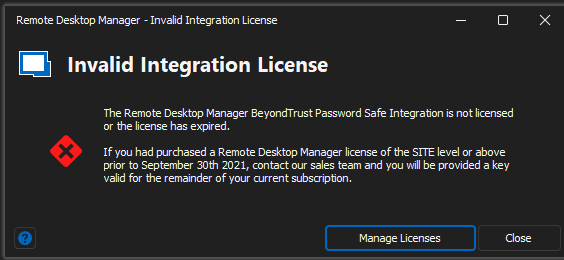
So it was working fine between August and today.
I checked with my co-workers and none of them are getting this; just me. I checked with our BT admin and she said they haven't done any updates. So, if my co-workers updated their copies with the new license key and they are working fine, what is going on with my end? Thinking it was a problem with my version, I updated to version 2022.3.21.0 and that didn't do anything. I also verified that the new license was installed, and it does say it expires 8/23. Can you tell me what's going on please?
Thanks,
Brian
Importing KeePass credentials from backup doesn't create the links and setup everything the same
Hi James, I appreciate the response. Let's hold off a bit and I'll get back to you. He's going to try some more testing as I did some exporting/importing on my end and it worked fine. My guess is, he has something misconfigured. I sent him some screenshots of how I had mine configured so when he has a chance, he's going to take a look and compare the process and where it's failing at. -Thanks, Brian
Importing KeePass credentials from backup doesn't create the links and setup everything the same
Unless it's not supposed to, my coworker noticed that when he's importing KeePass cred backups an exported RDM backup or an exported "My Personal Credentials (.RDM) file into a a Windows 10 VDI that has a working and updated KeePass verified plugin, all of the links are not set up and he has to manually set them up again. Is this expected? If the path of where the DB is located (on the same network share) is the same, including the creds/installation, etc., and any other factors, shouldn't everything import over the same? If so, what is it we could be doing wrong?
BeyondTrust update broke our RDM's saved server list and Console list
when you say "this gets resolved soon", exactly what is not working for you?
We're still getting this error which is still indicative of the original issue we had when we reported the issue when it first started. Is there anything else we need to do to resolve this? I just updated the version to 2021.1.26.0. When I double click the BT enabled RDP session, I get the error below. I have not changed anything about the BT enabled session. that we have configured inside of RDM.

BeyondTrust update broke our RDM's saved server list and Console list
Currently, we’re using PingID but only in limited usage for critical servers such as ones that are required for PCI/DSS. Otherwise, we’re just using BT with nothing else enabled. I know our security department is getting antsy with the lack of information here because we came forward with this solution a couple of years ago and as SysAdmins, we felt their solution of having to go into a web portal to RDP to servers one at a time with no multi-tabbed solution was time consuming and non-productive for us. So I am really hoping this gets resolved soon.
BeyondTrust update broke our RDM's saved server list and Console list
Checking back in to see if there's an update. Management is asking (as is our Security Department because, you know "Security" lol). Any update I can provide both areas? Thanks.
I don't know if you offer users the option to test versions you are working on, but I generally live off of using BT integrated inside of RDM as I patch our servers and use RDM/BT to fix various patching issues. I'd be willing to make a copy of my RDM config files and test any issues if you need testers for this.
BeyondTrust update broke our RDM's saved server list and Console list
Any update to this? The wolves in my group are restless and of course I've had to bypass the BT connections which isn't making our Security Department too happy (as you can imagine :P )
BeyondTrust update broke our RDM's saved server list and Console list
Hi,
Our Security Department updated BeyondTrust from version 6.9 to 7.1 and afterwards most of our saved servers come up with this error:

Our Security contact opened a ticket with BT and they reported that there were several API changes made between the versions and it's possible that RDM needs to have an update for these to work. However, I do have a few VMs that do work. Not many compared to the total list of servers I manage, but a few. And it doesn't matter if they are new, old, same VLANs, etc...there is nothing in them that has any type of similarity or correlation that I can spot. Also, the other method of accessing these servers through BT, using the Web method, works fine. I can see all of the servers in the list from our access on the BT website. However, if I refresh the console here, I do not see any of the servers that are missing. It's like RDM is not pulling our full list at all. I have upgraded RDM to version 2020.3.19.0.
Did the BeyondTrust connection types get remove from newer RDM versions?
Thanks. We have opened a ticket with the Bomgar side on their error too because the admin couldn't find any solutions for their error. I am attaching it here. I also asked what version they are on and they are on Enterprise 2019.1.20.0. I, however am on 2020.1.20 so I asked them to upgrade.

Did the BeyondTrust connection types get remove from newer RDM versions?
oh, that's news to me. Are there still issues? I have a couple of people who aren't able to get theirs to work consistently, for example, our servers lock after 15 minutes but when they go to double click the entry to unlock, it doesn't work for them and they cannot get back in. I haven't had an issue as I have been using the connections for years. They are in a meeting right now so I do not know if there are resulting errors. I will find out and reply.
Thanks for the info!
Did the BeyondTrust connection types get remove from newer RDM versions?
Had a couple of people mention today that they do not see the ability to add them and I noticed the same thing in mine. It's not under the New Entry > Session.
Can you create bulk Beyond Trust connections?
Thanks for the update on this. Looking forward to the feature!
Possible to push out new serial to clients?
Thanks. Is this Advanced Datasource a repository of all remote connections? If so, we wouldn't want that as not everyone would have access to every remote connection.
If there is no other option, I'm assuming we'd have to just email the key out or create a new installer package and have users run that for the next update.