Invalid Integration License with BeyondTrust option

Hi. This one is strange. So we renewed out licensing back in August and ever since today, any BeyondTrust (BT) connection I try to open, I get the attached error: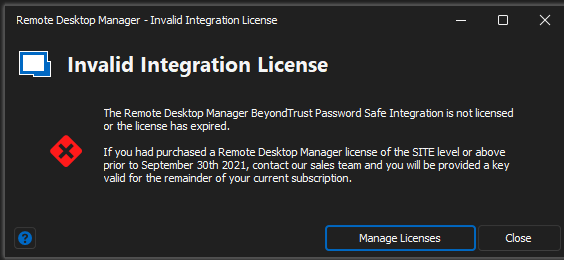
So it was working fine between August and today.
I checked with my co-workers and none of them are getting this; just me. I checked with our BT admin and she said they haven't done any updates. So, if my co-workers updated their copies with the new license key and they are working fine, what is going on with my end? Thinking it was a problem with my version, I updated to version 2022.3.21.0 and that didn't do anything. I also verified that the new license was installed, and it does say it expires 8/23. Can you tell me what's going on please?
Thanks,
Brian
License error.png
All Comments (4)
Hello Brian,
Thank you for contacting us on that matter!
Could you please use the link below to download RDM 2022.3.23.0 and see if this issue still occurs?
https://cdn.devolutions.net/download/Setup.RemoteDesktopManager.2022.3.23.0.exe
Also, what type of data source are you currently using?
Best regards,
James Lafleur
Thanks, James, for getting back to me quickly.
So, the new version works for the majority of BT servers now however some recent ones I created, I get the error:
I tried recreating one of them from the BT Console option and it does work. So, I think I can live with that. Still, I would like to know why I'm getting this error even though it worked before.
Also, I have a file called connections.db stored on my personal drive out on the network. Been working fine for years. All other connections that are not BT ones worked fine, which are basically just RDP files.
Thanks for your help. The 6 servers showing that error are the newest ones I created so I will just recreate them.
protocol error.png
Hello Brian,
Thank you for your swift reply!
I am glad to see that this version has worked for you! As for the issue you are experiencing with 6 of your servers, I would recommend comparing them with the new one and seeing if there are any different settings that would explain this error.
Best regards,
James Lafleur
Will do. Thank you again for your help!