
hazen
add additional features for gateway farms (multiple farms, more LB options)
That would absolutely be an acceptable solution. I think it would also help people that might want to have a failback gateway but don't want to set up farms.
You can point to either gateway primary, gateway secondary .. or gateway farm primary, gateway farm secondary.
add additional features for gateway farms (multiple farms, more LB options)
Here's what I'm having trouble with: in your scenario, the entire Gateway Farm in Japan could be down, but you would still have a way to connect through a different Gateway Farm located elsewhere? Does that mean you have some kind of site-to-site connectivity that makes it possible to have Japan inaccessible from the Internet, but accessible through a different network path you have between your different sites? Or are you worried that while the entire site may be reachable remotely, there's still a possibility of downtime for your Gateway Farm deployment, in a case where your other Gateway Farm deployments would still be able to reach the network resources in Japan?
The latter. The site's WAN circuits wouldn't be down, but the gateway farm might be. As such, without the US based farm, IT users would be unable to connect to any servers in Japan until the Japan farm was accessible again. This would delay troubleshooting and potentially cause more downtime while we focus on getting farms back up before we even jump into the servers we need to get into to correct whatever error is happening.
The likelihood of Japan's farm being down 100% is very low, but I must be able to answer that scenario in my presentation to implement this solution.
Actually, we factor in the Gateway health into the load balancing decision, such that an unhealthy Gateway will be skipped entirely. If there is only one "healthy" Gateway standing in a Gateway Farm, it will receive all the new connections. This should give you the "Gateway of last resort" feature, with the exception that we don't have the ability to factor in the client geolocation into the load balancing decision right now.
Not necessarily. Imagine 3 servers in a farm. 2 of them are in Japan, one of them is in the US. The 2 JP gateways might have a weight of 200, while the US gateway only has a weight of 50. Although the percentage chance the US gateway has an incoming connection might be low, it's not 0. It still participates in the connection rotation.
With a true gateway of last resort let's suppose we have a gateway with a weight of 0. This way, it will never accept connections unless all other gateways in the farm are unavailable. Perhaps a weight of 0 is already possible and would achieve the above?
With the ability to have a gateway be part of multiple farms, and a weight a 0 to act as a gateway of last resort, you wouldn't really need to factor in geolocation anymore. Even if you only had 2 gateways in a farm. 1 gateway in Japan, 1 in the US. You assign the JP gateway with a default weight of 100 and the US gateway with a weight of 0. You have basically accomplished the scenario from the first post.
And with the ability to have gateways in multiple farms, you can build another farm with 1 gateway in Europe, and the second gateway to be the same US based gateway that is in the first farm (also with a weight of 0). This way, even if the geographically closer gateway is down, you can always use that US based gateway to connect as a back up.
add additional features for gateway farms (multiple farms, more LB options)
We have a globally distributed IT support force. We have many global factories with local IT support, but also operate a corporate shared IT services for engineering support.
Our server environment is very segmented where you can only RDP/SSH to servers via jump hosts.
So right now, if an IT support engineer in Japan must first RDP to their local jump server onsite, then from there they RDP to the whatever server they need to connect to.
Our corporate IT staff are based in various locations in the US, and we have local US based jump servers which they would use to connect to that same server in Japan rather than using the Japan jump host.
It also protects the corporate IT staff to still be able to connect to the servers even if Japan's jump host is down for whatever reason.
If we followed your above suggestion where we have a farm in Japan, and a farm in the US .. and if the US user wants to connect to a server in Japan we would just have them use the Japan gateway farm, and the Japan farm is not working .. we don't want to lock our engineers out of still being able to connect to the server they need to support.
I think the best scenario would be the ability to have gateways part of multiple farms. And also allow a concept of 'gateway of last resort' such that regardless of how many gateways are in the farm, and regardless of the weights of each gateway, you can designate one as the last resort, such that only use that gateway if ALL other gateways in the farm are unavailable.
That way, we would create a Japan farm, and a Europe farm, etc. and then have a single gateway in our datacenter that can be in all the farm groups .. and only use that datacenter gateway if all the other gateways in a particular farm are down. That way, if we point an RDP connection to the Japan farm, it can have consistent settings on the RDP entry regardless of who connects to it (the Japan engineer or the US based engineer), but then if Japan's farm is having a problem, it will fallback to the US based gateway without us having to change any settings on the RDP entry in the vault.
add additional features for gateway farms (multiple farms, more LB options)
If this belongs in the gateway section please feel free to move. We are working with Devolutions to explore the Gateway and Devolutions Server products. The request for HA led your folks to recommend 'gateway farms'. These looks like a good solution to HA, but reading through the documentation it appears only 'weight' is supported to control how each gateway in a farm receives connections.
Let's assume the following architecture.
RDM User1 in Dallas, Texas
RDM User2 in Bangkok, Thailand
Devolutions Server Platinum (HA configuration) in datacenter in Phoenix, Arizona
Gateway1 in Phoenix, Arizona
Gateway2 in Tokyo, Japan
(gateway1 and gateway2 are set up as GWFarm1)
Server1 in Vietnam
Server2 in Maimi Florida
In this above example, if User1 wants to connect to Server2 we would obviously want to proxy those connections through GW1 since it is geographically closer to the user. But if User2 wants to connect to Server2 we would want that user to proxy their connections through GW2 since GW2 is closer to the user accessing the server.
Weighted metric wouldn't really make sense in this scenario because you wouldn't want User1 ever connecting to GW2 because they would end up going all the way around the world and back just to connect to a server 2 states away from them. Obviously if GW1 is down then you have no choice, but we're trying to avoid bouncing our users all over the world.
How might we achieve the scenario where a gateway in a farm that is "closer" to the user is the one that is always used unless it is down?
How to create a powershell session with a specific configuration context
Why is it not possible? My SecureCRT does not behave this way. Opening powershell sessions within SecureCRT opens the window directly in my session window without having this strange powershell behavior.
How to create a powershell session with a specific configuration context
Got it. I successfully connected using your instructions. 2 problems I'm seeing.
1) When first launching the powershell session, a powershell window pops up for a split second that is outside of RDM, then the powershell window is loaded in RDM. How do I prevent this behavior? I don't want this jarring GUI experience.
2) When the powershell window does load into RDM, it is not taking on the correct window size of RDM. How do I correct this?
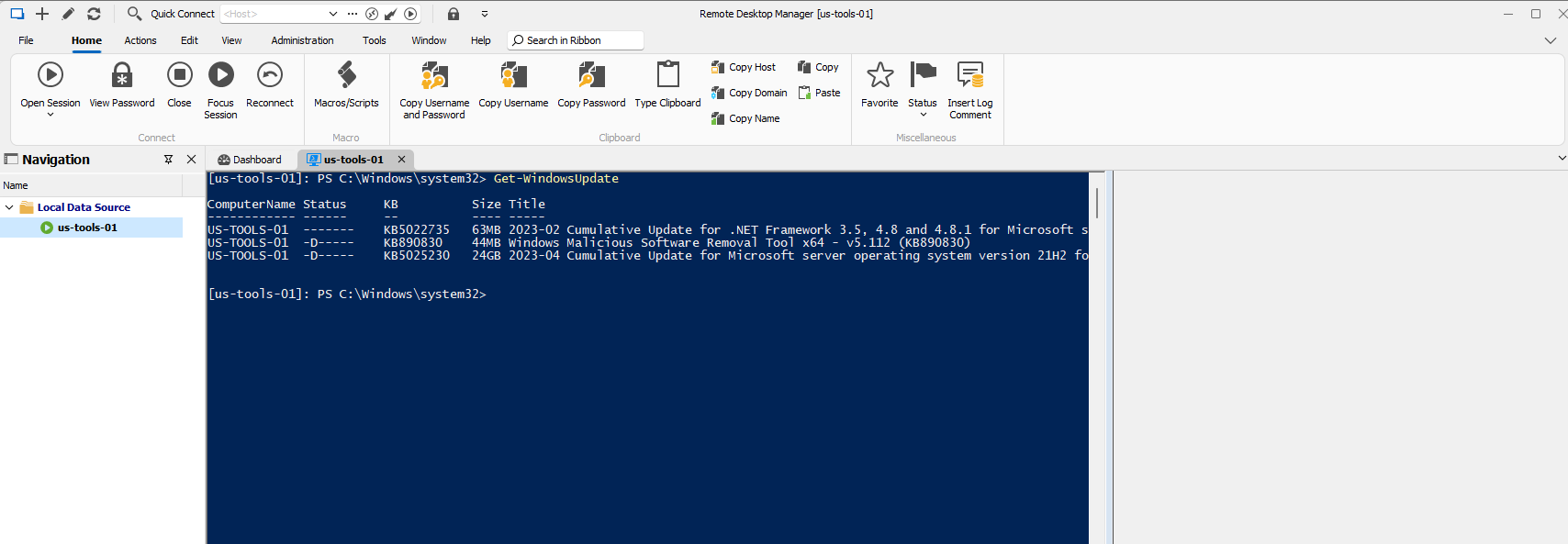
How to create a powershell session with a specific configuration context
Hi Richard, please assume I'm unfamiliar with how to create powershell sessions to remote hosts in RDM.
How would I replicate the commands I gave in my original post to connect to a remote server with powershell using the "-ConfigurationName 'VirtualAccount'" arguments.
How to create a powershell session with a specific configuration context
where are you accessing the above settings? You aren't clear how you're getting to whatever menu's are in the screenshots.
How to create a powershell session with a specific configuration context
PowerShell Virtual Account leverages Just Enough Administration (JEA) to work around Windows Update API restrictions that prevent calling updates from remote sessions.
We run the following commands on the server to create a "VirtualAccount" configuration context.
New-PSSessionConfigurationFile -RunAsVirtualAccount -Path .\VirtualAccount.pssc
Register-PSSessionConfiguration -Name 'VirtualAccount' -Path .\VirtualAccount.pssc -Force
This creates a persistent virtualaccount session context. We then use the following command to connect to that specific session from our workstations.
Enter-PSSession -ComputerName <hostname> -Credential <domain\username> -ConfigurationName 'VirtualAccount'The question I have for the devs is, how would we leverage RDM to connect to a remote server being able to specify the ConfigurationName ?
Is there an Powershell connection
I've been out of the loop on RDM feature progress for about 2 years.
I've found this thread since we're wanting to transition connecting to our servers via powershell rather than RDP when we can avoid it.
My question is, can this powershell connection method be used to tunnel through a jump host?
For example. If I want to connect to a server (serverA) from my desktop (desk), but the connection is actually being routed through a jump host such that my desk is not connecting DIRECTLY to serverA.
desk -> jumphost -> serverA
Is this possible?
launching remoteapp inside RDM
David, I sent the help file to you guys attached to my ticket. DEVO-30535
launching remoteapp inside RDM
David, no payment necessary. I'll gladly write something up including screenshots. I've been using RDM for 8+ years so I'm happy to contribute something.
I'll forward the document through my open support ticket on this issue.
launching remoteapp inside RDM
So I've been messing with this and I have indeed been able to get remoteapp's to work. The main problem here is that things are not well documented for RDM.
That support guide I linked to in my original post actually has nothing to do with remoteapp's working or not in RDM. It's completely unnecessary.
What is needed is to point the host entry to your RDS session host server. That is the trick. That isn't how the remoteapp RDP files are set though which is what was giving me problems.
Typically in remoteapp you point to the server that hosts the RD Gateway which then acts as a kind of broker pointing you to the different session hosts servers you may have different applications installed/hosted on.
What is needed for RDM is to set up the host entry to point to the specific RD session host server where the application youre trying to launch is installed and published on. Then on the session host options on the 'programs' tab you check the box for using remote app (seamless) and specify the alias of the remoteapp you want (with any additional command line options you want to specify)
This method works. BUT, the big caveat to remember is it will only work correctly in 'external' mode. You can't run remoteapps embedded.
launching remoteapp inside RDM
I'm going to post here because I've been very disappointed in 'supports' ability to understand and provide guidance on how to use RDM to launch remoteapp's.
https://help.remotedesktopmanager.com/tools_localrdpremoteappconsole.html
The help article is woefully lacking in exactly what is needed to set up remoteapp's. Has anyone here been able to get them to work? Can you provide any feedback on maybe what I'm doing wrong? Support seems to have no idea and its taking them almost a day to respond every time I send them back debugs and screenshots.
I have a RD session host server with a number of published apps. The RD web role is also installed and I can launch the remoteapp's from the RD website. In addition, I can download the RDP file from the website and launch the remoteapp's from the RDP file and everything works fine. So I know its not anything to do with my RDS implementation.
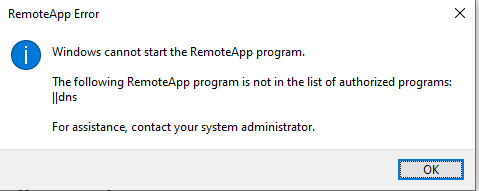
The problem is when I try and follow the above 'instructions' I can't get RDM to launch remoteapp's correctly. It just fails. Screenshots attached.
The RDP file:
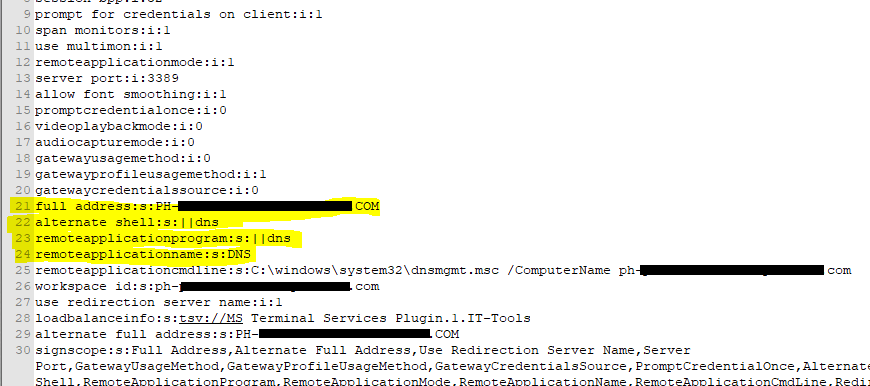
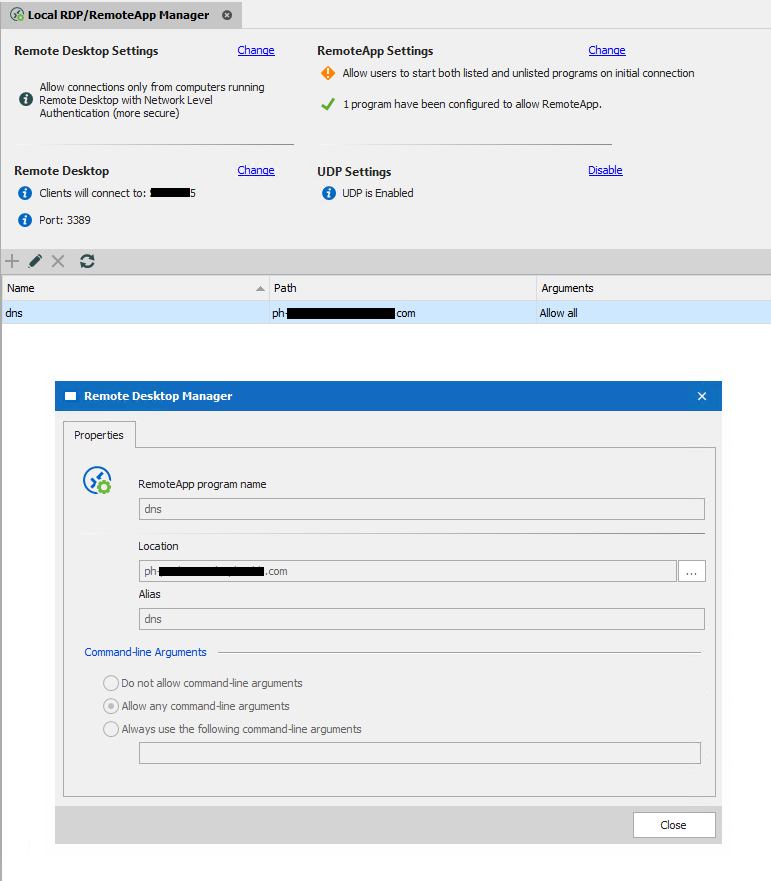
RDM RemoteApp config according to the instructions above:
The DNS remoteapp working when launched from the RDP file:
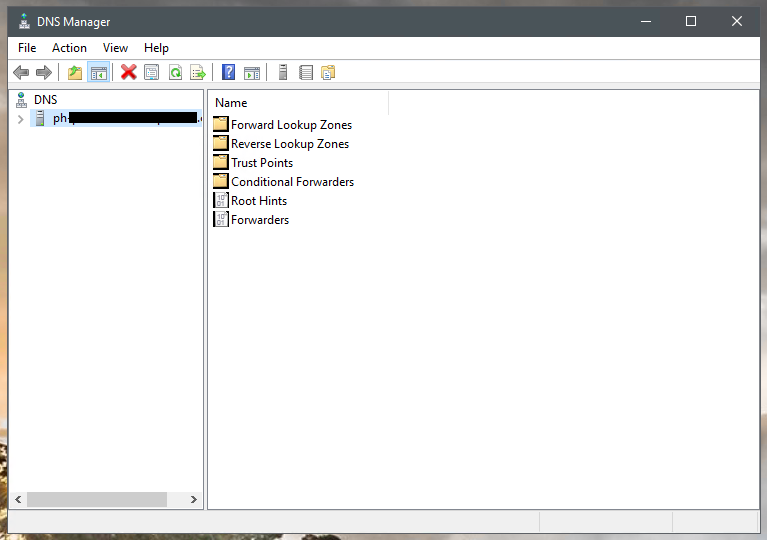
The DNS remoteapp being launched from RDM:
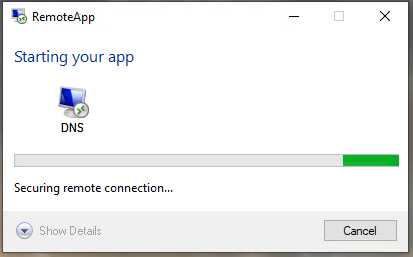
The error I got when trying to launch remoteapp's from RDM:
PowerShell Remote Console
This entry type seems to be very poorly documented. I can't find any references to it in either the online help or the PDF user manual on the devolutions website.
Some questions about this entry type.
1) Why when checking Advanced -> Run as Administrator will the window be outside of RDM? I can't dock it inside RDM.
2) When I open the entry if I don't like the font size and I use ctrl + scroll wheel to make the font smaller and exit the session, if I re-enter the session the font size has been reset. Why?
3) When you open an entry initially (non administrator) a powershell window is launched outside of RDM which then gets sucked into RDM after 2 or 3 seconds. Why?
4) Is there a way to set the default directory location when you open the session in? By default it always keeps opening up into C:\users\administrator\documents. Maybe I want it to open into the root of C:\? How do I change this as a default?
5) If you give RDM focus on on other entry types (for example RDP) and you focus your window on another application then focus back to RDM the RDP session still has focus. But when you do this with the PowerShell Remote Console entry type it doesn't. You have to specifically click INSIDE the powershell window to give it focus back. Why?
6) There doesn't seem to be a logoff feature of any kind. I just simply have to close the window. Why?
MAC address discovery both freezes RDM and is wrong
WMI only works for windows machines. What if I want to discover the MAC of a firewall, or a network switch, or a linux server, or anything other than a windows machine?
MAC address discovery both freezes RDM and is wrong
When clicking on the 'asset' page for the properties of an entry. If you click the magnifying glass for the MAC address field to discover a MAC it freezes RDM for about 8-10 seconds. Then when it finally starts responding again the MAC address that it discovers is not the MAC address of the entry.
How do I get RDM to
a) stop freezing when doing MAC discovery
b) discover the correct MAC for an entry
ability to make property menus part of 'advanced mode' or not
With the release of 2020.2.12.0 when you right click an entry and go to 'properties' there is now a new slimmed down set of pages on the left and a toggle at the bottom for 'advanced mode'.
We would like the ability to choose what pages are part of advanced mode or not. For example, it seems the 'assets' page has now been moved to advanced mode. We would like the assets page to not be behind the advanced mode toggle, but instead be part of 'simple mode?'
make session properties mandatory
any updates on this request?
make session properties mandatory
any updates on this feature request?
ability to "lock" the navigation bar from resizing
any updates on this feature?
go offline if data source not found
Ok, so the "application start" options for startup online state are as follows (online, automatically go offline)
But there isn't any option for starting up *online* then only going offline if the datasource isn't found.
How do I accomplish this? I want RDM to start online. But if the datasource isn't found I don't want RDM to freeze for a second and then bug me saying it can't find the datasource and then have to click "go offline"... why can't I just have it automatically go offline?
The RDM application start state of "automatically go offline" is misleading.
The options and behavior should be as such:
Online (start RDM in online mode)
Offline (start RDM in offline mode)
Automatically go Offline (RDM starts online, but if datasource isn't found it will automatically go offline without prompting the user)
Solar Winds Integration
We would also like to have solarwinds and RDM integration. Especially if we can pull in additional solarwinds inventory information like IP and MAC address of monitored nodes.
what is the "break" keyboard shortcut?
that we can't do.
I'm curious how you're unable to to reproduce this.
Can you please walk me through your internal RDM configuration/combination of settings... and what happens when you perform the steps above that cause this issue?
Do you have a cisco device (any cisco device really) that you SSH to via CLI.
You then run a traceroute or ping command .. then attempt to break out of the command.
ping 8.8.8.8 repeat 1000
then as that command is running you press CTRL+C, or CTRL+6, or any of the other actions... or even if you right click the toolbar and select special actions and break.... I'm genuinely curious what behavior your experiencing.
ability to make syntax highlighting enabled/disabled
For terminal syntax highlighting, if you have an entry its active.
If you don't want highlighting your only option is to delete the entry. It would be nice to be able to simply 'disable' the entry rather than delete it. That way, you don't lose the data in the entry. (maybe you have a complicated regex that you don't want to lose)