Is there an Powershell connection

I assume I may be missing something but does in fact RDM missing option to have remove powershell WinRM connection as option?
All Comments (36)
Hi,
Do you mean to execute a remote powershell for a specific host? It's a Macro/Script/Tools:
http://help.remotedesktopmanager.com/macroscripttools_powershellremote.htm
Regards
David Hervieux
No I mean I open remote console like SSH or telnet to remove host. (Enter-PSSession)
We don't have anything directly but you could create a local Powershell session and execute Enter-PSSession
http://help.remotedesktopmanager.com/sessions_powershell.htm
David Hervieux
I'm really surprised. Why SSH, telnet are there but not powershell remoting?
I'm sure we could do something better but with the PowerShell session type you can connect. Just use the host in the variable.
Perhaps I'm missing something.
David Hervieux
I want to have the same type of functionality which RDP provides but which will open remote WinRM powershell session with alternative credentials support, ability to specify all properties which Enter-PSsession support (like Configuration Name, port number, SSL etc).
I was fully expecting that I just did not find this option in UI since Remote Desktop manager supports pretty obscure remote connection types.
Powershell remoting is how Microsoft envisions admins will be administering servers, not RDP. You can see it by looking at Nano server as well as Windows containers neither of which has any administrative GUIs.
Artisticcheese,
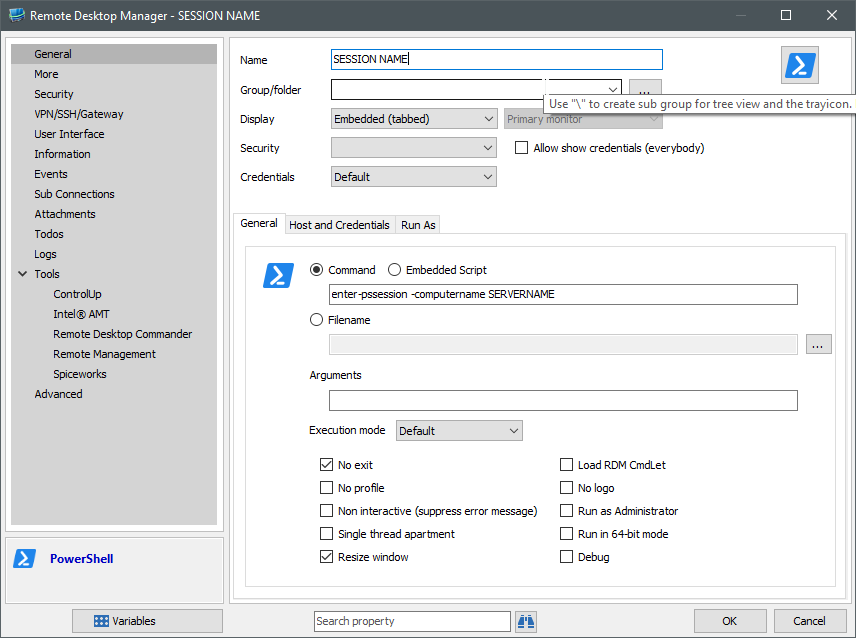
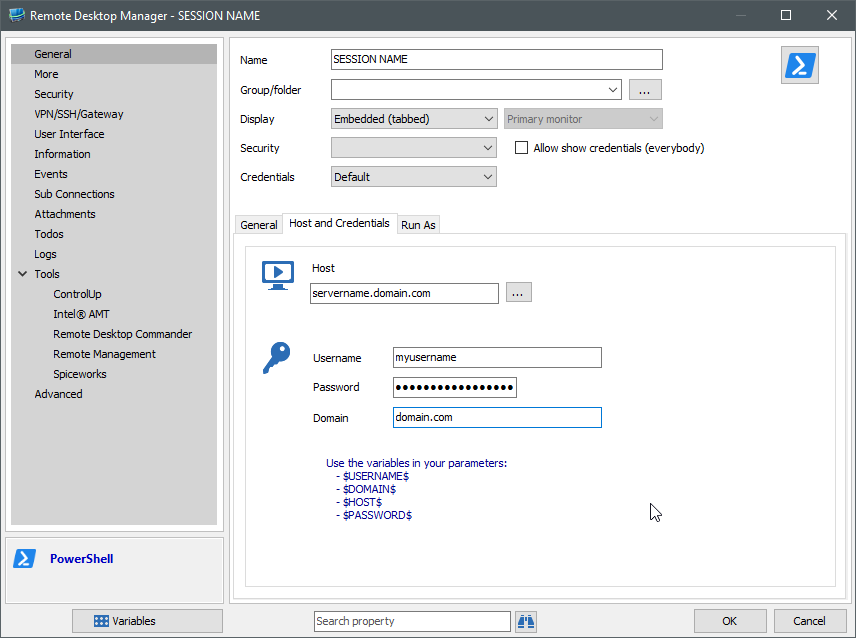
I believe I was able to achieve your goal per David's instruction.
Is this what you are looking for?
2016-05-13 15_54_06-Remote Desktop Manager - SESSION NAME.png
2016-05-13 15_53_35-Remote Desktop Manager - SESSION NAME.png
You should be able to achieve this by specifying those parameters in the "Command" section. If you want to run as a different user with different credentials, simply add those under the "Run As" tab.
Kyle
I have already have entered a feature request for Remote Powershell Console but for now you can use the workaround with the hard coded values;
https://technet.microsoft.com/en-us/library/hh849707.aspx
Don't forget that you can use the $HOST$ variable
David Hervieux
Thanks. I will wait for proper feature implementation. It's not emergency but just really surprised me that something like DeskRoller (never even heard of it) is supported along with all the bells and whistles and nobody thought or suggested so far to have PowerShell remoting to be added as well.
This is a future of Windows Administration (in fact been probably for a lot of admins in last couple of years already).
I agree with you that this is something we MUST do quickly.
David Hervieux
Do you have a link for DeskRoller?
David Hervieux
I meant you have DeskRoll as option to create a new connection but not Powershell Remoting.
Ah I see what you mean.
David Hervieux
Good news,
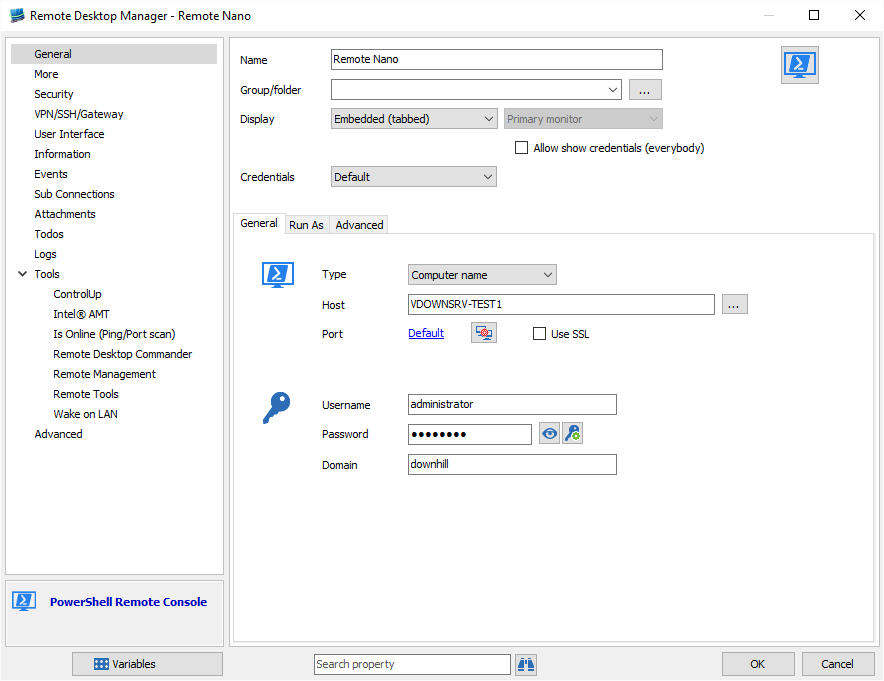
The new RDM minor release will contain a new connection type called PowerShell Remote Console
David Hervieux
RemotePowerShell.png
Excellent,
Is there also an option to choose "Configuration Name" somewhere in menu.
The password management is already implemented. For the configuration name if I add a textfield will it be ok?
Regards
David Hervieux
Yes, textfield is ok. Also please allow to specify alternative port for connection.
Hello,
RDM 11.5.1.0 is out with the new PowerShell Remote Console;
http://remotedesktopmanager.com/Home/Download
If there is anything else we can help you with, please let us know.
Best regards,
Marc Beauséjour
Is there the ability to use variables with this feature? For Instance, if you don't have good SSL certs on your server, but need to use the ssl port PowerShell has the option to use a variable like:
$CertChk = (New-PSSessionOption -SkipCNCheck -SkipCACheck -SkipRevocationCheck) then add this to your connection.
New-PSSession -ComputerName $DC -Credential $Creds -UseSSL $CertChk -EA 0
The problem with this is that it cannot be used like a parameter
New-PSSession -ComputerName $DC -Credential $Creds -UseSSL -EA 0 -New-PSSessionOption
Thanks!
Where do I post bugs? On this thread?
1. There is external windows pops up when you launch new powershell tab
2. If you specify port then -credentials parameter when added is not having space in front of it
3. Credentials repository is not working (not appended with -Credential)
@artisticcheese
I have made an patch (already online). Just download the zip and overwrite the installation:
http://remotedesktopmanager.com/Home/ThankYou?f=RDMbin
The only thing I was unable to fix was the external window popup. This is a limitation that we have since we do an integration of PowerShell.exe
Regards
David Hervieux
Can you launch it minimized? I though you are emedding tab using stuff below (https://channel9.msdn.com/Blogs/bruceky/How-to-Embedding-PowerShell-Within-a-C-Application)
Hi,
Unfortunately it's very limited. You would not have a real interactive console.
David Hervieux
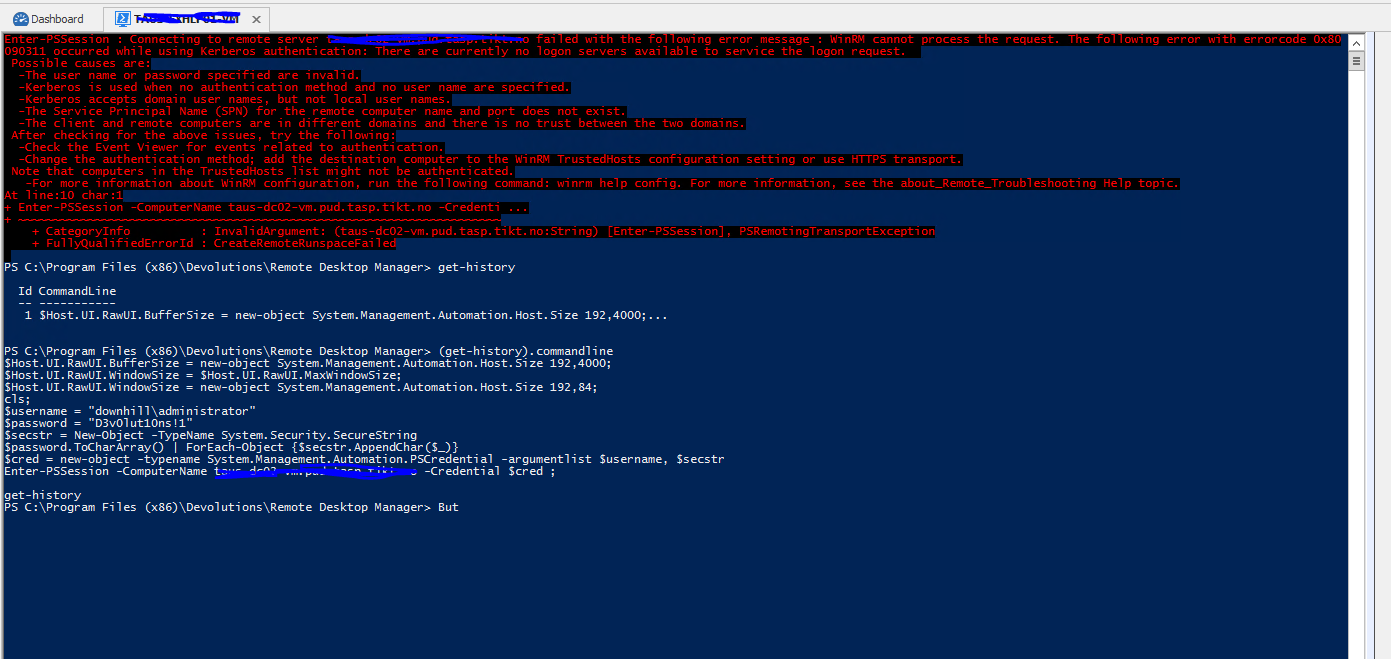
How should i configure the Powershell connection? I have added a connection like so:
But when i try to connect i get the following error, looks like a bug to me?
The domain\username and password is not mine :)
And why are you using this method to create a securestring? (ToCharArray() | foreach-object with the .appendchar method? )
The you are slowing down the process when piping the password variable, it would be much more efficient to use the convertto-securestring cmdlet.
Or have i misunderstood?
It would also be nice to choose authentication type, can i do this in the configuration input box?

Capture2.PNG
Capture.PNG
Hi,
Indeed it's a bug. It's already fixed internally. It's should be available in the next beta release planned for today.
Sorry about that.
Regards
David Hervieux
Could you give a try to this beta version?
http://remotedesktopmanager.com/Home/ThankYou?f=RDMsetupBeta
David Hervieux
Sorry to dredge up an old post.
We have over 400 Windows servers we hit with our Site license, and have been directed to start transitioning to powershell instead of RDP. Instead of adding 400 entries (yep, I'm lazy), Is it possible to have a macro/script/tool entry that would open up a pssession to the RDP object?
So if I have an RDP session for Server01.test.net, I could right-click the RDP entry -> Macros/Scripts/Tools -> Enter-PSSession
Thanks,
Timothy
Hello,
It should be indeed possible to use the PowerShell (Local) Macro/Script/Tool entry and embed a PowerShell script to run the New-PSSession and Enter-PSSession cmdlets.

It is important to enable the Allow password in variable option in Security Settings tab of the RDP entry and the credential entry to get the $PASSWORD$ RDM variable content properly transferred in the script.
Let me know if that works in your environment.
Best regards,
Érica Poirier
Thank you, Erica.
We use MSSQL as our RDM DB with roughly 15 users. For a given RDP entry, our SOP is to use "My personal credentials" so each individual user can use their domain creds to access the servers. Using My personal credentials does not seem to work with this script, but hard-coding the credentials in the Remote Desktop entry does.
Is there a different variable name that can be used to access My personal credentials for this script?New-PSSession : [t***********.****.*********.com] Connecting to remote server t***********.****.*********.com failed with the following error message : The user name or password is incorrect. For more information, see the about_Remote_Troubleshooting Help topic.At C:\Users\tharryman\AppData\Local\Temp\RDM\491067f3-fe25-4ca9-955c-74e0f8e4f414.ps1:4 char:14+ ... PSSession = New-PSSession -ComputerName t***********.****.*********.c ...+ ~~~~~~~~~~~~~~~~~~~~~~~~~~~~~~~~~~~~~~~~~~~~~~~~~~~~~~~~~ + CategoryInfo : OpenError: (System.Manageme....RemoteRunspace:RemoteRunspace) [New-PSSession], PSRemotingTransportException + FullyQualifiedErrorId : LogonFailure,PSSessionOpenFailedEnter-PSSession : Cannot validate argument on parameter 'Session'. The argument is null or empty. Provide an argument that is not null or empty, and then try the command again.At C:\Users\*********\AppData\Local\Temp\RDM\491067f3-fe25-4ca9-955c-74e0f8e4f414.ps1:5 char:17+ Enter-PSSession $PSSession+ ~~~~~~~~~~ + CategoryInfo : InvalidData: (:) [Enter-PSSession], ParameterBindingValidationException + FullyQualifiedErrorId : ParameterArgumentValidationError,Microsoft.PowerShell.Commands.EnterPSSessionCommand
Best Regards,
Timothy
Hello,
Thank you for your feedback.
It seems that using the Personal credentials isn't supported. There is no Allow password in variable option for the Personal Credential feature so the $PASSWORD$ variable isn't populated.
The workaround would be to create a credential entry in the User Vault. And everyone should name that credential entry with the same name.
In the following sample, the entry will check in the User Vault for a credential entry named as Admin. So everyone that wants to connect on that machine must have an Admin credential entry in their User Vault.
Best regards,
Érica Poirier
Hello Timothy,
I want to inform you that I have submitted a ticket to the engineering department. They will investigate if it's possible to add the Allow password in variable option in My Personal Credential section. Once an update will be available, we will update this thread.
Best regards,
Érica Poirier
Thank you, Erica.
We do not use user vaults at this time, but I will look into it.
Hello,
We've added the possibility to enable the Allow password in variable feature while using My Personal Credentials. This should be available with the upcoming version: 2022.3.4.
Regards,
Jafran Majeau
I've been out of the loop on RDM feature progress for about 2 years.
I've found this thread since we're wanting to transition connecting to our servers via powershell rather than RDP when we can avoid it.
My question is, can this powershell connection method be used to tunnel through a jump host?
For example. If I want to connect to a server (serverA) from my desktop (desk), but the connection is actually being routed through a jump host such that my desk is not connecting DIRECTLY to serverA.
desk -> jumphost -> serverA
Is this possible?
Hi,
Yes, this is possible! PowerShell Remoting (WinRM HTTP(S) and SSH transports) is supported in Devolutions Gateway along with many other protocols like RDP, SSH, VNC, ARD, websites, etc:
https://devolutions.net/server/features/gateway
Devolutions Gateway requires Devolutions Server, but Devolutions Password Hub integration is now also available with RDM 2022.3. You can configure existing connection entries to use a Devolutions Gateway as a "VPN" and it will open a just-in-time connection through it - you won't even notice the difference: https://blog.devolutions.net/2022/04/a-closer-look-at-devolutions-gateway/
Here's a screenshot, this is a PowerShell Remoting session made through the Devolutions Gateway. There is no direct connection involved - you can use it to replace your existing VPN, or to complement your VPN if you wish to have two layers of network security:
Best regards,
Marc-André Moreau