
(user deleted)
Failed to authenticate the user in AD
Hi Stéfane,
I apologize for the long wait. I've been trying to get the user with the problem to test if it still occurs but she hasn't done so. She thinks it's still a problem but as she's the only one who has it, no one else can reproduce it and she doesn't get around to testing it, we're parking it there.
I appreciate you looking into it. I asked on the off chance you might have an idea of what was happening, knowing that it's very hard to troubleshoot a problem one can't reproduce.
River
Failed to authenticate the user in AD
Hi Devolutions team
A coworker was trying to access RDM from home and ran into the following error:
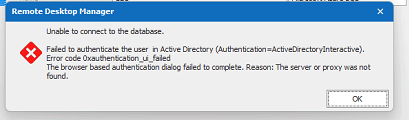
Are you familiar with it?
It seems to be her PC as it happens no matter what user credentials we enter in the datasource and I can confirm that I have access to RDM from home on my own PC.
Details are
OS: Windows 11
RDM: Enterprise Editition 2022.1.25.0 64-bit
Datasource:
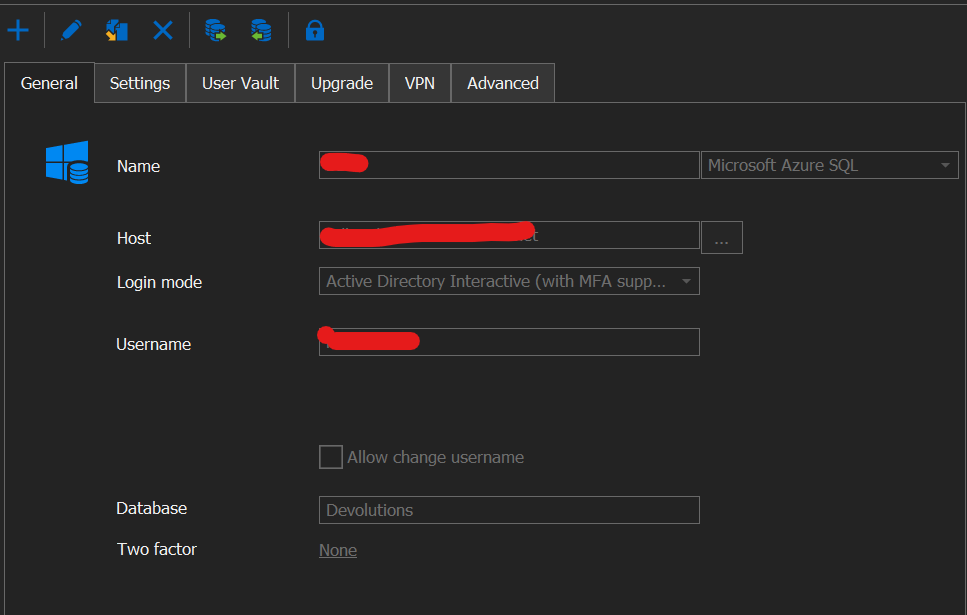
She can access the Devolutions database through SQL Server Management Studio
All other applications and sites that require Windows login work fine for her
There is no proxy set
Rebooting the machine, emptying %localappdata%/Devolutions/Remote Desktop Manager did not work
She is connected correctly to the office VPN and it is confirmed functional for other purposes (VPN is required in order to access RDM outside of the office)
The popup to select Microsoft account on RDM startup shows up for a split second before disappearing
If you have any ideas as to what's causing this issue or how we can fix it, it would be greatly appreciated.
Sincerely
River
Log duration & selecting account every time
Ah, a decision from the big M is out of our hands.
Thank you very much for looking into it, now I can at least let our users know why it's happening.
After a quick try it doesn't look like using Active Directory Integrated (experimental) works for us, but we'll manage.
You've fixed what can be fixed and answered questions about the rest, so that's good enough for me. Thanks again and keep up the good work.
Sincerely River
Log duration & selecting account every time
Hi Samuel,
Unfortunately I have had almost all of our users ask me if I could find a way to make it stop because they find it annoying.
If it's a feature that is staying, it would be great if there was a setting so those who don't need/want it can go back to the old way of only getting the prompt when there isn't a valid token..
Log duration & selecting account every time
Amazing and fast support as always.
I'm assuming Jafran is just talking about the duration, so to answer Samuel:
When I wrote yesterday I was on Enterprise 2022.1.17.0 64-bit.
I just updated to Enterprise 2022.1.20.0 64-bit and can confirm the same behavior.
We are using Microsoft Azure SQL and I have attached a screenshot of our configuration
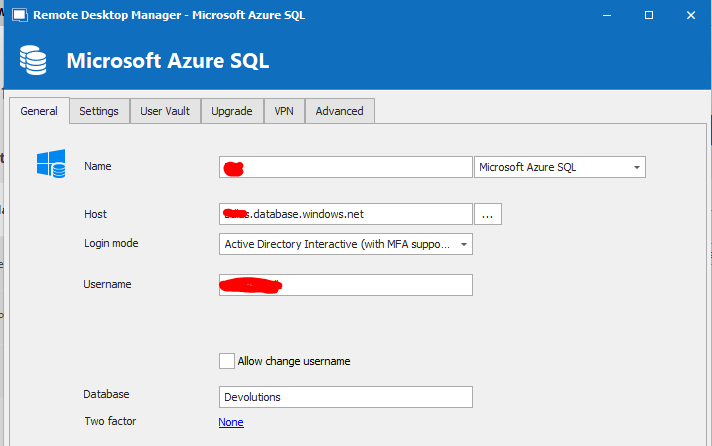
Log duration & selecting account every time
Hi Devolutions team
In the last couple of updates my coworkers and I have noticed some minor inconveniences.
The Duration column in Logs is now shown in seconds, previously it showed the duration in a more user friendly format (ex. something like 1t 5min).
Is there a way to get that back? (see Log Duration.PNG)
In one of the more recent updates, unfortunately I can't say which one exactly, we keep being asked to select an account when opening RDM (see select account.PNG).
We are not being asked to authenticate with Authenticator more frequently, we just have to click on the user it shows and we're through.
Is there a way to avoid having that popup unless we actually have to authenticate?
Sincerely River
Restricted users can't see the logs tab without legacy security
Thank you, that worked.
I had noted that setting before but I had mixed it up with something else.
With that fixed everything is now running smoothly without legacy security enabled.
Sincerely River
Restricted users can't see the logs tab without legacy security
Hi,
Recently we started getting the prompt to switch from legacy security to the permission system.
After unchecking the Use legacy security option our restricted users could no longer see the Logs tab on any entries.

I tried to look around for a place where I could set a permission for it but couldn't find anything. How can I give users permission to see this tab?
Sincerely River
Problems with license change
Thank you Stéfane and James for taking the time to look at the issue.
My fellow RDM admin contacted me this morning to let me know that the problem has disappeared company wide, so the solution James posted above worked flawlessly.
- River
Problems with license change
Of course. That would be a great help.
- River
Problems with license change
I just updated to RDM Enterprise version 2020.3.19.0 and the problem seems to persist. When I remove the old license and close the license window I get the same popup about a new license with unassigned users and regardless of whether I press yes or no to the prompt about assigning users the old license has reappeared in the license window among the new licenses that it also looks like we are assigned to.
Is there a specific way I should go about getting the fix from the update to work?
Problems with license change
That is indeed good news! I'll keep an eye on the release notes.
Aside from the alert about the expired license everything still works, so unless that changes waiting until next release is not an issue.
- River
Problems with license change
Use registration from data source was already selected and it even says it's valid until December 31, 2023 (correct date for the new license) at the bottom but a restart didn't help and the problem persists.
Let me know if you need any info on our setup.
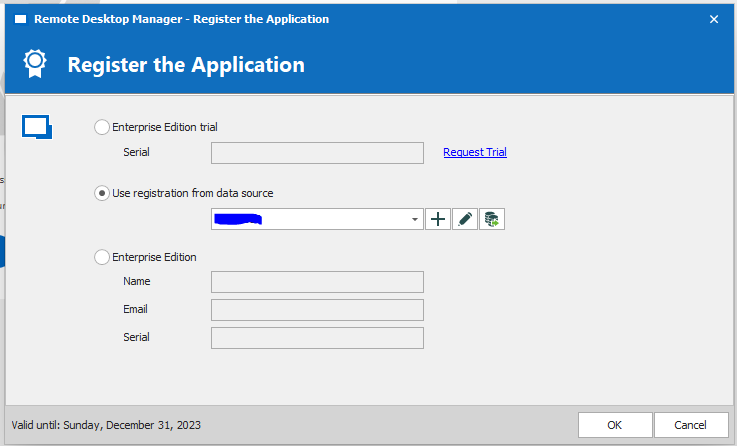
- River
Problems with license change
Hi Devolutions
Our old license expired and we've added the new one under Administration -> Licenses.
When opening Licenses now we have the expired license, an active license with 12 users and an active license with 6 users.
All users have been assigned to the new licenses and yet we still seem to be on the old one, even after a refresh.
Trying to remove the old license seems to work, until we interact with RDM then we get the attached message and the old expired license reappears in the Licenses window.
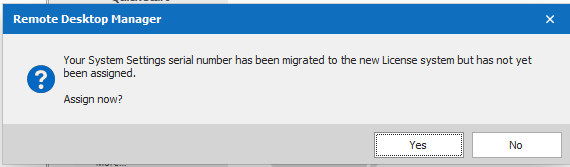
What are we doing wrong and how do we fix it?
We're running RDM Enterprise edition 2020.3.16.0 64-BIT
- River
Red X over credentials
Thanks for the reply. I'll keep that in mind in case it happens again.
This time the problem went away after rebooting the machine.
We did try removing the folder under AppData but I had forgotten about the Reset Layout option in RDM.
- River
Red X over credentials
Hi Devolutions team
A coworker of mine has some issues with the credential lists in RDM version 14.1.0.0 64bit where the credentials list just shows a big red X instead of the tree view.
The issue seems like the one described here: https://forum.devolutions.net/topic24615-red-x-instead-of-tree-view.aspx
except it doesn't come and go and deleting .lyt files or restarting the program hasn't helped.
Any ideas how this can be solved?
- River
Cisco Anyconnect VPN not typing full password
Hi everyone
At my company we suddenly found all versions of AnyConnect to work through RDM again yesterday.
We haven't changed anything as far as we know it just suddenly worked when one of my coworkers tried so it may be worth checking it again for those of you who had problems.
- River
RDM Documentation tab display issue
Each user log in with their Active Directory user and we run the 64 bit version.
I attached a zip file with 2 different users' .lyt files. The ones that start with r are from an admin. The ones that start with m is from a restricted user.
Deleting the .lyt files does sometimes help for a bit other times the problem returns almost immediately.
- River
RDM Documentation tab display issue
I've sent the report through RDM, subject line is RDM Documentation tab display issue.
I included a link to this thread plus a short overview of the issue and what we've tried so far in the message.
- River
RDM Documentation tab display issue
The issue already reappeared.
- I had not yet closed RDM since reinstalling.
- At the time I noticed it was back I had been testing a new web browser connection in RDM that is set to use IE.
- The first time it happened I hadn't discovered the web browser function in RDM so that was not the cause last time. However I have used IE outside of RDM even back then.
I don't know if any of that is relevant but that is all I noticed.
- River
RDM Documentation tab display issue
My OS is Windows 10 enterprise.
I tried to reset the layout, delete the .lyt files and reset IE's settings to default as instructed and tested between each step.
None of it had an effect.
A full reinstall where I completely removed the folder under localappdata, thanks for reminding me it existed, seems to have fixed the issue for now.
I had the .exe of version 13.0.6.0 lying around and that is what I installed then proceeded to update until I was back to 13.6.7.0 and then imported our .rdd file.
I still have no idea what caused the issue or if it will occur again, but if it does I'll try to keep an eye on what I was doing so we'll have something more specific to troubleshoot.
- River
RDM Documentation tab display issue
Thank you and if you need any more info or screenshots let me know.
- River
RDM Documentation tab display issue
I apologize for the delay in replying, I was sick and had no access to my work machine.
We have hundreds of connections in RDM that are all following the structure of a main folder (Company), which is where we type the documentation, and under that folder we keep all relevant teamviewer, vpn, rdp and passwords.
Because of the sheer number of connections I can't say 100% that there isn't one that displays correctly but so far all seem to have the issue I'm describing.
Note, it's client side as some of my colleagues who access the same database don't have this issue and can easily see all the entries that are partially cut off in my RDM and most have no issue with the editor being squished either.
- River
RDM Documentation tab display issue
I'm running RDM Enterprise edition 13.6.7.0 64-bit.
The screenshot here is what it looks like when I in the editor click maximize and thus get the full screen view.
- River
RDM Documentation tab display issue
I have encountered an issue with the documentation tab where is displays poorly and so far I've had no luck getting it to work properly again.
Note it's not the input or markdown that's an issue but rather the window and input fields.
It displays fine in the View but I can't scroll all the way to the bottom and the Editor tab shows up as a gray area with no input field.
If I in the editor decide to maximize the screen I do get an input field and a preview but both are squished in the top left corner of the window only big enough to display a couple of lines at a time and I can't seem to resize them at all.
This is an issue that seemed to appear out of nowhere for a couple of my colleagues where it had worked fine previously and the rest of my colleagues have no issues.
- River