Failed to authenticate the user in AD

Hi Devolutions team
A coworker was trying to access RDM from home and ran into the following error: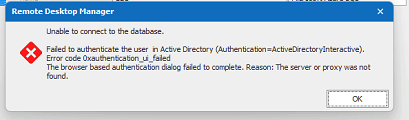
Are you familiar with it?
It seems to be her PC as it happens no matter what user credentials we enter in the datasource and I can confirm that I have access to RDM from home on my own PC.
Details are
OS: Windows 11
RDM: Enterprise Editition 2022.1.25.0 64-bit
Datasource: 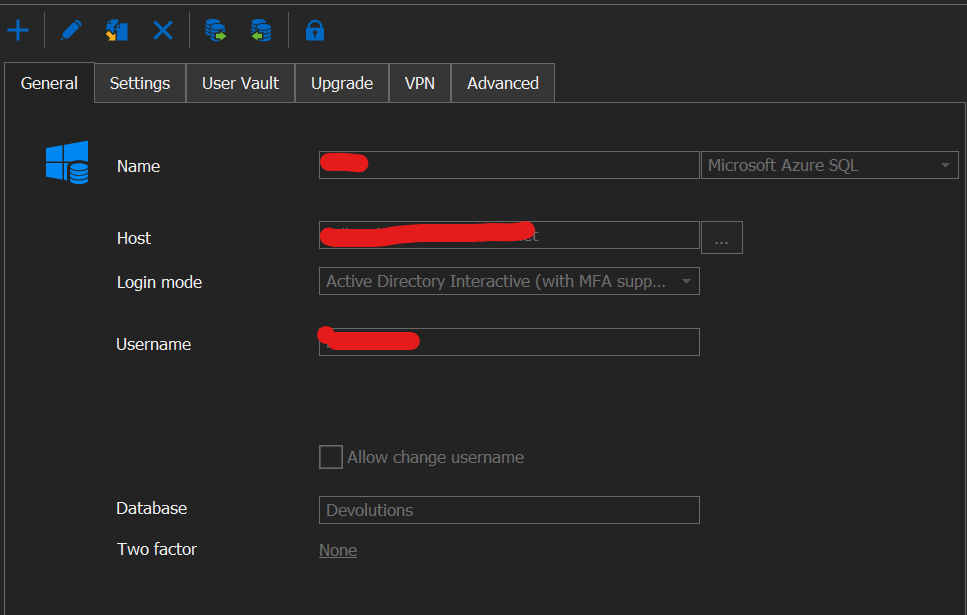
- She can access the Devolutions database through SQL Server Management Studio
- All other applications and sites that require Windows login work fine for her
- There is no proxy set
- Rebooting the machine, emptying %localappdata%/Devolutions/Remote Desktop Manager did not work
- She is connected correctly to the office VPN and it is confirmed functional for other purposes (VPN is required in order to access RDM outside of the office)
- The popup to select Microsoft account on RDM startup shows up for a split second before disappearing
If you have any ideas as to what's causing this issue or how we can fix it, it would be greatly appreciated.
Sincerely
River
error.png
datasource.png
All Comments (4)
Odd, I've never seen this behaviour before, I will need to investigate.
Stéfane Lavergne
Is the issue still occurring or was it due to an Azure issue?
We still can't reproduce the issue here and have no idea what the solution might be.
Stéfane Lavergne
Hi Stéfane,
I apologize for the long wait. I've been trying to get the user with the problem to test if it still occurs but she hasn't done so. She thinks it's still a problem but as she's the only one who has it, no one else can reproduce it and she doesn't get around to testing it, we're parking it there.
I appreciate you looking into it. I asked on the off chance you might have an idea of what was happening, knowing that it's very hard to troubleshoot a problem one can't reproduce.
River
Hi River,
Thank you for the update. No, I haven't had time to investigate further and, in all honesty, until you can get back to us with more information this thread will most likely end in the "cold-case" list. I have no clue how to reproduce and/or where to look for a solution so not much I can do at this time. Let me know if ever she gets back to you and we will see what we can do from there.
Best regards,
Stéfane Lavergne