Log duration & selecting account every time

Hi Devolutions team
In the last couple of updates my coworkers and I have noticed some minor inconveniences.
The Duration column in Logs is now shown in seconds, previously it showed the duration in a more user friendly format (ex. something like 1t 5min).
Is there a way to get that back? (see Log Duration.PNG)
In one of the more recent updates, unfortunately I can't say which one exactly, we keep being asked to select an account when opening RDM (see select account.PNG).
We are not being asked to authenticate with Authenticator more frequently, we just have to click on the user it shows and we're through.
Is there a way to avoid having that popup unless we actually have to authenticate?
Sincerely River
select account.PNG
Log Duration.PNG
All Comments (8)
Hello rwn,
Thank you for contacting us regarding this,
I have a few questions which you can hopefully answer.
- Which version of RDM are you using?
- Which type of data source are you using?
I'm also wondering if you can provide me a screenshot of your data source configuration? By going under "File" -> "Data sources".
That being said, a ticket has been opened to our engineering department regarding the log duration and active time format.
Let me know,
Best regards,
Samuel Dery
Hello,
The issue has been found and fixed. The logs should display its information in the same manner as it did before, starting as early as next version. Thanks for catching this and bringing it to our attention!
Regards,
Jafran Majeau
Amazing and fast support as always.
I'm assuming Jafran is just talking about the duration, so to answer Samuel:
When I wrote yesterday I was on Enterprise 2022.1.17.0 64-bit.
I just updated to Enterprise 2022.1.20.0 64-bit and can confirm the same behavior.
We are using Microsoft Azure SQL and I have attached a screenshot of our configuration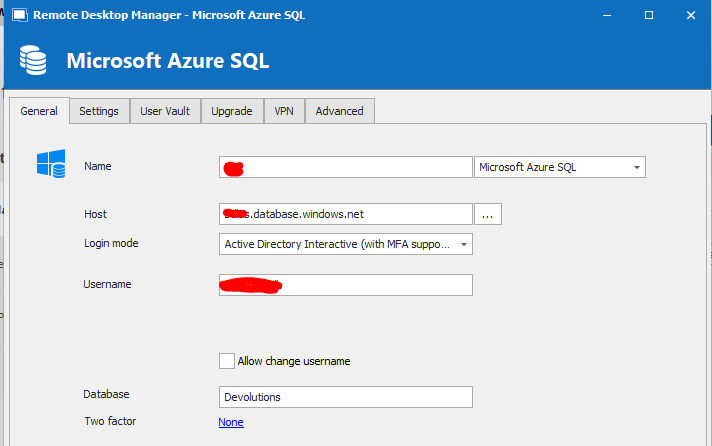
data source.PNG
Hello,
Thank you for your patience,
From my understanding, this is currently the intended behavior. Since the token used for this connection is still valid this is why you're not prompted for the credentials if you were using a different user you would be prompted to authenticate.
Hopefully, this helps,
Let me know if you have further questions.
Best regards,
Samuel Dery
Hi Samuel,
Unfortunately I have had almost all of our users ask me if I could find a way to make it stop because they find it annoying.
If it's a feature that is staying, it would be great if there was a setting so those who don't need/want it can go back to the old way of only getting the prompt when there isn't a valid token..
Hello,
I will confirm with our engineering department and get back to you once I have news.
Best regards,
Samuel Dery
Unfortunately I have had almost all of our users ask me if I could find a way to make it stop because they find it annoying.
If it's a feature that is staying, it would be great if there was a setting so those who don't need/want it can go back to the old way of only getting the prompt when there isn't a valid token..
We understand it's annoying unfortunately, for the time being, it is out of our control.
We updated RDM to the latest (recommended) Microsoft libraries and this is the designed behaviour. If/when things change with the library, we will implement a fix/work around as soon as possible. Until then maybe try with Active Directory Integrated (experimental) and see if it works for you.
Best regards,
Stéfane Lavergne
Ah, a decision from the big M is out of our hands.
Thank you very much for looking into it, now I can at least let our users know why it's happening.
After a quick try it doesn't look like using Active Directory Integrated (experimental) works for us, but we'll manage.
You've fixed what can be fixed and answered questions about the rest, so that's good enough for me. Thanks again and keep up the good work.
Sincerely River