Problems with license change

Hi Devolutions
Our old license expired and we've added the new one under Administration -> Licenses.
When opening Licenses now we have the expired license, an active license with 12 users and an active license with 6 users.
All users have been assigned to the new licenses and yet we still seem to be on the old one, even after a refresh.
Trying to remove the old license seems to work, until we interact with RDM then we get the attached message and the old expired license reappears in the Licenses window.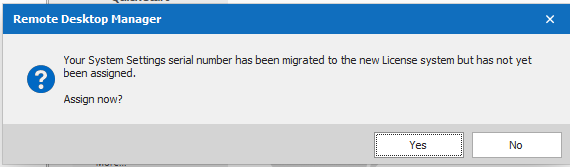
What are we doing wrong and how do we fix it?
We're running RDM Enterprise edition 2020.3.16.0 64-BIT
- River
assign migrated license.PNG
All Comments (10)
This is odd. If you go into Help > Register Product what option is selected? You should be set to "User registration from data source" with your data source selected. If not select it. Regardless of what is was before, please close RDM and open it again to see if that resolves the issue.
It looks like RDM is having an issue while toggling from the old licensing format to the new one. We will need to investigate, in the meantime, I'm hoping a restart will act as a workaround.
Best regards,
Stéfane Lavergne
Use registration from data source was already selected and it even says it's valid until December 31, 2023 (correct date for the new license) at the bottom but a restart didn't help and the problem persists.
Let me know if you need any info on our setup.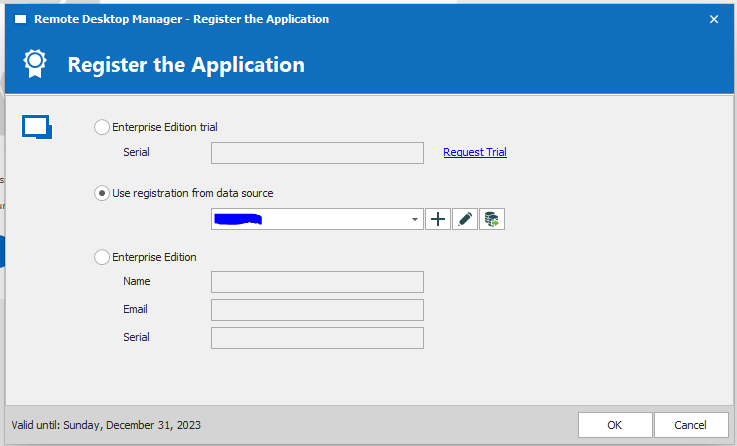
- River
register application.PNG
Good news, the fix for this issue will be in the next RDM release. I don't have an ETA for you but it shouldn't be very long.
It will be available here: Download Enterprise - Remote Desktop Manager
Best regards,
Stéfane Lavergne
That is indeed good news! I'll keep an eye on the release notes.
Aside from the alert about the expired license everything still works, so unless that changes waiting until next release is not an issue.
- River
I just updated to RDM Enterprise version 2020.3.19.0 and the problem seems to persist. When I remove the old license and close the license window I get the same popup about a new license with unassigned users and regardless of whether I press yes or no to the prompt about assigning users the old license has reappeared in the license window among the new licenses that it also looks like we are assigned to.
Is there a specific way I should go about getting the fix from the update to work?
Hi River,
This is very intriguing behaviour. Would you be willing to do a quick remote session so that we can properly diagnose the issue?
If so, I will get our support department to send you a scheduling URL to get the process started.
Best regards,
Stéfane Lavergne
Of course. That would be a great help.
- River
Hello River,
I just contacted you via private message to provide you a link to schedule a remote session with Stefane at your convenience.
We will wait for your confirmation.
Best regards,
James Lafleur
Hello River,
Thank you again for your time today!
I am glad that we have been able to find the cause of this issue.
For our community, here is a brief summary :
On older versions of RDM, with an Advanced Data Source, it was possible to enter a serial of RDM under Administration -> System Settings -> Serial Number, In doing so, the license was applied to every user connecting to this Data Source. On more recent versions of RDM, this menu has been replaced with the new Administration -> Licenses menu.
To avoid issues when our users moved from an old version of RDM to a newer version, we added a tool to migrate the licenses entered in the old menu, to the new one.
In the current case, that was the cause of this issue. The old expired license of RDM kept being migrated to the new menu because it was still present under Administration -> System Settings -> Serial Number. We had to do the following:
1- Go under Administration -> Licenses -> Select the old RDM license and delete it
2- Go back under Administration -> System Settings -> Serial Number. Deleting the license during step #1 allowed us to see and delete the old license
3- Since the old license was no longer under Administration -> System Settings -> Serial Number, it stopped being imported in the new menu, thus solving this issue.
Best regards,
James Lafleur
Thank you Stéfane and James for taking the time to look at the issue.
My fellow RDM admin contacted me this morning to let me know that the problem has disappeared company wide, so the solution James posted above worked flawlessly.
- River