
techreg
Passwordstate integration issues since RDM 2026.2.x
Many thanks for letting us know, Jafran.
Regards.
Passwordstate integration issues since RDM 2026.2.x
Hello Carl,
Do you have any news on when the fix may be released?
Thanks!
Passwordstate integration issues since RDM 2026.2.x
Hello Carl,
I have installed the latest version you've indicated (we were previously on 2026.3.12.0), but unfortunately our issue with Passwordstate 9.x persists. We have planned to move to Passwordstate 10, but not right now, I don't know if it makes any difference with the reported issue.
To answer to your request of additional details:
Passwordstate version is V9.9 (Build 9992)
RDM data source is MS SQL 2022
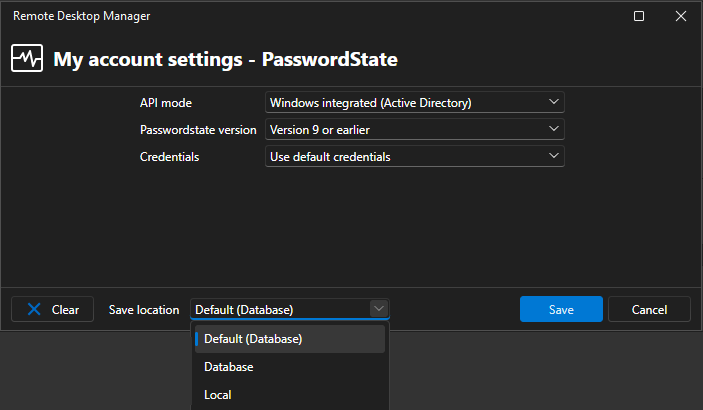
[17/7/2026 17:28:36] Information - 'SRV-WU-01': Inherits credentials from Parent
[17/7/2026 17:28:39] Connecting - 'SRV-WU-01' (RDP (Microsoft Remote Desktop))
[17/7/2026 17:28:39] Entry edited - 'MRU' ()
[17/7/2026 17:28:39] Connecting - 'SRV-WU-01' (Host)
[17/7/2026 17:28:39] Entry edited - 'MRU' ()
[17/7/2026 17:29:03] Disconnected - 'SRV-WU-01' (RDP (Microsoft Remote Desktop))
I hope it helps. Thanks!
Passwordstate integration issues since RDM 2026.2.x
Hello,
We are having some issues with the latest versions of RDM, in that a password entry pointing to a Passwordstate server (still version 9.x) is misbehaving.
We used to set a user specific login/password at the root of a connections tree (with inheritance enabled), and this login/password combo is normally collected from an entry in one of the Passwordstate lists. The Passwordstate password entry, located in the user vault, is configured so that it is not pointing directly to a given Passwordstate list. However, what normally occurred is that the user set in the root of connections tree a particular entry from a Passwordstate list (that is, he/she browse the Passwordstate entries until he/she gets to the desired credential), and this selection lasted from then on.
Now, instead, whenever a connection is open, in which the resulting credential is coming from Passwordstate, the following dialog is presented, and not just once, but on every time a connection is to be made to the Passwordstate server:
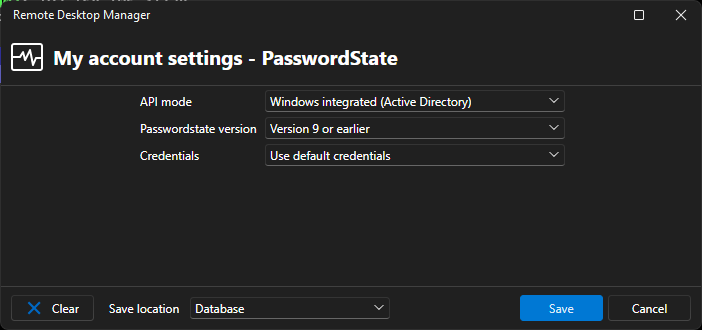
We have always confirmed the data shown with the Save button, using as the save location Database (or Default (Database) combo selection, which is the same), but eventually the configuration is never saved properly, and the dialog reappears at the next iteration. BTW, by confirming the data in the dialog, the correct credential entry is finally retrieved from Passwordstate and injected in the opening session.
We are asking if there is some log we could check for potential issues, or other suitable known workarounds.
Thanks.
Web custom login with JavaScript
Hello Samuel,
We are using version 2023.3.20.0 with MSSQL data source. We can certainly share the script, it's just one line as follows:
document.mainPage.frames['loginBody'].acceptBanner();
with acceptBanner()being the function called on the checkbox click event.
The URL is not public, unfortunately, and requires access to an HPE Virtual Connect hardware. By default, the web interface goes straight to the typical username/password, but in case the device has been configured in showing a banner before logging in, the text boxes for the mentioned fields are disabled until you click on a specific checkbox shown under the banner, as an acknowledgement that you have read the banner content.
Independently from the fact the banner is shown or less, the web page has a couple of nested iframes that load asynchronously from the initial page. We tried to define an arbitrary (long enough) delay, but it didn't work. We also tried to change the code as follows, mimicking what another user in this forum did for 365 login:
function waitForElement(selector) {
  return new Promise(resolve => {
    if (document.querySelector(selector)) {
      return resolve(document.querySelector(selector));
    }
    const observer = new MutationObserver(mutations => {
      if (document.querySelector(selector)) {
        observer.disconnect();
        resolve(document.querySelector(selector));
      }
    });
    observer.observe(document.body, {
      childList: true,
      subtree: true
    });
  });
}

// Simulate click on the accept notice checkbox
waitForElement("iframe[id='loginBody']").then((element) => {
  element.contentWindow.acceptBanner();
});
I am not personally well versed on JavaScript, but without knowing when and if the code is injected/fired, and no (known) way to debug it, it is very difficult to understand what's going on.
Thanks.
Web custom login with JavaScript
We are trying to automate the login on the HPE Virtual Connect web management UI. The current configuration includes a compulsory banner that requires the user to click on a checkbox before enabling the username/password fields, hence autofill is not an option in this specific case.
We have identified the ID of the checkbox and created a single line JavaScript code that will simulate the mouse click. We have checked that the code is working when, while having opened the web session as embedded in RDM, we fire the web browser developer tools (F12) and execute the single line code from the debugger. However, when we insert the exact same line in Authentication / Script / Custom script the code apparently it's not executed, or maybe it is executed before the whole page is loaded, or maybe it has failed.
How is it supposed to work a custom script? Is it injected in the page after the web page has been completely loaded? Is there a way to check/debug that the code has been effectively executed, or if it has incurred in an error? We don't find a proper documentation for this feature, nor it's very clear how the three tabs in Authentication interact / mutually exclude among them.
Thanks.
pop up windows in websites
Hello,
Running version 2024.3.x and the pop-up blocker issue is still there. We used to run the HPE IP Console (Avocent) in an embedded web session, but it is now impossible to use it as the KVM HTML5 sessions (which open another tab in the browser) cannot be started due to the above.
I understand there isn't a way to "enable" the pop-ups right now, is it true?
Regards.
VPN/Gateway in System Vault does not support User Specific Settings
Well, I was too enthusiastic apparently. It works, somewhat...
The behavior is not exactly the same as of using straight a RDP Gateway connection. First of all, now it appears this dialog upon opening an entry whose VPN is set as described in Min post:
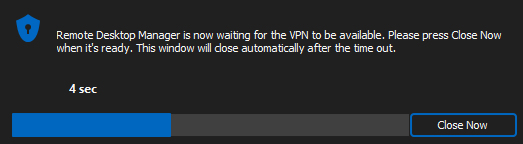
And after having waited around 10 seconds, most of the time it fails to go through the "VPN" (an RDP Gateway in reality) and tries to open a connection directly with the target host (which doesn't work).
Really, I don't understand why in the session I can't select directly the gateway in the system vault instead of going with this VPN -> Session -> RDP Gateway detour.
VPN/Gateway in System Vault does not support User Specific Settings
Hello Min,
This works, thanks! I'd never thought to select a session type, where is this information coming from?
VPN/Gateway in System Vault does not support User Specific Settings
Hello Hubert,
Thank you for your answer. I still fail to understand how it could be used, apart from the credentials "issue". Having one RDP Gateway defined in the System Vault, I am not able to select it as a gateway in any entry of any vault.
Thanks.
Template Groups not working as expected
Hello Stéfane,
We have checked what you have described with version 2023.2.32.0 and it seems to work pretty well. Well done!
Thank you.
VPN/Gateway in System Vault does not support User Specific Settings
Hello,
We've seen that the latest versions of RDM (2023.2.32.0 at least) support now the creation of a VPN/Gateway entry in the System Vault. That's great, as there are thing like a VPN/Gateway that would be nice to share among all the vaults.
However, it doesn't seem that user specific settings are supported in the System Vault, or at least they are not supported with a Windows RDP Gateway entry (host name is fictitious in these snapshots):
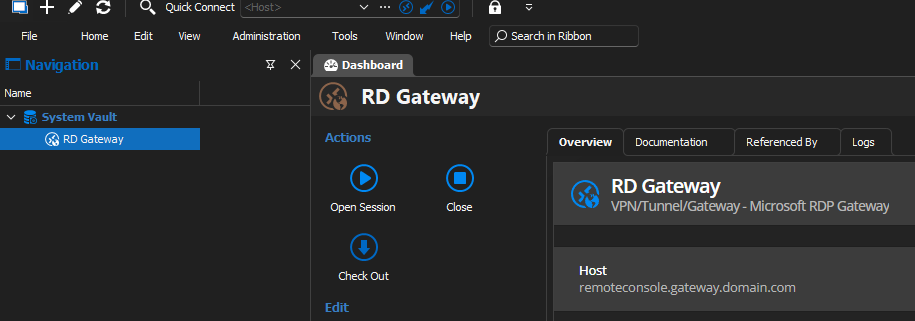
But there is no provision for specifying user's settings. In the case of a gateway, those would include the user's login/password, which would be specific for each user.

How is it supposed to work?
Thanks!
RDM Open with Template not inheriting variable from host
Hello,
Using version 2023.2.25.0 and the issue is still there apparently. So, we have a website entry with an URL and a computed host name:
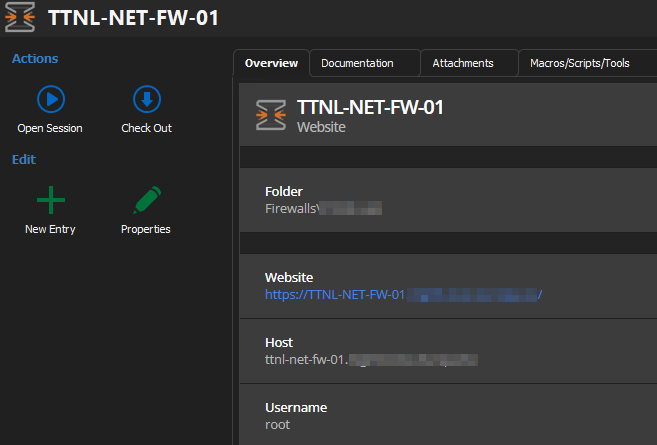
Then, as a child, we have an SSH connection where the host should be inherited:
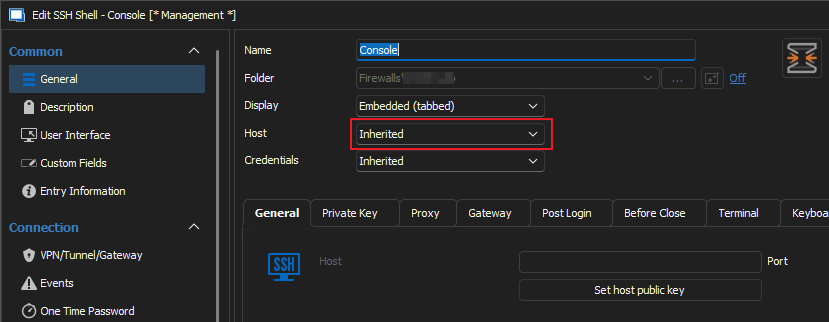
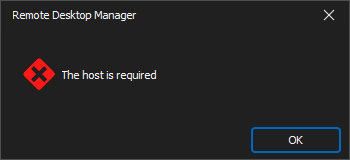
Unfortunately, by double-clicking on the child node it doesn't work:
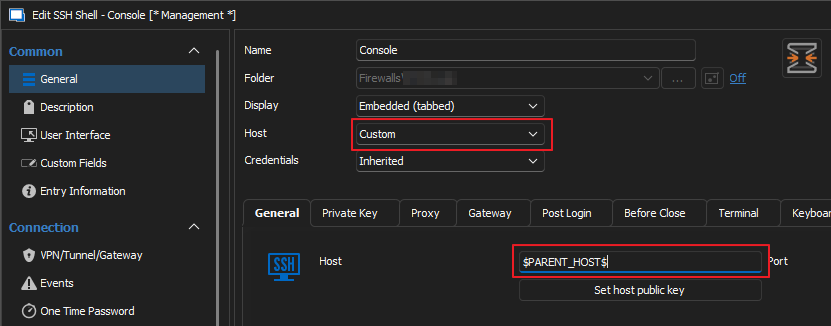
Using a custom host value set to $PARENT_HOST$ doesn't work as well:
Thanks!
Template Groups not working as expected
Hi Stéfane,
I was off a couple of days, sorry for replying so late. It seems good!
I would like to comment on sub-sub-connections not being supported (yet?). In a couple of cases sub-sub-connections could have helped us. For instance, when you deal with some kind of cluster (NetApp, Citrix, Hyper-V, ...) it's quite common to access the cluster directly by double-clicking on the cluster entry. The cluster entry could be, like in a Citrix Netscaler case, a web entry pointing to the management console, but then you may want to access the cluster via SSH, hence you create a sub-connection with that entry.
The next logical step would be to set as sub-connections also the nodes composing the cluster. In the case of a Citrix Netscaler node, the entry is again a web entry, but the node as well can be accessed via SSH, and it has also a management interface (LOM, as it's called). Due to the fact sub-sub-connections are not supported, the cluster nodes cannot be grouped below the cluster entry. Currently, our entries for one of such clusters are deployed as below:
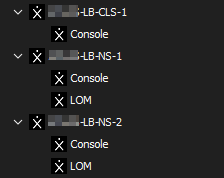
Here LB-CLS-1 is the cluster entry, and LB-NS-1 / LB-NS-2 are its nodes. Ideally, they should be arranged as in the mock-ups below:
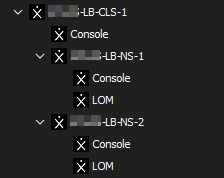
Or, in a more compact view:
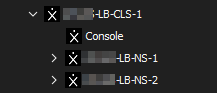
But in reality, all you need to show and use 99% of the times is the main cluster entry, and double-click on it:

It's just a use case that you may (or may not) take into account for a future improvement of the product.
Many thanks!
Template Groups not working as expected
Hi Stéfane,
Thank you for the follow-up and the update. Nice!
Template Groups not working as expected
Here we are again with Template Groups. The more we try to use them, the more it seems difficult to understand the way they should work.
Previously, before they were introduced, it was possible to create templates having sub-connections, and those templates could be managed completely, also in terms of appearance. They could also be used with the Edit / Edit (Special Actions) / Convert with Template contextual menu, which was a life saver when a template had to be modified / enhanced, and then re-applied to all the entries which were using the previous version.
All of the above is not available with Template Groups, or at least we don't understand how they should be used. We have already reported that currently there is no way to define the icon the templates have: those that were created during the migration of sub-connections in a previous version of RDM inherited the icon from the ancestor node being converted, but every other one created by the user has no way to modify this feature. Contextual menus on the templates editor are not very intuitive, too.
Then there is the big limitation that the Template Groups DO NOT appear within the selection windows of the Entry Conversion with Template, and this zeroes more than half of value of groups. Unfortunately, it is not anymore possible to create sub entry (as it is now called the previous sub-connection) within a template entry that is not in a template group, hence a functionality that existed before the introduction of the Template Groups has been lost now. I fail to understand why there is such limitation in the templates, and also why it is not possible to move/copy a template entry from a Template Group to another one.
Our take is that even with version 2023.2.22.0, which we are currently using, Template Groups are still an half-implemented concept that has been released in a rush removing, instead of at least equaling, functionalities previously available.
I apologize for the semi-rant. Thanks.
Templates still "disappearing" randomly at start
Hello,
We are using RDM Enterprise 2023.2.18.0 and today it happened again a bug that we noticed in previous versions but that it seemed resolved (it's not). Our RDM database is backed by a MS SQL cluster, and we have hundreds of host entries which depend on the availability of a specific host template.
All of a sudden, without an apparent reason, upon the RDM startup the entry templates are not available, and a couple of time in the past it occurred that they were only partially available. It's like there is a sort of race condition at startup and the templates fail to show up.

We have noticed also that both the "Administration Logs" and "Application Logs" tabs are empty as well, so unfortunately we cannot provide additional information to support the case. What we do know is that, normally, by existing and restarting RDM all goes back in place and indeed, while writing this post, we did exactly that and the entry templates magically reappeared:

Thanks.
Issues on 2023.2.17.0 with variables expansion
Hello Paul,
You are right, the Active Directory entry isn't anymore located in a domain folder, my bad. The fact is that once you've extended the vault settings in incorporating the feature request regarding the UI settings, we removed the Domain folder (which was the only direct child of the vault, as we have a separate vault for each domain) because it was unneeded with the new UI settings in place. We had completely forgotten about the Domain folder removal, and we've been biased by the fact the $PARENT_HOST$ variable is not being expanded properly in the current version.
I apologize for the false bug report. I am sorry for the confusion.
Thank you!
Issues on 2023.2.17.0 with variables expansion
Hello,
We have noticed that in version 2023.2.17.0 (and the previous one, at least) a bug has been introduced in expanding variables in certain contexts. We don't know if it has any relation with the issue, already reported, of $PARENT_HOST$ not being expanded. This time we noticed that using the $DOMAIN_NAME$ variable in this User Interface option:

results in the following misbehavior:

This occurs also with the $DOMAIN_DOMAIN$ domain and possibly other domain related variables. We don't remember to have noticed this issues with versions 2023.1.x
Thanks!
Template Group icon
Hello @Stéfane,
Thank you for the detailed explanation on what goes on with TG. Is there a planned date on when the missing features of Template Groups will be implemented?
And what about "Override entry name"?
Thanks.
RDM Open with Template not inheriting variable from host
It seems a similar problem we have spotted just yesterday (same RDM version of the original poster), in that we created a sub-connection of s a Web site to access the underlying appliance but via SSH. Even tho' on the Web site's entry dashboard the value for the Host is clearly and correctly computed (from the site's URL), in the sub-connection inheriting the host or even using $PARENT_HOST$ lends to the same error message reported.
Template Group icon
Hello,
So for a long time we have had a lot of Entry Templates that were often entries having sub-connections. With the changes introduced in version 2023 for the sub-connections, during the upgrade process those entries with sub-connections have been embedded in Template Groups, one for each of the entries having sub-connections. See the snapshot below:

The original entry was the the one boxed in red, and with the upgrade a Template Group (boxed in yellow) has been created around the original entry. The Template Group has inherited the icon of the original entry, however in the Template Group edit dialog there is no mean to change that icon:

In this dialog there is also the field for which I asked what it is for (Override entry name)
Back to icon issue, with no way to select any icon, I thought the Template Group would 'auto-magically' inherit the icon from the first entry in the group, or whatever other logic has been used. So we need to create another entry similar to the one in the example above, but for a different device. We duplicated the Citrix template group and modified the URL and icons of the entries to access OPNsense firewall. Unfortunately, the icon in the Template Group sticked to the copied one, and as said we don't see a way to change it:

And by creating a new Template Group from scratch, another generic icon is being used, which of course cannot be changed as well.
It seems like the Template Group editing dialog is missing some needed features.
I hope it is more clear now.
Template Group icon
Hello,
Updating from one of the recent versions (can't remember which) we've found that our Entry Templates having sub-connections were re-organized in Template Groups. The Template Groups inherited the icon of the grouped entry, but now we have changed the icon in one of those entries. How do we change the icon in the template group as well? We don't find a way to do it. We have also tried to recreate the group selecting an instanced entry sporting the new icon, but a generic icon was used instead for the group.
On a related note, what the "Override entry name" field is meant for in Template Group? We couldn't find an help page for it. I am sorry to say that nevertheless your intention on enhancing the product's documentation, we didn't notice it.
Thanks.
After starting up RDM Entry Templates sometimes are not loaded and host entries are not working
Hi,
We are experiencing the problem in subject since some time, let's say until version 2023.1.23 or maybe before it wasn't an issue.
Our vaults relies strongly on certain Entry templates, and what's happening (completely random) is that at RDM startup the templates are not loaded for some colleagues, while they are for others. As such, 70% of the entries are not functional as they depend on the SSH/RDP templates not being present. Exiting from the program and starting it again most of the time cures the problem, but sometime it doesn't and the user cannot use the application.
We haven't changed anything on our MS SQL server where the RDM datasource is hosted, it seems like starting with at a certain version of RDM a race condition has been introduced and it results in the templates not being available always.
We are currently using the latest available version, 2023.1.29.0. Thank you in advance for the support.
Icon (favicon) issue when adding tabs to an embedded web page
Hello Jafran,
Thank you for the update. Any idea on when the first 2023 version will be out for GA?