After starting up RDM Entry Templates sometimes are not loaded and host entries are not working
After starting up RDM Entry Templates sometimes are not loaded and host entries are not working

Hi,
We are experiencing the problem in subject since some time, let's say until version 2023.1.23 or maybe before it wasn't an issue.
Our vaults relies strongly on certain Entry templates, and what's happening (completely random) is that at RDM startup the templates are not loaded for some colleagues, while they are for others. As such, 70% of the entries are not functional as they depend on the SSH/RDP templates not being present. Exiting from the program and starting it again most of the time cures the problem, but sometime it doesn't and the user cannot use the application.
We haven't changed anything on our MS SQL server where the RDM datasource is hosted, it seems like starting with at a certain version of RDM a race condition has been introduced and it results in the templates not being available always.
We are currently using the latest available version, 2023.1.29.0. Thank you in advance for the support.
All Comments (5)
Hi,
Next time you get it please try the following and please let me know which one resolves it best (if any):
- Go Offline + Go Online
- CTRL + Refresh
We have at least one other client that I'm aware of the got has this issue. I was able to reproduce it once but I don't yet understand how or why it happens. I've also added (yet to be released) CTRL+Refresh directly in the Shared Template screen to force the Shared Template refresh as known good work around.
Best regards,
Stéfane Lavergne
I dont know if it's related but i have an issue that if i create a Shared Template for an AD Synchroniser. It will just flat out refuse to work even if the "layout" is the same as another one that is working. When i press the Open session on the Synchroniser, nothing happen, no error message. While with the old template i created i can see the sync bar working.
@smarin
Interesting observation, I'm not sure it's related but let us at least investigate.
Can you please, on both AD Synchroniser entries, right-click > Clipboard > Copy > OK and use a comparer tool (WinMerge, Beyond Compare, ...) to compare both entries to see the differences?
Best regards,
Stéfane Lavergne
Actually it's the same Synchroniser, i just manually update the template for it.
The only difference between the 2 template is that one of them the Session is a Remote Desktop and the Test one is a Command Line and the test one also has fewer Sub-entries.
I made a video that i hope will explain it better.
2023-06-20_11-05-30.mp4
Yes, the video was very helpful. Thanks
The explanation as to why one works and not the other, on the other hand, is not simple. Let me try to explain and give you a possible workaround.
Synchronizers currently only support templates and "simple" template groups. That is a template group (TG) that we can fake into a template (parent/child).
What is a "simple" TG? It only contains 1 (single) entry at the "root". Example here the Clients folder (red arrow) is "virtual" so it doesn't count (yes, still allowed in TG even if the system option is disabled) therefore we can take then TG entries (yellow box) and squeeze into an old parent/child style entry that the synchronizer can work with. 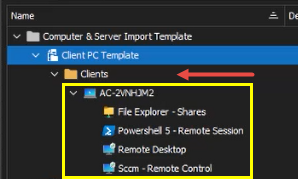
As for why does this one does not work, since the icon has been changed on the Clients folder (blue arrow) we now see this TG is seen as 3 distinct entries (Clients, AC-pcname & File Explorer - Shares) which we can't squeeze it into the old parent/child style entry there the synchronizer aborts.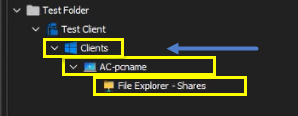
There is hope, you can try the following.
- Edit
AC-pcname, remove the folder name, OK.- the entry will be at the root, same level as
Clients
- the entry will be at the root, same level as
- Delete
Clientsfolder - Edit
AC-pcname, set the folder name Clients - Test it with the synchronizer
Note: we have a feature request to allow all template groups via the synchronizers, the case is somewhat complex but we are working on it.
Best regards,
Stéfane Lavergne
9d069a93-86fc-420d-a7d6-cbf6f74a2191.png
45964dcc-bae5-490f-9a5c-6bcfb1bd8565.png