Template Groups not working as expected

Here we are again with Template Groups. The more we try to use them, the more it seems difficult to understand the way they should work.
Previously, before they were introduced, it was possible to create templates having sub-connections, and those templates could be managed completely, also in terms of appearance. They could also be used with the Edit / Edit (Special Actions) / Convert with Template contextual menu, which was a life saver when a template had to be modified / enhanced, and then re-applied to all the entries which were using the previous version.
All of the above is not available with Template Groups, or at least we don't understand how they should be used. We have already reported that currently there is no way to define the icon the templates have: those that were created during the migration of sub-connections in a previous version of RDM inherited the icon from the ancestor node being converted, but every other one created by the user has no way to modify this feature. Contextual menus on the templates editor are not very intuitive, too.
Then there is the big limitation that the Template Groups DO NOT appear within the selection windows of the Entry Conversion with Template, and this zeroes more than half of value of groups. Unfortunately, it is not anymore possible to create sub entry (as it is now called the previous sub-connection) within a template entry that is not in a template group, hence a functionality that existed before the introduction of the Template Groups has been lost now. I fail to understand why there is such limitation in the templates, and also why it is not possible to move/copy a template entry from a Template Group to another one.
Our take is that even with version 2023.2.22.0, which we are currently using, Template Groups are still an half-implemented concept that has been released in a rush removing, instead of at least equaling, functionalities previously available.
I apologize for the semi-rant. Thanks.
All Comments (8)
Hi techreg,
No apology needed, I hear you loud and clear. We need to fix these lingering issues with template groups. I will bump up the priority and try to have a look at it personally.
Templates are extremely powerful but at the same time very frustrating/difficult to use, in part due to the issue you've outlined above. In the past, since they are not widely used we haven't put much effort in improving or even fixing issue with them. A vicious circle that needs to stop.
Best regards,
Stéfane Lavergne
I've started looking into your request, doing the low hanging issues first. FYI, I'm on vacation next week. They should be releasing a new build sometime next week.
Yesterday I got this done, it's a start.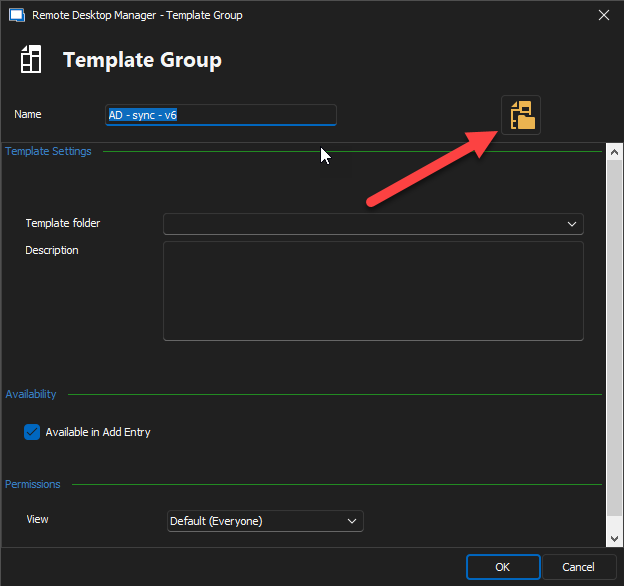
Best regards,
Stéfane Lavergne
ec3a3e8f-5d24-4242-8086-4b5c185cb762.png
Hi Stéfane,
Thank you for the follow-up and the update. Nice!
I'm working on Edit / Edit (Special Actions) / Convert with Template
What I got working now is what I call "simple template groups", that is a template group that can be converted back to the old parent/child, so that we can apply it. Here is an example of a simple-TG and a non-simple-TG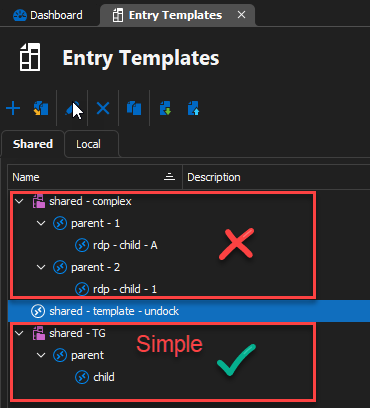
In this case the Simple-TG is now available in the Convert with Template screen (see below).
Note: I also enhanced the form to save the check box values from one action to the other (it was already saving but was lost on restart of RDM). I also save the currently selected tab (Shared vs Local) & selected template.
In my example below, if you select the "My Parent" connection and apply the "shared - TG" from the screen shot below, we will delete Child (red icon) & random and add child (blue icon), since both Sub Entries check boxes are checked.
I believe this now works exactly as it did prior to the changes to sub-entries. Let me know if I'm missing something.
I also now validate that when you apply an Entry Conversion with Template to a sub-connection that the change doesn't require to make sub-sub-connections since we don't support multiple levels of sub-connections. Example, you select Child (red) and try to apply shared - TG, we simply kick out and do nothing. That is unless you uncheck Add template sub entries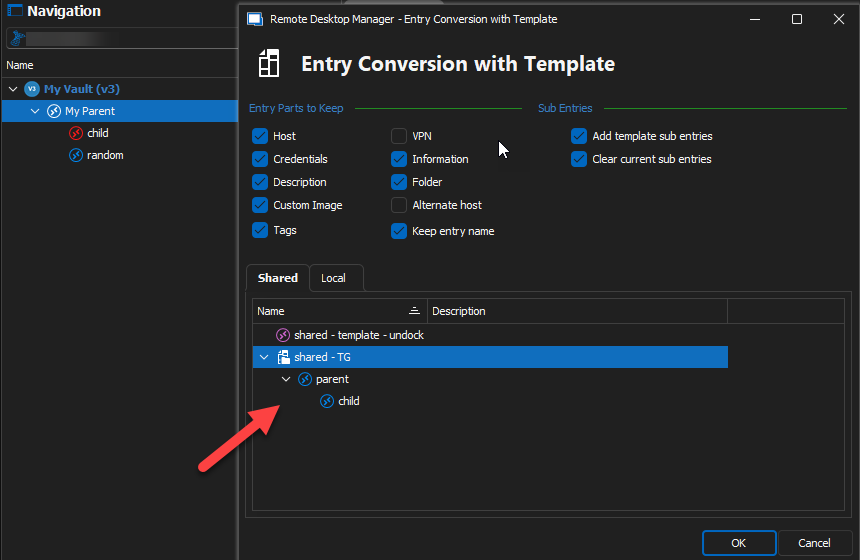
Is this looking usable? Any comments/questions?
Best regards,
Stéfane Lavergne
42d47b7e-63fd-4b77-b13a-77de45007d76.png
205f8926-1c46-435c-a9d7-88b9e53775e1.png
Hi Stéfane,
I was off a couple of days, sorry for replying so late. It seems good!
I would like to comment on sub-sub-connections not being supported (yet?). In a couple of cases sub-sub-connections could have helped us. For instance, when you deal with some kind of cluster (NetApp, Citrix, Hyper-V, ...) it's quite common to access the cluster directly by double-clicking on the cluster entry. The cluster entry could be, like in a Citrix Netscaler case, a web entry pointing to the management console, but then you may want to access the cluster via SSH, hence you create a sub-connection with that entry.
The next logical step would be to set as sub-connections also the nodes composing the cluster. In the case of a Citrix Netscaler node, the entry is again a web entry, but the node as well can be accessed via SSH, and it has also a management interface (LOM, as it's called). Due to the fact sub-sub-connections are not supported, the cluster nodes cannot be grouped below the cluster entry. Currently, our entries for one of such clusters are deployed as below: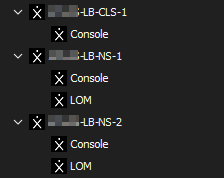
Here LB-CLS-1 is the cluster entry, and LB-NS-1 / LB-NS-2 are its nodes. Ideally, they should be arranged as in the mock-ups below: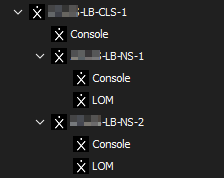
Or, in a more compact view: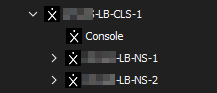
But in reality, all you need to show and use 99% of the times is the main cluster entry, and double-click on it:
It's just a use case that you may (or may not) take into account for a future improvement of the product.
Many thanks!
d2270ac7-a8f6-4112-8600-3f324f594685.png
a52717cc-c866-49f5-9200-23f5bfa47ee3.png
a89c9603-2257-472c-9830-a2c856e8997d.png
7f34a614-3bf2-42f1-9ac8-36033bc55ce7.png
Thank you for the detail explanation. We've started discussing the possibility of supporting sub-sub-connections.
Things are not simple on our end, unfortunately. Part due to the way we implement Folders (including virtual folders). The holy grail would be that everything is folder. So that you could add a Folder to an RDP connection for example.
We will keep your comments/suggestions in mind as we move forward with this.
Best regards,
Stéfane Lavergne
Quick update, drag & drop (d&d) will be available starting next release.
You can:
- Only a single node (including sub-nodes) can be dragged and dropped at a time. Example:
- Parent node with sub-entries -> allowed
- Entire folder structure -> allowed
- Multiple entries -> we only move the dragged node, not all the other selected nodes. Visually you will notice that the drag only includes that node.
- Drag & Drop between Template Group (TG) or within the same to move things around
- If Drop onto a Template (T), you will be prompted to convert it to a TG
- You can't undo the T -> TG action (at this time).
- CTRL + Drag & Drop will create a copy/duplicate of the node(s)
Give it a try once the version is released and let me know what you think.
Best regards,
Stéfane Lavergne
Hello Stéfane,
We have checked what you have described with version 2023.2.32.0 and it seems to work pretty well. Well done!
Thank you.