
garyh
Syntax highlighting using colour codings.
What long wait? It's only been four years :-).
I guess we have been using this product for quite some time. We still use it daily thank you.
RDM 2023.3.35.0 breaks .NET Framework. Constant CPU .NET Runtime Optimization service
After installing an RDM (teams) update to version 2023.3.35.0, we found constant CPU utilization. from the .NET Runtime Optimization service. I tracked that down to what appear to be corrupt or invalid .NET files. Hopefully nothing malicious.
RDM Version 2023.3.34.0 does not have this issue.
I had this also occur on a new computer I am configuring for myself. A Windows Reset fixed the issue. After reinstalling the .34 version on the new computer, I am not having this issue.
I am running:
Edition Windows 11 Enterprise
Version 23H2
Installed on 12/23/2023
OS build 22635.2915
Experience Windows Feature Experience Pack 1000.22682.1000.0
To get details on the compile issue, open an admin CMD and run:
cd c:\Windows\Microsoft.NET\Framework64\v4.0.30319
ngen.exe executequeueditems
You will find the native compiles never complete with MANY errors like:
Microsoft (R) CLR Native Image Generator - Version 4.8.9065.0
Copyright (c) Microsoft Corporation. All rights reserved.
2> Compiling assembly System, Version=4.0.0.0, Culture=neutral, PublicKeyToken=b77a5c561934e089 (CLR v4.0.30319) ...
1> Compiling assembly System.Deployment, Version=4.0.0.0, Culture=neutral, PublicKeyToken=b03f5f7f11d50a3a (CLR v4.0.30319) ...
1>Error compiling System.Deployment, Version=4.0.0.0, Culture=neutral, PublicKeyToken=b03f5f7f11d50a3a: Windows cannot verify the digital signature for this file. A recent hardware or software change might have installed a file that is signed incorrectly or damaged, or that might be malicious software from an unknown source. (Exception from HRESULT: 0x80070241)
1>Ngen failed to generate native code for image System.Deployment, Version=4.0.0.0, Culture=neutral, PublicKeyToken=b03f5f7f11d50a3a because of the following error: Windows cannot verify the digital signature for this file. A recent hardware or software change might have installed a file that is signed incorrectly or damaged, or that might be malicious software from an unknown source. (Exception from HRESULT: 0x80070241)
1>Ngen will retry compilation of image System.Deployment, Version=4.0.0.0, Culture=neutral, PublicKeyToken=b03f5f7f11d50a3a
1> Compiling assembly System.Deployment, Version=4.0.0.0, Culture=neutral, PublicKeyToken=b03f5f7f11d50a3a (CLR v4.0.30319) ...
1>Error compiling System.Deployment, Version=4.0.0.0, Culture=neutral, PublicKeyToken=b03f5f7f11d50a3a: Windows cannot verify the digital signature for this file. A recent hardware or software change might have installed a file that is signed incorrectly or damaged, or that might be malicious software from an unknown source. (Exception from HRESULT: 0x80070241)
1>Failed to generate native code for dependent image System.Deployment, Version=4.0.0.0, Culture=neutral, PublicKeyToken=b03f5f7f11d50a3a because of the following error: Windows cannot verify the digital signature for this file. A recent hardware or software change might have installed a file that is signed incorrectly or damaged, or that might be malicious software from an unknown source. (Exception from HRESULT: 0x80070241)
Keeper credentials link constantly disconnecting.
Ver: 2022.3.31.0 64-bit
Azure SQL
Keeper credentials link constantly disconnecting.
I have been playing with using Keeper as the credential storage for remote desktop manager. The typical scenario is editing user settings and overriding the credential with a keeper stored credential.
What I have found is that after logging out and back into remote desktop manager, the keeper credential although set to override loses its linkage to the specific keeper credential. We have seen this occur multiple times. Is this a known issue or is there a process we should be following to make these stick?
Improve search for external credentials like Keeper
We would not want to pull secure data from Keeper into Remote Desktop Manager. The point of using Keeper would be for the level of security provided. Their focus is security.
Improve search for external credentials like Keeper
We use Keeper for secure credential storage. We have several thousand credentials. Searching for a credential to associate with an RDM record is tedious with a poor interface. This component needs attention and improvement.
Plethora of sign in to your account windows.
We are still having this. Just happened today, in the middle of the day. May have lost connection temporarily to the Azure data source. I then get about 30 sign-in dialogs for the datasource.

OTP permissions. Create a specific permission or allow all users to view OTP.
Any update on this feature availability?
This is becoming a larger issue as we use so many OTP codes now. We are currently having to create a separate OTP credential for each one and set override permissions to make it usable.
Plethora of sign in to your account windows.
Our datasource is Azure SQL.
I do not have the screenshots any longer.
Plethora of sign in to your account windows.
This seems to be a new issue. Went to access RDM this morning. It had been logged in since yesterday. There were hundreds of "sign in to your account" windows. RDM was at this point using a lot of memory as well. Had to kill off RDM.

OTP permissions. Create a specific permission or allow all users to view OTP.
That sounds like a workable plan to me. Thanks!
Microsoft Edge InPrivate with RDM
We use Incognito with Chrome all the time, generally to use different credentials.
We have switched our primary Browser to Microsoft Edge due to better performance and lower resource utilization.
We need to have RDM open Edge in InPrivate mode, but the option is not available when setting up connection entries set to the Edge browser.
We also never use embedded browser in RDM due to functionality limitations.
OTP permissions. Create a specific permission or allow all users to view OTP.
Thanks.
OTP permissions. Create a specific permission or allow all users to view OTP.
We restrict our techs from seeing passwords. However with OTP, the techs are required to view the OTP as it cannot be auto-entered. There is also not a need to restrict access to OTP as it is useless without using the primary credentials first.
In the past, we have created a separate OTP credential and added the view option for all our techs.
This causes extra work and now with OTP integrated into the connection entries, we would prefer to not to have to create separate credential entries.
OTP Password permissions
Datasource is Azure SQL.
The permissions show view password for the group containing the users of interest. The permission is set on the specific entry.
How do I search ONLY the feature request forum?
OTP Password permissions
This is a two-part issue.
1) We need separate permissions between password and One-Time password. We need our techs to have access to the OTP, but not the password itself.
2) We tried to grant one of our RDM User Groups access to view a specific entries password, but the users still do not have the view OTP option for that entry.
RDM Version: 2021.2.14.0
adding a OTP to an entry - qr code?
Some sites do not offer codes, only the barcode. I currently have been resorting to downloading the barcode image, running it thru a converter tool, extracting the code and pasting it in to RDM.
It would be nice to be able to point at the image or copy and paste the image into RDM to get the code.
Wayk Bastion or what? linux install instructions
I saw those before I found this forum thread. The documentation and unclear, hard to follow and I could not figure out what is needed to setup a Linux host server.
Like Tin_Man, it is also unclear what all the components are and how they interact. Naming is also confusing.
One example from your Overview documentation page "WaykBastion is a PowerShell module for Wayk Bastion" WTF does that mean?
Since you do support Linux for the server, I would absolutely want to use Linux and avoid the licensing fees for Windows Server. It would be nice to have a one-liner bash installer for this.
Another confusion "While we recommend configuring the Devolutions Gateway separately, most customers start with the simple option (automatic configuration alongside Wayk Bastion) and stick with it unless they feel they'd need a larger deployment with more relay servers."
Is there any place that clearly explains the different server components and what they do?
Does a single server automatic install, install a "relay server" on that server or something else?
The product looks interesting for us to add to our RDM tool. However, I cannot spend hours just trying to figures out the components to get it working.
Wayk Bastion or what? linux install instructions
How about making these instructions easy to find on the Wayk documentation pages?
Linking one time password with a web browser session
This would be helpful. It is painfull and time consuming to deal with all this MFA entry all day long. Anything that can be done to ease this process would be welcome. A quick easily accessible copy the OTP button would help.
Also, separate permissions for users to access OTP. We block access to the credentials for most of our techs but have to make exceptions for OTP credentials. OTP access should either be globally available or a separate permission that can easily be globally applied.
Documentation: URL instead of editor
This all seems to work already. At least for another site. I entered the URL to our clients PSA tool page in the Confluence field of the RDM company entry.
Our PSA page now shows on the "Confluence" tab. Nice.
Documentation: URL instead of editor
Here are some conceptual options.

Unable to connect to your DataSource
2020.3.16.6 64 bit
I am seeing these disconnects more frequently. Certainly EVERY time it wakes up from sleep.
Unable to connect to your DataSource
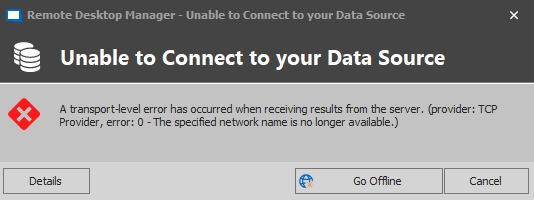
We constantly get the message "Unable to connect to your DataSource" Typically after computers wake up from sleep but sometimes due to network conditions. We are using the Azure SQL source.
There should be another button: Reconnect. I never want to go offline as I know the DataSource is reachable.
May want to make this auto re-connect after sleep as well.
Please add Azure AD authentication to the mobile app
Thanks Jeff, One thing I can always count on is Devolutions to develop everything your users ask for.