Linking one time password with a web browser session

For accounts which are protected by two-factor authentication is there a way to create a web browser session, which links to a credential entry, but also links to a one-time passwort entry for the second factor? Best would be if second factor can be entered automatically, but otherwise it would be nice to have it copied to clipboard so that it only needs to be pasted.
All Comments (11)
Hello,
It's not possible to link a session to two different credential entry type.
Could you send us a few screenshots of what you are trying to achieve so that we can have a look at it and propose you a proper solution.
Best regards,
Jeff Dagenais
I will add a feature request for that.
Regards
David Hervieux
Any update on this feature?
Hello,
Thank you for contacting us on that matter!
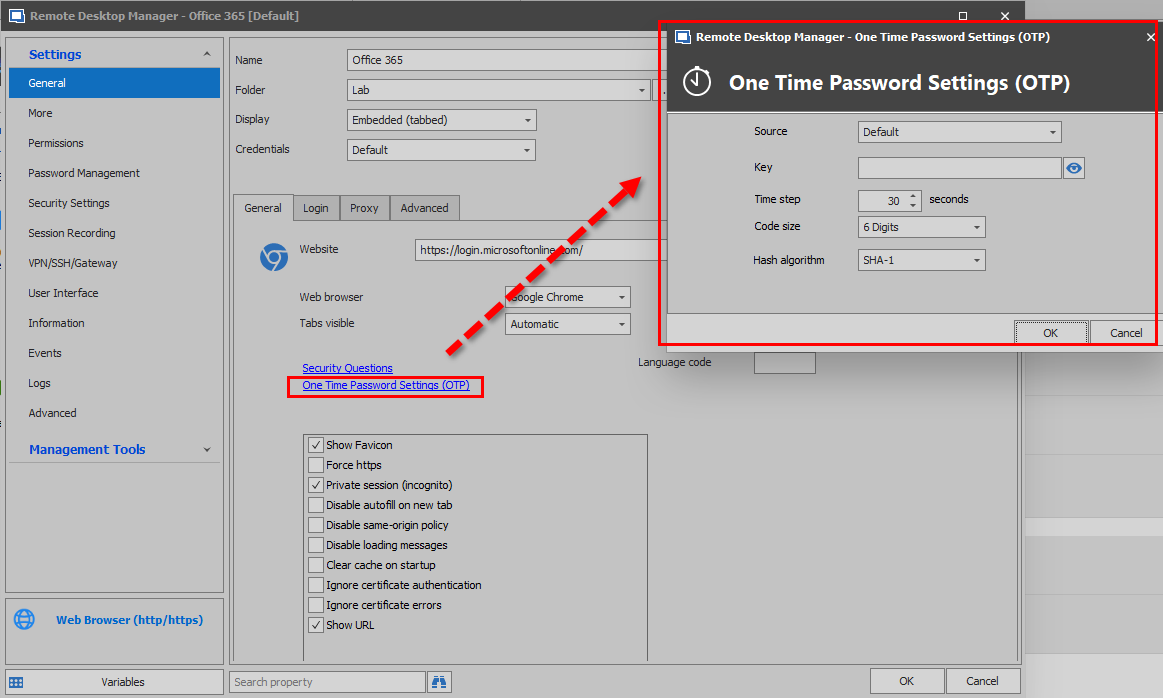
This option can be found in the general section of a Web Browser entry type under the "One Time Password Settings (OTP) link:
Best regards,
James Lafleur
WebBrowserOTP.png
Hello,
I have a question related to this topic.
It would be nice to show in the properties of web browser and website sessions when a one-time password or security question is configured.
So that these sub-menus don't have to be opened to check if a one-time password or security questions are added / linked into the session.
Best regards.
This would be helpful. It is painfull and time consuming to deal with all this MFA entry all day long. Anything that can be done to ease this process would be welcome. A quick easily accessible copy the OTP button would help.
Also, separate permissions for users to access OTP. We block access to the credentials for most of our techs but have to make exceptions for OTP credentials. OTP access should either be globally available or a separate permission that can easily be globally applied.
Hello,
We've actually made some changes that will be available with RDM 2021.1 for OTP. We have added a "copy OTP" and "view OTP" context menu item for entries that support OTP linking (like the website and webbrowser entries). As a note, these buttons follow the same permissions as the "copy password" and "view password" buttons that already existed.
@lm05: For the security questions we could definitely add them to the dashboard (without showing the answers). For the OTP being configured, it might be a bit redundant with the adding of the view/copy OTP buttons. What do you think?
@garyh: Interesting suggestion for the separate access rights for OTP. We'll see if it would be feasible to make this distinction in the future.
Regards,
Hubert Mireault
Hello,
It is great to hear you implemented OTP copy and view functions to RDM 2021.1 release.
Thanks, this will already indicate when a one-time password is configured.
I think it would be useful to display in the properties when there are other settings configured. I've created an example.
If something is configured in these sub-screens a text/number on main tab would be useful.
For example in a small text when an OTP is configured (and if it's embedded or linked).
Best regards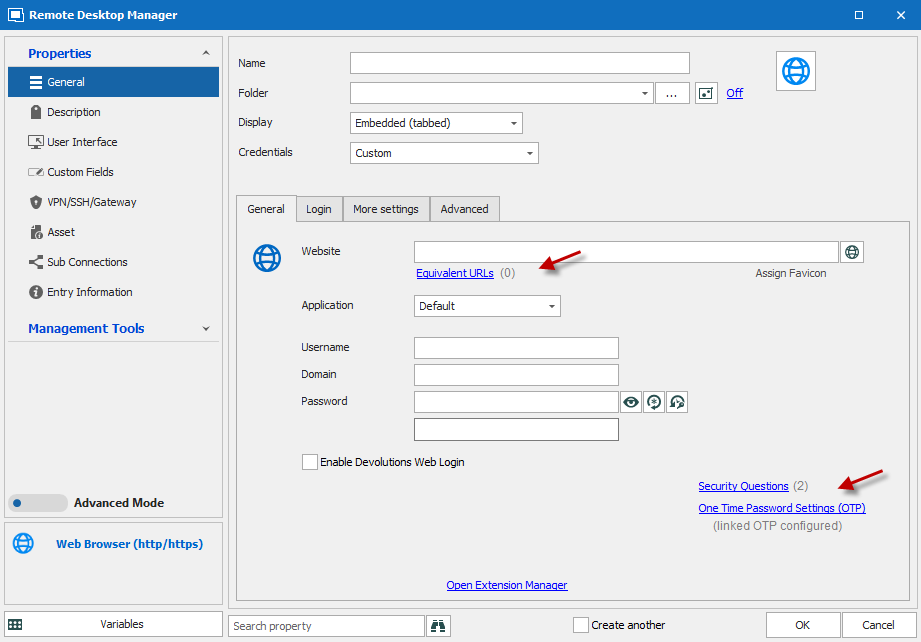
example otp information configured.png
That's a good idea, I'll open a ticket for this. With this change, would you still want the security questions in the dashboard as you mentioned originally? The reason why we don't put all configured information in the dashboard is because it would get hard to read quickly.
Regards,
Hubert Mireault
It would be nice for users to know when security questions have been added to an item (without going to the properties).
Maybe show the security questions (without answers) or a note in the dashboard, only when they are configured?
No problem, we'll add this information to the dashboard as well. I've added this to the ticket.
Regards,
Hubert Mireault